1. Introduktion
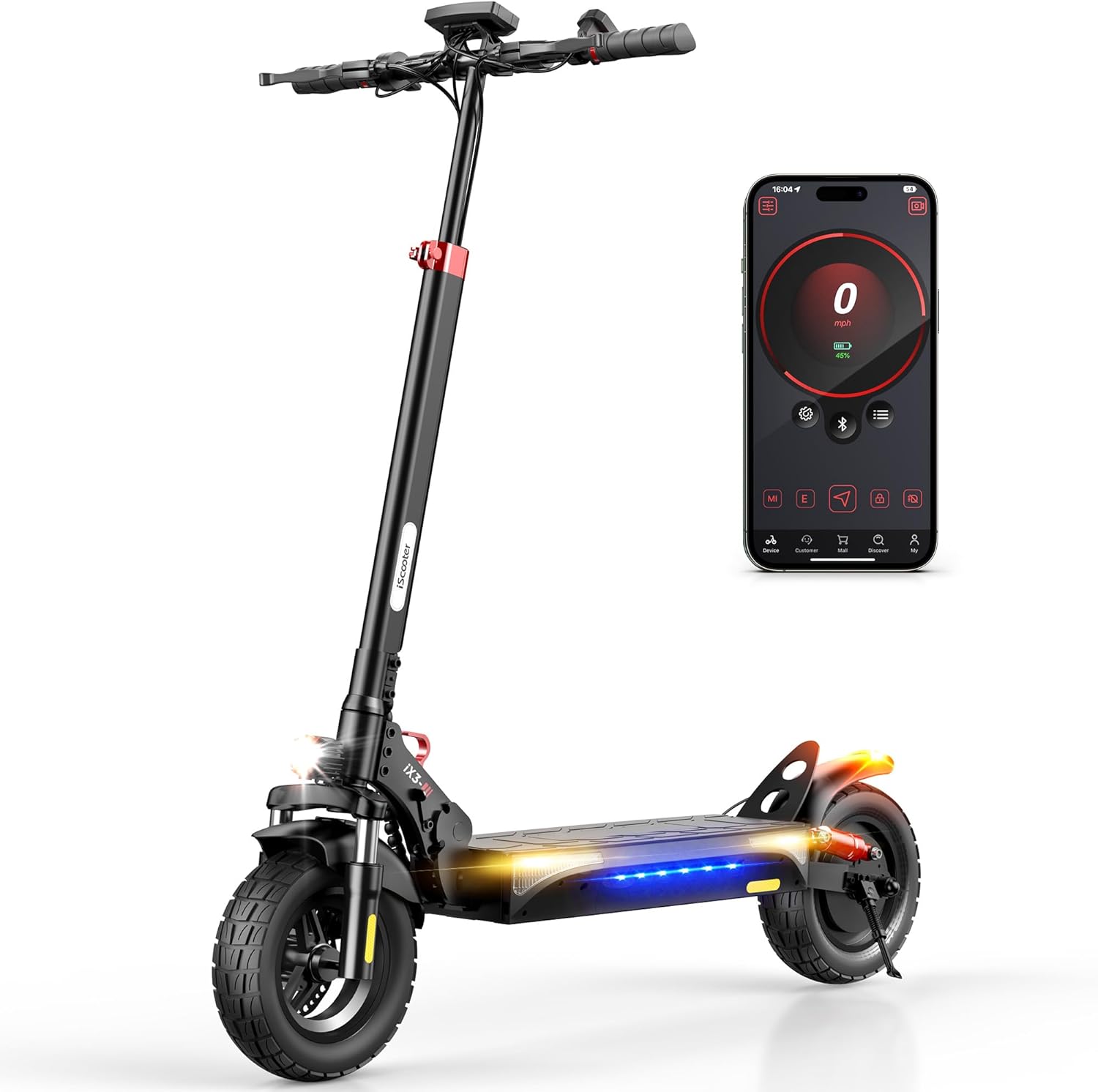
The iScooter iX3 Electric Scooter is designed for versatile use, offering a robust solution for commuting, errands, and off-road adventures. This manual provides essential information for the safe and efficient operation and maintenance of your iX3 scooter.
Nøglefunktioner:
- Kraftig motor: Equipped with an 800W brushless motor for speeds up to 25 MPH and climbing inclines of 20-25°.
- Udvidet rækkevidde: A 480WH battery provides an impressive cruising range of up to 25 miles.
- Mulighed for terræn: Features 10-inch off-road pneumatic tires and dual front and rear shock absorbers for a smooth ride on various terrains.
- Enhanced Safety & Visibility: Includes directional signals, ambient lighting, powerful front headlights, and tail lights for improved nighttime visibility.
- Adjustable & Portable Design: Adjustable handlebar height (44.5-52.8 inches) and a foldable design for easy transport and storage.
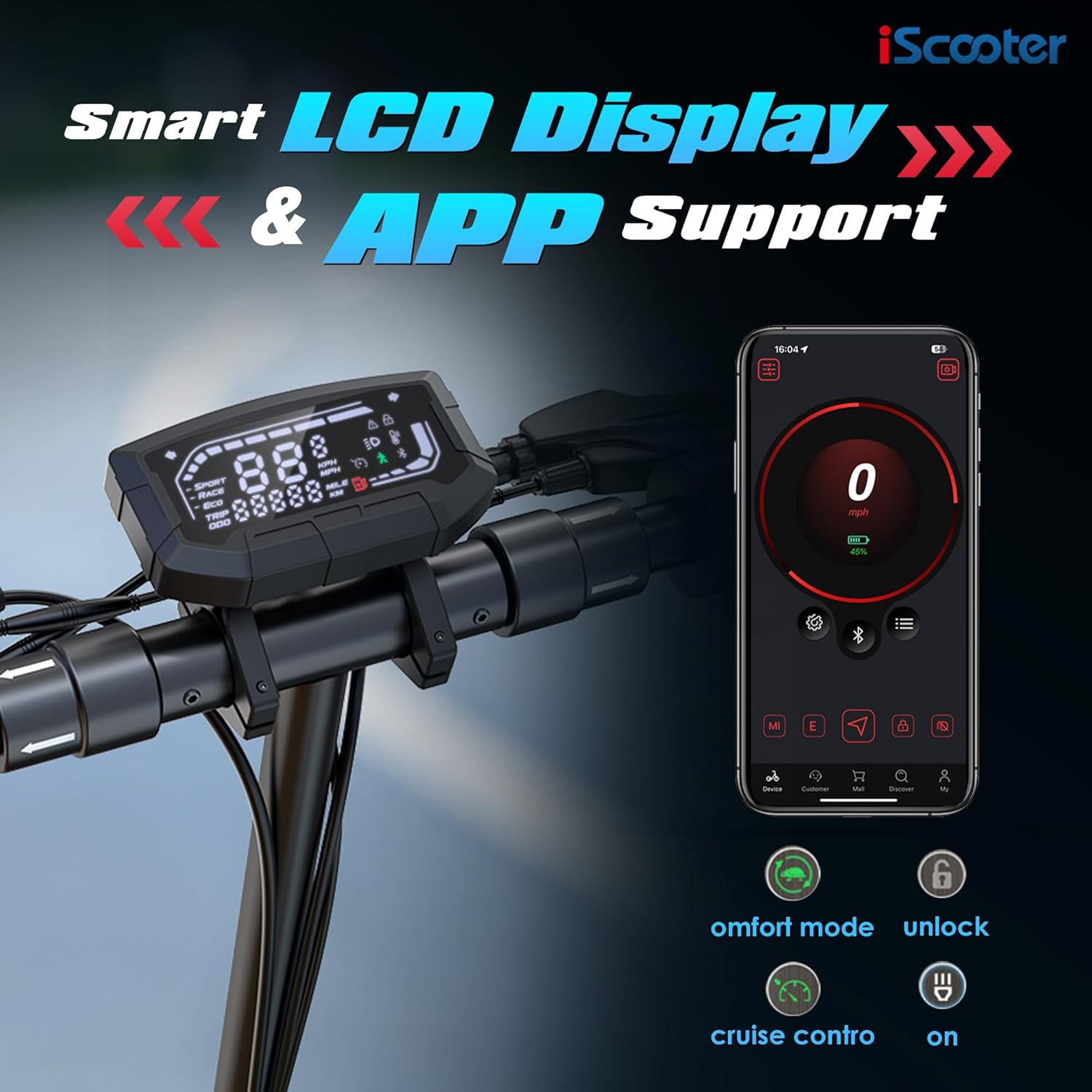
- Smart kontrol: Three riding speed modes (ECO, STD, TURBO) and full-color LCD display. Customize settings and lock the scooter via the 'iScooter Club' app.
2. Sikkerhedsoplysninger
Your safety is paramount. Always adhere to the following guidelines when operating the iScooter iX3:
- Always wear a certified helmet and appropriate protective gear (e.g., knee pads, elbow pads) while riding.
- Sæt dig bekendt med lokale love og regler vedrørende brug af elektriske løbehjul.
- Rid ikke under påvirkning af alkohol eller stoffer.
- Hold en sikker hastighed og afstand til andre køretøjer og fodgængere.
- Avoid riding in heavy traffic, on slippery surfaces, or in adverse weather conditions.
- Regularly inspect your scooter for any damage, loose parts, or tire pressure issues before each ride.
- Sørg for, at batteriet er tilstrækkeligt opladet før brug.
3. Opsætning og montering
3.1. Hvad er der i æsken
Upon unboxing your iScooter iX3, verify that all components are present:
- iX3 Electric Scooter (partially folded)
- Oplader
- Instruktionsmanual
- Tool Kit (including Allen wrench)
3.2. Monteringsvejledning
The iX3 features a one-piece pre-installation design, minimizing assembly. Follow these steps to prepare your scooter for its first ride:
- Fold scooteren ud:
- Placer scooteren på en flad overflade.
- Unfold the kickstand to ensure stability.
- Push the stem away from the base until it clicks into place.
- Close the quick-release lever firmly to secure the stem.
- Fastgør styret:
- Carefully organize the cables to prevent pinching.
- Slide the handlebar and cables into the stem.
- Ensure the headlight is facing forward.
- Use the provided Allen wrench to insert and tighten the four screws in the suggested order (refer to the diagram in the physical manual for specific order).

4. Opladningsinstruktioner
To charge your iScooter iX3:
- Locate the charging port and open the rubber plug.
- Sæt opladestikket i porten.
- Sæt opladeren i en strømkilde.
- The LED indicator on the charger will turn from red to green when fully charged.
- Once charging is complete, remove the charger and reinsert the rubber plug to protect the port.
Batteriaktivering: For the first use, plug the scooter into the charger for at least 3 seconds to activate the battery.
Battery Sleep Mode: If the battery power is 30% or less and the scooter has not been powered on for about 7 consecutive days, the battery will enter sleep mode. To reactivate, charge the battery to 30% or higher.

5. Aktivering
To activate your iScooter iX3 and unlock its full potential, you need to use the 'iScooter Club' app:
- Download and install the 'iScooter Club' app on your smartphone.
- Opret en konto eller log ind.
- Power on your iX3 Electric Scooter.
- In the app, search for your vehicle and pair it via Bluetooth.
- Follow the on-screen instructions and watch any required riding safety videos within the app.
- Tap to activate your iX3.
Note: Upon initial activation, the scooter's speed mode may be set to a limited "Demo Mode" (e.g., 20 km/h). You can adjust this in the app after activation.
6. Betjeningsvejledning
6.1. Sådan kører du
- Tænd for scooteren.
- Fold up the kickstand.
- Placer den ene fod fast på fodbrættet.
- Skub fra med din anden fod for at få indledende momentum.
- Når du er i bevægelse, skal du forsigtigt trykke på gashåndtaget for at accelerere.
- For at sætte farten ned skal du slippe gashåndtaget og klemme på bremsehåndtagene.
- For safety, the motor will not engage until the scooter reaches approximately 1.9 MPH (3 km/h). This start speed can be adjusted via the app.
6.2. Hastighedstilstande
The iX3 offers three riding modes, selectable via the control panel:
- ØKO -tilstand: Max speed approximately 10 MPH (16 km/h). Ideal for energy saving and beginners.
- STD Mode (Standard): Max speed approximately 18 MPH (29 km/h). A balanced mode for daily commuting.
- TURBO tilstand: Max speed approximately 25 MPH (40 km/h). For maximum performance and speed.
- Gangtilstand: Max speed approximately 3.1 MPH (5 km/h). Assists when pushing the scooter manually.

6.3. Drejning
To turn left or right, gently pivot the handlebar in the desired direction.
6.4. Lights and Bell
- Forlygte: Press the dedicated button on the handlebar to turn the headlight on or off.
- Tail Light & Ambient Lights: The tail light and ambient mood lights activate automatically for enhanced visibility.
- Blinklys: Use the directional indicator buttons on the handlebar to signal turns. Press again to turn them off.
- Klokke: Press the bell button to alert pedestrians or other riders.

6.5. Brugerdefineret knap
The iX3 features a customizable button. Through the 'iScooter Club' app, you can assign various quick features to this button, such as Automatic Hill Hold Assist. Refer to the app settings for customization options.
7. Apple Find My Integration
The iScooter iX3 is compatible with Apple Find My, allowing you to track your scooter's whereabouts using the global Find My network of iOS devices.
- Open the 'iScooter Club' app.
- Navigate to "More Functions" and then "Segway-Ninebot Lab".
- Select "Locating vehicle" (Beta version).
- Agree to use the function and start pairing with your scooter.
- The app will automatically redirect you to the Apple Find My app.
- In the Find My app, add a new item and give your scooter a name.
Once set up, you can quickly and conveniently locate your iX3 via the Find My app on your iPhone.
8. Vedligeholdelse
8.1. Dækopfyldning
Proper tire pressure is crucial for ride quality and safety. The iX3 uses 10-inch off-road pneumatic tires.
- Unscrew the valve cap on the tire.
- Connect a pump to the tire valve.
- Inflate the tire to the recommended pressure of 45 PSI.
- Remove the pump and replace the valve cap.

8.2. Phone Holder Installation (Optional)
If you wish to install a phone holder (not included), follow these general steps:
- Use an Allen wrench to loosen the screws on the handlebar where the removable part is located.
- Remove the existing removable part.
- Install your phone holder in its place.
- Tighten the screws to secure the phone holder.
Refer to your specific phone holder's manual for detailed installation instructions.
9. Fejlfinding
If you encounter issues with your iScooter iX3, consider the following common solutions:
- Scooter tænder ikke:
- Ensure the battery is charged above 30% and not in sleep mode.
- Kontroller alle kabelforbindelser for sikkerhed.
- Motoren går ikke i indgreb:
- Confirm the scooter is activated via the 'iScooter Club' app.
- Ensure you are pushing off to reach the minimum start speed (1.9 MPH) before applying throttle.
- Problemer med appforbindelse:
- Ensure Bluetooth is enabled on your phone and the scooter is powered on.
- Prøv at genstarte både appen og løbehjulet.
- Reduceret ydeevne/rækkevidde:
- Check tire pressure; under-inflated tires can reduce range and speed.
- Rider weight, terrain, wind conditions, and speed mode can all affect performance.
For persistent issues or error codes, please refer to the 'iScooter Club' app's help section or contact customer support.
10. Specifikationer
| Feature | Detalje |
|---|---|
| Mærke | iScooter |
| Modelnavn | iX3 |
| Motorkraft | 800W |
| Tophastighed | 25 MPH |
| Maksimal afstand | 25 Mil |
| Batteri | 480WH |
| Dækstørrelse | 10 tommer |
| Dæk type | Offroad pneumatisk |
| Ophængstype | Dual Suspension (Front and Rear) |
| Bremse stil | Front and Rear Double Braking Systems |
| Justerbar styrhøjde | 44.5-52.8 tommer |
| Varens vægt | 22 kilogram (ca. 48.5 lbs) |
| Vægtgrænse | 264 pund |
| Opladningstid | 7 timer |
| Rammemateriale | Aluminium |
| Produktmål (LxBxH) | 47 cm L x 23 cm B x 50 cm H |
| UPC | 699838690608 |
11. Garanti og support
iScooter is committed to providing quality products and service. Your iX3 Electric Scooter comes with a limited warranty:
- Elektrisk scooter: Et års garanti.
- Specific Parts (e.g., Motor, Battery): 180 dages garanti.
This warranty is non-transferable after the product's initial sale. iScooter also offers a 7-day no-reason return policy, provided there is no human damage or stains.
Kundesupport: For any questions, warranty claims, or assistance, please contact iScooter customer service:
- E-mail: vip.support@iscooterglobal.com
- Telefon: +1 (855) 696-2888
If shipping damage occurs, please provide photo or video proof when contacting support.
12. Officielle produktvideoer
iX3 Video from iScooter Center
Denne video giver et generelt overblikview of the iX3 Electric Scooter, highlighting its features and usage. It is provided by iScooter Center.


