1. Introduktion
The EJEAS V7 Motorcycle Helmet Bluetooth Intercom system is designed to provide clear and reliable wireless communication for motorcycle riders. This upgraded V7 model supports two-way full-duplex communication between two riders and can connect up to seven devices, allowing a host unit to switch between six sub-devices for conversation. Featuring advanced CVC noise reduction technology, Bluetooth 5.1 connectivity, and an IP65 waterproof rating, the V7 ensures stable and high-fidelity audio even at speeds up to 120 km/h. It also offers convenient features such as simultaneous connection to two mobile phones, voice assistant support, and automatic call answering.

Billede: Overview of EJEAS V7's core technologies including Bluetooth 5.1, 1200M intercom distance, navigation, dual phone connection, automatic call answering, music listening, CVC noise cancellation, and IP65 waterproof rating.
2. Sikkerhedsoplysninger
Please read all safety warnings and instructions before using this product to ensure safe operation and prevent damage. Keep these instructions for future reference.
- Do not operate the device while riding if it distracts you from safe operation of your motorcycle.
- Sørg for, at enheden er sikkert monteret på din hjelm, inden du kører.
- Undgå at udsætte enheden for ekstreme temperaturer eller direkte sollys i længere perioder.
- Forsøg ikke at skille enheden ad eller ændre den. Dette vil ugyldiggøre garantien og kan forårsage skade.
- Hold enheden væk fra børn og kæledyr.
- Use only the provided charging cable and a DC5V/1A charger.
3. Pakkens indhold
Bekræft, at alle nedenstående varer er inkluderet i din pakke:
- EJEAS V7 Intercom Unit(s) (2 units for V7-2 model)
- Headset with Speakers and Microphone (2 sets)
- USB Type-C Charging Cable (2 cables)
- Helmet Mounting Clip (Plastic) (2 clips)
- Adhesive Mount Base (2 bases)
- Speaker Velcro Pads (multiple)
- Brugermanual

Image: Contents of the EJEAS V7 package, including two intercom units, two sets of headsets, two USB-C charging cables, mounting clips, adhesive pads, and the user manual.
4. Produktet er slutview
Familiarize yourself with the components and controls of your EJEAS V7 intercom unit.

Image: Two EJEAS V7 intercom units showing the front panel with power button, phone button, volume controls, and intercom buttons.
Unit Controls:
- Tænd/sluk-knap (midten): Turns the unit on/off, initiates pairing.
- Phone Button (C): Answers/ends calls, redials.
- Volume Up (B): Increases volume.
- Volume Down (D): Decreases volume.
- Intercom Buttons (A, E): Used for intercom pairing and switching between connected units.
- F Button (A+E): Combination button for specific functions.
- Headphone/Charging Port (Type-C): Located at the bottom of the unit.
- Clip slot: Located on the back for mounting.
5. Opsætning og installation
Follow these steps to install the EJEAS V7 intercom unit onto your helmet.
5.1. Choosing a Mounting Method:
The V7 offers two primary mounting methods: a plastic clip mount or an adhesive mount.
5.1.1. Clip Installation Steps:
- Insert the plastic clip into the slot on the back of the V7 unit.
- Loosen the screws on the clip to open it.
- Slide the clip between the outer shell and the inner padding of your helmet, ensuring it is securely fastened.
- Tighten the screws to secure the clip and the intercom unit firmly in place.
5.1.2. Adhesive Installation Steps:
- Clean the desired mounting area on your helmet thoroughly. Ensure it is dry and free of dust or grease.
- Peel off the protective film from one side of the adhesive pad and attach it to the adhesive mount base.
- Peel off the protective film from the other side of the adhesive pad and firmly press the mount base onto the helmet surface. Hold for 30 seconds to ensure good adhesion.
- Slide the V7 intercom unit onto the mount base until it clicks into place.

Image: Visual guide for installing the EJEAS V7 intercom using both the clip mount and the adhesive mount methods on a helmet.
5.2. Headphone Installation Steps:
- Connect the headset cable to the Type-C port on the V7 intercom unit.
- Attach the speaker velcro pads to the back of the speakers.
- Carefully place the speakers inside the helmet's ear pockets, ensuring they are aligned with your ears for optimal sound.
- Route the microphone towards your mouth, securing it within the helmet's padding or chin bar.
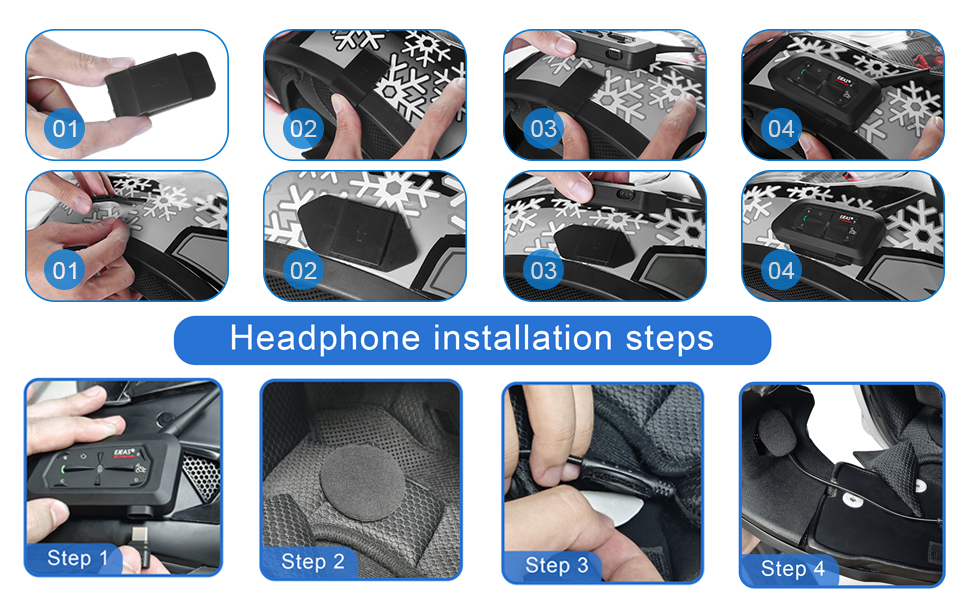
Image: Step-by-step visual instructions for installing the headphones and microphone inside a motorcycle helmet, connecting them to the intercom unit.
6. Betjeningsvejledning
6.1. Tænd/sluk:
- Tænd: Press and hold the Power Button (center) for approximately 3 seconds until the indicator light turns on.
- Sluk: Press and hold the Power Button (center) for approximately 3 seconds until the indicator light turns off.
6.2. Bluetooth Pairing with Mobile Phone:
The V7 can connect to two mobile phones simultaneously.
- With the V7 unit powered off, press and hold the Power Button (center) for about 5-7 seconds until the indicator light flashes red and blue alternately, indicating pairing mode.
- On your mobile phone, enable Bluetooth and search for "EJEAS V7".
- Select "EJEAS V7" from the list of available devices to connect. Once connected, the indicator light will flash blue slowly.
- To connect a second phone, repeat the process. The V7 will automatically manage connections.
6.3. Phone Call Functions:
- Besvar opkald: Short press the Phone Button (C). The V7 also supports 5-second auto-answering.
- Afslut opkald: Short press the Phone Button (C) during a call.
- Afvis opkald: Press and hold the Phone Button (C) for 2 seconds when a call comes in.
- Genopkald sidste nummer: Double-press the Phone Button (C) when not on a call.
- Stemmeassistent: Press and hold the Phone Button (C) for 2 seconds to activate your phone's voice assistant (e.g., Siri, Google Assistant).
6.4. Musikafspilning:
- Afspil/pause: Short press the Power Button (center) when connected to a phone.
- Næste spor: Short press the Volume Up button (B).
- Forrige spor: Short press the Volume Down button (D).
6.5. Intercom Communication:
The V7 supports 2-way full-duplex intercom for 2 riders and can connect up to 7 devices, with the host unit able to switch between 6 sub-devices.
6.5.1. Two-Rider Intercom Pairing:
- Ensure both V7 units are powered off.
- On both units, press and hold the Power Button (center) for about 5-7 seconds until the indicator lights flash red and blue alternately.
- On one unit, short press the Intercom Button A. On the other unit, short press the Intercom Button E.
- The units will search for each other and automatically pair. Once paired, the indicator lights will flash blue slowly, and you will hear a confirmation tone.

Image: Depiction of two motorcycle riders communicating via EJEAS V7 intercoms over a distance of 1200 meters, highlighting the long-range capability.
6.5.2. Multi-Rider Intercom (Host and Sub-devices):
For connecting more than two riders (up to 7 devices total), one unit acts as the host, and others as sub-devices. The host can initiate communication with any of the paired sub-devices.
- Pair the host unit with each sub-device individually using the two-rider pairing method, ensuring the host unit is always one of the two being paired.
- Once all units are paired, the host unit can switch between sub-devices by pressing the A or E buttons to cycle through them.

Image: Diagram illustrating the 2-way intercom capability where one host unit can switch between communicating with up to 6 sub-machines, showing multiple riders on a road.
6.6. Lydstyrkejustering:
- Øg lydstyrken: Press the Volume Up button (B).
- Sænk lydstyrken: Press the Volume Down button (D).
6.7. CVC Noise Reduction:
The EJEAS V7 features advanced CVC (Clear Voice Capture) noise reduction technology that automatically recognizes and suppresses environmental noise, ensuring clear communication even in noisy riding conditions.

Image: Illustration of the CVC noise reduction technology in action, showing a rider communicating clearly despite background noise from other motorcycles, with speech bubbles indicating clear audio.
6.8. Optional EUC Handle Control:
The V7 intercom can be connected to an optional EJEAS EUC handle for convenient control of various functions while riding, including FM radio, music, phone calls, intercom, and volume adjustments.

Image: A rider on an ATV, with an EJEAS EUC handle shown in the foreground, indicating its use for controlling the intercom's functions like FM, music, phone calls, intercom, volume, and connection.
7. Vedligeholdelse
Proper maintenance will ensure the longevity and optimal performance of your EJEAS V7 intercom.
- Rensning: Wipe the unit with a soft, damp klæde. Brug ikke skrappe kemikalier eller slibende rengøringsmidler.
- Vandmodstand: The V7 is IP65 waterproof, meaning it is protected against dust ingress and low-pressure water jets from any direction. While it can withstand rain, avoid submerging it in water.
- Opladning: Charge the unit fully before first use and regularly to maintain battery health. Avoid overcharging.
- Opbevaring: When not in use for extended periods, store the device in a cool, dry place. Charge the battery at least once every three months to prevent deep discharge.

Image: The EJEAS V7 intercom unit being splashed with water, demonstrating its IP65 waterproof rating and protection against rain and dust.
8. Fejlfinding
| Problem | Mulig årsag | Løsning |
|---|---|---|
| Enheden tænder ikke. | Lavt batteri. | Oplad enheden i mindst 2 timer. |
| Kan ikke parres med telefonen. | Unit not in pairing mode; Bluetooth off on phone; too many paired devices. | Ensure unit is in pairing mode (flashing red/blue). Turn on phone's Bluetooth. Forget previous Bluetooth connections on phone and retry. |
| Intercom forbinder ikke. | Units not in intercom pairing mode; out of range. | Ensure both units are in intercom pairing mode. Move closer to each other (within 1200m line of sight). |
| Dårlig lydkvalitet/støj. | Microphone/speakers improperly positioned; high wind noise; interference. | Adjust microphone closer to mouth. Ensure speakers are aligned with ears. CVC noise reduction is active, but extreme conditions may affect. Avoid strong electromagnetic interference. |
| Kort batterilevetid. | Battery degradation; frequent use at high volume. | Ensure full charge cycles. Reduce volume if not necessary. Battery life naturally decreases over time. |
9. Specifikationer
| Feature | Detalje |
|---|---|
| Modelnavn | V7 |
| Bluetooth version | 5.1 |
| Intercom afstand | Up to 1200 meters (between 2 riders) |
| Afstand til headset | 10 meters (to phone) |
| Batterikapacitet | 850mAh (3.7V) |
| Opladningsport | Type-C |
| Opladningstid | Ca. 2 timer |
| Taletid | 16 timer |
| Musik afspilningstid | 22 timer |
| Standby tid | 160 timer |
| Vandtæt vurdering | IP65 |
| Støjkontrol | Adaptive Noise Cancellation (CVC) |
| Lydkodning | SBC & AAC |
| Produktdimensioner | 5.91 x 3.15 x 2.76 tommer |
| Varens vægt | 12 ounce |

Image: A detailed graphic displaying the product specifications of the EJEAS V7 intercom, including Bluetooth version, intercom distance, battery, charging time, talk time, music time, standby time, charger requirements, waterproof rating, and physical dimensions (1.5cm thickness, 11cm length, 7.5cm height).
10. Garanti og support
EJEAS products are designed for reliability and performance. For warranty information and technical support, please refer to the official EJEAS webhjemmeside eller kontakt deres kundeservice direkte.
- Officiel Webwebsted: www.ejeas.com (Bemærk venligst: Dette er en pladsholder URL da der ikke er nogen specifik støtte URL was provided in the data. Users should refer to the actual product packaging or official brand channels for precise support information.)
- Kundeservice: Refer to the contact information provided in your product packaging or on the official website for assistance with product inquiries, troubleshooting, or warranty claims.


