1. Introduktion
This manual provides essential instructions for the setup, operation, maintenance, and troubleshooting of your White Shark GK-2102 LEGIONNAIRE-X RGB USB Keyboard. Please read this manual thoroughly before using the product to ensure proper functionality and longevity.

Billede 1.1: Top view of the White Shark GK-2102 LEGIONNAIRE-X RGB USB Keyboard, showcasing dens fulde layout og RGB-belysning.
2. Opsætning
Follow these steps to connect your White Shark GK-2102 LEGIONNAIRE-X RGB USB Keyboard to your computer.
- Pak tastaturet ud: Carefully remove the keyboard and its USB cable from the packaging.
- Tilslut USB-kablet: Insert the USB connector of the keyboard into an available USB port on your computer.

Image 2.1: Close-up of the USB connector, which is used to connect the keyboard to a computer.
- Driver installation: Tastaturet er plug-and-play. Dit operativsystem burde automatisk registrere og installere de nødvendige drivere. Der kræves typisk ingen yderligere softwareinstallation.
- Juster tastaturfødder: For ergonomic comfort, you may extend the adjustable feet located on the underside of the keyboard.

Billede 2.2: View of the adjustable feet on the keyboard's underside, allowing users to modify the typing angle.
3. Betjeningsvejledning
The White Shark GK-2102 LEGIONNAIRE-X is a standard USB keyboard with RGB lighting features. Below are general operating guidelines.
3.1 Grundlæggende tastaturfunktioner
The keyboard functions as a standard QWERTY layout device. All keys perform their indicated character or function when pressed. Special function keys (F1-F12) may require the 'Fn' key to be held down simultaneously for their secondary functions, depending on your operating system and specific keyboard model configuration.
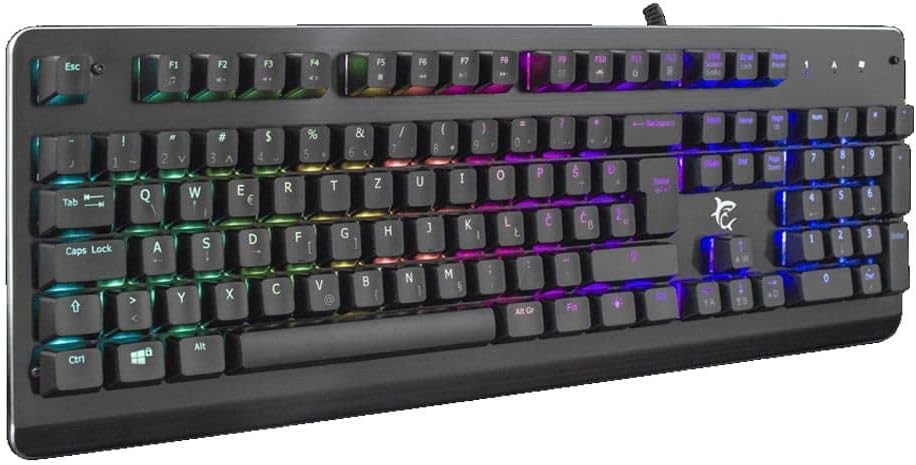
Billede 3.1: Vinklet view of the keyboard, highlighting the key layout and illuminated RGB backlighting.
3.2 RGB-lysstyring
This keyboard features RGB lighting. Specific key combinations, often involving the 'Fn' key and other designated keys (e.g., arrow keys, Ins, Home, PgUp, Del, End, PgDn), are typically used to cycle through lighting modes, adjust brightness, or change colors. Refer to the quick start guide or manufacturer's website for detailed RGB control commands specific to this model.
4. Vedligeholdelse
Korrekt vedligeholdelse sikrer dit tastaturs levetid og ydeevne.
- Rensning: Disconnect the keyboard from your computer before cleaning. Use a soft, dry cloth to wipe the surface. For stubborn dirt, a slightly damp cloth with mild soap can be used, ensuring no liquid enters the keyboard. Compressed air can be used to remove dust and debris from between the keys.
- Undgå væsker: Do not spill liquids on the keyboard. Liquid damage can cause permanent malfunction.
- Opbevaring: Opbevar tastaturet et køligt, tørt sted væk fra direkte sollys og ekstreme temperaturer, når det ikke er i brug i længere perioder.
5. Fejlfinding
Hvis du støder på problemer med dit tastatur, kan du prøve følgende løsninger:
- Tastaturet reagerer ikke:
- Sørg for, at USB-kablet er korrekt tilsluttet til både tastaturet og computeren.
- Prøv at tilslutte tastaturet til en anden USB-port på din computer.
- Test tastaturet på en anden computer for at afgøre, om problemet skyldes tastaturet eller computerens port/drivere.
- Genstart din computer.
- Taster virker ikke:
- Kontrollér for eventuelle fysiske forhindringer under tastaturerne.
- Rengør tastaturet som beskrevet i afsnittet Vedligeholdelse.
- RGB-belysning virker ikke/forkert:
- Sørg for, at tastaturet er korrekt tilsluttet og modtager strøm.
- Refer to the manufacturer's specific instructions for RGB control key combinations.
6. Specifikationer
Below are the technical specifications for the White Shark GK-2102 LEGIONNAIRE-X RGB USB Keyboard:

Billede 6.1: Side profile of the keyboard, illustrating its physical dimensions and keycap height.
| Feature | Detalje |
|---|---|
| Mærke | Hvidhaj |
| Model | GK-2102 LEGIONNAIRE-X |
| Forbindelse | USB |
| Produktdimensioner | 50 x 50 x 28 cm |
| Vægt | 1.06 kg |
| Materiale | Plast |
| Særlige funktioner | RGB belysning |
| Batterier påkrævet | Ingen |
7. Garantioplysninger
For detailed warranty information regarding your White Shark GK-2102 LEGIONNAIRE-X RGB USB Keyboard, please refer to the warranty card included with your product or visit the official White Shark webGarantibetingelserne kan variere afhængigt af region og forhandler.
8. Support
If you require further assistance or have questions not covered in this manual, please contact White Shark customer support through their official website or the contact information provided with your purchase. Please have your product model (GK-2102 LEGIONNAIRE-X) and purchase details ready when contacting support.


