1. Introduktion
Thank you for choosing the White Shark GK-2022 SHINOBI Mechanical Keyboard. This compact 61-key keyboard is designed for optimal performance and durability, featuring OUTEMU Red mechanical switches and vibrant RGB backlighting. This manual provides detailed instructions for setup, operation, maintenance, and troubleshooting to ensure you get the most out of your new keyboard.
2. Pakkens indhold
Tjek venligst pakken for følgende varer:
- White Shark GK-2022 SHINOBI Mechanical Keyboard
- USB-A til USB-C-kabel (1.8 m)
- Brugervejledning (dette dokument)
3. Produktet er slutview
The White Shark GK-2022 SHINOBI is a 61-key compact mechanical keyboard, ideal for users seeking a minimalist design without compromising on functionality. It features durable mechanical switches and customizable backlighting.

Figur 3.1: Øverst view of the White Shark GK-2022 SHINOBI keyboard, showcasindens kompakte layout med 61 taster og levende RGB-baggrundsbelysning.

Figur 3.2: Vinklet view of the keyboard, highlighting its ergonomic profile and keycap design.
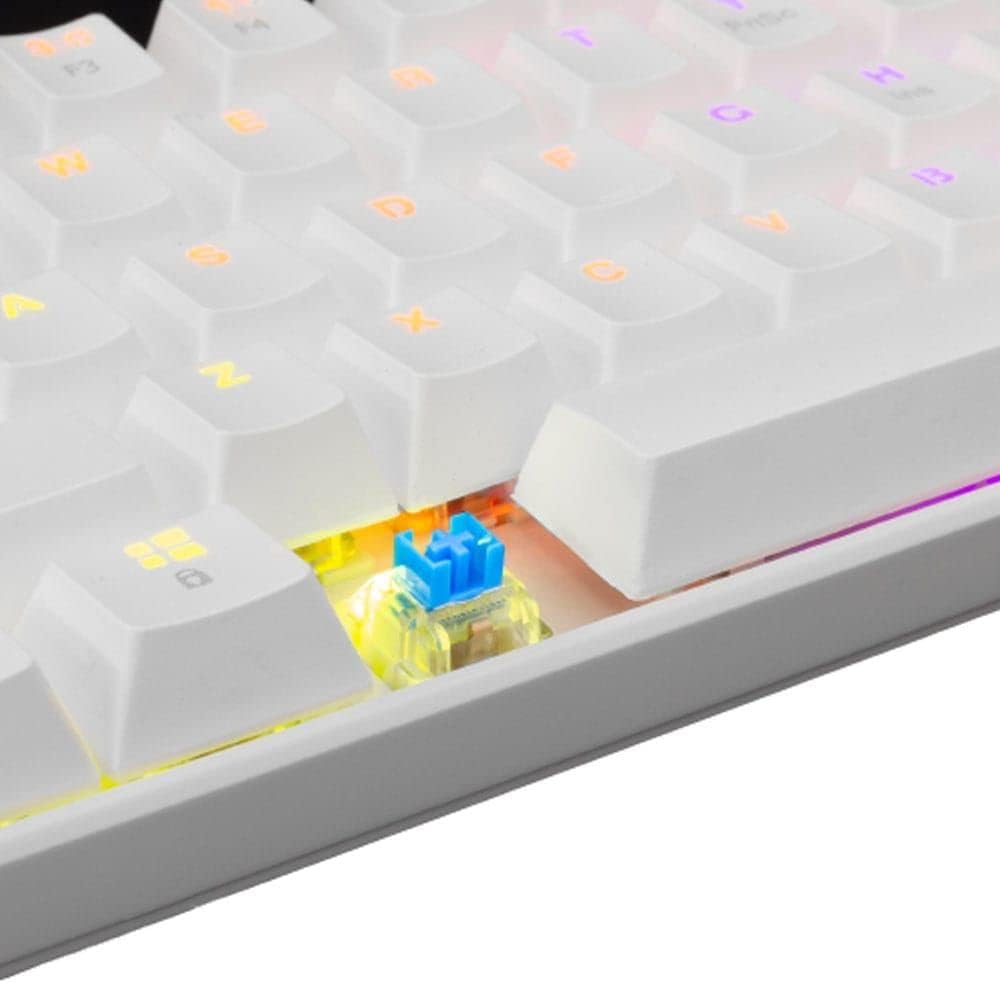
Figur 3.3: Et nærbillede view of an OUTEMU Red mechanical switch, known for its linear and quiet operation.
4. Opsætning
Follow these steps to set up your White Shark GK-2022 SHINOBI keyboard:
- Unpack the keyboard and the USB cable from the box.
- Find USB-C-porten på tastaturet.
- Insert the USB-C end of the cable into the keyboard's port.
- Connect the USB-A end of the cable to an available USB 2.0 port on your computer (PC, Laptop, etc.).
- Tastaturet er plug-and-play og burde automatisk blive genkendt af dit operativsystem. Der kræves typisk ingen yderligere drivere.

Figure 4.1: Connecting the USB-C cable to the keyboard's port for power and data transmission.
5. Betjeningsvejledning
5.1 Grundlæggende betjening
Once connected, the keyboard is ready for immediate use. Type as you would on any standard keyboard.
5.2 Function Keys and Shortcuts
Due to its compact 61-key layout, many standard functions are accessed via a combination of the Function (Fn) key and other keys. Refer to the keycaps for specific Fn layer markings.
- Fn + [Tast]: Access secondary functions printed on the keycaps (e.g., F1-F12, multimedia controls, navigation keys).
- Baggrundsbelysningskontrol: The keyboard features single-color backlighting. Use Fn key combinations to cycle through lighting modes or adjust brightness. Specific combinations are usually marked on the keys (e.g., Fn + \ for lighting modes, Fn + arrow keys for brightness/speed).
5.3 Anti-ghosting
The GK-2022 SHINOBI supports full 61-key anti-ghosting, ensuring that every key press is registered accurately, even during rapid, simultaneous keystrokes, which is beneficial for gaming and fast typing.
6. Vedligeholdelse
Korrekt vedligeholdelse vil forlænge levetiden på dit tastatur:
- Rensning: Use a soft, dry cloth to wipe the surface of the keyboard. For deeper cleaning, you may use compressed air to remove dust and debris from between the keycaps.
- Spild: In case of liquid spills, immediately unplug the keyboard from your computer. Turn it upside down to drain any liquid and allow it to dry completely before reconnecting. Do not use a hairdryer as excessive heat can damage components.
- OpbevaringOpbevar tastaturet et køligt og tørt sted, væk fra direkte sollys og ekstreme temperaturer.
7. Fejlfinding
Hvis du støder på problemer med dit tastatur, kan du prøve følgende løsninger:
- Tastaturet reagerer ikke:
- Sørg for, at USB-kablet er korrekt tilsluttet til både tastaturet og computeren.
- Prøv at tilslutte tastaturet til en anden USB-port på din computer.
- Genstart din computer.
- Test tastaturet på en anden computer for at afgøre, om problemet skyldes tastaturet eller dit system.
- Nøgler registreres ikke eller dobbelttastning:
- Check for any debris or foreign objects under the affected keycap.
- Sørg for, at tastaturet sidder korrekt på kontakten.
- Baggrundsbelysningen virker ikke:
- Sørg for, at tastaturet er korrekt strømforsynet.
- Try cycling through the lighting modes using the Fn key combinations.
- Juster lysstyrkeindstillingerne.
If the problem persists after trying these steps, please contact White Shark customer support.
8. Specifikationer
| Feature | Beskrivelse |
|---|---|
| Model | GK-2022 SHINOBI |
| Mærke | Hvidhaj |
| Antal nøgler | 61 |
| Switch Type | Mechanical - OUTEMU (Red) |
| Nøgletryk | 60 g +/- 15 g |
| Anti-Ghosting | 61 keys (Full Anti-Ghosting) |
| Farve | Hvid |
| Interface | USB 2.0 |
| Kabellængde | 1.8 meter |
| Kompatible enheder | PC, Laptop, Tablet, Smartphone (via USB) |
| Anbefalede anvendelser | Gaming, Office Work, Multimedia Editing |
| Tastatur baggrundsbelysning | Single Color (RGB effects) |
| Materiale | Plast |
| Varens vægt | 556 g |
| Pakkedimensioner | 31 x 13 x 5 cm |
9. Garanti og support
White Shark products are manufactured to the highest quality standards. For information regarding warranty coverage, technical support, or service inquiries, please refer to the warranty card included with your product or visit the official White Shark webwebsted. Gem venligst din købsbevis til garantikrav.
For further assistance, you may contact White Shark customer support through their official channels.


