1. Introduktion
Thank you for choosing the Ctronics Outdoor Wi-Fi Security Camera. This manual provides detailed instructions for setting up, operating, and maintaining your camera to ensure optimal performance and security. This advanced surveillance camera features 5MP Ultra HD resolution, dual-band 2.4GHz/5GHz Wi-Fi connectivity, intelligent human detection with auto-tracking, color night vision, two-way audio, and robust IP66 waterproof construction.

Figure 1: Ctronics Outdoor Wi-Fi Security Camera Overview
2. Nøglefunktioner
- Dual-Band Wi-Fi & Enhanced Antenna: Supports both 2.4GHz and the latest 5GHz Wi-Fi for more stable, faster, and smoother data transmission with less interference. Equipped with a reinforced 5DBi antenna for improved signal stability, especially in outdoor environments.

Figure 2: Dual-band Wi-Fi and 5DBi antenna for stable connection.
- 5MP Ultra HD-opløsning: Captures crystal-clear 5-megapixel video, allowing for precise identification of details like facial expressions, clothing, and accessories, crucial for evidence collection. Supports 4x digital zoom.

Figure 3: High-definition 5MP video capture.
- Advanced Night Vision & Two-Way Audio: Offers full-color night vision for clear identification of subjects even in low light. Features a high-quality built-in microphone and speaker for clear two-way communication without noise.

Figure 4: Color and Infrared night vision modes.
- 360° Pan-Tilt & Smart Detection: Provides a 360° surveillance range with Pan 350° and Tilt 90° capabilities. Equipped with intelligent human detection to minimize false alarms (over 95% accuracy) and an auto-tracking function that follows detected subjects and returns to the preset position after they leave the frame.

Figure 5: Pan-Tilt functionality for comprehensive coverage.

Figure 6: Human detection and auto-tracking in action.
- Durable Construction & Multiple Recording Options: Features a metal front cover for superior heat dissipation, fire resistance, and extended lifespan compared to plastic alternatives. IP66 waterproof and dustproof rating ensures reliable outdoor performance. Supports 24-hour continuous recording, motion-triggered recording, human detection recording, and schedule recording. Compatible with up to 128GB SD cards, ONVIF, NVR, and FTP.

Figure 7: Durable metal construction for longevity.

Figure 8: Multiple recording modes and storage options.
3. Opsætningsvejledning
3.1 Pakkens indhold
Før du starter, skal du sørge for, at alle varer er til stede i pakken:
- Ctronics Outdoor Wi-Fi Security Camera
- Strømadapter
- Monteringsskruer og ankre
- LAN-kabel
- Advarselsmærkat
- Brugervejledning (dette dokument)
3.2 Indledende opsætning
- Strømtilslutning: Tilslut kameraet til en strømkilde ved hjælp af den medfølgende strømadapter.
- App-download: Download the "Ctronics" app from the App Store (iOS) or Google Play Store (Android).
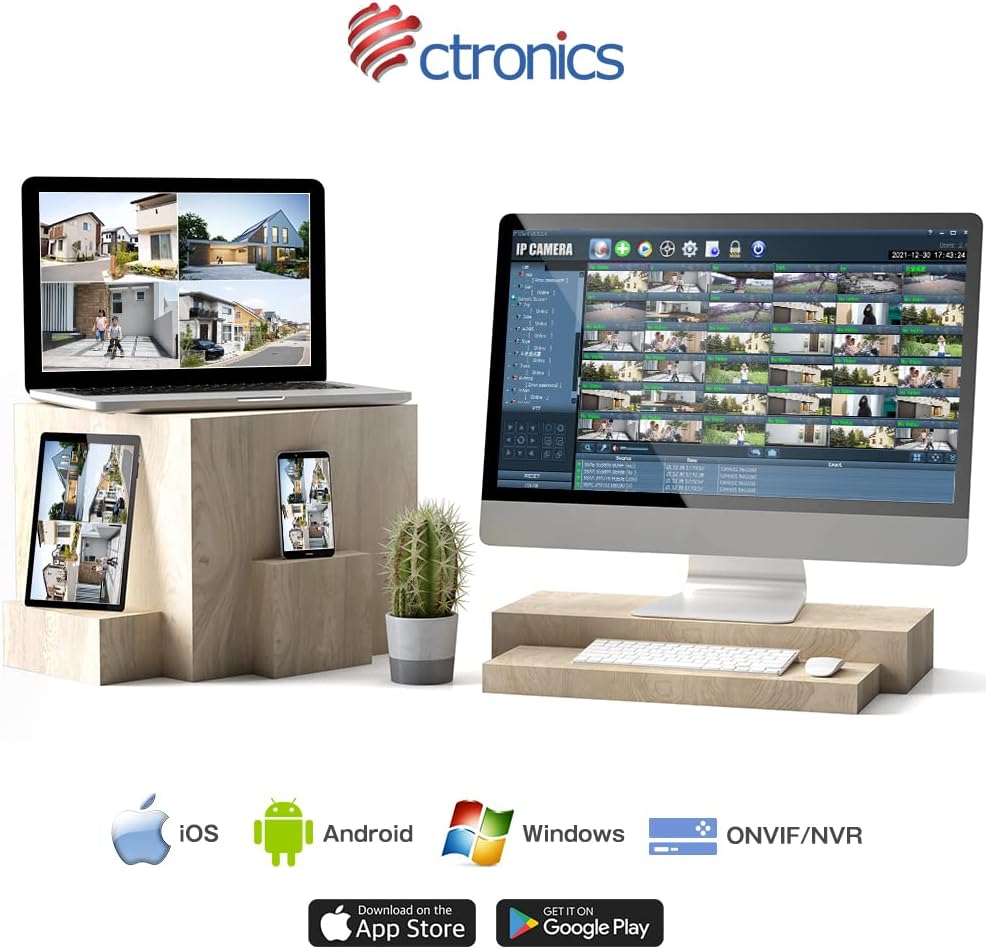
Figure 9: Ctronics App for mobile devices.
- Kontoregistrering: Åbn appen, og opret en ny konto, eller log ind, hvis du allerede har en.
- Tilføj enhed: Følg instruktionerne i appen for at tilføje dit kamera. Dette involverer typisk at scanne en QR-kode på kameraet eller manuelt indtaste dets ID.
- Netværkskonfiguration: Select your preferred Wi-Fi network (2.4GHz or 5GHz) and enter the password. Ensure your camera is within range of your Wi-Fi router. For initial setup, it is recommended to place the camera close to the router.
- Montering: Once configured, choose a suitable outdoor location for mounting. Use the provided screws and anchors to securely attach the camera. Ensure the camera has a clear view af det område, du ønsker at overvåge.
4. Betjeningsvejledning
4.1 Live View
Open the Ctronics app and select your camera from the device list to access the live video feed. You can view foo i realtidtage hvor som helst med en internetforbindelse.
4.2 Panorerings- og vippekontrol
På live view screen, use the directional controls to remotely adjust the camera's pan (horizontal) and tilt (vertical) angles. The camera supports 350° pan and 90° tilt.
4.3 Optagelsestilstande
The camera offers several recording options:
- 24 timers kontinuerlig optagelse: Records continuously to the inserted SD card or connected NVR/FTP server.
- Bevægelsesoptagelse: Optager kun, når der registreres bevægelse.
- Human Detection Recording: Records specifically when a human figure is detected, reducing false alarms.
- Planlæg optagelse: Set specific times or days for recording.
Recordings can be stored on a microSD card (up to 128GB, not included), or via ONVIF/NVR/FTP for external storage solutions.
4.4 Tovejslyd
Tryk på mikrofonikonet i appen for at tale gennem kameraets højttaler. Tryk på højttalerikonet for at lytte til lyd fra kameraets mikrofon.
4.5 Alarm og notifikationer
When motion or human detection is triggered, the camera can:
- Send push-notifikationer til din mobilenhed.
- Activate a sensor light to deter intruders.
- Trigger a customizable alarm sound.

Figure 10: Alarm and push notification system.
5. Vedligeholdelse
- Rensning: Rengør regelmæssigt kameralinsen og huset med en blød klud.amp cloth to ensure clear image quality. Do not use harsh chemicals or abrasive materials.
- Firmwareopdateringer: Check the Ctronics app periodically for firmware updates. Keeping your camera's firmware up-to-date ensures optimal performance, security, and access to new features.
- Strømforsyning: Sørg for, at strømadapteren og kablet ikke er beskadiget og er korrekt tilsluttet.
- Miljøforhold: While the camera is IP66 waterproof, avoid direct exposure to extreme weather conditions if possible, such as prolonged heavy rain or direct sunlight in very hot climates, to maximize its lifespan.

Figure 11: IP66 waterproof and wide operating temperature range.
6. Fejlfinding
| Problem | Mulig årsag | Løsning |
|---|---|---|
| Kamera offline/Kan ikke oprette forbindelse til Wi-Fi | Svagt Wi-Fi-signal; Forkert Wi-Fi-adgangskode; Routerproblemer; Kamera for langt fra routeren. | Ensure camera is within Wi-Fi range. Check Wi-Fi password. Restart router and camera. Try connecting to 2.4GHz if 5GHz is unstable, or vice versa. |
| Dårlig billedkvalitet | Dirty lens; Insufficient light; Network bandwidth issues. | Clean the lens. Ensure adequate lighting or enable night vision. Check network speed. |
| False alarms/Too many notifications | Motion detection sensitivity too high; Non-human objects triggering detection. | Juster følsomheden for bevægelsesdetektion i appen. Aktiver kun menneskelig detektion. Juster detektionszoner. |
| SD-kort optager ikke | SD card full or corrupted; Incorrect recording settings. | Format the SD card in the app. Check recording schedule and mode settings. Ensure SD card is inserted correctly. |
7. Specifikationer
| Feature | Detalje |
|---|---|
| Mærke | Ctronics |
| Modelnummer | CTIPC-380C-5MP-BW |
| Forbindelsesteknologi | Trådløs (2.4 GHz og 5 GHz Wi-Fi) |
| Videooptagelsesopløsning | 5 megapixel (2560x1920) |
| Pan/tilt rækkevidde | Panorer 350°, vip 90° |
| Særlige funktioner | Human Detection, Auto Tracking, Color Night Vision, Two-Way Audio, Alarm Notification, IP66 Waterproof |
| Materiale | Metal (front cover) |
| Strømkilde | Elektrisk med ledning |
| Wattage | 5 W |
| Lyskilde | Infrared, White Light |
| Support til opbevaring | MicroSD card (up to 128GB), ONVIF/NVR/FTP |
| Operativsystemkompatibilitet | iOS, Android, Windows, MAC |
| Varens vægt | 800 g |
| Pakkedimensioner | 21.1 x 20.3 x 13.7 cm |
8. Garanti og support
Ctronics provides a two-year quality warranty for dette produkt.
If you encounter any malfunctions or issues with your security camera during the warranty period, you are eligible for a new product replacement, return, or refund.
For any inquiries or support, please feel free to contact our customer service team at: support.jp@ctronics.com


