Indledning
Thank you for choosing the ATTACK SHARK K87 Wireless Mechanical Keyboard. This manual provides detailed instructions for setting up, operating, and maintaining your keyboard to ensure optimal performance. The K87 offers versatile connectivity options including 2.4G wireless, Bluetooth 5.0, and wired USB-C, making it compatible with various operating systems and devices.
Pakkens indhold
Kontroller venligst, at alle varer er til stede i din pakke:
- ATTACK SHARK K87 Wireless Mechanical Keyboard
- USB-C to USB-A Coiled Cable
- 2.4G Wireless Receiver (USB Dongle)
- Keycap aftrækker
- Brugervejledning (dette dokument)
Produkt overview
The ATTACK SHARK K87 is a Tenkeyless (TKL) mechanical keyboard designed for both gaming and productivity. It features a compact layout, hot-swappable switches, customizable RGB backlighting, and a durable construction.
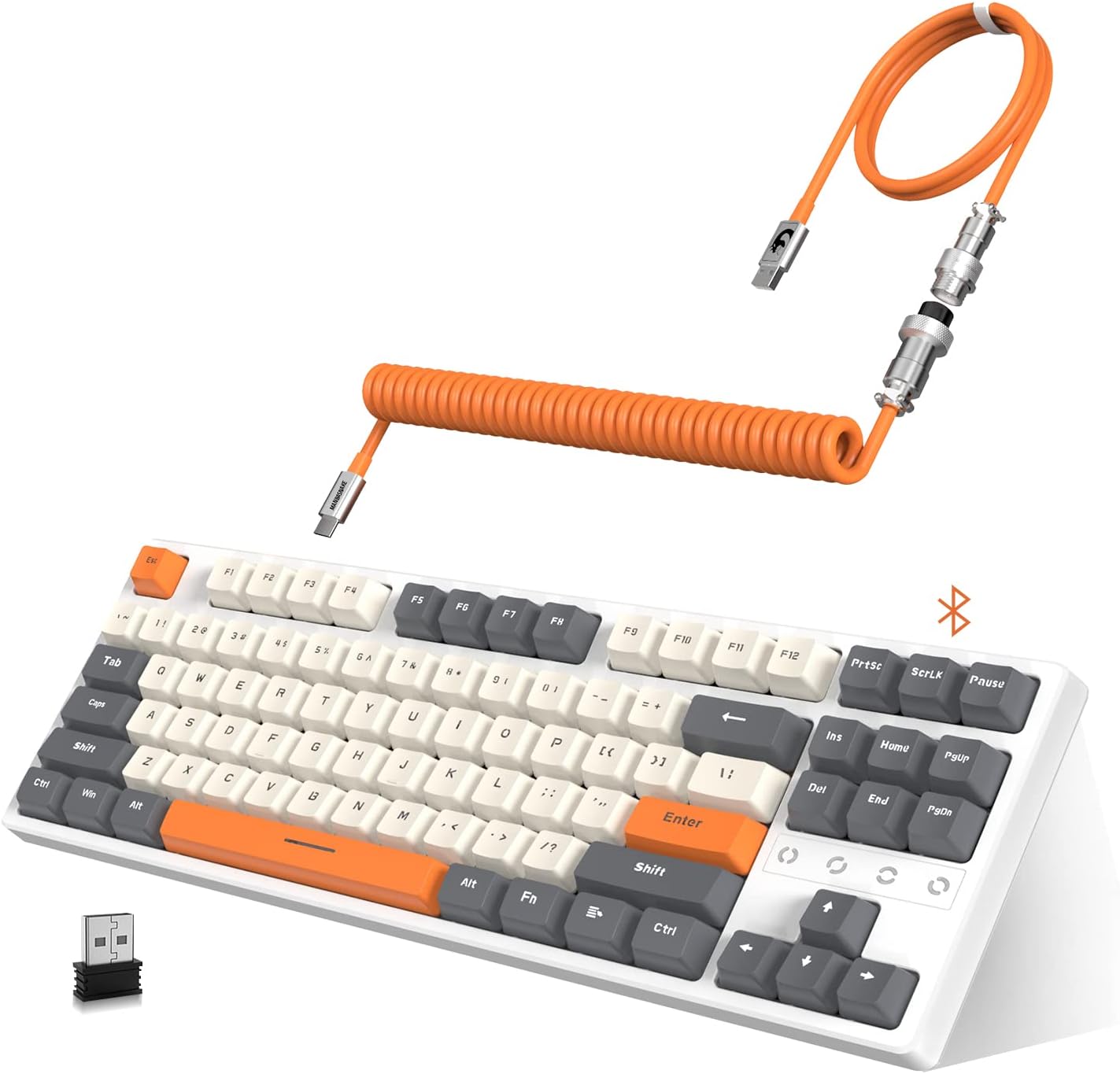
Image: The ATTACK SHARK K87 keyboard in white and gray, shown with its orange coiled USB-C cable and 2.4G wireless dongle.
Nøglefunktioner:
- Triple Mode-tilslutning: Seamlessly switch between 2.4G wireless, Bluetooth 5.0, and wired USB-C connections.
- Hot-swap-kontakter: Compatible with most 3-pin or 5-pin mechanical switches, allowing for easy customization and maintenance. The keyboard comes equipped with tactile blue switches.
- Chroma RGB Backlight: Features 28 RGB backlight modes, 8 monochrome modes, and 20 full-color backlight options. Backlight customization and macro settings are available.
- 3000mAh genopladeligt batteri: Provides extended wireless usage and includes an intelligent power-saving mode.
- Dual Layer Sound Absorbing Silicone Pads: Enhances typing and gaming experience by reducing noise and improving acoustics.
- 80% TKL Compact Design: Space-saving layout without a numeric keypad, ideal for gaming and minimalist setups.
- Custom Coiled Cable: Durable double-sleeved USB Type-C to USB-A cable with an aviation connector for reliable wired connection and charging.

Image: An exploded diagram illustrating the K87's unique gasket structure, showing layers like the top case, ABS keycaps, 3/5 pin switches, aluminum plate with silicone gasket, Poron plate foam, PCB, Poron switch pad, and bottom case, designed for sound absorption.
Opsætning
1. Opladning af tastaturet
Before initial use, it is recommended to fully charge the keyboard. Connect the provided USB-C coiled cable to the keyboard's USB-C port and the USB-A end to a power source (e.g., computer USB port, USB wall adapter). The 3000mAh battery provides long-lasting power.

Image: The K87 keyboard connected via its coiled cable, indicating charging status and compatibility with Windows XP, 7, 10, macOS, and Linux OS.
2. Tilslutning af tastaturet
The K87 supports three connection modes: Wired, 2.4G Wireless, and Bluetooth 5.0.

Image: The K87 keyboard connected to a laptop via 2.4G wireless, a tablet via Bluetooth, and a phone via Bluetooth, illustrating its triple mode connectivity.
Kablet forbindelse:
- Ensure the keyboard's mode switch (usually on the back or side) is set to 'Wired' or 'USB'.
- Connect the USB-C end of the coiled cable to the keyboard and the USB-A end to your computer's USB port.
- Tastaturet vil automatisk blive genkendt af dit operativsystem.
2.4G trådløs forbindelse:
- Find den trådløse 2.4G-modtager (USB-dongle) i pakken.
- Sæt 2.4G-modtageren i en ledig USB-port på din computer.
- Set the keyboard's mode switch to '2.4G' or the corresponding wireless icon.
- The keyboard should connect automatically. If not, press the designated pairing key combination (refer to keyboard legends or a quick start guide if provided separately) to initiate pairing.
Bluetooth 5.0-forbindelse:
- Set the keyboard's mode switch to 'BT' or the Bluetooth icon.
- Aktiver Bluetooth på din enhed (computer, tablet, telefon) og søg efter nye enheder.
- The keyboard should appear as 'ATTACK SHARK K87' or similar. Select it to pair.
- The K87 can connect to up to 5 devices simultaneously. Use specific key combinations (e.g., Fn + 1, Fn + 2, Fn + 3) to switch between paired Bluetooth devices.
Betjeningsvejledning
1. RGB-baggrundsbelysningskontrol
The K87 offers extensive RGB customization. Use the function keys (Fn) in combination with other keys to change backlight modes, colors, and brightness.
- Ændring af tilstande: Refer to the keyboard's key legends for specific Fn key combinations to cycle through 28 RGB modes and 8 monochrome modes.
- Justering af lysstyrke/hastighed: Typically, Fn + Arrow keys or other designated keys control brightness and animation speed.
- Tilpasning: The keyboard supports macro settings for personalized lighting effects. Consult the official ATTACK SHARK software (if available) for advanced customization.

Image: The K87 keyboard displaying various RGB backlight patterns, highlighting its ergonomic design, hot-swappable keys, and triple mode connection capabilities.
2. Hot-swap-kontakter
The K87's hot-swappable design allows you to change mechanical switches without soldering. This feature is compatible with most 3-pin or 5-pin switches available on the market.
- Fjernelse af tastehætter: Brug den medfølgende tastaftrækker til forsigtigt at fjerne den ønskede tast.
- Fjernelse af kontakter: Use a switch puller (not always included, but often with replacement switches) to carefully extract the switch from the PCB.
- Installing New Switches: Juster stifterne på den nye kontakt med hullerne på printkortet, og tryk forsigtigt ned, indtil den klikker på plads. Sørg for, at stifterne ikke er bøjede.
- Re-installing Keycaps: Place the keycap onto the new switch and press down firmly.
3. Strømbesparende tilstand
To conserve battery life, the K87 features an intelligent power-saving mode:
- If not used for 2 minutes, the backlight will turn off, entering the first power-saving mode.
- If not used for 30 minutes, the keyboard will enter sleep mode. Press any key to wake it up.
Opretholdelse
1. Rensning
- Frakobl tastaturet fra alle strømkilder før rengøring.
- Brug en blød, fnugfri klud lidt damprengøres med vand eller en mild rengøringsopløsning til at tørre tastaturerne og kabinettet af.
- For en dybere rengøring skal du fjerne tastehætterne ved hjælp af den medfølgende aftrækker og bruge trykluft til at fjerne snavs mellem kontakterne.
- Undgå at bruge skrappe kemikalier eller slibende materialer.
2. Batteripleje
- Undgå at aflade batteriet helt ofte.
- Opbevar tastaturet et køligt og tørt sted, når det ikke er i brug i længere perioder.
- Brug kun det medfølgende USB-C-kabel eller et tilsvarende certificeret kabel til opladning.
Fejlfinding
| Problem | Mulig årsag | Løsning |
|---|---|---|
| Keyboard not responding in 2.4G wireless mode | Keyboard switch is off or in another mode; dongle not properly connected; low battery. | Ensure the keyboard's mode switch is set to '2.4G'. Verify the 2.4G dongle is securely plugged into a USB port. Charge the keyboard. |
| Problemer med Bluetooth-forbindelse | Keyboard not in pairing mode; device Bluetooth off; interference; low battery. | Set keyboard to 'BT' mode. Ensure Bluetooth is enabled on your device. Try re-pairing. Move closer to the device. Charge the keyboard. |
| Keys not registering or double-clicking | Faulty switch; debris under keycap; software issue. | Remove keycap and clean around the switch. If hot-swappable, try replacing the switch. Test on another computer. |
| Baggrundsbelysningen virker ikke eller flimrer | Backlight turned off; low battery; software glitch. | Adjust backlight brightness/mode using Fn key combinations. Charge the keyboard. Restart the keyboard/computer. |
| Kablet forbindelse virker ikke | Cable issue; USB port issue; keyboard mode switch. | Ensure the keyboard's mode switch is set to 'Wired'. Try a different USB port or a different USB-C cable. |
Specifikationer
| Feature | Detalje |
|---|---|
| Modelnummer | K87 |
| Forbindelsesteknologi | Bluetooth 5.0, 2.4G trådløs, USB-C kablet |
| Tastaturbeskrivelse | Mechanical (Tactile Blue Switches) |
| Speciel funktion | Hot-Swappable, RGB Backlight, Water Resistant |
| Kompatible enheder | PC (Windows, macOS, Android) |
| Batterikapacitet | 3000 mAh |
| Produktdimensioner | 36.3 cm L x 13.7 cm B x 3.8 cm H (ca. 14.3 cm L x 5.4 cm B x 1.5 cm H) |
| Varens vægt | 2.59 pund (ca. 1.17 kg) |
| Materiale | Acrylonitrile Butadiene Styrene, Aluminum, Silicone |
| Farve | Hvid Grå |
Garanti og support
For garantioplysninger og teknisk support henvises til den officielle ATTACK SHARK webwebstedet eller kontakt din forhandler. Gem din købskvittering til garantikrav.
Du kan også besøge ATTACK SHARK Butik på Amazon for yderligere produktinformation og supportressourcer.


