Indledning
Tak for købetasing the Proscan PSP333 Portable Bluetooth Speaker. This manual provides important safety instructions, operational guidelines, and maintenance tips to ensure optimal performance and longevity of your device. Please read this manual thoroughly before using the product and retain it for future reference.
Sikkerhedsoplysninger
- Udsæt ikke enheden for ekstreme temperaturer, direkte sollys eller høj luftfugtighed.
- Undgå at tabe eller udsætte højttaleren for kraftige stød.
- Adskil ikke enheden eller forsøg at reparere den selv. Overlad al service til kvalificeret personale.
- Hold højttaleren væk fra vand og andre væsker.
- Brug kun det angivne opladningskabel.
- Sørg for ordentlig ventilation, når du bruger højttaleren.
Pakkens indhold
Kontroller venligst, at følgende varer er inkluderet i din pakke:
- Proscan PSP333 Portable Bluetooth Speaker
- USB opladningskabel
- Brugervejledning (dette dokument)
Produktegenskaber
The Proscan PSP333 speaker offers a range of features for an enhanced audio experience:
- Trådløs Bluetooth-forbindelse til streaming af lyd fra kompatible enheder.
- Integrated LED lights for visual ambiance.
- Built-in FM radio for listening to local stations.
- Auxiliary (AUX) input for wired connection to non-Bluetooth devices.
- Adjustable Bass, Treble, and Volume controls.
- Genopladeligt batteri til bærbar brug.
- Convenient carrying handles that also function as a built-in stand.
- Output Power: 2 x 3W (6-Watt-RMS total).
Styringer og forbindelser
Familiarize yourself with the control panel and connection ports of your speaker.

Figur 1: Front view of the Proscan PSP333 speaker, highlighting the speaker grilles and the central control interface.
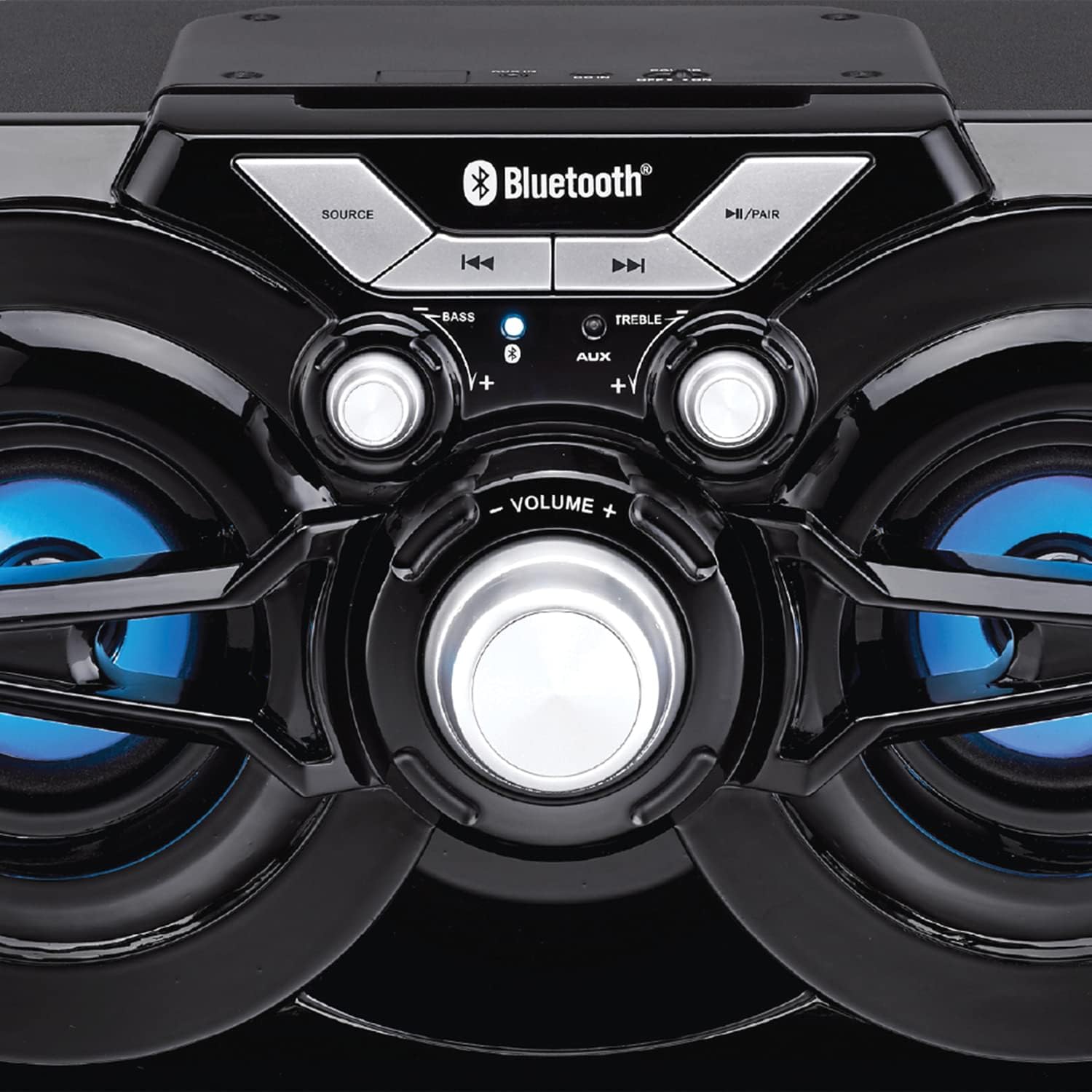
Figur 2: Detaljeret view of the speaker's control panel, illustrating the various buttons and adjustment knobs.
Kontrolpanelets funktioner:
- SOURCE knap: Press to switch between Bluetooth, FM Radio, and AUX input modes.
- ◀◀ (Previous Track/Tune Down) Button: In Bluetooth mode, press to go to the previous track. In FM mode, press to tune down the frequency.
- ▶▶ (Next Track/Tune Up) Button: In Bluetooth mode, press to go to the next track. In FM mode, press to tune up the frequency.
- ►/PAIR Button: Press to Play/Pause audio. Press and hold to initiate Bluetooth pairing mode. In FM mode, press and hold to auto-scan for stations.
- BAS knap: Drej for at justere basniveauet.
- TREBLE knap: Drej for at justere diskantniveauet.
- VOLUME knap: Rotate to adjust the overall volume output.
- AUX-indgang: 3.5mm jack for connecting external audio devices via an auxiliary cable (not included).
- Opladningsport: Til tilslutning af USB-opladerkablet.
Opsætning
Indledende opladning:
- Before first use, fully charge the speaker. Connect the small end of the included USB charging cable to the charging port on the speaker.
- Tilslut den større ende af USB-kablet til en USB-strømadapter (medfølger ikke) eller en computers USB-port.
- The charging indicator light will illuminate. Once fully charged, the light may change color or turn off (refer to specific indicator behavior if detailed in product).
- En fuld opladning tager typisk flere timer.
Tænd/sluk:
- To power on the speaker, locate the power switch (usually on the back or side) and slide it to the 'ON' position.
- For at slukke skal du skubbe kontakten til 'OFF'-positionen.
Betjeningsvejledning
Bluetooth-tilstand:
- Power on the speaker. It will automatically enter Bluetooth pairing mode, indicated by a flashing LED light (e.g., blue LED).
- If the speaker is not in Bluetooth mode, press the KILDE button until the Bluetooth indicator light flashes.
- Aktiver Bluetooth på din mobilenhed (smartphone, tablet osv.) og søg efter tilgængelige enheder.
- Select "PSP333" or "Proscan Speaker" from the list of devices.
- Once paired, the Bluetooth indicator light will stop flashing and remain solid. You can now play audio from your device through the speaker.
- Use the ◀◀, ▶▶, and ►/PAIR buttons on the speaker or your device to control playback.
AUX-indgangstilstand:
- Tænd for højttaleren.
- Tilslut den ene ende af et 3.5 mm lydkabel (medfølger ikke) til AUX-indgangsporten på højttaleren.
- Connect the other end of the 3.5mm audio cable to the headphone jack or audio output of your external device (e.g., MP3 player, computer).
- Tryk på KILDE button until the speaker is in AUX mode.
- Play audio from your external device. Volume can be controlled via the speaker's VOLUME knob and your external device.
FM -radiotilstand:
- Tænd for højttaleren.
- Tryk på KILDE button until the speaker is in FM Radio mode.
- To auto-scan and save available stations, press and hold the ►/PAIR button. The speaker will scan and store stations automatically.
- Once scanning is complete, use the ◀◀ and ▶▶ buttons to navigate between the saved stations.
- For manual tuning, short press the ◀◀ or ▶▶ buttons to adjust the frequency incrementally.
LED lys:
The speaker features integrated LED lights that illuminate the speaker cones. These lights typically activate automatically when the speaker is powered on. There may be a dedicated button or a combination of button presses to cycle through light modes or turn them off/on. (Note: Specific control for LED lights is not detailed in product description, assume automatic or simple toggle if present.)
Opladning af højttaleren
The Proscan PSP333 speaker is equipped with a built-in rechargeable Lithium Ion battery.
- When the battery is low, the speaker may emit an audible alert or an indicator light may flash.
- Connect the included USB charging cable to the speaker's charging port and to a suitable USB power source (e.g., 5V USB adapter, computer USB port).
- Opladningsindikatoren viser opladningsstatus.
- Frakobl opladningskablet, når batteriet er fuldt opladet, for at forlænge batteriets levetid.
Opretholdelse
- Rensning: Brug en blød, tør klud til at rengøre højttalerens yderside. Brug ikke flydende rengøringsmidler eller slibende materialer.
- Opbevaring: Når højttaleren ikke er i brug i længere perioder, skal den opbevares køligt og tørt, væk fra direkte sollys og ekstreme temperaturer.
- Batteripleje: To maintain battery health, avoid fully discharging the battery frequently. Charge the speaker regularly, even if not in use, to prevent deep discharge.
Fejlfinding
| Problem | Mulig løsning |
|---|---|
| Højttaleren tænder ikke. | Ensure the battery is charged. Connect the speaker to a power source using the USB cable. Check the power switch is in the 'ON' position. |
| Ingen lyd fra højttaleren. | Increase the volume on both the speaker and the connected device. Ensure the correct source mode (Bluetooth, AUX, FM) is selected. Check audio cable connection for AUX mode. |
| Kan ikke parres via Bluetooth. | Ensure the speaker is in Bluetooth pairing mode (flashing LED). Make sure the speaker is within 30 ft (9 meters) of your device. Turn off and on Bluetooth on your device. Forget "PSP333" from your device's Bluetooth list and try pairing again. |
| FM-radiomodtagelsen er dårlig. | Relocate the speaker to an area with better signal. Ensure no large metallic objects are blocking the signal. |
| Forvrænget lyd. | Reduce the volume on both the speaker and the connected device. Check Bass and Treble settings. Ensure the audio source is not distorted. |
Specifikationer

Figur 3: Dimensions of the Proscan PSP333 speaker, showing its length, height, and depth.
| Feature | Detalje |
|---|---|
| Modelnummer | PSP333 |
| Udgangseffekt | 2 x 3W (6-Watt-RMS) |
| Forbindelse | Bluetooth, Auxiliary (3.5 mm jack) |
| Driver størrelse | 3 tommer |
| Wireless Range | Op til 30 fod (9 meter) |
| Strømkilde | Genopladeligt lithium-ion-batteri |
| Produktmål (L x B x H) | 24.31 x 42.09 x 24.1 cm (ca. 9.57 x 16.57 x 9.49 tommer) |
| Varens vægt | 2.61 kg (ca. 5.75 lbs) |
| Farve | Sort |
Garanti og support
This product is covered by a limited manufacturer's warranty. For specific warranty terms and conditions, please refer to the documentation provided at the time of purchase or contact the retailer. For technical support or service inquiries, please contact the customer service department of PROSCAN or your authorized dealer.
Manufacturer: Curtis International
Place of Business: Mississauga, ON L5S 2A4


