Indledning
Thank you for choosing the Platinum Karaoke DK-88 Duo Speaker System. This manual provides essential information for the safe and efficient operation of your new device. Please read it thoroughly before use and retain it for future reference.
The DK-88 Duo is an all-in-one karaoke solution, featuring a built-in song library, wireless microphones, and various connectivity options. Its robust design and versatile features make it ideal for home parties, family gatherings, and outdoor events.
Sikkerhedsoplysninger
- Udsæt ikke enheden for regn eller fugt for at forhindre brand eller elektrisk stød.
- Åbn ikke c'enasing. Overlad al service til kvalificeret personale.
- Sørg for tilstrækkelig ventilation omkring enheden. Bloker ikke ventilationsåbningerne.
- Use only the provided charging adapter.
- Hold enheden væk fra direkte sollys, varmekilder og for meget støv.
- Undgå at placere tunge genstande oven på enheden.
- Opbevares utilgængeligt for børn.
Pakkens indhold
Kontroller venligst, at alle nedenstående varer er inkluderet i din pakke:
- Main Unit (DK-88 Duo Speaker)
- Opladningsadapter
- 2 x trådløse mikrofoner
- Fjernbetjening
- Batteries (for remote control and microphones)
- AV-kabel
- Brugermanual
- Garantikort

Figur 1: Medfølgende tilbehør og komponenter
Produkt overview
Front View

Figur 2: Forside View of the DK-88 Duo with LED Lighting
Kontrolpaneler på øverste panel

Figure 3: Top Panel Controls and Inputs
Bagpanel

Figur 4: Bagpanel med tilslutningsporte
Opsætning
1. Powering On/Charging
- AC strøm: Connect the charging adapter to the 'DC IN 20V/4A' port on the top panel and plug it into a wall outlet. The unit can be used while charging.
- Batteristrøm: The unit has a built-in rechargeable battery providing up to 6 hours of playback. Ensure the unit is charged before portable use. The battery indicator on the display will show the current charge level.
2. Mikrofonopsætning
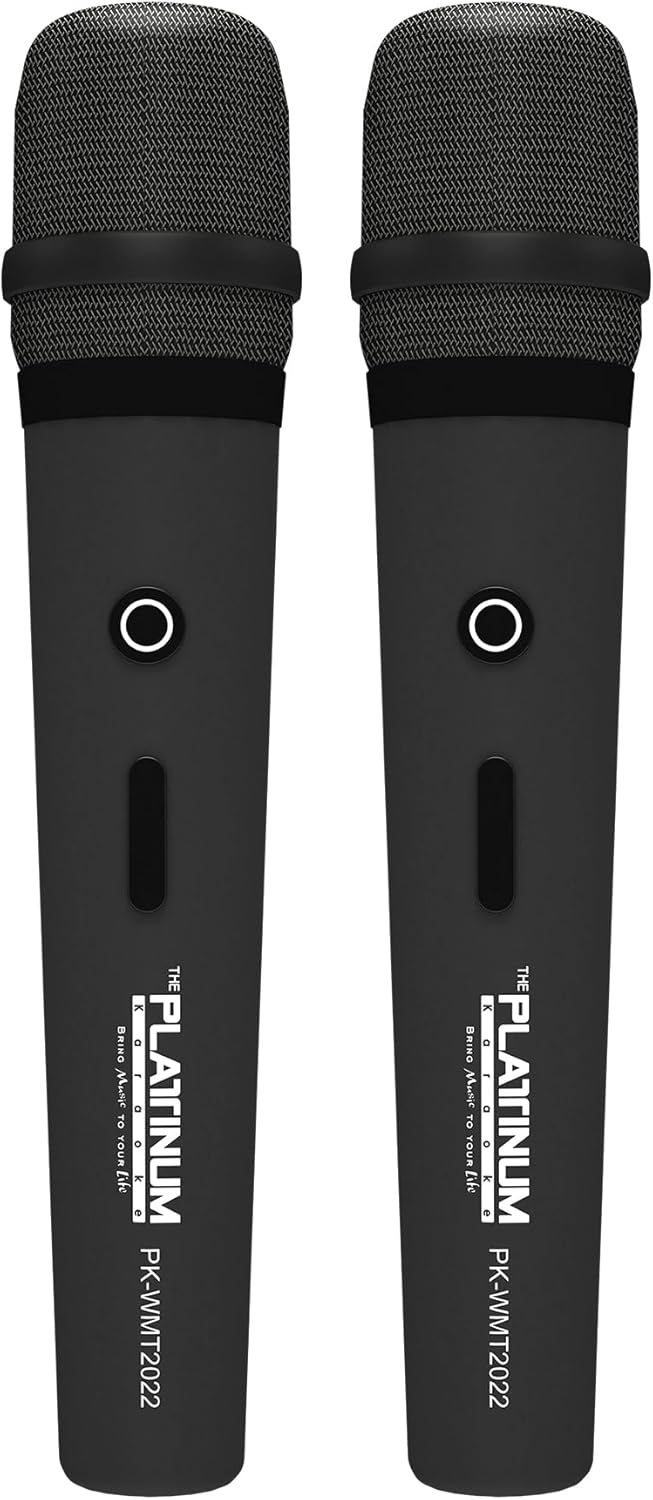
Figure 5: Wireless Microphones
- Insert the provided batteries into each wireless microphone.
- Turn on the microphones using their power switches. They will automatically connect to the DK-88 Duo unit.
- Adjust the 'MIC VOLUME' knob on the top panel to control the microphone output level.
3. Tilslutning af lydkilder
- Bluetooth: Turn on the unit. The Bluetooth indicator will flash. Enable Bluetooth on your mobile device and select 'DK-88 Duo' from the list of available devices to pair.
- USB-drev: Indsæt et USB-flashdrev med MP3-musik files into the 'USB' port on the top panel. The system will automatically detect and play the files.
- Micro SD-kort: Insert a Micro SD card (up to 32GB, pre-loaded with songs) into the 'MICRO SD' slot on the top panel. The system will automatically detect and play the songs.
- AUX-indgang: Use the provided AV cable to connect external audio devices (e.g., DVD player, TV) to the 'AUX' input on the top panel.
- Guitar input: Connect a guitar to the 'GUITAR IN' port on the top panel. Adjust the dedicated 'GUITAR' volume knob.
Betjeningsvejledning
1. Grundlæggende betjening
- Tænd/sluk: Use the 'POWER' switch on the top panel to turn the unit on or off.
- Lydstyrkekontrol: Rotate the 'VOLUME' knob to adjust the overall sound output.
- Valg af tilstand: Press the 'MODE' button to switch between input sources (Bluetooth, USB, Micro SD, AUX).
2. Karaoke Features
- Sangvalg: Use the 'SKIP' buttons (|< / >>|) to navigate through songs.
- Ekkoeffekt: Adjust the 'ECHO' knob to add or reduce echo to your vocals. This helps blend your voice with the music.
- Sangoptagelse: Press the 'REC' button to start recording your performance. The system will save the music and your vocals to the inserted Micro SD card or USB drive. To share, simply copy the recorded file til en computer.
- Vocal Assist (Training Songs): For training songs, the main vocals will automatically fade out when you sing into the microphone and reappear when you stop.
3. Audio Adjustment
- Diskantkontrol: Use the 'TREBLE' knob to adjust the high-frequency sounds of the music.
- Baskontrol: Use the 'BASS' knob to adjust the low-frequency sounds of the music.
4. Lyseffekter
- Press the 'LIGHT' button on the top panel to cycle through different colorful fire lighting modes. The lights glow and dance with the music, enhancing the party atmosphere.
5. Platinum Link App
- Download the 'Platinum Link' app from your mobile device's app store (available on Android and iOS).
- Connect your mobile phone to the DK-88 Duo via Bluetooth.
- Use the app to control song selection, browse the song library, reserve songs, and display karaoke lyrics directly on your phone screen.
- The app also features a karaoke recording function to measure your vocal performance and improve your singing skills.
Opretholdelse
- Rengør enheden med en blød, tør klud. Brug ikke flydende rengøringsmidler eller aerosoler.
- Opbevar enheden på et køligt, tørt sted, når det ikke er i brug.
- Remove batteries from the remote control and microphones if storing for extended periods to prevent leakage.
Fejlfinding
| Problem | Mulig årsag | Løsning |
|---|---|---|
| Ingen strøm | Unit is not charged or not connected to AC power. | Connect the charging adapter and ensure it's plugged into a working outlet. Check battery level. |
| Ingen lyd fra mikrofoner | Microphones are off, batteries are low, or volume is too low. | Turn on microphones, replace batteries, increase 'MIC VOLUME' knob. |
| Bluetooth forbinder ikke | Bluetooth is not enabled on the unit or mobile device, or device is too far. | Ensure unit is in Bluetooth mode, enable Bluetooth on your device, move closer to the unit. |
| Cannot play songs from USB/SD | Ukorrekt file format, beskadiget files, or card/drive not inserted properly. | Sikre files are MP3 format. Reinsert the USB drive/SD card. Try a different drive/card. |
| Lys virker ikke | Light feature is turned off. | Press the 'LIGHT' button to activate the lighting effects. |
Specifikationer
| Feature | Detalje |
|---|---|
| Modelnummer | DK-88 |
| Dimensioner (L x B x H) | 35 x 38 x 78 cm |
| Vægt | 13 kg |
| Strømkilde | Battery Powered (1 x 12V battery included), AC Powered |
| Batteri spilletid | Op til 6 timer |
| Forbindelsesteknologi | USB, Bluetooth |
| USB-porte | 1 |
| Antal højttalere | 2 |
| Speciel funktion | Built-in Song Track |
| Farve | Sort |
| Anbefalede anvendelser | Home parties, family gatherings, karaoke bars, outdoor events, musical performances |
Garanti og support
Your Platinum Karaoke DK-88 Duo comes with a warranty. Please refer to the included Warranty Card for detailed terms and conditions, including warranty period and coverage.
For technical support, service, or inquiries not covered in this manual, please contact Platinum Karaoke customer service. Contact information can typically be found on the Warranty Card or the official Platinum Karaoke webwebsted.


