1. Introduktion
Thank you for choosing the Cherry KW 9100 Slim Wireless Keyboard. This manual provides essential information for setting up, operating, and maintaining your new keyboard. The KW 9100 Slim is designed for both work and home office environments, offering flexible connectivity options and a comfortable typing experience with its silent SX Scissor Mechanism.

Figur 1.1: Top-down view of the Cherry KW 9100 Slim Wireless Keyboard, showcasing dens fulde layout og elegante design.
2. Pakkens indhold
Kontroller venligst, at alle varer er til stede i din pakke:
- Cherry KW 9100 Slim Wireless Keyboard
- USB-kabel (USB-A til USB-C)
- USB Receiver (2.4 GHz RF dongle)
- Instruktionsmanual (dette dokument)
- Magnetic Support Bar (pre-attached or separate)
3. Nøglefunktioner
- Dobbelt tilslutning: Seamlessly switch between wireless RF (2.4 GHz) and Bluetooth transmission modes.
- Genopladeligt batteri: Built-in lithium rechargeable battery with USB-C connection for convenient charging.
- SX Scissor Mechanism: Cherry's proprietary low-profile scissor technology ensures a quiet and precise typing experience.
- Slim and Stable Design: Har en tynd profile with a built-in metal plate for maximum stability and rigidity.
- Justerbar skrivevinkel: Includes a removable magnetic support bar for a steeper typing angle preference.
- Status LED'er: Integrated LEDs for CAPS LOCK, NUM, and SCROLL keys.
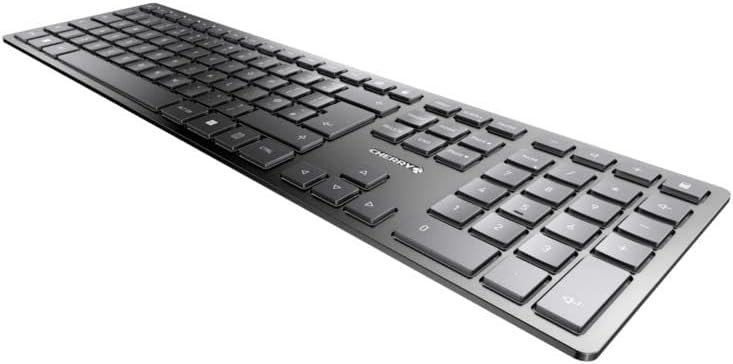
Figur 3.1: Vinklet view fremhæver den slanke profile and key layout of the keyboard.

Figur 3.2: Nærbillede view of the keys, illustrating the low-profile design and quiet SX Scissor Mechanism.
4. Opsætning og tilslutning
4.1 Opladning af tastaturet
Før første brug anbefales det at oplade tastaturet helt.
- Connect the supplied USB-A to USB-C cable to the USB-C port on the keyboard.
- Connect the other end of the cable to a USB-A port on your computer or a compatible USB power adapter.
- The charging indicator LED will illuminate. The keyboard can be used while charging.

Figure 4.1: Location of the USB-C charging port on the Cherry KW 9100 Slim keyboard.
4.2 Connecting via 2.4 GHz RF Wireless
For a stable and fast wireless connection, use the included USB receiver.
- Locate the USB receiver (dongle) in the package.
- Sæt USB-modtageren i en ledig USB-A-port på din computer.
- On the keyboard, locate the connectivity switch (usually on the back or side) and set it to the "RF" or 2.4 GHz icon position.
- Tastaturet burde automatisk oprette forbindelse til din computer.
4.3 Tilslutning via Bluetooth
The keyboard supports Bluetooth connectivity for devices with Bluetooth capabilities.
- On the keyboard, set the connectivity switch to the "Bluetooth" icon position.
- The Bluetooth indicator LED on the keyboard will start blinking, indicating it's in pairing mode.
- Åbn Bluetooth-indstillingerne på din computer eller enhed.
- Søg efter new devices and select "Cherry KW 9100 Slim" from the list.
- Følg eventuelle anvisninger på skærmen for at fuldføre parringsprocessen.
4.4 Attaching the Magnetic Support Bar
The keyboard comes with a magnetic support bar that can be attached to adjust the typing angle.
- Locate the magnetic support bar.
- Align the bar with the magnetic strip on the underside of the keyboard.
- The magnets will snap the bar into place, providing an elevated typing angle.
- To remove, simply pull the bar away from the keyboard.

Figur 4.2: Side view of the keyboard demonstrating the elevated angle with the magnetic support bar attached.

Figure 4.3: Illustration of how the magnetic support bar attaches to the keyboard's underside.
5. Betjening
5.1 Grundlæggende brug
Once connected, the Cherry KW 9100 Slim functions as a standard keyboard. Type as you normally would.

Figure 5.1: A user demonstrating typing on the Cherry KW 9100 Slim keyboard in an office setting.
5.2 Function Keys (F-Keys)
The F-keys (F1-F12) on the top row may have secondary functions accessible by pressing the Fn key simultaneously. Refer to the keycap legends for specific functions such as media control, volume adjustment, or brightness control.
5.3 status -lysdioder
The keyboard features indicator LEDs for:
- CAPS LOCK: Lyser, når Caps Lock er aktiv.
- NUM: Lyser, når Num Lock er aktiv.
- RUL: Lyser, når Scroll Lock er aktiv.
- Battery/Charging: Indicates charging status or low battery.
6. Vedligeholdelse
6.1 Rengøring af tastaturet
Sådan bevarer du tastaturets udseende og funktionalitet:
- Frakobl tastaturet fra computeren, før du rengør det.
- Brug en blød, fnugfri klud lidt dampafsluttes med vand eller en mild rengøringsopløsning.
- Undgå for meget fugt, og sprøjt ikke rengøringsmidler direkte på tastaturet.
- Brug trykluft til støv og snavs mellem tasterne.
6.2 Pleje af batterier
The built-in rechargeable battery is designed for long life.
- Recharge the keyboard when the battery indicator shows low power.
- Undgå at aflade batteriet helt ofte for at forlænge dets levetid.
- Opbevar tastaturet et køligt og tørt sted, hvis det ikke bruges i længere perioder.
7. Fejlfinding
| Problem | Mulig årsag | Løsning |
|---|---|---|
| Keyboard not responding (RF) | USB receiver not plugged in; keyboard not in RF mode; low battery. | Ensure USB receiver is securely plugged in. Set keyboard switch to RF mode. Charge the keyboard. Try a different USB port. |
| Tastaturet svarer ikke (Bluetooth) | Keyboard not in Bluetooth mode; not paired; out of range; low battery. | Set keyboard switch to Bluetooth mode. Ensure keyboard is paired with the device. Move keyboard closer to the device. Charge the keyboard. |
| Tasterne er klæbrige eller reagerer ikke | Debris under keys; liquid spill. | Clean the keyboard using compressed air. If liquid spill, disconnect immediately and allow to dry completely before use. Do not attempt to disassemble. |
| Batteriet oplades ikke | Faulty USB cable or port; power source issue. | Try a different USB cable and/or USB port. Ensure the power source is active. |
8. Specifikationer
| Feature | Detalje |
|---|---|
| Modelnummer | JK-9100US-2 |
| Forbindelse | Bluetooth, 2.4 GHz RF (with USB receiver), USB-C (for charging) |
| Tastaturbeskrivelse | Wireless, Full-size |
| Nøglemekanisme | SX Scissor Mechanism |
| Antal nøgler | 108 |
| Farve | Sort |
| Materiale | Metal (built-in plate) |
| Varens vægt | 1.49 pund (ca. 676 gram) |
| Pakkedimensioner | 18.19 x 6.69 x 1.26 tommer |
| Fabrikant | KIRSEBÆR |
| Kompatible enheder | PC |
| Anbefalede anvendelser | Gaming, Office, Work |
9. Garanti og support
For garantioplysninger og teknisk support henvises til den officielle Cherry-butik. website or contact Cherry customer service. Keep your proof of purchase for warranty claims.
Officiel kirsebær Webwebsted: www.cherry.de/en/
Kundeservice: Se kontaktsektionen på den officielle webwebsted for regionale supportoplysninger.


