Indledning
This manual provides detailed instructions for the setup, operation, and maintenance of your LFF Atomic Clock Model LWC204. This digital clock features a large, easy-to-read display, atomic time synchronization, and a wireless sensor for indoor and outdoor temperature readings. Please read this manual thoroughly before use to ensure proper functionality and longevity of your device.
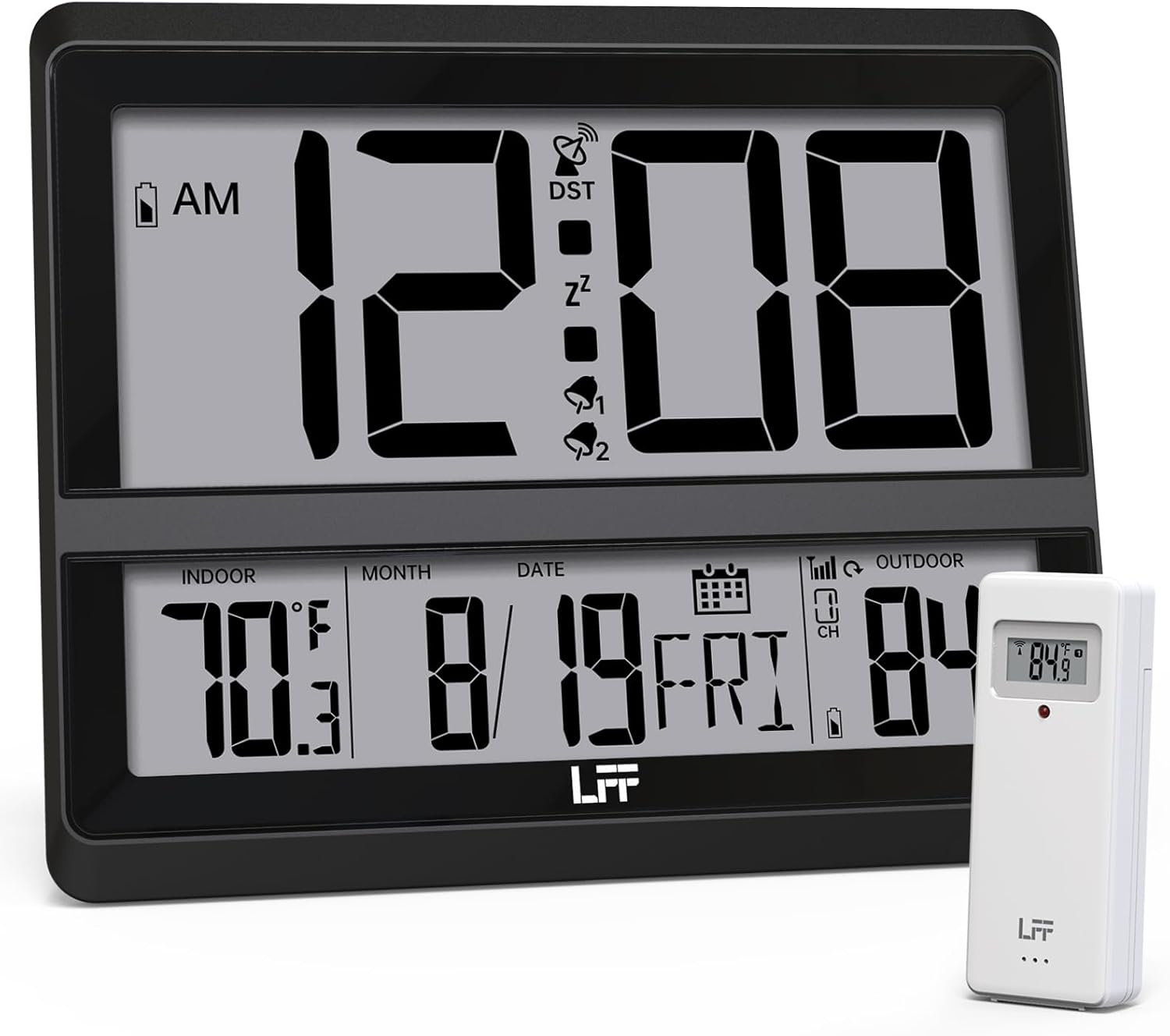
Image: The LFF Atomic Clock main unit with its wireless outdoor temperature sensor.
Pakkens indhold
- LFF Atomic Clock Main Unit
- Trådløs udetemperaturføler
- Instruktionsmanual (dette dokument)
- Bracket for table standing
Note: Batteries are not included. The main clock unit requires 3x AA batteries, and the outdoor sensor requires 2x AAA batteries.
Produkt overview
Familiarize yourself with the main components and controls of your LFF Atomic Clock.

Image: Front display and rear button layout of the LFF Atomic Clock.
Displayfunktioner:
- Tidsvisning: Large digits for current time (12/24 Hour format).
- AM/PM-indikator: For 12-hour format.
- DST Symbol: Indicates Daylight Saving Time is active.
- RCC Reception Icon: Shows status of atomic time signal reception.
- Alarm Icons (Zz, 1, 2): Indicate active alarms and snooze function.
- Indendørs temperatur: Current temperature inside (°C/°F).
- Udendørs temperatur: Current temperature from wireless sensor (°C/°F).
- Date & Weekday: Month, Day, and Day of the Week.
- Indikator for lavt batteri: For both main unit and outdoor sensor.
Bagerste knapper:
- SET -knap: Går i indstillingstilstand.
- ALARM knap: Giver adgang til alarmindstillinger.
- KANAL-knap: Cycles through outdoor sensor channels (if multiple sensors are used).
- DOWN/WAVE/°C/°F Button: Decreases values in setting mode, manually initiates atomic signal search (WAVE), or switches temperature units.
- UP/ALARM Button: Increases values in setting mode, or activates/deactivates alarm.
Opsætning
1. Batteriinstallation
- Udendørs sensor:
- Åbn batterirummet på bagsiden af den trådløse udendørssensor.
- Isæt 2x AAA-batterier, og overhold den korrekte polaritet (+/-).
- Luk batterirummet forsvarligt.
- Note: For temperatures below -4°F (-20°C), Lithium batteries are recommended for the outdoor sensor.
- Main Clock Unit:
- Open the battery compartment on the back of the main clock unit.
- Isæt 3x AA-batterier, og overhold den korrekte polaritet (+/-).
- Luk batterirummet forsvarligt.

Image: Battery compartments for the main clock and outdoor sensor.
2. Indledende synkronisering og indstillinger
Upon battery installation, the clock will automatically begin searching for the WWVB atomic time signal and attempt to connect with the outdoor sensor.
- The RCC Reception Icon will flash during the atomic signal search. This process may take several minutes or up to 24 hours depending on signal strength.
- The outdoor temperature should appear on the display within a few minutes after the sensor batteries are installed. If not, press the KANAL button on the main unit to cycle through channels or press the reset button on the outdoor sensor.
3. Manual Settings (if needed)
If the atomic signal is not received or you wish to adjust settings manually:
- Tidszoneindstilling:
- Tryk og hold på SÆT button for 3 seconds to enter time zone setting.
- Brug UP/ALARM or DOWN/WAVE/°C/°F buttons to select your time zone (e.g., PST, MST, CST, EST).
- Trykke SÆT for at bekræfte og gå til den næste indstilling.
- 12/24 timers format:
- After time zone, the hour format will flash. Use UP/ALARM or DOWN/WAVE/°C/°F to select 12-hour or 24-hour format.
- Trykke SÆT for at bekræfte.
- Manual Time and Date Setting:
- Fortsæt med at trykke SÆT to cycle through Year, Month, Day, Hour, Minute settings.
- Bruge UP/ALARM or DOWN/WAVE/°C/°F for at justere hver værdi.
- Trykke SÆT for at bekræfte hver indstilling.
- Sommertid (DST):
- After setting the time, the DST setting will flash. Use UP/ALARM or DOWN/WAVE/°C/°F to enable or disable DST.
- Trykke SÆT for at afslutte indstillingstilstand.

Image: The clock automatically corrects time daily via WWVB signal.
4. Placering af udendørs sensorer
- Place the wireless outdoor sensor within 330 feet (100 meters) of the main unit.
- Choose a shaded location to avoid direct sunlight, which can affect temperature accuracy.
- Ensure the sensor is protected from direct rain and snow.
- Avoid placing the sensor near large metal objects or electrical appliances that may interfere with the wireless signal.

Image: Wireless range of 330 feet for the outdoor sensor.
Betjeningsvejledning
1. Visningstilstande
- The clock continuously displays time, indoor temperature, outdoor temperature, date, and day of the week.
- Tryk på DOWN/WAVE/°C/°F button to switch between Celsius (°C) and Fahrenheit (°F) for temperature display.
2. Alarm funktion
- Indstilling af alarm:
- Tryk på ALARM button once to display Alarm 1 time. Press again for Alarm 2.
- While an alarm time is displayed, press and hold the ALARM button for 3 seconds to enter alarm setting mode. The hour will flash.
- Bruge UP/ALARM or DOWN/WAVE/°C/°F for at justere timen. Trykke ALARM for at bekræfte.
- The minute will flash. Use UP/ALARM or DOWN/WAVE/°C/°F for at justere minuttet. Trykke ALARM for at bekræfte og afslutte alarmindstillingen.
- Aktivering/deaktivering af alarm:
- Tryk på ALARM button to display Alarm 1 or Alarm 2.
- Tryk på UP/ALARM button to toggle the alarm ON or OFF. The corresponding alarm icon (1 or 2) will appear/disappear on the display.
- Snooze-funktion:
- Når alarmen lyder, skal du trykke på SLUM button (usually located on top or a dedicated button) to activate snooze. The alarm will sound again after approximately 5-10 minutes.
- For at stoppe alarmen helt, tryk på en hvilken som helst anden knap (f.eks. ALARM, SÆT).
3. Manual Atomic Signal Search
If you wish to manually initiate a search for the WWVB atomic time signal, press and hold the DOWN/WAVE/°C/°F button for 3 seconds. The RCC Reception Icon will flash, indicating the search is in progress.
Opretholdelse
- Rensning: Tør uret og sensoren af med en blød, tør klud. Brug ikke slibende rengøringsmidler eller opløsningsmidler.
- Udskiftning af batteri: When the low battery indicator appears on the display for either the main unit or the outdoor sensor, replace the batteries promptly to ensure continuous operation and accurate readings. Refer to the "Battery Installation" section for details.
- Opbevaring: Hvis enheden opbevares i en længere periode, skal alle batterier fjernes for at forhindre lækage.
Fejlfinding
| Problem | Mulig årsag | Løsning |
|---|---|---|
| Intet display på hovedenheden. | Batterierne er døde eller forkert installeret. | Kontroller batteripolariteten, og udskift dem med nye AA-batterier. |
| Outdoor temperature not displayed or incorrect. |
|
|
| Atomic time signal not received (RCC icon flashing or not displayed). |
|
|
| Time is incorrect after atomic synchronization. | Forkert tidszoneindstilling. | Adjust the time zone setting as described in the "Manual Settings" section. |
Specifikationer
| Feature | Detalje |
|---|---|
| Modelnummer | LWC204 |
| Display Type | Digital LCD |
| Strømkilde (hovedenhed) | 3x AA batterier (medfølger ikke) |
| Strømkilde (udendørs sensor) | 2x AAA batterier (medfølger ikke) |
| Indendørs temperaturområde | 32°F til 122°F (0°C til 50°C) |
| Udendørs temperaturområde | -58°F til 158°F (-50°C til 70°C) |
| Wireless Range | Op til 100 meter i fri luft |
| Tidsformat | 12/24 timers valgbar |
| Dimensioner (hovedenhed) | 7.48" W x 8.66" H (approx.) |
| Monteringsmuligheder | Wall Mount or Tabletop (bracket included) |
Garanti og support
LFF products are designed for reliability and performance. For specific warranty information, please refer to the warranty card included with your purchase or contact LFF customer support.
For technical assistance or further inquiries, please visit the official LFF webwebstedet eller kontakt deres kundeserviceafdeling. Kontaktoplysninger findes typisk på produktemballagen eller mærkets officielle online tilstedeværelse.


