Indledning
The Lexon MINUT is a compact and elegantly designed digital alarm clock, recognized for its minimalist aesthetic. It is ideal for bedrooms, nightstands, or as a travel companion due to its small size and long-lasting rechargeable battery. This manual provides essential information for setting up, operating, maintaining, and troubleshooting your MINUT alarm clock.
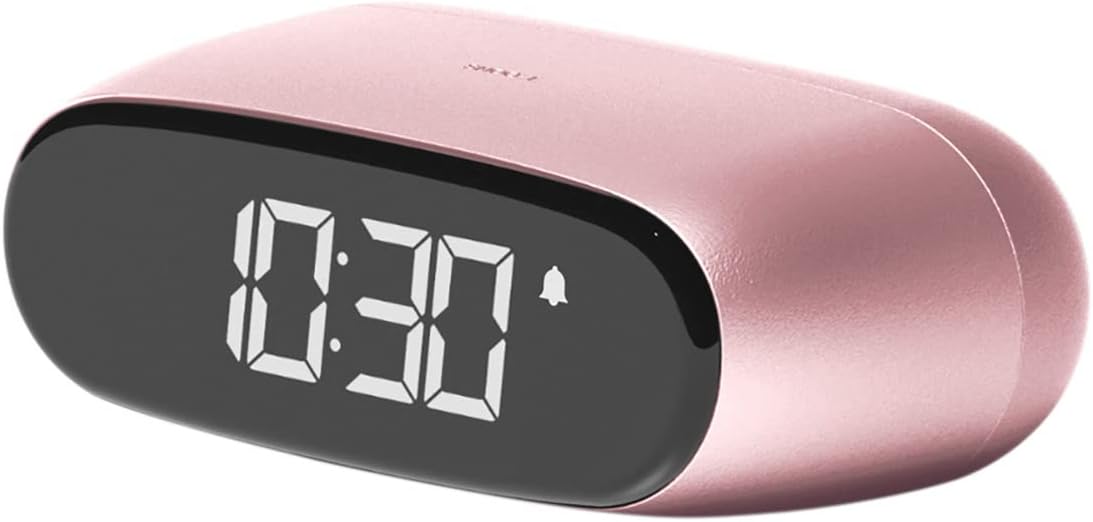
Image: The Lexon MINUT Digital Alarm Clock, showcasing its compact, oval design and digital LCD display with the time 10:30 and an alarm icon visible. The clock is light pink with an aluminum finish.
Pakkens indhold
- Lexon MINUT Digital Alarm Clock
- USB-C-kabel
- Brugermanual
Opsætning
Opladning af enheden
The Lexon MINUT alarm clock is equipped with a rechargeable battery offering an autonomy of up to 6 months. For optimal performance, fully charge the device before its first use.
- Connect the provided USB-C cable to the charging port located on the clock.
- Tilslut den anden ende af USB-C-kablet til en kompatibel USB-strømadapter (medfølger ikke).
- The display may show an indication of charging status. Allow sufficient time for the battery to reach full capacity.
Første gang tændt
Once adequately charged, the clock should power on automatically. If not, a gentle tap or movement of the device will activate the display.
Betjeningsvejledning
Display Activation
The MINUT clock features a low-light option and a dimmable display. To temporarily activate the display and view the time, gently tap or move the clock. The display will illuminate for a short period.
Indstilling af tid
Time setting is typically managed through intuitive touch controls. Refer to the small icons or indicators on the clock's surface for specific time adjustment modes. Generally, a series of taps or holds on designated areas will allow you to cycle through and set hours and minutes.
Indstilling af alarm
The alarm setup is designed for quick and simple operation using touch controls. Look for an alarm icon (bell symbol) or a specific area dedicated to alarm settings.
- Activate the display by tapping the clock.
- Locate the alarm setting control.
- Adjust the desired alarm time using the designated controls (e.g., tapping specific areas to increment or decrement hours and minutes).
- Confirm the alarm setting. A visible alarm icon on the display indicates that the alarm is active.
Snooze funktion
When the alarm sounds, a gentle tap on the clock will activate the snooze function. The alarm will pause and sound again after a predetermined interval.
Justering af lydstyrke og lysstyrke
The MINUT allows for customization of both alarm volume and display brightness. These adjustments are typically performed via specific touch gestures or dedicated controls on the device.
- Lysstyrke: The display is dimmable to suit your environment. Experiment with tapping or holding specific areas to cycle through available brightness levels.
- Bind: The alarm volume can be adjusted, including a high volume option suitable for heavy sleepers. Consult the device for indicators related to volume control.
Opretholdelse
Rensning
To clean your Lexon MINUT clock, use a soft, dry, lint-free cloth. Avoid using abrasive cleaners, solvents, or aerosol sprays directly on the device, as these can damage the finish or internal components.
Batteripleje
The clock utilizes a rechargeable Lithium Metal battery. To maximize battery lifespan, avoid exposing the device to extreme temperatures. If storing the device for an extended period, ensure it has some charge remaining.
Fejlfinding
| Problem | Mulig årsag | Løsning |
|---|---|---|
| Displayet lyser ikke. | Battery is low or depleted; device is not activated. | Charge the device fully. Gently tap or move the clock to activate the display. |
| Alarmen lyder ikke. | Alarm is not set or volume is too low. | Ensure the alarm is correctly set and the alarm icon is visible on the display. Increase the alarm volume. |
| Clock not charging. | Faulty cable or power adapter; charging port issue. | Try a different USB-C cable and power adapter. Ensure the cable is securely connected to both the clock and the power source. |
Specifikationer
- Mærke: Lexon
- Model: LR154LP
- Skærmtype: LCD
- Materiale: Aluminium
- Strømkilde: Electric (Rechargeable Battery)
- Produktdimensioner: 2.36 cm B x 0.79 cm H
- Varens vægt: 1.76 ounces (50 gram)
- Batteri: 1 Lithium Metal batteri (medfølger)
- Batteriautonomi: Op til 6 måneder
- Inkluderede komponenter: USB-C-kabel
- Særlige funktioner: Cordless, Touch Sensor, Adjustable Volume & Brightness, Low Light Option
Garanti og support
The Lexon MINUT Digital Alarm Clock comes with a Limited Warranty. For specific warranty terms and conditions, please refer to the documentation included with your purchase or visit the official Lexon webwebsted.
For technical support, troubleshooting assistance, or warranty claims, please contact Lexon customer service. Contact information can typically be found on the Lexon webwebstedet eller på produktemballagen.
For additional information or to explore other Lexon products, you may visit the Lexon Store on Amazon.


