1. Introduktion
This manual provides essential information for the setup, operation, and maintenance of your LILYGO T-Dongle-S3 ESP32-S3 TTGO Development Board. The T-Dongle-S3 is a compact development board featuring an ESP32-S3 Xtensa LX7 microprocessor, Wi-Fi, Bluetooth 5, a 0.96-inch ST7735 LCD display, and a TF card slot, all integrated into a USB dongle form factor.
It is designed for various embedded projects and supports development environments such as Arduino-IDE, PlatformIO-IDE, and MicroPython.
2. Produktet er slutview
The LILYGO T-Dongle-S3 combines powerful processing capabilities with integrated display and storage options in a convenient USB form factor. Key components include the ESP32-S3 chip, a 0.96-inch IPS LCD, and a TF card slot.

Image: LILYGO T-Dongle-S3 overview highlighting key features like ESP32-S3, ST7735 0.96 IPS LCD, and 16MB Flash.

Image: Visual comparison between the T-Dongle model with an integrated LCD and a version without an LCD, showing the transparent casing.
3. Opsætningsvejledning
- Hardwareforbindelse: Insert the LILYGO T-Dongle-S3 directly into a standard USB-A port on your computer. The device will draw power from the USB port.
- Installation af TF-kort: The device includes a TF card slot. If you intend to use TF card functionality, insert a standard TF card into the designated slot. Note that the 'Virtual TF card' mentioned in some contexts has no memory; a physical TF card is required for storage functions. Inserting a common TF card also helps protect the USB-A interface.
- Opsætning af udviklingsmiljø: To program the T-Dongle-S3, you will need to set up a development environment. Supported platforms include Arduino-IDE, PlatformIO-IDE, and MicroPython. Detailed instructions and necessary libraries can be found on the official LILYGO GitHub repository: github.com/Xinyuan-LilyGO/T-Dongle-S3. It is recommended to refer to the latest documentation and examples provided there for specific setup procedures.
- Driver installation: Your operating system may automatically install necessary USB drivers. If not, refer to the GitHub repository for driver installation guides specific to your OS.
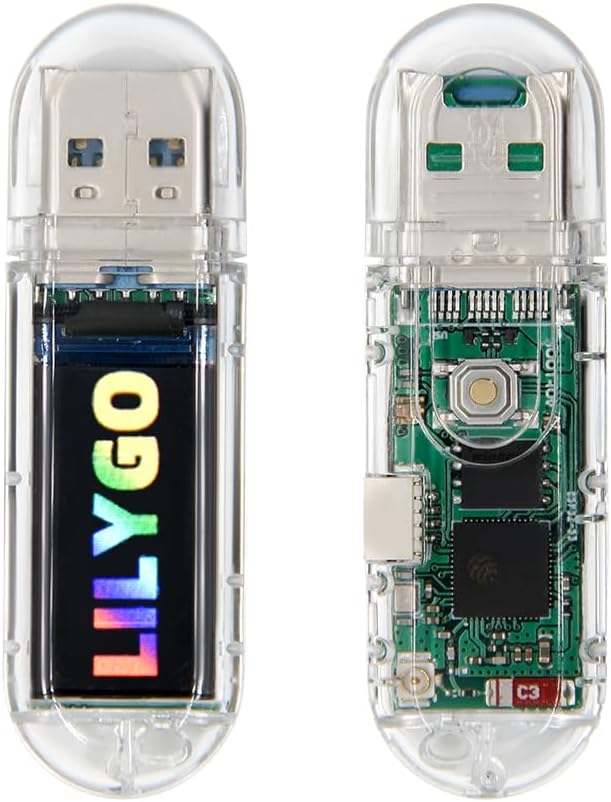
Billede: Forside og bagside views of the LILYGO T-Dongle-S3, showing the USB-A connector, LCD screen, and internal components.

Image: The LILYGO T-Dongle-S3 with its protective cap removed, revealing the USB-A connector and the integrated display.
4. Betjeningsvejledning
Once the development environment is set up and your custom firmware is uploaded, the T-Dongle-S3 operates according to the programmed logic.
- Tænd: The device powers on automatically when connected to a USB port.
- LCD-skærm: The 0.96-inch ST7735 LCD display will show information as programmed. Its resolution is 80x160 pixels with 65k full color.
- Trådløs forbindelse: Utilize the integrated Wi-Fi (802.11 b/g/n) and Bluetooth 5 for wireless communication as defined in your application.
- TF Card Functionality: If a TF card is inserted, your application can read from and write to it for data storage.
- Boot Button: The onboard boot button (IO00) is typically used for entering bootloader mode during firmware flashing.
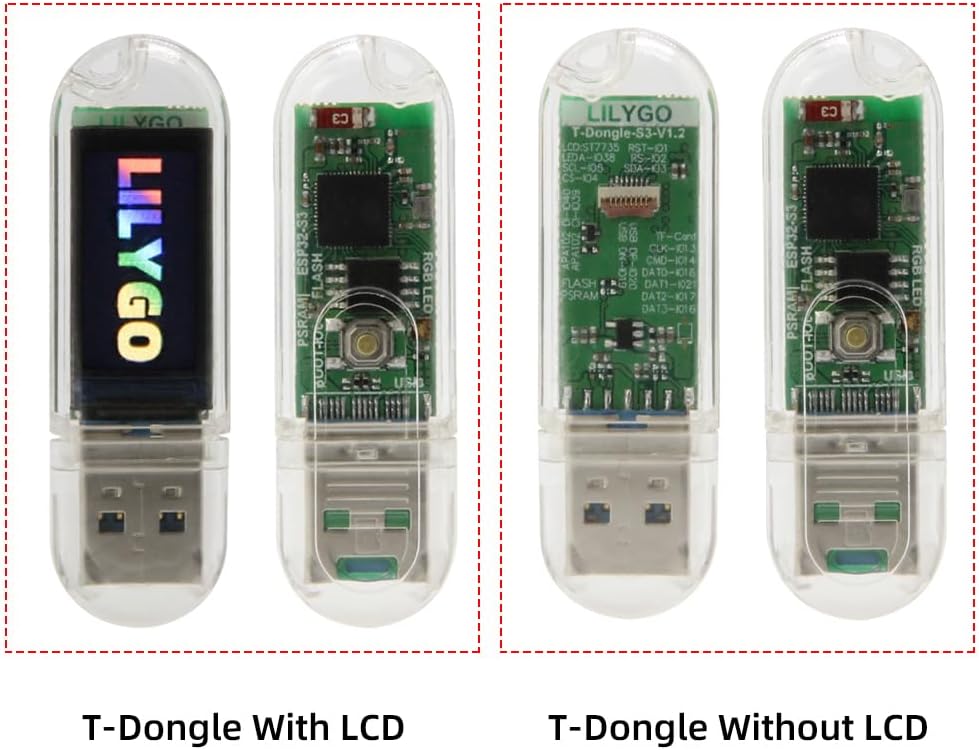
Image: The LILYGO T-Dongle-S3 securely placed within its clear protective case.
5. Vedligeholdelse
- Rensning: Use a dry, soft cloth to clean the device. Avoid liquid cleaners.
- Opbevaring: Opbevar enheden et køligt, tørt sted væk fra direkte sollys og ekstreme temperaturer.
- USB-A Interface Protection: If the virtual TF card is removed, it is recommended to insert a common TF card into the slot to protect the USB-A interface from dust and physical damage.
- Firmwareopdateringer: Regularly check the official LILYGO GitHub repository for firmware updates and new examples to ensure optimal performance and access to the latest features.
6. Fejlfinding
- Enhed ikke genkendt: Ensure the T-Dongle-S3 is fully inserted into the USB port. Check if necessary drivers are installed. Refer to the GitHub repository for driver information.
- Flashing Issues: Some users have reported issues with flashing firmware due to specific library or board package versions. It may be necessary to use older versions of the Arduino ESP32 board package (e.g., 2.0.13) and update the TFT_eSPI library to its latest git branch, adjusting configuration files as needed. Consult the 'Issues' section of the GitHub repository for community solutions.
- Display Pin Errors: If the display is not functioning as expected, verify that the display pins in your code match the specific configuration of your T-Dongle-S3 model. Pin definitions are often available on the GitHub repository.
- Slow SD Card Read/Write: Performance for SD card operations via USB or Wi-Fi may vary. This is a known characteristic for some configurations.
- No TF Card Functionality: Confirm that a physical TF card is inserted. The 'Virtual TF card' does not provide actual storage.
For further assistance, refer to the official LILYGO GitHub repository: github.com/Xinyuan-LilyGO/T-Dongle-S3.
7. Specifikationer

Image: Detailed diagram showing the internal components, pin assignments, and specifications of the LILYGO T-Dongle-S3.
| Feature | Detalje |
|---|---|
| MCU | ESP32-S3 Xtensa LX7 microprocessor |
| Trådløs forbindelse | Wi-Fi 802.11 b/g/n, Bluetooth 5 |
| Flash-hukommelse | 16 MB |
| Platform support | Arduino-IDE, PlatformIO-IDE, MicroPython |
| Vise | 0.96 inch ST7735 IPS LCD |
| Skærmopløsning | 80 x 160 pixels |
| Display interface | 4-leder SPI |
| Virkende strømforsyning | 3.3V |
| Indbyggede funktioner | Boot button, TF card slot, Built-in Wi-Fi/Bluetooth ceramic antenna |
| Dimensioner (LxBxH) | 58.6 x 17.9 x 8.7 mm (ca. 2.3 x 0.7 x 0.34 tommer) |
| Varens vægt | 0.634 ounce |
| Forbindelsesteknologi | USB, Wi-Fi |
8. Garanti og support
For warranty information, please refer to the purchase documentation or contact your retailer. LILYGO provides technical resources and community support through its official GitHub repository.
- Technical Resources & Community Support: github.com/Xinyuan-LilyGO/T-Dongle-S3
- Manufacturer Store: LILYGO Amazon Store


