1. Produktet er slutview
The ProCase Rugged Heavy Duty Shockproof Rotating Kickstand Cover is designed to provide comprehensive protection for your compatible Samsung Galaxy Tab models. This case features a robust 3-in-1 construction, an integrated S Pen holder, a versatile rotating kickstand, and an adjustable shoulder strap for enhanced portability and usability.
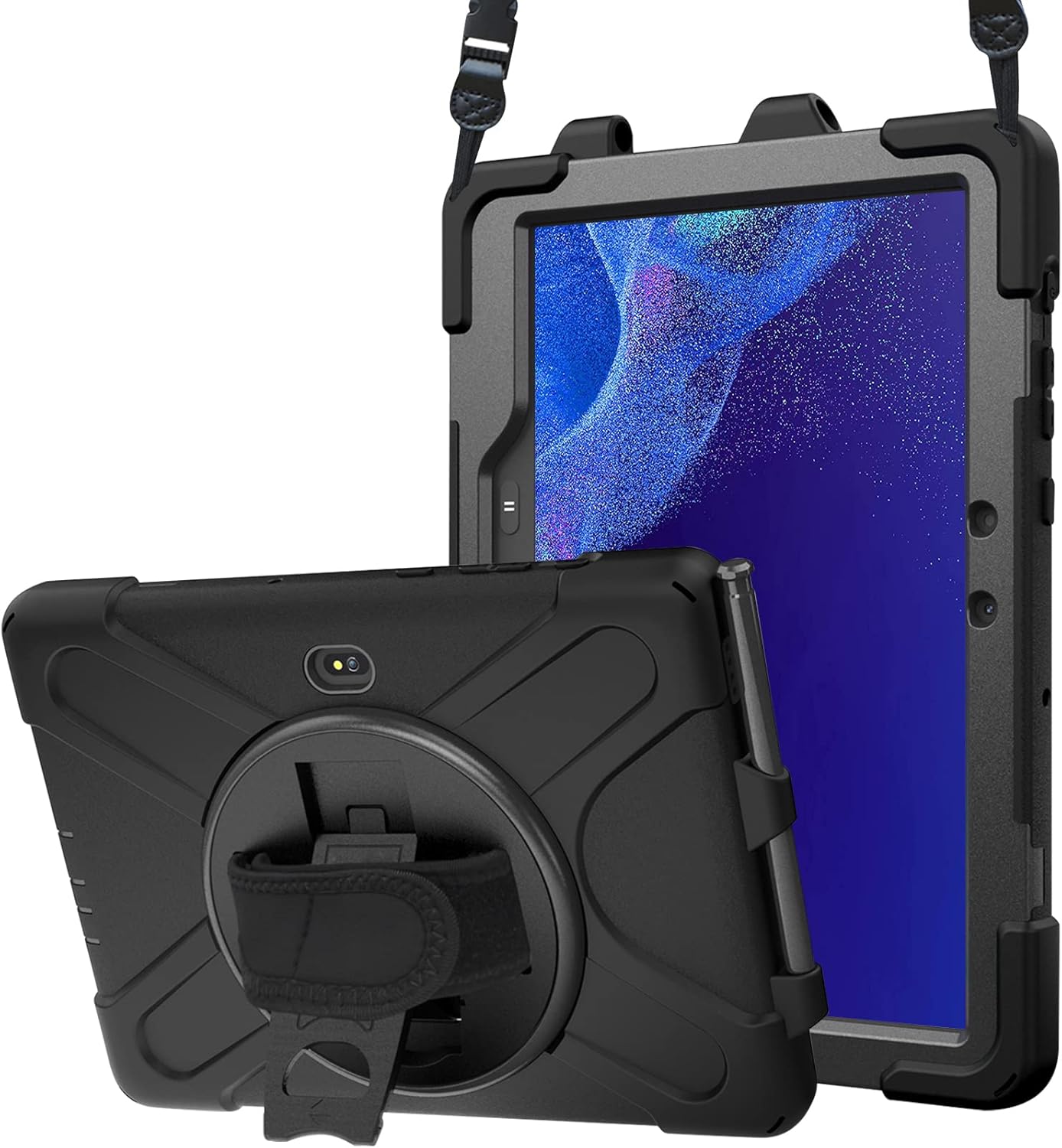
Billede 1.1: Forside og bagside view of the ProCase Rugged Heavy Duty Shockproof Rotating Kickstand Cover, showcasing its robust design and integrated S Pen holder.
Nøglefunktioner:
- Kompatibilitet: Exclusively designed for 10.1 inch Samsung Galaxy Tab Active5 Pro 2025 (SM-X350), Active4 Pro 2022 (SM-T630 / SM-T638), and Active Pro 2019 (SM-T540 / SM-T547).
- 360-Degree Rotatable Kickstand: Tilbyder flere viewindtastnings- og skrivevinkler.
- Ergonomic Back Handle: Allows secure and comfortable one-hand grip.
- Adjustable & Removable Shoulder Strap: Provides convenience for carrying and can be mounted to a car headrest.
- Advanced 3-in-1 Construction: Made from premium PC and shock-absorbing silicone for comprehensive protection.
- S Pen Holder: Features an extra cut-out for magnetic attachment and wireless charging of your S Pen.
- Fuld adgang: Precise cutouts ensure full access to cameras, speaker, ports, and buttons.

Billede 1.2: Overview of the ProCase Anti-shock Hybrid Protective Case, highlighting its hand strap, shoulder strap, and multiple view muligheder.
2. Opsætning og installation
Follow these steps to properly install your tablet into the ProCase Rugged Heavy Duty Shockproof Rotating Kickstand Cover:
- Step 1: Remove Front Frame. Carefully remove the front frame of the case. Refer to the arrow indicated on the case for the correct position to begin.
- Step 2: Separate Silicone Cover. Gently separate half of the silicone outer cover from the rigid PC (polycarbonate) inner shell.
- Step 3: Place Tablet. Insert your Samsung Galaxy Tab into the PC inner shell, ensuring it is seated correctly and securely.
- Step 4: Reinstall Silicone Cover. Reinstall the silicone cover to its original position, ensuring it fits snugly around the PC shell and tablet.
- Step 5: Attach Front Frame. Place the front frame back onto the case and press firmly along the edges until it clicks securely into place.
- Step 6: Assemble Shoulder Strap. Attach the adjustable shoulder strap to the designated loops on the case, if desired.

Image 2.1: Visual step-by-step guide for installing the tablet into the ProCase cover.
3. Betjeningsvejledning
3.1 Using the 360-Degree Rotatable Kickstand
The integrated kickstand on the back of the case can be rotated 360 degrees to provide various viewing and typing angles. Simply pull out the kickstand and rotate it to your desired orientation. This allows for hands-free use, whether you are watching videos, typing, or presenting.

Image 3.1: The 360-degree rotatable kickstand supporting the tablet at different angles for viewindtastning og skrivning.
3.2 Utilizing the Ergonomic Back Handle
The ergonomic handle located on the back of the case, integrated with the kickstand, allows you to securely grip your tablet with one hand. This feature reduces the risk of accidental drops and provides comfort during extended use.

Image 3.2: A hand demonstrating the secure grip provided by the 360-degree rotatable handle on the back of the case.
3.3 Adjustable and Removable Shoulder Strap
The included shoulder strap offers ultimate convenience for carrying your tablet. It can be adjusted to your preferred length for comfortable transport. Additionally, the strap allows you to mount the tablet to a car headrest, providing entertainment for passengers in the back seat, ideal for travel.

Image 3.3: The adjustable shoulder strap shown in use for carrying and mounted to a car headrest for hands-free viewing.

Image 3.4: A person wearing the tablet case with the shoulder strap, demonstrating its portability.
3.4 S Pen Holder and Access to Features
The case includes a dedicated cut-out for your S Pen, allowing it to be magnetically attached and charged wirelessly while the tablet is inside the case. Precise cutouts ensure full and unobstructed access to all tablet features, including cameras, speaker, charging ports, and control buttons.

Billede 3.5: Nærbillede views illustrating the precise cutouts for the speaker, cameras, and ports/buttons on the tablet case.
4. Vedligeholdelse
To ensure the longevity and optimal performance of your ProCase cover, follow these simple maintenance guidelines:
- Rensning: Tør etuiet regelmæssigt af med en blød kludamp cloth to remove dust and smudges. For stubborn dirt, a mild soap solution can be used, but ensure the case is completely dry before reinserting your tablet.
- Undgå barske kemikalier: Do not use abrasive cleaners, solvents, or strong detergents, as these can damage the silicone and PC materials.
- Opbevaring: Når etuiet ikke er i brug, skal det opbevares køligt og tørt, væk fra direkte sollys og ekstreme temperaturer.
- Inspektion: Periodically inspect the case for any signs of wear or damage, especially around the edges and moving parts like the kickstand.
5. Fejlfinding
If you encounter any issues with your ProCase cover, consider the following common solutions:
- Tablet Does Not Fit: Ensure your tablet model number matches the compatible models listed (SM-X350, SM-T630, SM-T638, SM-T540, SM-T547). Verify the tablet is oriented correctly during installation.
- Case Not Closing Properly: Double-check that the tablet is fully seated within the PC inner shell and that the silicone cover and front frame are aligned and snapped into place correctly.
- S Pen Not Staying in Holder/Charging: Ensure the S Pen is placed firmly into its designated slot. Confirm your tablet model supports magnetic attachment and wireless charging for the S Pen.
- Kickstand or Handle Stiffness: New cases may have slightly stiff moving parts. Gentle, repeated use should loosen them. Do not force the mechanisms.
If the issue persists, please refer to the support section for further assistance.
6. Specifikationer
| Produktnavn | ProCase Rugged Heavy Duty Shockproof Rotating Kickstand Cover |
| Kompatible enheder | Samsung Galaxy Tab Active5 Pro 2025 (SM-X350), Active4 Pro 2022 (SM-T630 / SM-T638), Active Pro 2019 (SM-T540 / SM-T547) |
| Produktdimensioner | 10.2 x 7.5 x 0.8 tommer |
| Varens vægt | 1.08 pund |
| Farve | Sort |
| Materiale | Hybrid (Premium PC and Shock-absorbing Silicone) |
| Særlige funktioner | Heavy Duty Protection, Kickstand, S Pen Holder, Shoulder Strap, Hand Strap |

Image 6.1: Diagram illustrating the three layers of defense: Soft Silicone Skin, Hard PC Inner Shell, and Hard PC Bumper, highlighting the anti-shock design.
7. Garanti og support
For specific warranty information regarding your ProCase product, please refer to the documentation included with your purchase or visit the official ProCase webwebsted. Garantivilkår og -betingelser kan variere.
Kundesupport:
If you require further assistance, have questions, or need to report an issue, please contact ProCase customer support through their official channels. You may also find support resources on the product page where you made your purchase.
ProCase Official Store: Visit the ProCase Store on Amazon


