1. Introduktion
This manual provides instructions for the Angrox Universal Replacement Remote Control, model RC280-2. This remote control is designed to be compatible with a wide range of Roku series TVs. It offers a straightforward, plug-and-play solution for controlling your television without the need for complex programming or pairing.

Image 1.1: Two Angrox universal replacement remote controls. These remotes are identical in design and functionality, providing a convenient two-pack for users.
The remote features a user-friendly layout with dedicated shortcut buttons for popular streaming services, enhancing your viewing experience. It operates using infrared technology, ensuring stable performance and quick response times.
2. Opsætning
2.1 Batteriinstallation
The Angrox RC280-2 remote control requires two (2) AAA batteries for operation. Batteries are not included with the product.
- Find batterirummets dæksel på bagsiden af fjernbetjeningen.
- Skub dækslet nedad, eller tryk på låsen (hvis den er monteret) for at åbne rummet.
- Isæt to AAA-batterier, og sørg for, at de positive (+) og negative (-) poler er korrekt justeret med markeringerne inde i batterirummet.
- Sæt batteridækslet på igen ved at skubbe det på plads, indtil det klikker sikkert.

Image 2.1: Illustration of battery installation. The image shows the back of the remote with the battery cover removed, indicating the correct orientation for inserting two AAA batteries.
2.2 Førstegangsbrug
No programming or pairing is required for this remote control. Once the batteries are correctly installed, the remote is ready for immediate use with compatible Roku TVs.
3. Betjeningsvejledning
3.1 Knapfunktioner
The remote control features a standard layout for intuitive navigation and control of your Roku TV. Refer to the diagram below for a detailed overview of each button's function.
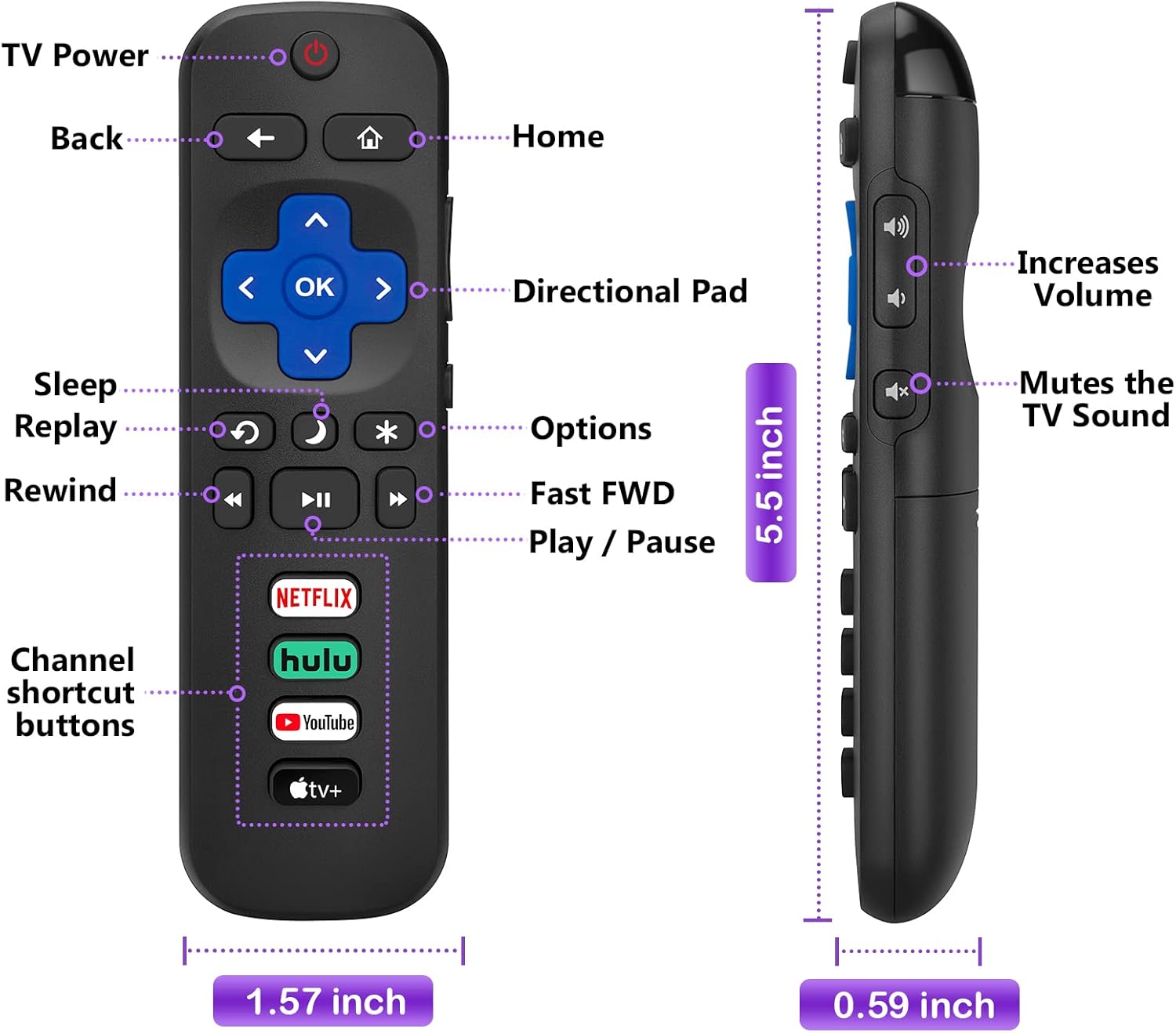
Image 3.1: Labeled diagram of the Angrox remote control. This image highlights the TV Power, Back, Home, Directional Pad (with OK button), Sleep, Replay, Options, Rewind, Fast FWD, Play/Pause, Channel shortcut buttons, Volume Up/Down, and Mute buttons. Dimensions are also indicated.
- Tænd/sluk-knap (●): Tænder eller slukker for tv'et.
- Tilbage knap (←): Vender tilbage til den forrige skærm eller menu.
- Hjemknappen (⌂): Navigerer til Roku TV-startskærmen.
- Directional Pad (Up, Down, Left, Right) & OK Button: Bruges til menunavigation og valg.
- Lydstyrke op/ned: Justerer tv'ets lydstyrkeniveau.
- Mute-knap: Mutes or unmutes the TV's audio.
- Rewind, Play/Pause, Fast Forward: Styrer medieafspilning.
- Genafspil knap: Jumps back a few seconds during playback.
- Options Button (*): Accesses context-sensitive options within applications or menus.
- Sleep Button (Moon icon): Puts the TV into sleep mode.
3.2 Genvejsknapper
The remote includes four dedicated shortcut buttons for quick access to popular streaming applications:
- NETFLIX
- Hulu
- YouTube
- Apple TV+
Pressing any of these buttons will directly launch the corresponding application on your Roku TV, provided the application is installed and configured.

Image 3.2: The remote control being held, with the four dedicated shortcut buttons for Netflix, Hulu, YouTube, and Apple TV+ clearly visible and highlighted.
4. Kompatibilitet
4.1 kompatible enheder
This replacement remote control (RC280-2) is compatible with all Roku series TVs, including but not limited to:
- TCL Roku TVs
- Hisense Roku TVs
- Onn Roku TVs
- Sharp Roku TVs
- Element Roku TVs
- Westinghouse Roku TVs
- Philips Roku TVs
- Insignia Roku TVs
- JVC Roku TVs
- RCA Roku TVs
- Sanyo Roku TVs
- Hitachi Roku TVs

Image 4.1: A visual representation of various Roku TV brands (Hisense, TCL, RCA, Onn, Philips, Westinghouse, Insignia, Sanyo, Element, JVC) that are compatible with this remote control.
4.2 Important Notes on Incompatibility
This remote control is an infrared (IR) remote and does NOT work with Roku streaming sticks, Roku Ultra, Roku Express, Roku Express 4K+, Roku Premiere, or Roku players. It also lacks voice control functionality and a headphone jack.

Image 4.2: A clear visual indicating that the remote is not compatible with Roku Box, Roku Ultra, Roku Player, Roku Sticker, Roku Express, Roku Premiere, Roku Streaming Stick, or Roku Wireless Speakers.
5. Specifikationer
| Feature | Detalje |
|---|---|
| Modelnummer | RC280-2 |
| Produktdimensioner | 7.2 x 4.25 x 1.06 tommer |
| Varens vægt | 3 ounce |
| Batterier påkrævet | 2 AAA batterier (medfølger ikke) |
| Særlige funktioner | Ergonomic, Lightweight, No Programming Required, Universal |
| Farve | Sort |
| Maks. antal understøttede enheder | 2 (refers to the pack quantity, controls one TV at a time) |
| Kompatible enheder | All Roku Television models |
| Teknologi | Infrarød (IR) |
6. Vedligeholdelse
For at sikre fjernbetjeningens levetid og optimale ydeevne skal du følge disse retningslinjer for vedligeholdelse:
- Rensning: Wipe the remote control regularly with a soft, dry cloth. For stubborn dirt, a slightly damp en klud kan bruges, efterfulgt af øjeblikkelig tørring. Undgå at bruge skrappe kemikalier eller slibende rengøringsmidler.
- Batteripleje: Replace batteries when the remote's responsiveness decreases. If the remote will not be used for an extended period, remove the batteries to prevent leakage and potential damage.
- Opbevaring: Opbevar fjernbetjeningen et køligt, tørt sted væk fra direkte sollys, ekstreme temperaturer og høj luftfugtighed.
- Håndtering: Avoid dropping the remote control or subjecting it to strong impacts, as this can damage internal components.
7. Fejlfinding
If you encounter issues with your Angrox remote control, refer to the following common troubleshooting steps:
- Fjernbetjeningen reagerer ikke:
- Kontroller, om batterierne er isat korrekt med den korrekte polaritet (+/-).
- Udskift gamle batterier med nye AAA-batterier.
- Sørg for, at der ikke er nogen forhindringer mellem fjernbetjeningen og tv'ets infrarøde modtager.
- Confirm that the remote is pointed directly at the TV.
- Specifikke knapper virker ikke:
- Rengør omkring knappen for at sikre, at der ikke er snavs, der forhindrer den i at trykke korrekt.
- If only shortcut buttons are not working, ensure the corresponding apps are installed and updated on your Roku TV.
- Fjernbetjeninger Andre enheder:
- This remote is designed for Roku TVs. If it is inadvertently controlling other IR-enabled devices, ensure you are pointing it specifically at your Roku TV.
- Remote Still Not Working:
- Verify that your TV is indeed a Roku TV model and not a Roku streaming device (stick, box, etc.) as this remote is not compatible with streaming devices.
- If all troubleshooting steps fail, consider contacting customer support.
8. Garanti og support
For information regarding product warranty, returns, or technical support, please refer to the seller's policies on the platform where the product was purchased. Keep your purchase receipt as proof of purchase.
For additional assistance, you may visit the Angrox brand store for more product information and contact options: Angrox Store on Amazon.


