Produkt overview
The Lockly Secure Plus Smart Lock is a versatile and secure keyless entry solution designed for various environments including homes, offices, and rental properties. It integrates multiple access methods and advanced security features to provide peace of mind and convenient control over your door.
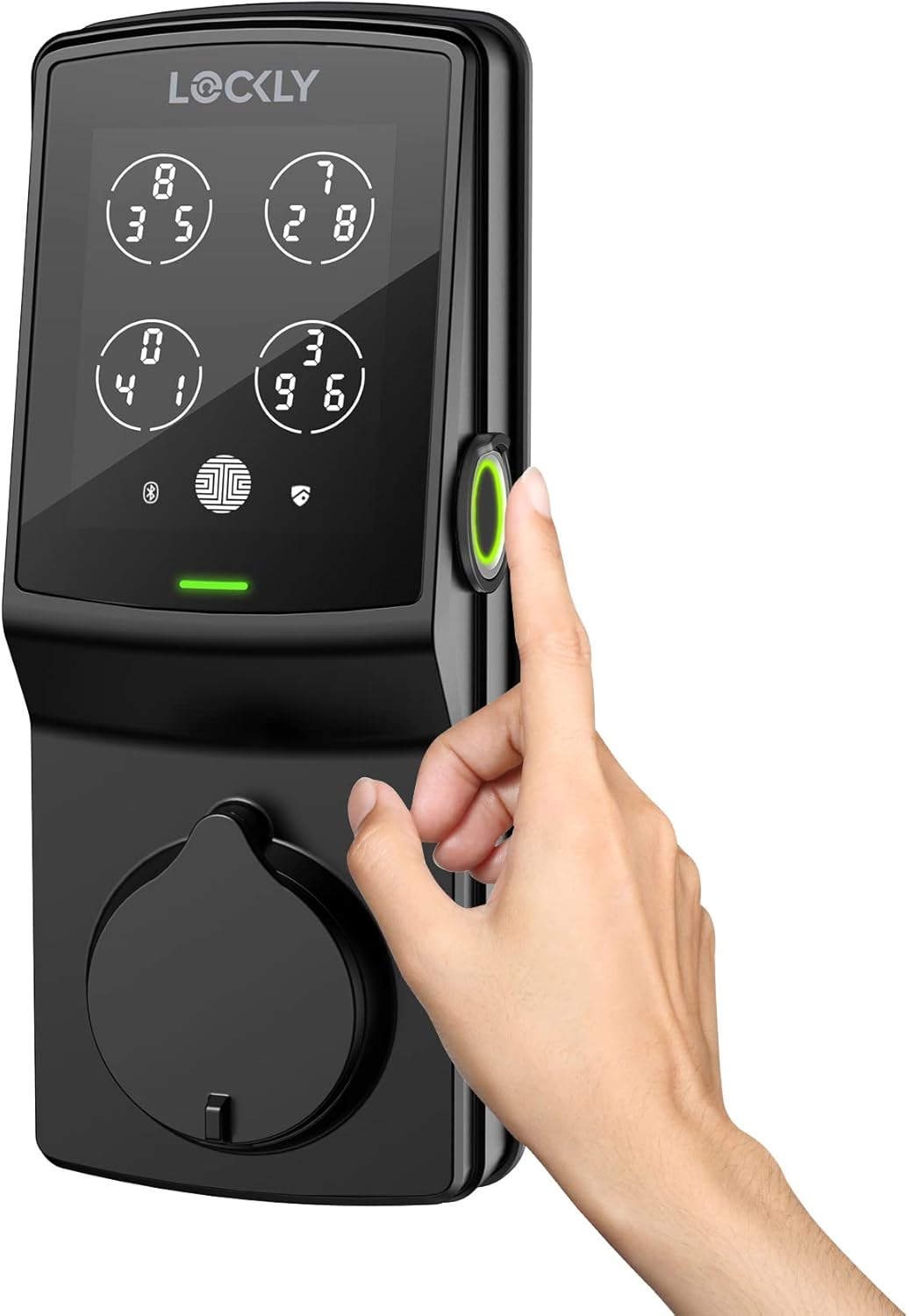
Front view of the Lockly Secure Plus Smart Lock in Matte Black.
Nøglefunktioner
- Flere måder at låse op på: Access your property using a 3D biometric fingerprint reader, patented PIN Genie digital keypad, Scan-to-Open blue QR code, smartphone app, Alexa and Hey Google voice control (with optional Wi-Fi hub), or a physical key.
- Peek-Proof Digital Keypad: The patented PIN Genie keypad shuffles the PIN number after each use, preventing unauthorized individuals from guessing your code through fingerprint smudges.
- 3D biometrisk fingeraftrykssensor: Enjoy quick access with fingerprint recognition in less than 0.3 seconds, with the ability to store up to 99 fingerprints.
- Programmable Auto Locking: Customize the auto-lock feature to ensure your door is always secured after a set period.
- e-nøgler og e-badges: Grant revocable access to family, friends, and visitors via the Lockly app.
- Offline adgangskoder: Provide access codes that can be used without Wi-Fi or internet connection.
- Overvågning og advarsler i realtid: Monitor the open/closed status of your lock from anywhere with real-time alerts sent to your smartphone (requires optional Wi-Fi hub).
- Nem gør-det-selv-installation: Designed for straightforward installation with common household tools.
- Rekeying Capability: The key cylinder can be replaced without changing the entire lock (with a standard rekey kit).
Hvad er der i æsken
The Lockly Secure Plus Smart Lock package includes all necessary components for installation and operation.

Diagram showing the various components included in the Lockly Secure Plus package, along with key specifications.
Værktøjer du skal bruge
To complete the installation of your Lockly Secure Plus Smart Lock, you will need the following tools:
- Phillips-skruetrækker
- Flad skruetrækker
- Målebånd eller lineal
- Optional: Drill (if new holes are required for added stability)
Installationsvejledning
Installation generally takes less than 30 minutes. For a visual step-by-step guide, please refer to the official installation video below.
Official Lockly Secure Plus Installation Guide video. This video provides detailed visual instructions for setting up your smart lock.
1. Forberedelse
- Remove any existing lock set from the door.
- Prep the door if necessary, ensuring the cross bore hole is 2-1/8" (54mm) diameter and the edge bore hole is 1" (25mm) diameter.
- Confirm your door thickness is between 1-3/8" (35mm) to 2" (50mm).
2. Adjust Deadbolt and Install
- Measure the backset. The deadbolt ships default for 2-3/4" (70mm).
- For a 2-3/8" (60mm) backset, adjust the length of the deadbolt by inserting a flathead screwdriver into the slot and turning clockwise.
- Attach the deadbolt into the door using the provided screws (K).
- Ensure the deadbolt slot aligns to the center of the door hole and the right side is up, with the slot in the vertical position.
3. Prepare Lock for Installation
- The upper portion of the lockset can be secured with double-sided adhesive tape and optional fasteners for added stability.
- If you wish to use fasteners and no holes are prepared, a drill is required. Refer to the provided template for drilling dimensions.
- After the hole is drilled, install the slotted barrel extension (O) to the exterior assembly (B) and securely tighten with a flathead screwdriver.
- Peel the paper cover off the exterior adhesive (T).
4. Installer den udvendige enhed
- Ensure the torque blade is in the vertical position.
- Place the exterior assembly and torque blade through the deadbolt slot.
- Guide connection cables through the cross bore hole under the deadbolt.
- Align and secure until flush to the exterior door surface.
5. Installer den indvendige enhed
- With adhesive strips, align and secure the mounting plate (M).
- Guide the connection cable through and secure to the lower left notched hole.
- Insert and hand-tighten two screws (G), located on the left and right of the blade.
- Check alignment and tighten with a screwdriver.
- Use the key to ensure the deadbolt locks and unlocks smoothly, with no binding or rubbing. When finished, leave the deadbolt extended and remove the key.
- Plug the cable coming through the mounting plate into the interior assembly. Ensure the plug is oriented correctly, matching the red side of the plug to the red side of the socket on the interior assembly.
- Tuck the cable under eyelet hooks and route to the right on the interior assembly.
- Ensure the thumb turn is vertical.
- Placer den indvendige enhed mod monteringspladen, og sørg for, at drejningsmomentbladet er indsat i tommelfingerdrejeakslen.
- Secure the interior assembly to the mounting plate with two screws (I).
6. Installer batterier
- With the door open and the deadbolt fully extended, insert three batteries only.
- Press and hold the program button. Continue to hold and install the fourth battery.
- The lock will automatically start a self-check. Release the program button once the check starts.
- If the lock is not properly installed, it will open and close repeatedly.
- Once the self-check completes, ensure the lock operates smoothly by manually locking and unlocking the door using the thumb turn on the interior assembly.
- Sæt batteridækslet (H) på igen, og fastgør det med skruen øverst.
7. Install Door Strike
- Use the supplied door strike or your existing one, as long as the deadbolt operates smoothly without binding or catching.
Betjeningsvejledning
Unlocking Your Lockly Secure Plus
- Fingeraftryk: Place your registered finger on the 3D biometric fingerprint sensor for quick access.

Quick access using the 3D biometric fingerprint sensor.
- PIN Genie-tastatur: Enter your access code on the digital keypad. The numbers shuffle after each use to prevent code guessing.

The patented PIN Genie keypad shuffles numbers for enhanced security.
Video demonstrating the Lockly Smart Lock's Random Mode feature, which shuffles keypad numbers for added security.
- Smartphone app: Use the Lockly App to remotely lock and unlock your door.

Control your Lockly Smart Lock wirelessly via Bluetooth using the smartphone app.
- Stemmestyring: With the optional Wi-Fi hub, unlock, lock, or check lock status using voice commands with Alexa or Hey Google.
- Fysisk nøgle: A traditional physical key is provided for manual unlocking.
Managing Access and Monitoring
- Del adgang: Send eKeys, eBadges, and Offline Access Codes to trusted individuals.

Easily share access codes with others through the Lockly app.
- View Begivenhedshistorik: Monitor open/closed lock status and access logs from anywhere with real-time alerts (requires optional Wi-Fi hub).

The Lockly app provides a detailed log of all lock activity.
- Automatisk låsning: The customizable auto-lock feature ensures the door locks automatically after a set period, preventing accidental unlocks.
Opretholdelse
- Udskiftning af batteri: The Lockly Secure Plus uses 4 AA alkaline batteries. Replace all batteries when the low battery indicator appears on the keypad or in the app. Always use new, high-quality alkaline batteries.
- Rengøring af tastatur: Gently wipe the keypad with a soft, dry cloth. Avoid abrasive cleaners or solvents that could damage the screen.
- Mekanisk kontrol: Periodically check that the deadbolt operates smoothly without any resistance or binding. If issues arise, refer to the troubleshooting section or contact support.
Fejlfinding
If you encounter any issues with your Lockly Secure Plus Smart Lock, please refer to the following common troubleshooting tips:
- Låsen svarer ikke: Check battery levels and replace if necessary. Ensure the cables are properly connected inside the lock.
- Tastatur lyser ikke: This usually indicates low or dead batteries. Replace all four AA batteries.
- Problemer med fingeraftrykssensor: Ensure your finger is clean and dry. Re-register your fingerprint if recognition is consistently poor.
- Fejl i automatisk låsning: Verify the auto-lock settings in the Lockly app. Ensure the door sensor (if installed) is correctly aligned and functioning.
- Problemer med fjernadgang: Confirm your optional Wi-Fi hub is properly connected and has a stable internet connection. Check your smartphone's internet connectivity.
- Binding or Sticking Deadbolt: Ensure the deadbolt and strike plate are correctly aligned. Lubricate the deadbolt mechanism if needed with a graphite-based lubricant (do not use oil-based lubricants).
- Nulstilling af låsen: If persistent issues occur, a factory reset may be necessary. Refer to the Lockly app or support resources for the specific reset procedure for your model.
Specifikationer
| Feature | Beskrivelse |
|---|---|
| Modelnavn | Secure Plus (PGD728FMB) |
| Mærke | Lockly |
| Låsetype | Smart Lock, Keypad Lock, Biometric Lock |
| Særlige funktioner | Biometrisk, berøringsskærm, patenteret PIN Genie-teknologi, Bluetooth, smartphone, eKeys og eBadges, offline adgangskoder™ |
| Dimensioner (L x B x H) | 7.4 x 3.15 x 4.5 tommer |
| Varens vægt | 4.8 pund |
| Farve | Mat sort |
| Strømkilde | Batteries (4x AA Alkaline, included) |
| Forbindelse | Bluetooth, Wi-Fi (with optional Wi-Fi hub) |
| Fingeraftrykskapacitet | Op til 99 fingeraftryk |
Garanti
The Lockly Secure Plus Smart Lock comes with a Limited 5-year mechanical and finish warranty and a 2-year electronics warranty. Please retain your proof of purchase for warranty claims.
Støtte
For additional support, frequently asked questions, or to download the Lockly app, please visit the official Lockly support webwebsted eller kontakt kundeservice.
- Officiel brugermanual (PDF): Download PDF
- Lockly App: Scan QR-koden eller besøg LOCKLY.com/app to download the app from the App Store or Google Play.
- Teknisk support: Besøg LOCKLY.com/support eller ring (669) 500-8835.


