1. Introduktion
This manual provides essential information for the proper installation, operation, and maintenance of your Antec NeoECO NE850GM White 850W 80 Plus Gold Full Modular Power Supply. Please read this manual thoroughly before installation to ensure optimal performance and safety.

Image 1.1: The Antec NeoECO NE850GM White 850W Power Supply. This image displays the power supply unit from an angled perspective, highlighting its white casing, fan grille, power switch, and AC inlet.
2. Sikkerhedsoplysninger
Overhold altid følgende sikkerhedsforanstaltninger:
- Sørg for, at strømforsyningen er afbrudt fra stikkontakten før installation eller håndtering.
- Åbn ikke strømforsyningen casing. Høj volumentagder er elektriske stød indeni.
- Installer strømforsyningen i et godt ventileret område, væk fra varmekilder og fugt.
- Brug kun de modulære kabler, der følger med denne strømforsyning. Brug af inkompatible kabler kan beskadige enheden eller de tilsluttede komponenter.
- Sørg for, at alle kabler er korrekt tilsluttet, før du tænder for systemet.
3. Pakkens indhold
Bekræft at alle varer er til stede i din pakke:
- Antec NeoECO NE850GM White 850W Power Supply Unit
- AC strømledning
- Modular Cable Set (refer to Image 3.1 for details)
- Monteringsskruer
- Brugervejledning (dette dokument)
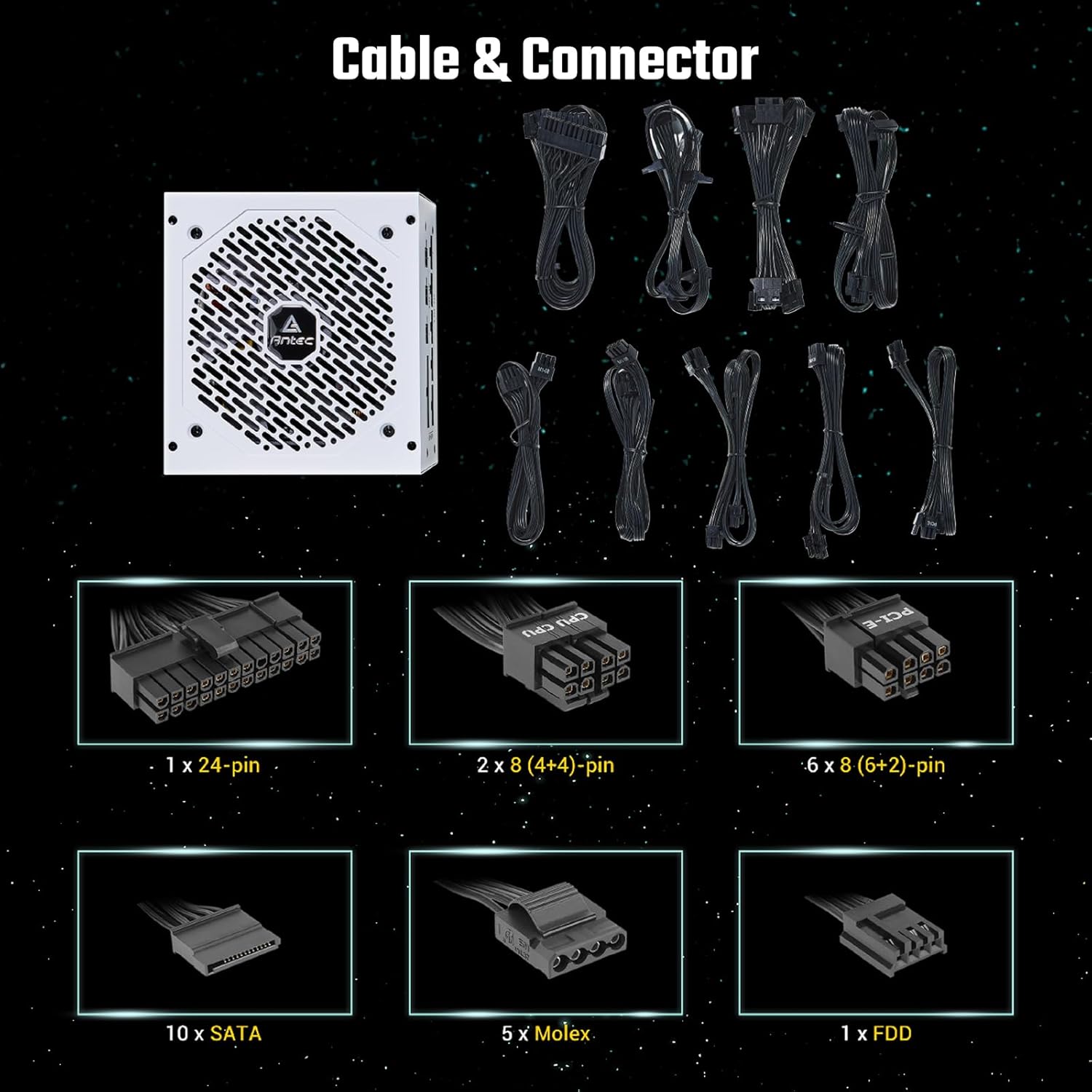
Billede 3.1: Overview of the modular cables and connectors included with the Antec NeoECO NE850GM power supply. The image shows the power supply unit alongside various modular cables, including 24-pin ATX, 8-pin (4+4) CPU, 8-pin (6+2) PCIe, SATA, and Molex connectors.
4. Produktfunktioner
The Antec NeoECO NE850GM White power supply incorporates several advanced features for reliable and efficient operation:
- 850W kontinuerlig effekt: Delivers a guaranteed 850W of continuous power.
- 80 PLUS guld certificeret: Achieves high energy efficiency, reducing electricity consumption.
- High-Quality Japanese Heavy-Duty Capacitors: Ensures stable performance and extended lifespan.
- Fuldt modulært design: Allows users to connect only necessary cables, improving airflow and cable management.
- PhaseWave Design: Features a server-class full-bridge LLC design with synchronous rectification based on a DC-DC topology for stable power delivery.
- Zero RPM Manager: An advanced low voltage fan control with a fan-off mode at low loads for absolute silence.
- 120 mm Silent Fan: A whisper-quiet fluid bearing fan designed for optimal cooling and durability.
- CircuitShield: Provides industrial-grade protections including OCP, OVP, SCP, OPP, OTP, SIP, and NLO.
- ATX 12V 2.4: Engineered according to the newest PSU guideline, compatible with the latest CPU generations.

Image 4.1: The 80 PLUS Gold certification logo, indicating high energy efficiency.

Billede 4.2: Intern view illustrating the PhaseWave LLC+DC to DC design, showcasing the advanced power conversion circuitry within the PSU.

Billede 4.3: Nærbillede view of the Japanese heavy-duty capacitors inside the power supply, emphasizing their role in ensuring stable DC output and reliability.

Billede 4.4: Bagside view of the power supply showing the Zero RPM mode switch, which allows the fan to remain off at low loads for silent operation.

Billede 4.5: En detaljeret view of the 120mm silent fan, highlighting its design for improved airflow and durability.

Image 4.6: An illustration of the 100% full modular design, showing the various ports on the power supply for connecting only the necessary cables.
5. Opsætning og installation
Follow these steps to install your Antec NeoECO NE850GM power supply:
- Forbered dit system: Ensure your computer case is compatible with ATX power supplies. Disconnect the old power supply if replacing one.
- Monter strømforsyningen: Insert the NE850GM into the power supply bay of your computer case. Secure it with the provided mounting screws.
- Tilslut vigtige kabler:
- Connect the 24-pin ATX motherboard cable to your motherboard.
- Connect the 8-pin (4+4) CPU power cable(s) to your motherboard's CPU power connector(s).
- Connect the 8-pin (6+2) PCIe power cable(s) to your graphics card(s).
- Tilslut perifere kabler: Attach SATA power cables to your storage drives (HDDs, SSDs) and optical drives. Use Molex cables for other peripherals as needed.
- Kabelstyring: Utilize the full modular design to connect only the cables required for your system. Route cables neatly to improve airflow and aesthetics.
- Tilslut vekselstrøm: Ensure the power supply's main switch is in the 'OFF' (0) position. Connect the AC power cord to the power supply and then to a wall outlet or surge protector.
6. Betjeningsvejledning
After installation, follow these steps to operate your power supply:
- Tænd: Flip the main power switch on the back of the power supply to the 'ON' (I) position.
- Systemstart: Tryk på tænd/sluk-knappen på computerens kabinet for at starte systemet.
- Nul RPM tilstand: The NE850GM features a Zero RPM mode. When enabled (via the switch on the PSU's rear), the fan will remain off at low system loads for silent operation. The fan will automatically activate as the load increases to maintain optimal temperatures.
- Sluk: Shut down your computer through the operating system. Once the system is off, you can flip the main power switch on the PSU to 'OFF' (0) for complete power disconnection.
7. Vedligeholdelse
Korrekt vedligeholdelse sikrer din strømforsynings levetid og ydeevne:
- Rensning: Periodically clean the exterior of the power supply and its fan grille using compressed air to remove dust buildup. Ensure the power supply is disconnected from the AC outlet before cleaning.
- Ventilation: Sørg for, at strømforsyningens indsugnings- og udstødningsventiler ikke er blokerede. Sørg for tilstrækkelig luftgennemstrømning i computerkabinettet.
- Kabelintegritet: Regularly check all modular cable connections to ensure they are secure and free from damage.
8. Fejlfinding
Hvis du støder på problemer med din strømforsyning, kan du se følgende almindelige problemer og løsninger:
- Ingen strøm:
- Kontroller, om netledningen er korrekt tilsluttet både strømforsyningen og stikkontakten.
- Ensure the main power switch on the PSU is in the 'ON' (I) position.
- Verify that all modular cables (24-pin ATX, CPU, PCIe) are correctly and firmly seated.
- Test stikkontakten med en anden enhed for at bekræfte, at den har strøm.
- Systemustabilitet/Tilfældige nedlukninger:
- Ensure the power supply is adequately rated for your system's components.
- Check for proper ventilation and ensure the PSU fan is operating when under load.
- Verify that all power connections to components are secure.
- If the issue persists, it may indicate a component failure (not necessarily the PSU). Consider testing components individually.
- Fan Not Spinning (Zero RPM Mode):
- This is normal behavior at low loads if Zero RPM mode is enabled. The fan will spin up automatically when the system load increases.
- If the fan never spins even under heavy load, ensure the Zero RPM switch is in the desired position and check for obstructions.
If troubleshooting steps do not resolve the issue, contact Antec customer support.
9. Specifikationer
Key specifications for the Antec NeoECO NE850GM White power supply:
| Specifikation | Værdi |
|---|---|
| Mærke | Antec |
| Modelnavn | NE850GM White |
| Varemodelnummer | 0-761345-11230-7 |
| Output Wattage | 850 watt |
| 80 PLUS certificering | Guld |
| Formfaktor | ATX |
| Design af strømforsyning | Fuldt modulært |
| Afkølingsmetode | Air (120mm Silent Fan) |
| Varens vægt | 5.85 pund |
| Produktmål (LxBxH) | 5.51 x 5.9 x 3.38 tommer |
| Kompatible enheder | Personlig computer |
10. Garanti og support
The Antec NeoECO NE850GM White power supply comes with a 7 års garanti, hvilket sikrer langvarig pålidelighed og ro i sindet. Denne garanti dækker materiale- og fabrikationsfejl under normal brug.

Image 10.1: Antec NeoECO Gold Modular series highlighting the 7-year warranty, indicating the product's durability and manufacturer support.
For technical support, warranty claims, or further assistance, please visit the official Antec webwebstedet eller kontakt deres kundeserviceafdeling. Gem din købsbevis for at validere garantien.


