Indledning
This manual provides detailed instructions for the safe and effective use of your W-KING T9-2 80W Portable Bluetooth Speaker. Please read this manual thoroughly before operating the device and retain it for future reference. The W-KING T9-2 speaker delivers powerful audio with rich bass, vibrant LED lighting, and versatile connectivity options for an enhanced listening experience.

Front view of the W-KING T9-2 Portable Bluetooth Speaker, showcasing its dual woofers with vibrant, mixed-color LED lighting and a sturdy top handle.
Pakkens indhold
Tjek venligst pakken for følgende varer:
- W-KING T9-2 Portable Bluetooth Speaker
- Type-C opladerkabel
- 3.5 mm AUX lydkabel
- Brugervejledning (dette dokument)
Produkt overview
Gør dig bekendt med højttalerens betjeningselementer og porte.
Højttalerkomponenter
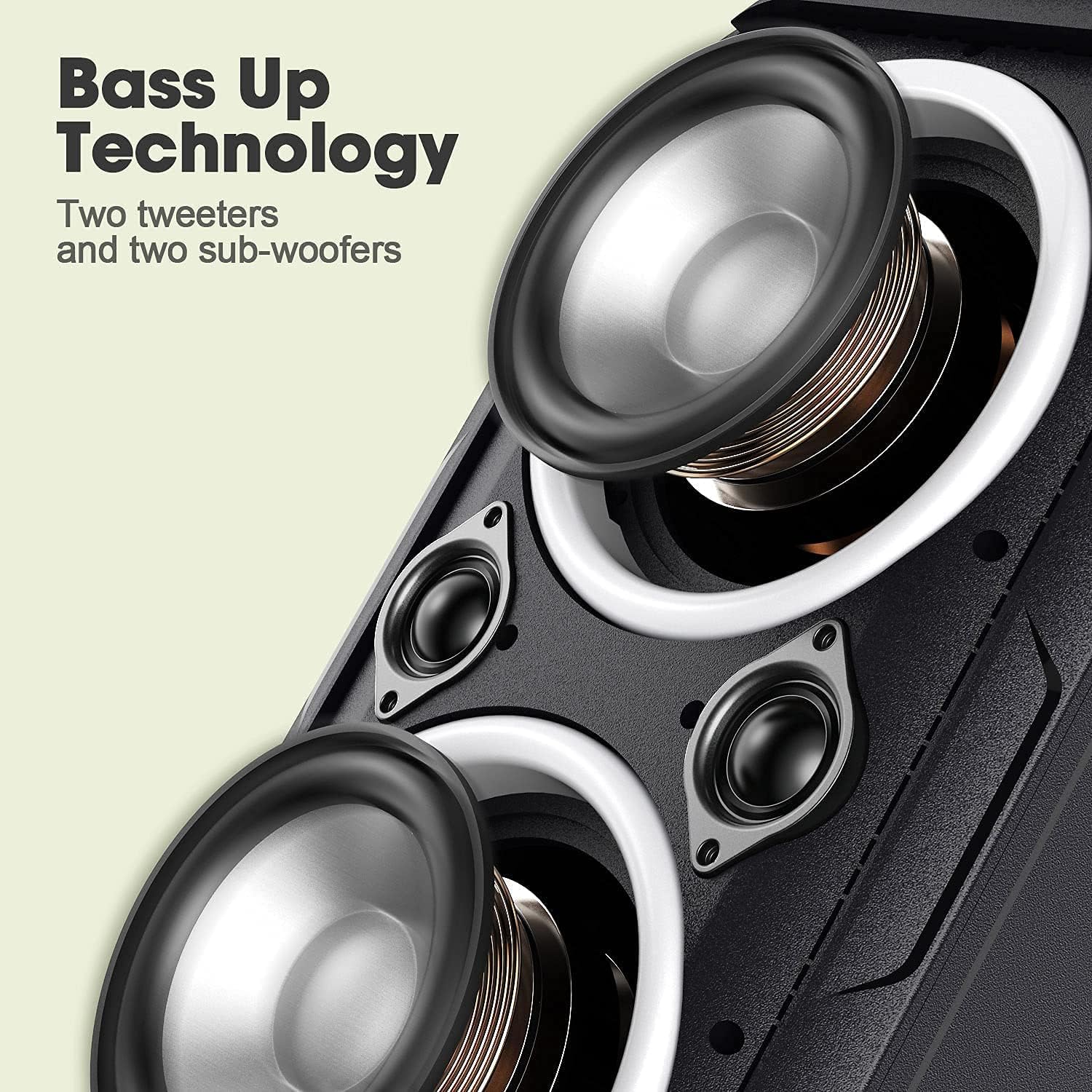
Nærbillede view of the speaker's internal components, highlighting the two large woofers and two smaller tweeters designed for enhanced bass and clear sound.
Kontrolpanel og porte
The rear panel of the speaker features various input and control options:

Bag view of the W-KING T9-2 speaker's input panel, showing the USB port, TF card slot, AUX input, DC 5V charging port, and a reset button.
- USB-port: Til afspilning fra USB-flashdrev.
- TF-kortslot: Til afspilning fra TF-kort (MicroSD).
- AUX-indgang: 3.5mm audio jack for wired connection to external devices.
- DC 5V opladningsport: Type-C port for charging the speaker.
- Nulstil knap: To reset the speaker if necessary.
Specific button functions (Power, Volume, Play/Pause, Mode, Light Control) are typically located on the top or front panel. Refer to the physical device for exact button placement and icons.
Opsætning
Opladning af højttaleren
- Connect the provided Type-C charging cable to the DC 5V charging port on the speaker.
- Tilslut den anden ende af kablet til en 5V/2A strømadapter (medfølger ikke).
- Opladningsindikatorlampen lyser under opladning og slukker, når den er fuldt opladet.
- For optimal batterilevetid skal højttaleren oplades helt inden første brug.
Tænd/sluk
- For at tænde: Press and hold the Power button for approximately 2-3 seconds until you hear an audible prompt and the LED lights activate.
- For at slukke: Press and hold the Power button for approximately 2-3 seconds until you hear an audible prompt and the LED lights turn off.
Betjeningsvejledning
Bluetooth-parring
The W-KING T9-2 uses advanced Bluetooth 5.0 technology for stable connections.
- Sørg for, at højttaleren er tændt og i Bluetooth-parringstilstand (indikeret med en blinkende Bluetooth-indikatorlampe).
- Aktiver Bluetooth på din mobile enhed (smartphone, tablet, bærbar computer), og søg efter tilgængelige enheder.
- Vælg "W-KING T9-2" fra listen over enheder.
- Når parringen er aktiveret, lyser Bluetooth-indikatoren konstant, og du hører en bekræftelseslyd.
- Højttaleren vil automatisk forsøge at genoprette forbindelsen til den sidst parrede enhed, når den tændes.
Ægte trådløs stereo (TWS) parring
Pair two W-KING T9-2 speakers for a true stereo sound experience. Note: W-KING T9-1 and T9-2 models are not compatible for TWS pairing.

Two W-KING T9-2 speakers wirelessly paired together in an outdoor setting, providing a true stereo sound experience for a musician and friends.
- Ensure both W-KING T9-2 speakers are powered on and not connected to any Bluetooth device.
- On one speaker (this will be the primary speaker), press the TWS button (refer to your speaker's physical buttons for exact location).
- Den primære højttaler vil søge efter den sekundære højttaler. Når den er tilsluttet, vil du høre en bekræftelseslyd.
- Now, connect your mobile device to the primary speaker via Bluetooth as described in the Bluetooth Pairing section.
- Lyden afspilles nu i stereo på tværs af begge højttalere.
AUX Input Playback
Use the 3.5mm AUX audio cable for a wired connection.
- Connect one end of the 3.5mm AUX audio cable to the AUX input port on the speaker.
- Connect the other end to the audio output jack of your external device (e.g., TV, laptop, MP3 player).
- Højttaleren skifter automatisk til AUX-tilstand, eller du skal muligvis trykke på Tilstandsknappen for at vælge AUX.
USB/TF-kortafspilning
Play music directly from a USB flash drive or TF (MicroSD) card.
- Insert a USB flash drive into the USB port or a TF card into the TF card slot on the speaker.
- Højttaleren registrerer automatisk lagerenheden og begynder at afspille lyd files, or you may need to press the Mode button to select the appropriate input.
LED-lystilstande
The speaker features mixed-color LED lights with various effects.

The W-KING T9-2 speaker positioned outdoors near a campfire, demonstrating its mixed-color LED lights creating an ambient atmosphere during a gathering.
- Press the Light button (refer to your speaker's physical buttons) to cycle through the available light modes and colors.
- There are typically 6 different light effects and 7 different colors that can synchronize with the music.
- Press and hold the Light button to turn the LED lights off.
Lydjustering
The W-KING T9-2 speaker is designed to deliver a powerful 105dB sound with rich bass from its dual 4-inch woofers and 1.2-inch tweeters. While there isn't an explicit EQ button, the speaker's sound profile is optimized for a balanced and impactful audio experience. Adjustments to bass and treble can typically be made through the audio settings on your connected source device.

The W-KING T9-2 speaker placed on a picnic table outdoors, providing music for a group of people enjoying a sunny day.

The W-KING T9-2 speaker on a ledge outdoors, with a group of friends relaxing nearby, illustrating its long battery life for extended use.
Opretholdelse
- Keep the speaker away from extreme temperatures, direct sunlight, and moisture.
- Rengør højttaleren med en blød, tør klud. Brug ikke slibende rengøringsmidler eller opløsningsmidler.
- Undgå at tabe højttaleren eller udsætte den for kraftige stød.
- Opbevar højttaleren et køligt og tørt sted, når den ikke er i brug i længere perioder.
- This speaker is not waterproof. Avoid exposure to water or rain.
Fejlfinding
- Ingen strøm:
- Ensure the speaker is fully charged. Connect the charging cable and check if the charging indicator light illuminates. Press and hold the power button for 2-3 seconds.
- Ingen lyd:
- Check the volume level on both the speaker and your connected device. Ensure the correct input mode (Bluetooth, AUX, USB, TF) is selected. If using Bluetooth, ensure the device is properly paired.
- Problemer med Bluetooth-parring:
- Ensure the speaker is in pairing mode. Turn off Bluetooth on other nearby devices that might be interfering. Try unpairing and re-pairing the speaker from your device's Bluetooth settings. Move your device closer to the speaker.
- TWS-parringsfejl:
- Ensure both speakers are W-KING T9-2 models. Make sure both speakers are not connected to any other Bluetooth device before initiating TWS pairing. Try resetting both speakers.
- Forvrænget lyd:
- Reduce the volume on both the speaker and your source device. Ensure the audio source is of good quality. Check for any physical obstructions around the speaker drivers.
Specifikationer
| Feature | Specifikation |
|---|---|
| Modelnavn | 80W Bluetooth Speaker (T9-2) |
| Højttaler type | Bashøjttaler |
| Speciel funktion | Transportabel |
| Forbindelsesteknologi | Bluetooth 5.0, Auxiliary |
| Trådløs kommunikationsteknologi | Bluetooth |
| Bluetooth rækkevidde | Op til 10 meter (33 fod) |
| Højttaler Maksimal udgangseffekt | 80 watt |
| Lydtrykniveau | 105dB |
| Bashøjttaler diameter | 4 tommer (x2) |
| Diskant-diameter | 1.2 tommer (x2) |
| Lydudgangstilstand | Stereoanlæg |
| Strømkilde | Batteridrevet |
| Spilletid | Up to 24 Hours (varies with volume and light usage) |
| Vandmodstandsniveau | Ikke vandafvisende |
| Kontrolmetode | Tryk (knapper) |
| Kompatible enheder | Smartphone, tablet, bærbar computer |
| Inkluderede komponenter | Type-C charging cable, 3.5mm AUX audio cable, user manual |
Garanti og support
The W-KING T9-2 Portable Bluetooth Speaker comes with a limited warranty. Please refer to the warranty information provided with your purchase for details on coverage and duration. For technical support or customer service inquiries, please contact W-KING customer support through the retailer or the official W-KING webwebsted.


