1. Introduktion
This manual provides detailed instructions for the Nulea Wireless Ergonomic Keyboard, Model RT05. This keyboard is designed to enhance typing comfort and efficiency through its split, splayed, and curved layout, integrated wrist rest, and versatile connectivity options. It features a 7-color adjustable backlight and convenient USB-C charging.

Figure 1.1: Nulea Wireless Ergonomic Keyboard (Model RT05)
This image displays the Nulea Wireless Ergonomic Keyboard from a top-down perspective, highlighting its split design, integrated wrist rest, and full key layout including a numeric keypad. The keyboard is black with yellow accents on the spacebar area.
2. Pakkens indhold
Bekræft at alle varer er til stede i pakken:
- Ergonomic Keyboard x1
- USB-kabel x1
- Brugervejledning x1
3. Opsætning
3.1 Indledende opladning
Before first use, fully charge the keyboard using the provided USB-C cable. The keyboard features a 2000mAh internal battery for extended operation.
- Connect the USB-C end of the cable to the keyboard's charging port.
- Tilslut USB-A-enden til en kompatibel USB-strømkilde (f.eks. en computers USB-port eller en vægadapter).
- The battery indicator light will provide charging status. Recharge when the battery level is below 10% (backlight will turn off to conserve power).

Figure 3.1: USB-C Quick Charging
This image illustrates the Nulea keyboard being charged via a USB-C cable, with a graphic indicating a 2000mAh built-in rechargeable battery. The image emphasizes the convenience of USB-C charging.
3.2 Trådløs forbindelse
The Nulea keyboard supports both Bluetooth and 2.4G USB connectivity, allowing connection to up to three devices simultaneously.
2.4G USB Connection:
- Find 2.4G USB-modtageren (normalt opbevaret i et rum på tastaturet).
- Sæt USB-modtageren i en ledig USB-port på din computer.
- Tænd tastaturet. Det burde automatisk oprette forbindelse til modtageren.
Bluetooth-forbindelse:
- Tænd for tastaturet.
- Tryk på Fn key simultaneously with either Q (for 2.4G), W (for Bluetooth 1), or E (for Bluetooth 2) to select the desired connection channel. For Bluetooth pairing, select W or E.
- Hold the selected Fn + W or Fn + E key combination for 3-5 seconds until the indicator light flashes rapidly, indicating pairing mode.
- On your device (computer, smartphone, tablet), go to Bluetooth settings and search for new devices.
- Select "Nulea Keyboard" or a similar name from the list of available devices to complete the pairing process.
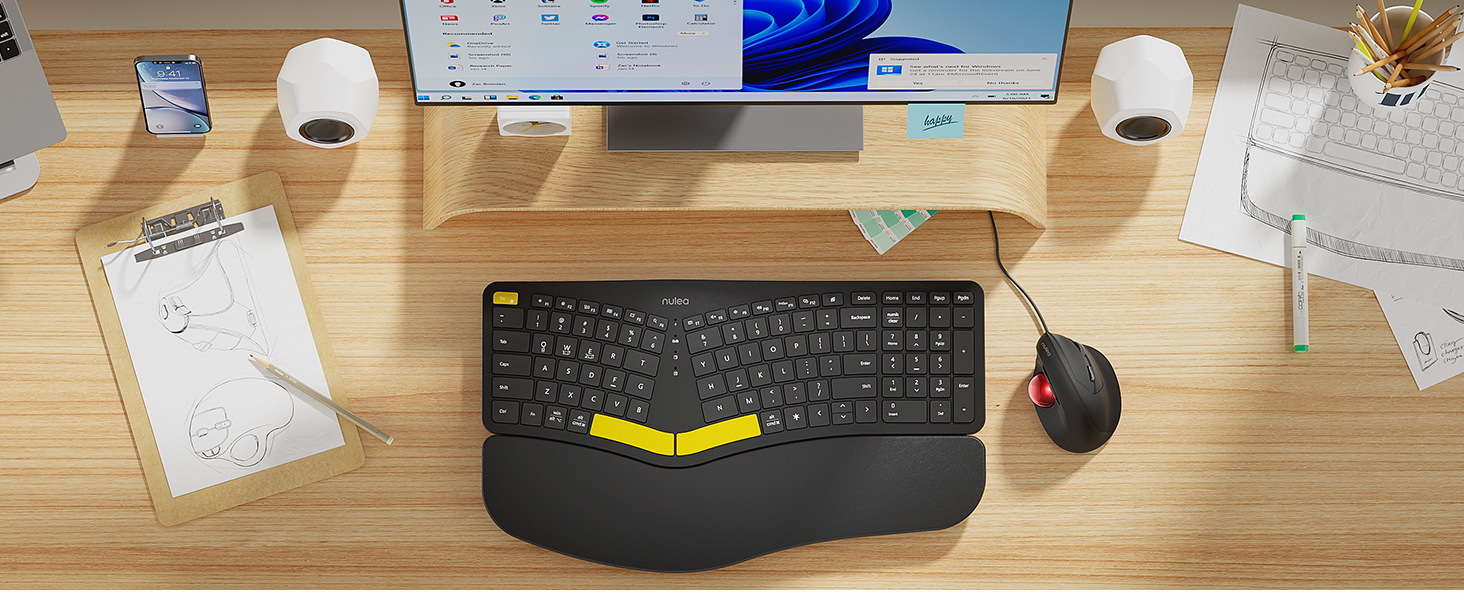
Figure 3.2: Wireless Connectivity Setup
This diagram illustrates the three connectivity options for the Nulea keyboard: 2.4G USB connection via a dongle, and two separate Bluetooth connections. It shows how to switch between devices using Fn + Q/W/E keys.
4. Betjeningsvejledning
4.1 Tænd/sluk
Locate the power switch on the keyboard (typically on the top edge or underside) and slide it to the 'ON' or 'OFF' position.
4.2 Skift mellem tilsluttede enheder
Once multiple devices are paired, you can switch between them instantly:
- Trykke Fn + Q to switch to the 2.4G USB connected device.
- Trykke Fn + W for at skifte til Bluetooth-enhed 1.
- Trykke Fn + E for at skifte til Bluetooth-enhed 2.

Figure 4.1: Easy Device Switching
This image shows the Nulea keyboard connected to a desktop monitor, a laptop, and a smartphone, illustrating its ability to easily switch between up to three paired devices with a single tap.
4.3 Backlight Control
The keyboard features a 7-color backlight with 3 brightness levels. You can customize the lighting to your preference:
- To cycle through backlight colors (blue, green, red, cyan, purple, yellow, white), press the backlight control key (refer to keyboard layout for specific key).
- To adjust brightness levels, use the dedicated brightness control keys (refer to keyboard layout).
- Note: When the battery level drops below 10%, the backlight will automatically turn off to preserve basic keyboard functionality.

Figure 4.2: Adjustable 7-Color Backlight
This image displays the Nulea keyboard in a dimly lit environment, showcasing its illuminated keys with a vibrant backlight. The image highlights the 7 available backlight colors and 3 brightness levels.
4.4 Adjustable Tilt Legs
The keyboard is equipped with 4 adjustable tilt legs, allowing you to set the keyboard at 3 different angles for optimal wrist comfort and posture.
- Gently pull out the tilt legs located on the underside of the keyboard to adjust the angle.
- Experiment with different tilt levels to find the most comfortable position for your typing style.

Figure 4.3: Adjustable Tilt Legs
Dette billede viser en side view of the Nulea keyboard on a desk, with its adjustable tilt legs extended to demonstrate the ergonomic angle. The image emphasizes how the tilt legs help maintain a comfortable wrist position.
4.5 Skriveerfaring
The keyboard features spherical-dished key shapes designed to conform to your fingertips, promoting effortless and comfortable typing.

Figure 4.4: Spherical-Dished Keys
This close-up image focuses on the keys of the Nulea keyboard, highlighting their spherical-dished shape designed for comfortable and precise typing.
5. Vedligeholdelse
5.1 Rengøring
Sådan bevarer du tastaturets udseende og funktionalitet:
- Frakobl tastaturet fra alle enheder og strømkilder før rengøring.
- Brug en blød, fnugfri klud lidt dampskylles med vand eller en mild rengøringsopløsning til at tørre overfladen af.
- Undgå at bruge skrappe kemikalier, slibende rengøringsmidler eller opløsningsmidler.
- Brug trykluft til at fjerne støv og snavs mellem tasterne.
5.2 Pleje af batterier
For at forlænge batterilevetiden:
- Recharge the keyboard when the battery low indicator appears.
- Undgå at aflade batteriet helt ofte.
- Hvis tastaturet opbevares i længere tid, skal det oplades til cirka 50% inden opbevaring.
6. Fejlfinding
6.1 Tastaturet reagerer ikke
- Sørg for, at tastaturet er tændt.
- Kontroller batteriniveauet og genoplad om nødvendigt.
- For 2.4G connection, ensure the USB receiver is securely plugged into the device. Try a different USB port.
- For Bluetooth connection, ensure Bluetooth is enabled on your device and the keyboard is paired. Try re-pairing the keyboard.
- Ensure you are on the correct connection channel (Fn + Q/W/E).
6.2 Baggrundsbelysning virker ikke
- Check the battery level. The backlight automatically turns off when the battery is below 10%. Recharge the keyboard.
- Ensure the backlight is turned on and brightness is adjusted using the dedicated keys.
6.3 Connectivity Issues / Lag
- Move the keyboard closer to your device to reduce interference.
- Avoid placing the keyboard near other wireless devices that may cause interference (e.g., Wi-Fi routers, cordless phones).
- Sørg for, at din enheds operativsystem og Bluetooth-drivere er opdaterede.
7. Specifikationer
| Feature | Detalje |
|---|---|
| Modelnavn | RT05 |
| Produktdimensioner | 41.9 x 24.4 x 3.3 cm (L x B x H) |
| Varens vægt | 3.5 pund (1.59 kg) |
| Fabrikant | Nulea |
| Batterier | 1 lithium-ion batteri (medfølger) |
| Forbindelsesteknologi | 2.4G USB, Bluetooth |
| Kompatible enheder | Bærbar computer, pc, smartphone, tablet |
| Særlige funktioner | Backlit, Rechargeable, Split Keyset Design, Adjustable Tilt Legs |
| Farve | Sort |
8. Garanti og support
For warranty information, technical support, or service inquiries, please refer to the contact information provided on the Nulea official webwebstedet eller kontakt sælgeren direkte. Gem din købskvittering til garantikrav.
This user manual is included with your product for future reference.


