1. Introduktion
This manual provides detailed instructions for the safe and efficient operation of your WiMiUS P61 Mini Projector. Please read this manual thoroughly before using the product and retain it for future reference.

Image 1.1: The WiMiUS P61 Mini Projector, a compact and portable device with a handle.
2. Sikkerhedsinstruktioner
- Se ikke direkte ind i projektorlinsen, når lamp er tændt.
- Sørg for korrekt ventilation omkring projektoren for at forhindre overophedning.
- Avoid placing the projector in unstable locations or near water.
- Brug kun den strømadapter, der følger med projektoren.
- Forsøg ikke selv at skille projektoren ad eller reparere den. Kontakt kvalificeret servicepersonale.
- Keep the projector away from extreme temperatures, dust, and humidity.
3. Pakkens indhold
Kontroller venligst, at alle varer er til stede:
- WiMiUS P61 Mini-projektor
- Fjernbetjening
- Strømadapter
- HDMI kabel
- Brugermanual
4. Produktet er slutview
4.1. Projektorkomponenter

Billede 4.1: Overview of the WiMiUS P61 Projector highlighting its key features such as 1080P support, 8500 Lumens, Bluetooth 5.2, and 5G/2.4G WiFi.
The WiMiUS P61 is a compact and portable projector designed for ease of use. It features a lens, ventilation grilles, and various input/output ports.

Image 4.2: The WiMiUS P61 Projector being held, illustrating its portable design and compact size.
4.3. Indgangs-/udgangsporte

Image 4.3: The projector's connectivity options, including HDMI, USB, AV, and 3.5mm audio, compatible with various devices like smartphones, laptops, TV sticks, and gaming consoles.
- HDMI-port: Connect to laptops, gaming consoles (PS4/PS5, Switch), TV sticks, and other HDMI-enabled devices.
- USB-port: Tilslut USB-drev til medieafspilning.
- AV-port: Tilslut til ældre enheder ved hjælp af et AV-kabel.
- 3.5 mm lydstik: Tilslut eksterne hovedtelefoner eller højttalere.
- Strømindgang: Tilslut strømadapteren.
5. Opsætning
5.1. Strømtilslutning
- Tilslut strømadapteren til projektorens strømindgang.
- Sæt strømadapteren i en stikkontakt.
- Strømindikatorlampen på projektoren vil lyse.
5.2. Placering
Position the projector on a stable, flat surface. For optimal image quality, ensure the projector is placed directly in front of the projection screen or wall. The projector includes a standard tripod screw mount for flexible positioning.

Image 5.1: Illustration of projection distance for a 100-inch screen, showing the WiMiUS P61 requires approximately 2.5 meters.
The projector supports various projection methods: front, rear, front ceiling, and rear ceiling. Adjust the projection mode in the settings menu according to your installation.
5.3. Fokusjustering
The WiMiUS P61 features electric focus for precise image clarity.
- Tænd for projektoren.
- Use the focus buttons on the remote control to adjust the image sharpness.
- Adjust until the projected image is clear and crisp.
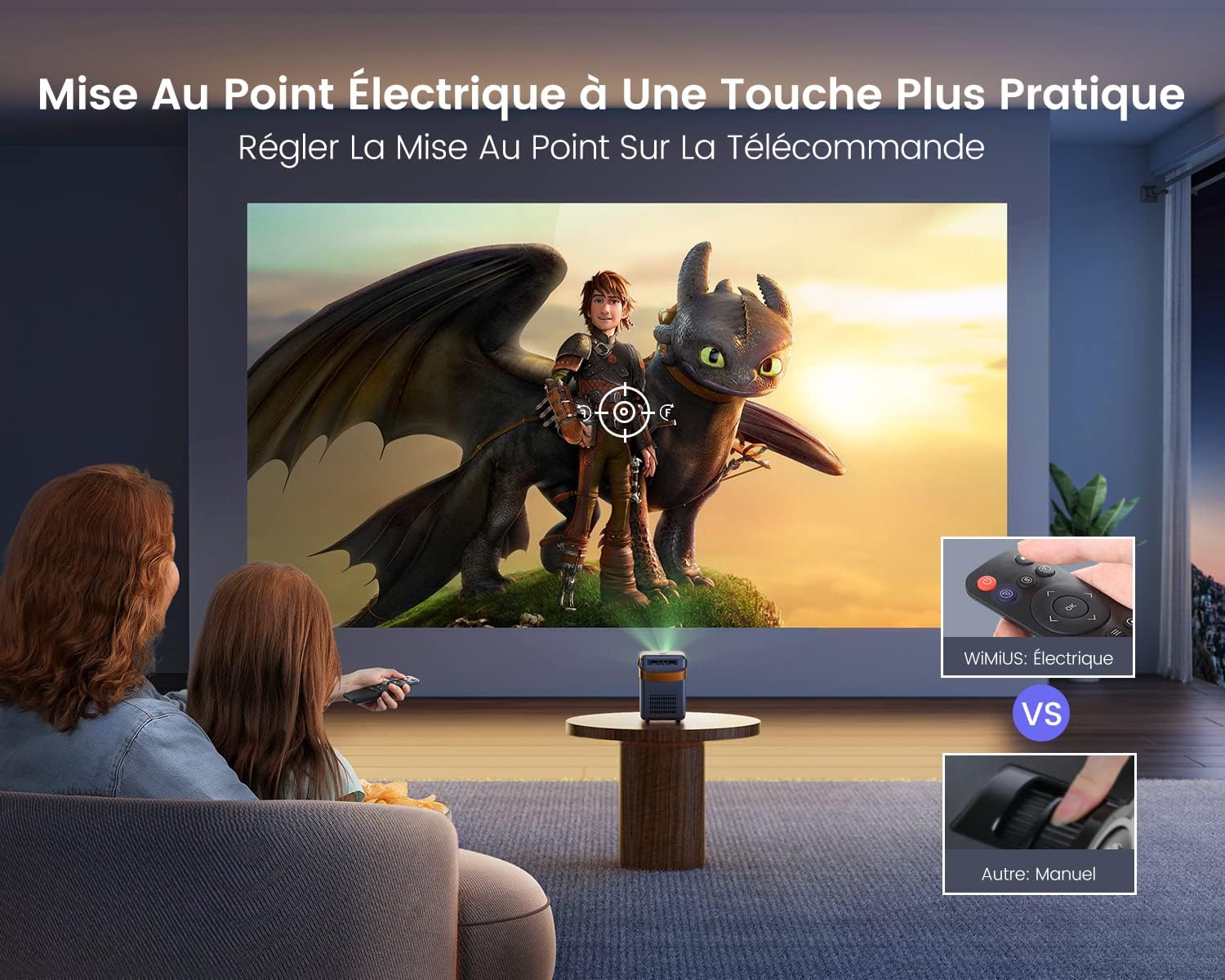
Image 5.2: The remote control allows for convenient electric focus adjustment, providing a clearer image compared to manual focus.

Image 5.3: Demonstrates the rapid 0.1-second electric focus adjustment feature of the WiMiUS P61 Projector.
6. Betjeningsvejledning
6.1. Tænd/sluk
- At tænde: Tryk på tænd/sluk-knappen på projektoren eller fjernbetjeningen.
- At slukke: Tryk på tænd/sluk-knappen igen. Projektoren går i standbytilstand.
6.2. Valg af inputkilde
Use the "Source" button on the remote control to cycle through available input sources (HDMI, USB, AV, Screen Mirroring).
6.3. Trådløs forbindelse (WiFi og Bluetooth)
6.3.1. WiFi-forbindelse
The projector supports dual-band 2.4G and 5G WiFi for stable and fast connections.

Image 6.1: The projector supports both 2.4G and 5G WiFi for ultra-fast wireless connectivity.

Image 6.2: Demonstrates the high-speed 5G WiFi connection for smooth content streaming.
- Navigate to the WiFi settings in the projector's menu.
- Vælg dit ønskede WiFi-netværk, og indtast adgangskoden.
- Once connected, you can use screen mirroring or access network features.
6.3.2. Bluetooth-forbindelse
The projector features integrated Bluetooth 5.2 for connecting external audio devices.

Image 6.3: The projector's Bluetooth 5.2 allows connection to various audio devices like Bluetooth speakers, headphones, and earbuds for enhanced sound.

Image 6.4: The projector connected via Bluetooth 5.2 to a soundbar for immersive audio.
- Gå til Bluetooth-indstillingerne i projektorens menu.
- Aktiver Bluetooth og søg efter tilgængelige enheder.
- Select your Bluetooth speaker or headphones to pair.
Note on Audio Output: If you connect external audio devices via Bluetooth or the 3.5mm audio jack, the projector's internal speakers will typically be muted. If you wish to use the projector's speakers while an external device is connected, you may need to adjust the volume settings or disconnect the external device.
6.4. Skærmspejling
The WiMiUS P61 supports screen mirroring for both Android and iOS devices.
- For Android-enheder: Use the Miracast function. Ensure your Android device and the projector are connected to the same WiFi network, or connect directly via the projector's Miracast feature without a router.
- For iOS-enheder (iPhone/iPad): Connect your iOS device and the projector to the same WiFi network. Then, use the screen mirroring function on your iOS device to project the screen.
6.5. Tilslutning af eksterne enheder
- HDMI: Connect an HDMI cable from your device (e.g., laptop, game console, TV stick) to the projector's HDMI port. Select HDMI as the input source.
- USB: Insert a USB drive into the USB port. The projector will typically prompt you to select media files til afspilning.
- AV: Connect an AV cable from your device to the projector's AV port. Select AV as the input source.

Image 6.5: The WiMiUS P61 Projector displaying content from various streaming applications, suitable for home entertainment.
7. Indstillingsmenu
Access the settings menu using the remote control to adjust various parameters:
- Billedindstillinger: Adjust brightness, contrast, color temperature, and aspect ratio (16:9 or 4:3).
- Lydindstillinger: Adjust volume, bass, treble, and balance.
- Netværksindstillinger: Configure WiFi connections and check network information.
- Projektionstilstand: Select front, rear, front ceiling, or rear ceiling projection.
- Sprog: Skift systemsproget.
- Softwareopdatering: Update the projector's firmware via network or USB.
- Sleep timer: Indstil en timer til automatisk nedlukning.
Settings are typically saved automatically after adjustment.
8. Vedligeholdelse
8.1. Rensning
- Linse: Brug en blød, fnugfri klud, der er specielt designet til optiske linser. Brug ikke slibende rengøringsmidler.
- Casing: Tør projektorens yderside af med en blød, tør klud. Brug ikke flydende rengøringsmidler eller rengøringsmidler på sprayform.
- Ventilation: Periodically check and clean the ventilation grilles to ensure proper airflow and prevent dust buildup.
8.2. Opbevaring
When not in use for extended periods, store the projector in a cool, dry place, away from direct sunlight and excessive dust. Use the original packaging or a protective case if available.
9. Fejlfinding
| Problem | Mulig årsag | Løsning |
|---|---|---|
| Intet billede vises | Strøm ikke tilsluttet; Forkert inputkilde; Enhed ikke tilsluttet korrekt. | Check power cable; Select correct input source; Ensure HDMI/USB/AV cables are securely connected. |
| Billedet er sløret | Fokus ikke justeret; Projektoren er for langt/tæt på skærmen. | Adjust focus using the remote control; Reposition the projector. |
| Ingen lyd | Volume too low; Muted; Incorrect audio output selected; External device volume low. | Increase projector volume; Unmute; Check audio settings; Increase volume on connected device. |
| WiFi-forbindelse ustabil | Distance from router; Interference; Incorrect password. | Move projector closer to router; Reduce interference; Re-enter WiFi password. |
| Skærmspejling virker ikke | Not on same WiFi network; Device compatibility; Network issues. | Ensure both devices are on the same WiFi; Check device's screen mirroring function; Restart devices. |
| Dust spots on image | Dust between lens components. | This issue may require professional cleaning. Contact customer support. |
10. Specifikationer
| Feature | Detalje |
|---|---|
| Mærke | WiMiUS |
| Modelnummer | P61 projektor |
| Farve | Sort |
| Skærmopløsning (indbygget) | 1280 x 720p |
| Max Display Resolution Supported | 1920 x 1080p (Full HD) |
| Lysstyrke | 8500 lumen |
| Kontrastforhold | 10000:1 |
| Forbindelsesteknologi | HDMI, USB, AV, 3.5mm Audio, Wi-Fi (2.4G/5G), Bluetooth 5.2 |
| Max skærmstørrelse | 300 tommer |
| Dimensioner (L x B x H) | 14 cm x 10.2 cm x 15.5 cm |
| Særlige funktioner | Portable, Electric Focus |

Image 10.1: Detailed dimensions of the WiMiUS P61 Projector, highlighting its compact and portable design.
11. Garanti og support
Information regarding warranty coverage and customer support was not available in the provided product details. Please refer to the product packaging or contact the retailer/manufacturer directly for warranty terms and technical assistance.


