Indledning
This manual provides detailed instructions for the setup, operation, maintenance, and troubleshooting of your HOMPOW Native 1080P 4K Supported Bluetooth Projector. Please read this manual thoroughly before using the product to ensure proper function and longevity.
Hvad er der i æsken
- Fjernbetjening
- Brugermanual
- Strømledning
- HDMI kabel
Nøglefunktioner
- 1080P Full HD High Performance: Native resolution of 1920*1080 with 6000:1 contrast ratio, supporting 4K input. Delivers 10% brighter images than similar projectors.
- Bluetooth Connection & HiFi Stereo Speaker: Supports various Bluetooth speakers and headphones for immersive sound. Features built-in HiFi stereo speakers for quality audio.
- Bred kompatibilitet: Connects via HDMI to Laptops, TV Sticks, ROKU, PS4, Smartphones (adapter not included). Also features AV and USB ports for versatile connectivity.
- Keystone Correction & Zoom: Adjustable vertical and horizontal angles (±15°) via keystone correction. Zoom function allows image size reduction to 50% without moving the projector.
- Lang L.amp Liv: LED bulb designed for 100,000 hours of lamp levetid.
Opsætning
1. Placering
Place the projector on a stable, flat surface or mount it securely. Ensure adequate ventilation around the projector to prevent overheating. Consider the projection distance to achieve your desired screen size.

Figure 1: The projector supports various installation methods, including front projection on a table, ceiling mount, and rear projection.
2. Strømtilslutning
Tilslut netledningen til projektorens strømindgang og derefter til en stikkontakt.
3. Tilslutning af enheder
Projektoren tilbyder flere inputmuligheder:
- HDMI: Use the provided HDMI cable to connect your Laptop, TV Stick, ROKU, PS4, or other HDMI-enabled devices.
- USB: Insert a USB flash drive into the USB port to play videos or view pictures directly.
- AV: Use an AV cable to connect older devices like DVD players.
- Bluetooth: Par med eksterne Bluetooth-højttalere eller hovedtelefoner for forbedret lyd.
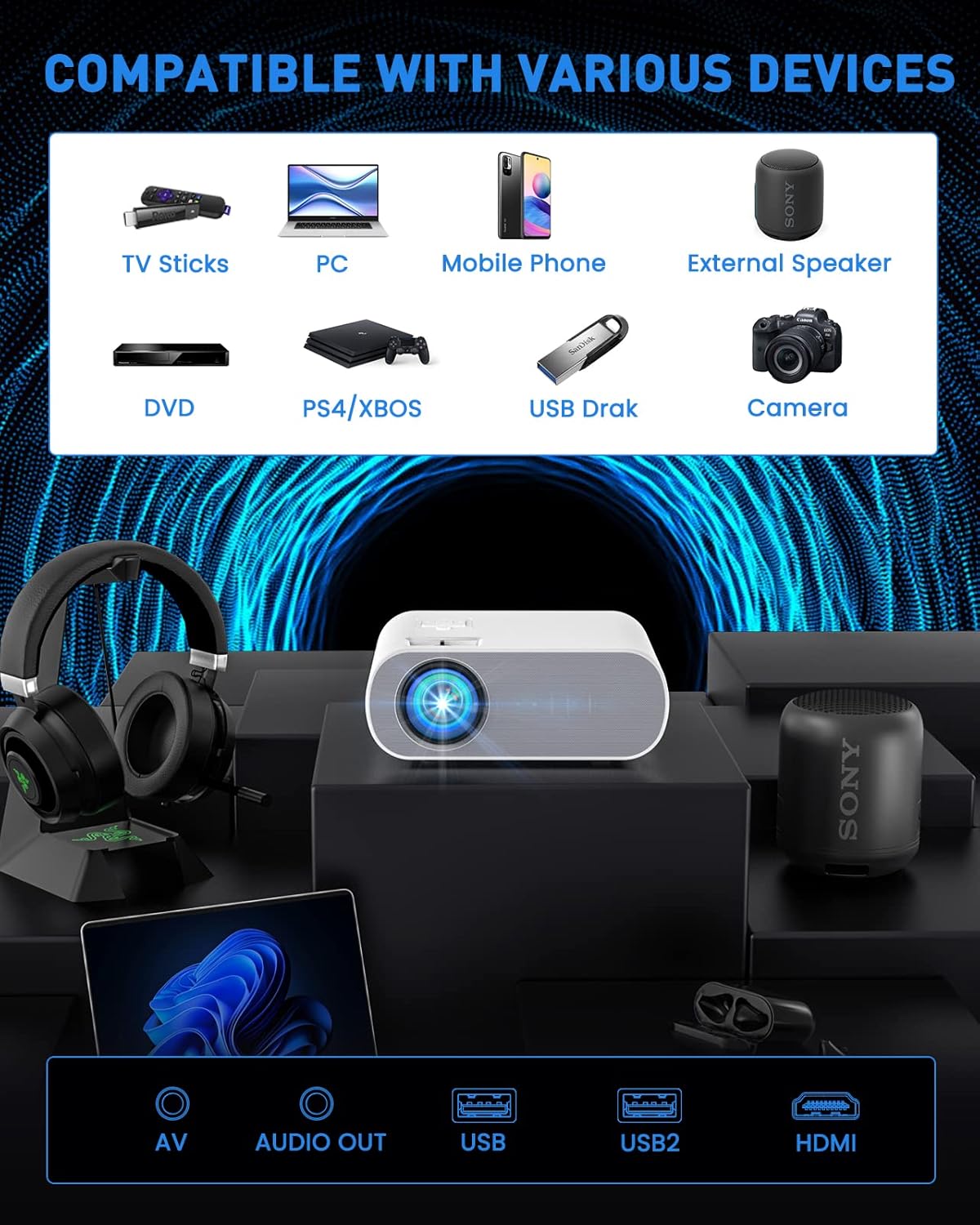
Figure 2: The projector is compatible with a wide range of devices via its multiple input ports.

Figure 3: Connect your smartphone or iPad using an HDMI adapter (not included) for screen mirroring.
4. Billedjustering
- Fokus: Drej fokusringen på projektorlinsen, indtil billedet er klart og skarpt.
- Keystone-korrektion: Use the keystone correction function (manual ±15°) to adjust the vertical and horizontal angles of the image if it appears trapezoidal.
- Zoom: Utilize the ZOOM function to reduce the image size to 50% without physically moving the projector.

Figure 4: Adjust focus and keystone correction for optimal image clarity and shape.
Betjeningsvejledning
1. Tænd/sluk
Tryk på tænd/sluk-knappen på projektoren eller fjernbetjeningen for at tænde eller slukke enheden.
2. Kildevalg
Use the "Source" button on the remote or projector to select the desired input source (HDMI, USB, AV).
3. Lydindstillinger
The projector has built-in HiFi stereo speakers. For external audio, connect Bluetooth speakers or headphones via the Bluetooth pairing function in the projector's settings menu.

Figure 5: The projector features Bluetooth 5.0 for wireless audio connectivity.
4. Brugsscenarier
The HOMPOW projector is ideal for home cinema and video games. For optimal performance, use in a relatively dark room environment.

Figure 6: Enjoy immersive outdoor movie experiences with the HOMPOW projector.

Figure 7: Experience a large, immersive display up to 200 inches.
Opretholdelse
1. Lamp Liv
Projektorens LED lamp has a lifespan of approximately 100,000 hours, reducing the need for frequent bulb replacements.
2. Rensning
- Regularly clean the lens with a soft, lint-free cloth designed for optical surfaces.
- Keep the projector's ventilation openings clear of dust and debris to ensure proper airflow.
Fejlfinding
If you encounter issues with your projector, please refer to the following common solutions:
- Intet billede/signal:
- Ensure the correct input source is selected (HDMI, USB, AV).
- Kontrollér alle kabelforbindelser (HDMI, strøm) for at sikre, at de er fastgjort.
- Verify the connected device (laptop, TV stick) is powered on and outputting a signal.
- Ingen lyd:
- Adjust the volume on both the projector and the connected device.
- Hvis du bruger eksterne højttalere, skal du sørge for, at de er korrekt tilsluttet eller parret via Bluetooth.
- Note: The projector does not support Dolby sound. If playing videos from services like Netflix or Amazon Prime Video, ensure Dolby sound is turned off in your source device's audio settings (e.g., Settings > Display & Sounds > Audio > Dolby Digital Output > OFF).
- Sløret billede:
- Juster fokusringen på projektorlinsen.
- Use the keystone correction to correct any trapezoidal distortion.
- Sørg for, at projektionsfladen er flad og glat.
- Overophedning:
- Sørg for, at projektoren har tilstrækkelig ventilation, og at dens ventilationsåbninger ikke er blokerede.
- Avoid operating the projector in excessively hot environments.
Specifikationer
| Feature | Detalje |
|---|---|
| Mærke | HOMPOW |
| Modelnummer | C10 |
| Indfødt opløsning | 1920 x 1080 (1080P Full HD) |
| 4K support | Ja |
| Kontrastforhold | 6000:1 |
| Lysstyrke | 10% brighter than similar projectors (specific lumens not provided in feature bullets, but 6000L is mentioned in an image) |
| Forbindelsesteknologi | Bluetooth (5.0), HDMI, USB, AV |
| Højttaler | Built-in HiFi Stereo Speaker |
| Keystone korrektion | Manual ±15° (Vertical and Horizontal) |
| Zoomfunktion | Image size reduction to 50% |
| Lamp Liv | 100,000 timer |
| Varens vægt | 4.33 pund |
| Pakkedimensioner | 12.01 x 9.88 x 5.47 tommer |
Garanti & Support
HOMPOW provides a 2-års garanti for this projector, along with lifetime professional technical support. For any problems or inquiries, please feel free to contact us anytime.

Figure 8: Dedicated customer support is available for assistance.


