Produkt overview
The Baseus Bowie WM05 True Wireless Earbuds are designed to provide a superior audio experience by effectively eliminating ambient noise and offering seamless transitions between various listening modes. These earbuds feature a low-latency mode for synchronized audio and video, making them ideal for gaming and media consumption. With a large-capacity battery and efficient wireless technology, they offer extended usage throughout the day. An intelligent AI neural network algorithm enhances voice clarity during calls by filtering out surrounding noise, ensuring your conversations are loud and clear. The earbuds are available in a cream white finish.
Nøglefunktioner omfatter:
- Effective ambient noise isolation and seamless mode switching.
- Low-latency mode for smooth audio and video synchronization.
- Large capacity battery with low-power wireless technology for extended use.
- Quick charging: up to two hours of battery life with only 10 minutes of charging.
- AI neural network algorithm for clear call quality by filtering ambient noise.

Image: Baseus Bowie WM05 True Wireless Earbuds shown inside their charging case, highlighting their compact and sleek design.
Pakkens indhold
Sørg venligst for, at alle varer er til stede i pakken:
- 1 x Pair of Baseus Bowie WM05 True Wireless Earbuds
- 1 x opladningsetui
- 1 x USB-C opladningskabel
- 3 x Pairs of Eartips (Small, Medium, Large)
- 1 x brugermanual

Image: The retail packaging of the Baseus Bowie WM05 earbuds, displaying the product and key features.
Opsætningsvejledning
1. Første opladning
Oplad ørepropperne og opladningsetuiet helt før første brug. Tilslut det medfølgende USB-C-kabel til opladningsporten på etuiet og en strømkilde. Indikatorlampen på etuiet viser opladningsstatus.

Billede: Top view of the Baseus Bowie WM05 charging case, showing the Baseus logo and smooth finish.
2. Parring med en enhed
- Sørg for, at ørepropperne er i opladningsetuiet, og at låget er åbent.
- Aktiver Bluetooth på din enhed (smartphone, tablet osv.).
- Søg efter new Bluetooth devices. The earbuds should appear as "Baseus Bowie WM05".
- Select "Baseus Bowie WM05" to pair. Once connected, a voice prompt will confirm successful pairing.
- The earbuds will automatically connect to the last paired device when removed from the case and Bluetooth is enabled on the device.
Betjeningsvejledning
Iført øretelefoner
Choose the correct size eartips for a comfortable and secure fit. Insert the earbuds into your ears and gently twist them until they feel snug and the sound quality is optimal.
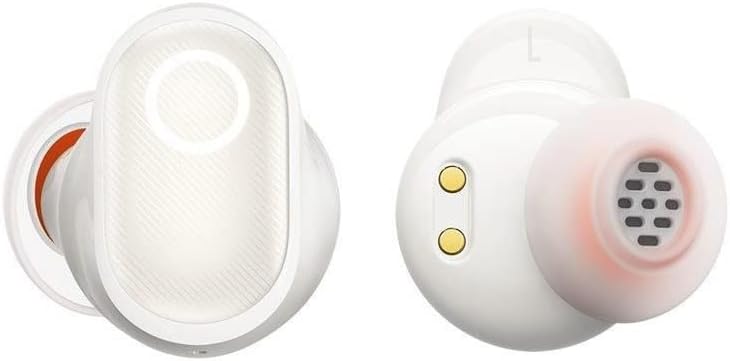
Billede: Detaljeret view of the Baseus Bowie WM05 earbuds, showing the in-ear design and charging contacts.
Tryk på kontrolelementer
The Baseus Bowie WM05 earbuds feature touch-sensitive areas for easy control of music playback, calls, and modes.
| Handling | Kontrollere |
|---|---|
| Afspil/pause | Dobbelttryk på en af øretelefonerne |
| Næste spor | Triple-tap right earbud |
| Forrige spor | Triple-tap left earbud |
| Besvar/afslut opkald | Dobbelttryk på en af øretelefonerne |
| Afvis opkald | Tryk på en af øretelefonerne, og hold den nede i 2 sekunder |
| Activate Low-Latency Mode | Tryk og hold venstre øretelefon nede i 2 sekunder |
| Toggle Noise Control (ANC/Transparency) | Tryk og hold højre øretelefon nede i 2 sekunder |
| Aktiver Voice Assistant | Quadruple-tap either earbud |
Vedligeholdelse og pleje
Proper maintenance ensures the longevity and optimal performance of your Baseus Bowie WM05 earbuds.
- Rensning: Rengør regelmæssigt ørepropperne og opladningsetuiet med en blød, tør og fnugfri klud. Brug ikke slibende rengøringsmidler eller opløsningsmidler.
- Ørespidser: Fjern ørepropperne, og rengør dem med mild sæbe og vand, hvis det er nødvendigt. Sørg for, at de er helt tørre, før du sætter dem på igen.
- Opladningskontakter: Gently wipe the charging contacts on both the earbuds and inside the case with a dry cotton swab to prevent accumulation of dirt or debris.
- Opbevaring: Når ørepropperne ikke er i brug, skal de opbevares i deres opladningsetui for at beskytte dem og holde dem opladede. Undgå ekstreme temperaturer.
- Vandtæthed: The earbuds are not waterproof. Avoid exposure to excessive moisture, rain, or submersion in water.
Fejlfinding
Hvis du støder på problemer med dine ørepropper, kan du bruge følgende almindelige løsninger:
- Ingen lyd:
- Sørg for, at ørepropperne er opladet.
- Kontroller Bluetooth-forbindelsen på din enhed.
- Increase volume on both the earbuds and your device.
- Prøv at parre ørepropperne igen.
- Øretelefoner parrer ikke:
- Ensure earbuds are in pairing mode (open case lid).
- Slå Bluetooth fra og til på din enhed.
- Forget "Baseus Bowie WM05" from your device's Bluetooth list and try pairing again.
- Sørg for, at der ikke er tilsluttet andre enheder til øretelefonerne.
- Opladningsproblemer:
- Check if the USB-C cable is properly connected.
- Prøv et andet USB-C-kabel eller strømadapter.
- Rengør opladningskontakterne på både ørepropper og etuiet.
- Dårlig opkaldskvalitet:
- Sørg for, at ørepropperne sidder korrekt i dine ører.
- Check for strong Bluetooth signal (stay close to your device).
- Sørg for, at mikrofonen ikke er blokeret.
If problems persist, please contact Baseus customer support.
Specifikationer
| Feature | Detalje |
|---|---|
| Mærke | Baseus |
| Modelnavn | Bowie WM05 |
| Varemodelnummer | NGTW200002 |
| Farve | Fløde hvid |
| Øreplacering | In-Ear |
| Støjkontrol | Aktiv støjreduktion |
| Forbindelsesteknologi | Trådløs |
| Trådløs kommunikationsteknologi | Bluetooth |
| Produktdimensioner | 10 x 5 x 3 cm |
| Varens vægt | 230 gram |
| Batterier | 1 Non-standard battery required. (Included) |
| Første ledige dato | 8. september 2022 |
Garanti og support
Baseus products are manufactured to the highest quality standards. For information regarding warranty coverage, please refer to the warranty card included in your product packaging or visit the official Baseus webwebsted.
For technical support, troubleshooting assistance, or any product-related inquiries, please contact Baseus customer service through their official channels. Contact information can typically be found on the product packaging or their official webwebsted.


