Indledning
Thank you for choosing the FULLJA 15-inch WiFi Smart Digital Photo Frame. This manual provides detailed instructions for setting up, operating, and maintaining your digital photo frame. Please read this manual thoroughly before use to ensure proper functionality and to maximize your experience.

Image: The FULLJA 15-inch WiFi Smart Digital Photo Frame showcasing a family photo, accompanied by a smartphone displaying the VPhoto application for remote photo sharing.
Pakkens indhold
Kontroller venligst, at alle varer er til stede i pakken:
- 1x FULLJA 15-inch WiFi Smart Digital Photo Frame
- 1x strømadapter
- 1x fjernbetjening
- 1x Brugermanual (dette dokument)
- 1x Bracket (for stand or wall mounting)
- 1x Micro USB-kabel

Image: Contents of the FULLJA Digital Photo Frame package, including the frame, user manual, power adapter, and mounting bracket.
Produkt overview
The FULLJA 15-inch WiFi Smart Digital Photo Frame features a 1024x768 HD display with a 4:3 aspect ratio, 32GB of internal storage, and supports various connectivity options for sharing photos and videos.
Nøglefunktioner:
- 15-tommer HD-skærm: 1024x768 resolution with a 4:3 aspect ratio for clear image reproduction.
- Trådløs deling: Share photos and videos via the VPhoto app or email.
- Intern opbevaring: 32 GB indbygget hukommelse.
- Ekstern opbevaring: Supports USB drives and TF cards (up to 32GB).
- Cloud Storage: Unlimited online cloud storage space.
- Smarte funktioner: Motion Sensor, Auto Rotate, Video Playback, Alarm, Clock, Auto Screen On/Off, Calendar, Split-Screen, Full Screen, Photo Folder, Music, Text Captions.
- Monteringsmuligheder: Can be placed on a desk using the bracket or wall-mounted.
Components and Ports:
Familiarize yourself with the frame's components and connection ports.

Image: Detail of the frame's rear, highlighting the wall-mounted hole for installation.
- Skærm: 15-inch HD display.
- Strømport: Tilsluttes strømadapteren.
- USB-port: Til tilslutning af USB-drev.
- TF-kortslot: For inserting TF (Micro SD) cards.
- Micro USB -port: For connecting to a computer (cable included).
- Hul til vægmontering: Located on the back for wall installation.
- Stand/Bracket Slot: Til fastgørelse af det medfølgende stativ.

Image: The digital photo frame displaying various feature icons, including WiFi, Photo, Video, Music, Weather Station, and Clock & Calendar.
Opsætningsvejledning
1. Tænd
- Connect the power adapter to the frame's power port and then to a wall outlet.
- The frame will automatically power on. Follow the on-screen instructions for initial setup.
2. Wi-Fi-forbindelse
- On the frame's screen, navigate to the "Settings" menu.
- Select "Wi-Fi" and choose your desired network from the list.
- Enter the Wi-Fi password and confirm. The frame will connect to the internet.
3. VPhoto App Installation and Pairing
The VPhoto app allows for remote photo and video sharing.
- Download the "VPhoto" app from the App Store (for iOS) or Google Play Store (for Android) on your smartphone or tablet.
- Åbn VPhoto-appen, og opret en konto, eller log ind.
- On your FULLJA frame, locate the unique connection code (usually found in the "Settings" or "Add Friends" section).
- In the VPhoto app, select "Add Device" and enter the connection code displayed on your frame.
- Once paired, you can invite family and friends to connect to your frame using the same connection code.

Image: Instructions for instantly sharing photos and videos via the VPhoto app, detailing the steps from app download to inviting others.
Betjeningsvejledning
Deling af fotos og videoer
- Via VPhoto-appen: Open the VPhoto app, select the photos or videos you wish to share, choose your connected frame, and send. The content will appear on your frame instantly.
- Via e-mail: The frame has a unique email address. Send photos or videos as attachments to this address. The frame will automatically receive and display them.
- Via USB Drive/TF Card: Insert a USB drive or TF card (up to 32GB) into the corresponding port. The frame will detect the storage and allow you to import media to its internal memory.

Image: The digital photo frame highlighting its wireless sharing capability, allowing users to share moments from any location.
Basic Settings and Features
- Indstillinger for slideshow: Customize the display order, transition effects, and duration of photos in the slideshow via the "Settings" menu.
- Bevægelsessensor: Enable or disable the motion sensor. When enabled, the frame will automatically turn on when motion is detected and turn off after a period of inactivity.
- Automatisk rotation: The frame supports automatic rotation, adjusting the display orientation (portrait or landscape) based on how it is positioned.
- Fjernbetjening: Use the included remote control to navigate menus, adjust settings, and control media playback.
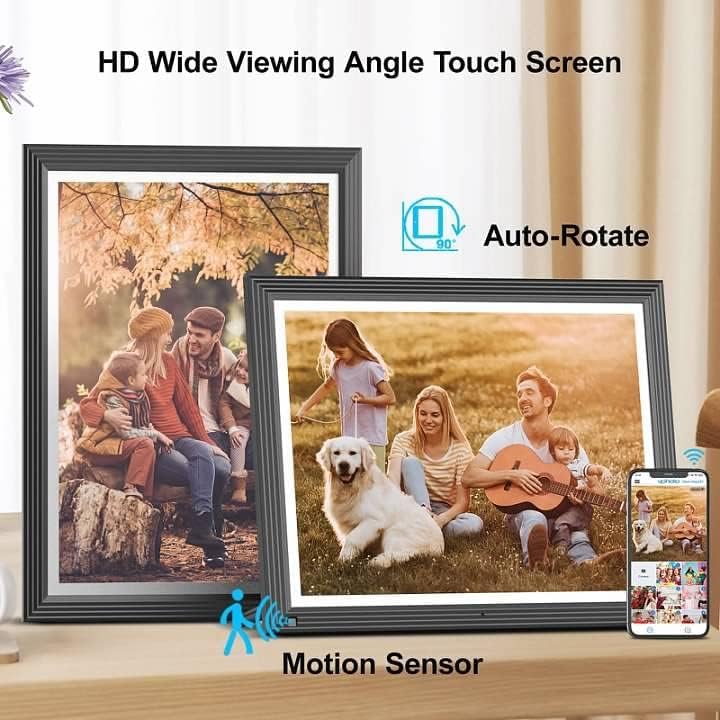
Image: Two digital photo frames demonstrating auto-rotate functionality and the presence of a motion sensor.

Billede: Den digitale fotorammeasing its HD wide viewing angle and flexibility for both portrait and landscape placement, including wall mounting.
Avancerede funktioner
- Videoafspilning: The frame supports video playback. Videos shared to the frame will play automatically or can be selected from the media library.
- Musikafspilning: Play background music during slideshows or as a standalone feature.
- Alarm, Clock, Calendar: Utilize the frame's built-in alarm, clock, and calendar functions for added utility.
- Text Captions: Add custom text captions to your photos for personalized messages.
- Split-Screen/Full Screen: Choose between displaying multiple photos in a split-screen view or a single photo in full-screen mode.
Opretholdelse
Rensning:
- Turn off the frame and unplug it before cleaning.
- Brug en blød, tør og fnugfri klud til forsigtigt at tørre skærmen og rammen af.
- For genstridige pletter på skærmen, tør letampRengør kluden med vand eller en skærmsikker rengøringsopløsning. Sprøjt ikke væske direkte på skærmen.
- Avoid using abrasive cleaners, solvents, or alcohol-based solutions, as these can damage the display or finish.
Opbevaring:
- If storing the frame for an extended period, ensure it is clean and dry.
- Opbevares på et køligt, tørt sted væk fra direkte sollys og ekstreme temperaturer.
- Gem den originale emballage til sikker opbevaring og transport.
Fejlfinding
| Problem | Mulig årsag | Løsning |
|---|---|---|
| Rammen tændes ikke. | Strømadapteren er ikke tilsluttet eller defekt. | Sørg for, at strømadapteren er korrekt tilsluttet stellet og en fungerende stikkontakt. Prøv en anden stikkontakt. |
| Kan ikke oprette forbindelse til Wi-Fi. | Forkert adgangskode, svagt signal eller netværksproblem. | Verify the Wi-Fi password. Move the frame closer to the router. Restart your router and the frame. Ensure your Wi-Fi network is 2.4GHz compatible. |
| Photos/Videos not appearing on the frame. | Frame not connected to Wi-Fi, incorrect sharing method, or file format ikke understøttet. | Check Wi-Fi connection. Ensure you are using the correct VPhoto app or email address. Verify that the file formats are compatible (e.g., JPEG for photos, MP4 for videos). |
| Fjernbetjening virker ikke. | Lavt batteri eller blokering. | Replace the remote control battery. Ensure there is no obstruction between the remote and the frame's IR receiver. |
| Skærmen er tom eller frosset. | Softwarefejl eller midlertidig fejl. | Unplug the power adapter, wait 10 seconds, then plug it back in to restart the frame. |
Specifikationer
- Model: 15E1
- Skærmstørrelse: 15 tommer
- Opløsning: 1024x768 HD
- Aspektforhold: 4:3
- Intern hukommelse: 32 GB
- Ekstern opbevaring: USB, TF Card (max 32GB)
- Forbindelse: Wi-Fi (2.4 GHz)
- Kompatible enheder: Android, iPhone
- Produktdimensioner: 13.98 x 11.3 x 0.99 tommer
- Varens vægt: 4.4 pund
- Farve: Sort
- Fabrikant: FULLJA

Image: The FULLJA WiFi Digital Photo Frame, 15 inches with a 4:3 aspect ratio, displayed on a shelf.

Image: The digital photo frame highlighting its 32GB internal storage and unlimited online cloud storage capabilities.
Garanti og support
FULLJA provides the following support for your digital photo frame:
- Et års begrænset garanti: Your product is covered by a one-year limited warranty from the date of purchase, covering manufacturing defects.
- Livsvarig support: Vi tilbyder livstids teknisk support til dit produkt.
- Hurtigt svar: Forvent svar på dine henvendelser inden for 24 timer.
For warranty claims, technical assistance, or any questions, please contact FULLJA customer support through the contact information provided with your purchase or on the official FULLJA webwebsted.


