1. Introduktion
This manual provides detailed instructions for the safe and effective operation of your EENOUR Tumbler Heat Press Machine. This machine is designed for sublimation heat transfer onto various cylindrical items such as tumblers, mugs, and glasses, ranging from 12oz to 30oz capacity.
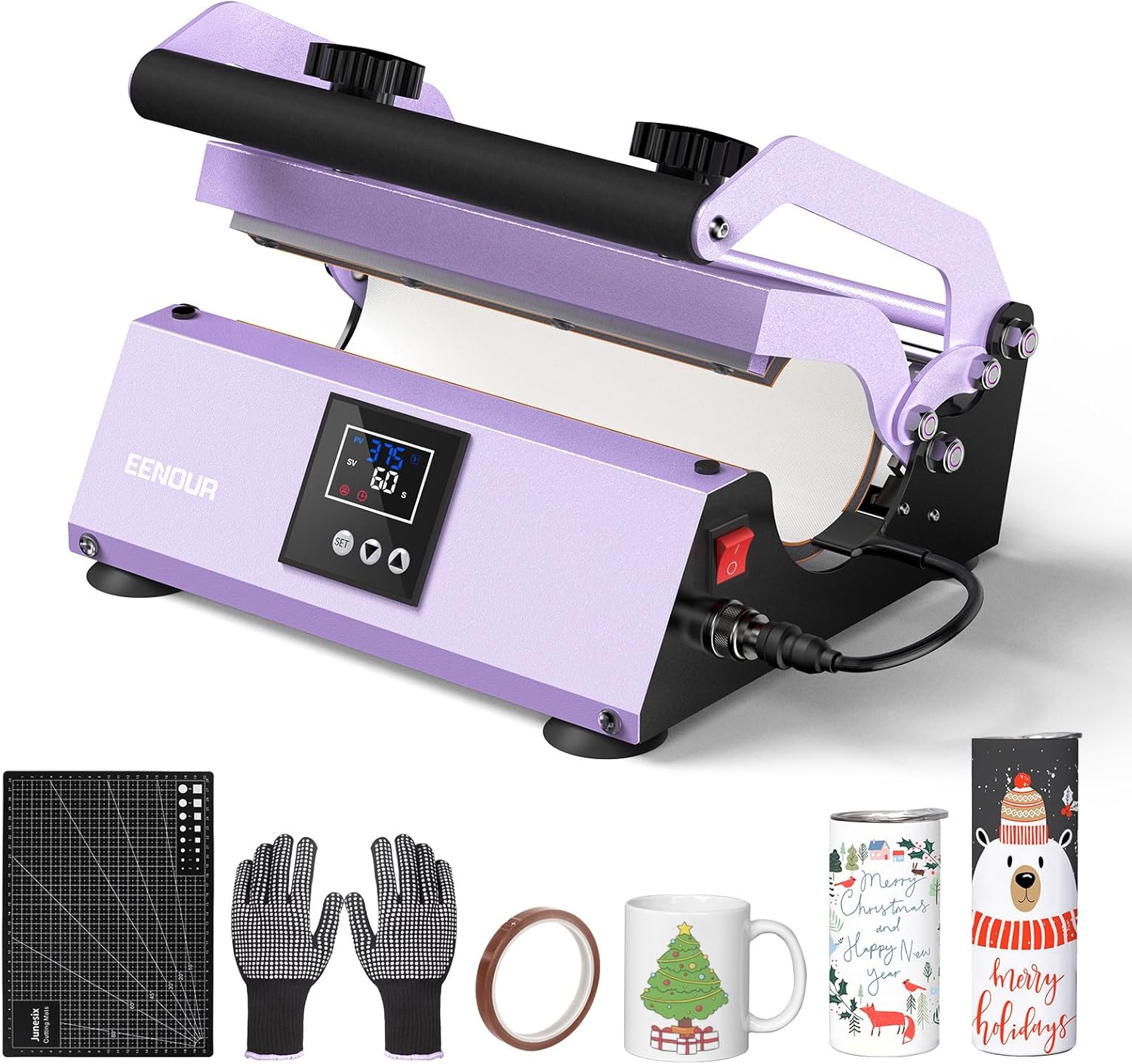
Image: The EENOUR Tumbler Heat Press Machine, purple in color, shown with included accessories like heat-resistant gloves, heat tape, and a cutting mat. Various sublimated tumblers and mugs are also displayed.
2. Sikkerhedsoplysninger
Læs venligst alle sikkerhedsinstruktioner omhyggeligt, inden du bruger maskinen, for at forhindre personskade eller beskadigelse.
- Elektrisk sikkerhed: Ensure the machine is connected to a grounded outlet with the correct voltage (110V AC). Do not operate with wet hands. Unplug when not in use or before cleaning.
- Varmefare: The heating element reaches high temperatures. Always use the provided heat-resistant gloves when handling hot items or adjusting the press. Allow items to cool before touching with bare hands.
- Ventilation: Operate the machine in a well-ventilated area. A new machine may emit a temporary odor during initial use.
- Automatisk slukning: The machine features a 10-minute auto-off function for safety. If the control panel is inactive for 10 minutes, the machine will power down.
- Børn og kæledyr: Hold maskinen utilgængeligt for børn og kæledyr.
- Varmeelement: The heating element is a consumable part and may require replacement every 6 months with regular use.
3. Pakkens indhold
Bekræft at alle varer er inkluderet i din pakke:
- 1 x EENOUR Tumbler Heat Press Machine
- 1 x Detachable Heating Attachment (pre-installed)
- 1 x strømkabel
- 1 x brugermanual
- 1 x A4 Handmade Mat (Cutting Pad)
- 2 x Heat-resistant Gloves
- 1 x Sublimation Heat Tape
- 2 x Fuses (spare)

Image: A visual representation of the package contents, including the heat press machine, power cord, user manual, heat-resistant gloves, A4 cutting mat, and heat-resistant tape.
4. Produktfunktioner
The EENOUR Tumbler Heat Press Machine offers several key features for efficient and precise sublimation:
- Alsidig kompatibilitet: Accommodates 12-30 oz straight sublimation tumblers, 16-30 oz water bottles, 11-16 oz mugs, can coolers, and various straight glasses. The heating attachment measures 10.6 inches (27 cm) in length with a diameter range of 2.65-3.4 inches (6.7-8.6 cm).
- Justerbart tryk: Manual pressure knobs allow for precise adjustment to ensure tight tension for different cup sizes, preventing ghosting.
- Digital Temperature & Timer Control: Easy-to-use digital interface for setting temperatures from 32-400 ℉ (0-204 ℃) and timers from 0-999 seconds.
- Fast & Even Heating: Improved heating wire density ensures rapid, uniform, and accurate heat distribution across the press.
- Auto Timer & Alarm: The timer starts automatically when the handle is pulled down and an alarm sounds upon completion.
- Hukommelsestilstand: Settings can be saved for repetitive tasks, streamlining mass production.
- Forbedret sikkerhed: Features a 10-minute inactivity auto-off function and thickened silicone layers for high-temperature and pressure resistance.

Image: An illustration demonstrating the range of compatible items, including 12-30oz tumblers, 11-16oz can coolers, 12-30oz glasses, 12-30oz water bottles, 12oz kids sippy cups, 11-16oz stainless steel coffee cups, and 11-16oz mugs. The maximum length is 10.6 inches and diameter range is 2.65-3.4 inches.

Image: A graphic comparing the EENOUR heat press with conventional models, highlighting features like auto timer, self-control temperature/time, thickened coaster, and longer coaster life.
5. Opsætning
- Udpakning: Fjern forsigtigt alle komponenter fra emballagen. Gem emballagen til senere opbevaring eller transport.
- Placering: Place the heat press on a stable, heat-resistant surface in a well-ventilated area. Ensure adequate space around the machine for safe operation.
- Strømtilslutning: Connect the power cord to the machine and then to a grounded 110V AC power outlet.
- Første gang tændt: Flip the red power switch to the ON position. The digital display will illuminate.
- Forvarmning: It is recommended to pre-heat the machine for a short period (e.g., 10-15 minutes at a low temperature like 200℉) during the first use to dissipate any new machine odors.

Image: A detailed diagram labeling the components of the EENOUR Tumbler Heat Press Machine, including the Press Handle, Pressure Knob, Heater, Temperature/Time display, Power Button, and Suction Cups.
6. Betjeningsvejledning
Follow these steps to perform sublimation heat transfer:
- Forbered dit design: Print your sublimation design onto sublimation paper using sublimation ink. Ensure the design is mirrored if necessary.
- Attach Design to Item: Securely wrap your printed design around the tumbler or mug. Use the provided heat-resistant tape to hold the design firmly in place, ensuring no gaps or wrinkles.
- Indstil temperatur og tid:
- Press the "SET" button on the control panel.
- Use the arrow buttons (▲ / ▼) to adjust the desired temperature (e.g., 360-380 ℉ for tumblers). Press "SET" again to confirm.
- Use the arrow buttons (▲ / ▼) to adjust the desired time (e.g., 60-120 seconds for tumblers). Press "SET" again to confirm.
- Allow the machine to reach the set temperature. The display will show the current temperature.
- Juster tryk: Use the pressure knobs on top of the machine to adjust the tightness of the heating element around your item. Ensure a firm, even pressure without being overly tight.
- Insert Item: Wearing heat-resistant gloves, carefully place the prepared tumbler or mug into the heating element.
- Engage Press & Start Timer: Pull down the press handle firmly. The timer will automatically begin counting down.
- Fjern element: Once the timer alarm sounds, lift the press handle. Wearing heat-resistant gloves, carefully remove the hot item from the machine.
- Cool Down & Peel: Place the hot item on a heat-resistant surface to cool. Once cool enough to handle, carefully peel off the sublimation paper to reveal your design.

Image: A sublimation design being printed from a desktop printer.

Image: Hands applying heat-resistant tape to secure a sublimation design onto a tumbler.

Billede: Et nærbillede view of the EENOUR heat press digital control panel, displaying temperature and timer settings, with a finger pressing a button.

Image: A person wearing heat-resistant gloves carefully inserting a tumbler with a sublimation design into the heat press.

Image: A close-up of the heat press machine with the display showing a timer counting down, indicating the pressing process is active.

Image: A person wearing heat-resistant gloves carefully removing a freshly sublimated tumbler from the heat press.
7. Vedligeholdelse
Regelmæssig vedligeholdelse sikrer din varmepresses levetid og optimale ydeevne.
- Rensning: After each use, ensure the machine is unplugged and cool. Wipe down the exterior and heating element with a soft, dry cloth. Do not use abrasive cleaners or solvents.
- Heating Element Replacement: The heating element is a consumable part. If you notice inconsistent heating or reduced performance after approximately 6 months of regular use, it may need replacement. Contact customer support for replacement options.
- Opbevaring: Opbevar maskinen et rent og tørt sted, når den ikke er i brug.
8. Fejlfinding
Se følgende tabel for almindelige problemer og løsninger på disse:
| Problem | Mulig årsag | Løsning |
|---|---|---|
| Uneven Transfer / Ghosting | Insufficient or uneven pressure; design not taped securely; incorrect temperature/time. | Adjust pressure knobs for tighter, even contact. Ensure design is taped tightly. Verify temperature and time settings are appropriate for the material. |
| Design Too Light / Faded | Temperature too low; pressing time too short; incorrect sublimation paper/ink. | Increase temperature or pressing time. Ensure you are using quality sublimation paper and ink. |
| Design Burnt / Scorched | Temperature too high; pressing time too long. | Decrease temperature or pressing time. |
| Maskinen varmer ikke op | Power cord loose; power switch off; internal fuse blown; machine in auto-off mode. | Check power connections. Ensure power switch is ON. If display is off, unplug and replug. If still no power, check/replace fuse. |
| Unusual Odor During Use | New machine odor (temporary); material burning. | Ensure adequate ventilation. If odor persists or is strong, check for material burning or consult customer support. Initial use may have a temporary smell. |
9. Specifikationer
| Feature | Detalje |
|---|---|
| Mærke | ENOR |
| Modelnummer | Purple - CH2242 Single Tumbler Press |
| Voltage | 110 volt (AC) |
| Wattage | 500 watt |
| Produktmål (L x B x H) | 10.6 x 9.1 x 11.8 tommer |
| Varens vægt | 15.97 pund |
| Materiale | Metal |
| Farve | Lilla |
| Temperaturområde | 32-400 ℉ (0-204 ℃) |
| Timer rækkevidde | 0-999 sekunder |
| Heating Attachment Length | 10.6 tommer (27 cm) |
| Heating Attachment Diameter Range | 2.65-3.4 tommer (6.7-8.6 cm) |
10. Garanti og support
EENOUR provides a 6-month manufacturer after-sale service for this product. If you encounter any issues or have questions regarding your Tumbler Heat Press Machine, please contact EENOUR customer support. We are committed to providing solutions to ensure your satisfaction.
For support, please refer to the contact information provided with your purchase or visit the official EENOUR webwebsted.


