1. Produktet er slutview
The Point Wired Mini Keyboard Pt-350 is a compact and versatile keyboard designed for both gaming and general typing. It features a high-quality build and a modern design, adhering to industry standards for reliable performance. This keyboard is an ideal choice for users seeking a durable and efficient input device.
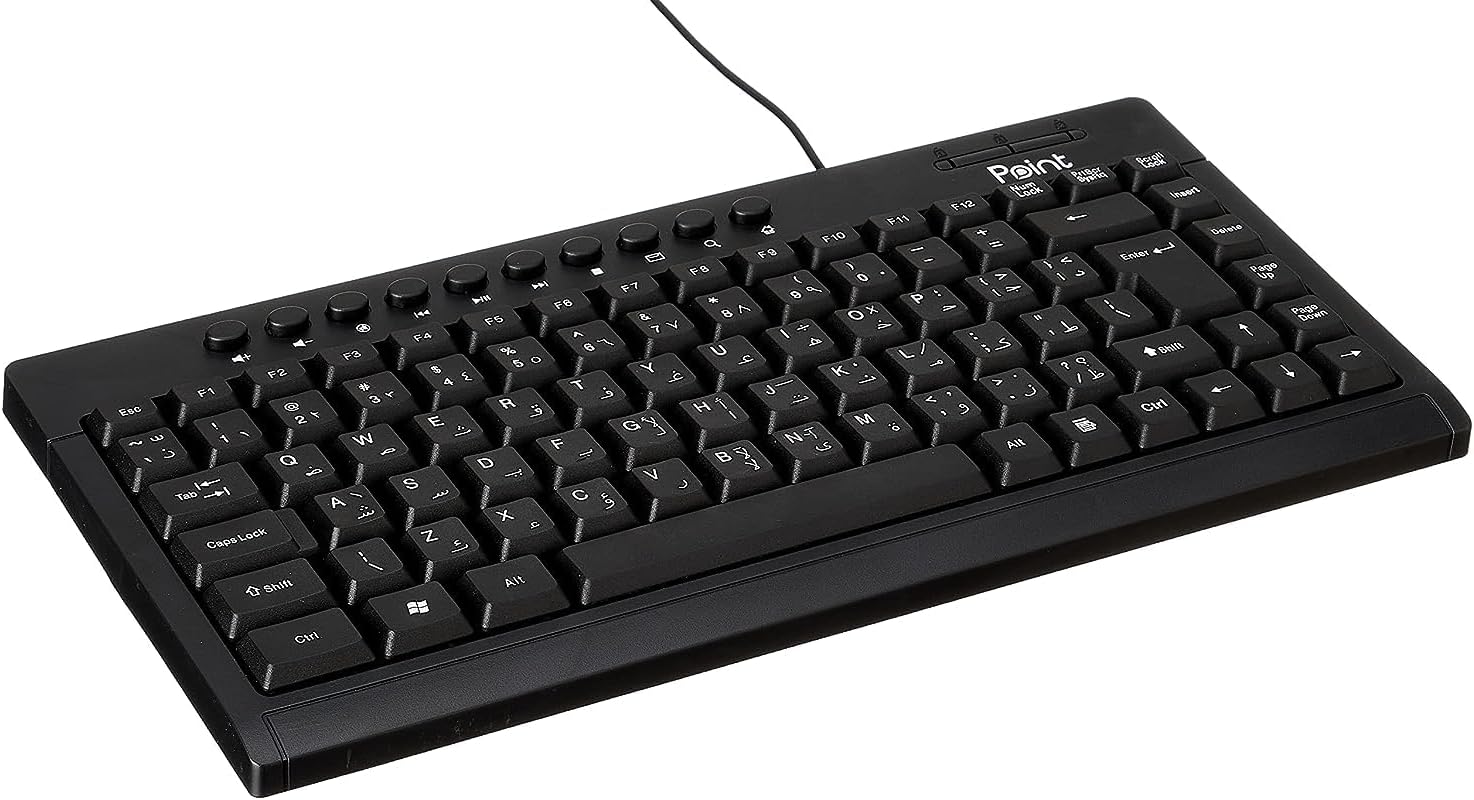
Figur 1.1: Vinklet view of the Point Wired Mini Keyboard Pt-350, showcasing dens kompakte design og tastelayout.
Nøglefunktioner:
- Wired connectivity for stable performance.
- Compact design suitable for various setups.
- Durable construction from high-quality plastic materials.
- Designed for both gaming and typing applications.
2. Pakkens indhold
Kontroller venligst pakken omhyggeligt for at sikre, at alle varer er til stede:
- Point Wired Mini Keyboard Pt-350
- Brugervejledning (dette dokument)
3. Opsætning
Follow these steps to set up your Point Wired Mini Keyboard Pt-350:
- Pak tastaturet ud: Tag forsigtigt tastaturet ud af emballagen.
- Identificér USB-stikket: The keyboard comes with an integrated USB cable.
- Opret forbindelse til din computer: Locate an available USB port on your computer (desktop PC, laptop, etc.). Insert the keyboard's USB connector firmly into the USB port.
- Driverinstallation (Plug & Play): The keyboard is plug-and-play compatible. Your operating system (Windows, macOS, Linux) should automatically detect and install the necessary drivers. This process usually takes a few seconds.
- Bekræft funktionalitet: Once connected, open a text editor or any application that accepts text input and test the keys to ensure proper operation.

Figur 3.1: Top-down view of the keyboard, illustrating the key layout and integrated cable for connection.
4. Betjeningsvejledning
The Point Wired Mini Keyboard Pt-350 operates like a standard computer keyboard. Below are general instructions and tips for use:
Grundlæggende skrivning:
- Simply press the desired keys to input characters, numbers, and symbols into your active application.
- Brug Flytte key for uppercase letters and alternative symbols on keys.
- De Caps Lock key toggles permanent uppercase typing.
- De Backspace key deletes characters to the left of the cursor.
- De Indtast key confirms input or moves to the next line.
Funktionstaster (F1-F12):
The function keys (F1 through F12) perform various tasks depending on the active program or operating system. Some common uses include:
- F1: Often opens help for the active program.
- F2: Renames a selected item.
- F5: Opdaterer en web page or document.
- F11: Toggles full-screen mode in many browsers.
Multimedienøgler:
The keyboard may include dedicated multimedia keys or secondary functions on the F-keys (accessed via the Fn key, if present). These typically control:
- Volume control (Mute, Volume Up, Volume Down)
- Media playback (Play/Pause, Stop, Previous Track, Next Track)
5. Vedligeholdelse
Korrekt vedligeholdelse sikrer dit tastaturs levetid og optimale ydeevne:
- Rensning: Regularly clean the keyboard to prevent dust and debris buildup. Use a soft, lint-free cloth slightly damprengøres med vand eller en mild rengøringsopløsning. Undgå skrappe kemikalier eller slibende materialer.
- Fjernelse af støv: Use compressed air to blow out dust and crumbs from between the keys.
- Undgå spild: Hold væsker væk fra tastaturet for at forhindre skader på de interne komponenter. I tilfælde af spild skal du straks frakoble tastaturet og lade det tørre helt, før du tilslutter det igen.
- Opbevaring: Når tastaturet ikke er i brug, skal det opbevares et rent og tørt sted væk fra ekstreme temperaturer.
6. Fejlfinding
If you encounter issues with your Point Wired Mini Keyboard Pt-350, refer to the following common problems and solutions:
Tastaturet reagerer ikke:
- Tjek USB-forbindelse: Sørg for, at USB-kablet er korrekt tilsluttet en fungerende USB-port på din computer. Prøv en anden USB-port.
- Genstart computeren: En simpel genstart kan ofte løse forbindelsesproblemer.
- Test på en anden computer: Connect the keyboard to another computer to determine if the issue is with the keyboard or your computer's setup.
- Tjek Enhedshåndtering (Windows): In Windows, go to Device Manager and check if the keyboard is listed under 'Keyboards' and if there are any error symbols. You might need to update or reinstall the driver.
Keys Not Working or Sticky:
- Rene nøgler: Dust, crumbs, or liquid residue can cause keys to stick or malfunction. Refer to the Maintenance section for cleaning instructions.
- Fysisk skade: Inspect the keys for any visible physical damage.
Incorrect Character Output:
- Check Language Settings: Ensure your operating system's keyboard language settings match the physical layout of your keyboard.
- Driverproblem: Reinstalling the keyboard driver might resolve this.
Hvis problemet fortsætter efter at have prøvet disse trin, bedes du kontakte kundesupport.
7. Specifikationer
Technical specifications for the Point Wired Mini Keyboard Pt-350:

Figur 7.1: Side view of the keyboard, highlighting its profile and compact form factor.
| Feature | Detalje |
|---|---|
| Mærkenavn | Punkt |
| Model | Pt-350 |
| Forbindelsesteknologi | Kablet |
| Kompatible enheder | Computer |
| Tastaturbeskrivelse | Multifunktionel |
| Anbefalede anvendelser | PC spil |
| Særlige funktioner | Spil |
| Farve | Sort |
| Stil | Moderne |
| Materiale | Plast |
| Forsendelsesdimensioner | 34.5 x 26.4 x 3 cm |
| Vægt | 800 gram |
| Første ledige dato | 4. september 2022 |
| ASIN | B0BD2DM9ZJ |
8. Garanti og support
This product is covered by a standard manufacturer's warranty. Please refer to the warranty card included with your purchase for specific terms and conditions, including the warranty period and coverage details.
For technical support, troubleshooting assistance, or warranty claims, please contact Point customer service through the contact information provided on the product packaging or the official Point website. When contacting support, please have your product model (Pt-350) and purchase details ready.


