Indledning
This manual provides instructions for the setup, operation, and maintenance of your Xidehuy MP3 Player. Please read this manual thoroughly before using the device to ensure proper function and longevity.
Vigtig bemærkning: This MP3 player does not support iTunes synchronization and is not an Apple iPod device.
Pakkens indhold
Bekræft at alle varer er til stede i pakken:
- 1 x Xidehuy MP3/MP4 Player
- 1 x 32GB Memory Card (pre-installed or separate)
- 1 x HiFi Bass Earphone
- 1 x USB-kabel
- 1 x Brugermanual (dette dokument)
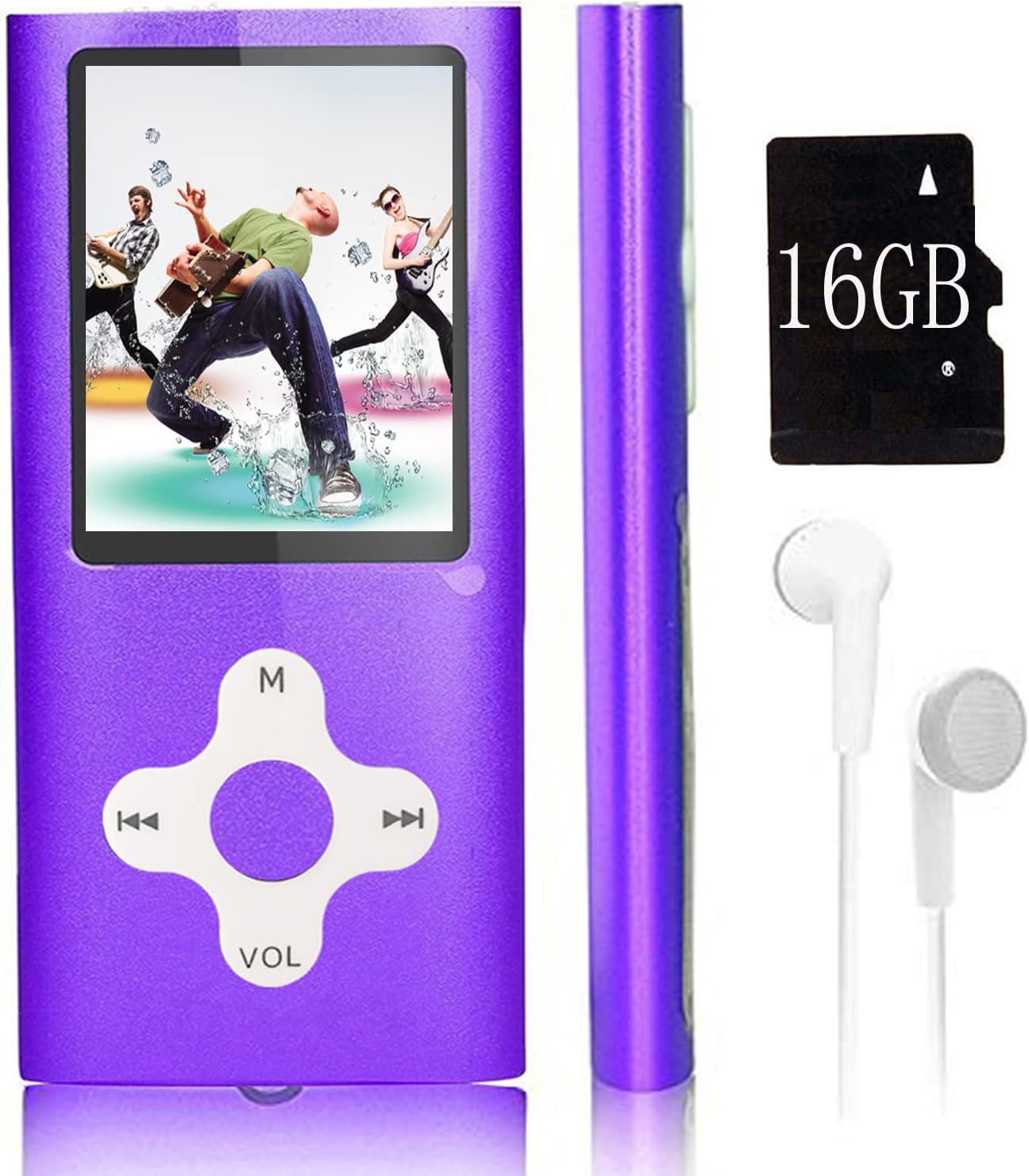
Image: The Xidehuy MP3 Player in violet, shown with a memory card (note: product includes 32GB, image shows 16GB) and white earphones. The player features a 1.8-inch LCD screen and circular navigation buttons.
Produkt overview
Kontrol og porte
The MP3 player features a 1.8-inch LCD screen and a circular control pad. The control pad typically includes:
- M (Menu/Mode): Accesses menus or changes modes.
- Play/Pause/Confirm: Central button for playback control and selection.
- Forrige/spol tilbage: Navigates to the previous track or rewinds.
- Næste/spol frem: Navigates to the next track or fast forwards.
- VOL (lydstyrke): Justerer lydstyrken.
Side ports typically include a Mini USB port for charging and data transfer, and a 3.5mm audio jack for earphones.
Opsætning
1. Opladning af enheden
- Connect the provided USB cable to the MP3 player's Mini USB port.
- Tilslut den anden ende af USB-kablet til en computers USB-port eller en kompatibel USB-vægadapter (medfølger ikke).
- The device will begin charging. It is recommended to turn on the player before charging.
- En fuld opladning tager typisk cirka 1 time.
2. Tilslutning til en computer og overførsel Files
- Sørg for, at MP3-afspilleren er tændt.
- Tilslut MP3-afspilleren til din computer ved hjælp af USB-kablet.
- The player will appear as an external storage device (e.g., a removable disk) on your computer.
- Open the device folder. You can drag and drop music files (MP3), video files (AMV), photo files (JPEG), or e-book files (TXT) directly into the player's storage.
- Engang fileNår filerne er overført, skal du fjerne enheden fra computeren på en sikker måde, før du frakobler USB-kablet.
Betjeningsvejledning
Tænd/sluk
- To power on, press and hold the Power button (usually on the side or top) until the screen illuminates.
- For at slukke skal du trykke på og holde tænd/sluk-knappen nede, indtil enheden lukker ned.
Skærmlås/lås op
- Press the dedicated lock/unlock button (if available) or a specific combination (refer to on-screen prompts) to lock or unlock the screen and controls.
Grundlæggende navigation
- Use the directional buttons on the control pad to navigate through menus.
- Press the central Play/Pause/Confirm button to select an option.
- Press the 'M' (Menu) button to go back to the previous menu or access main menu options.
Musikafspilning
- Vælg "Musik" fra hovedmenuen.
- Browse your music files eller mapper.
- Vælg en sang for at starte afspilningen.
- Use the Play/Pause button to pause or resume.
- Brug knapperne Forrige/Næste til at springe numre over.
- Juster lydstyrken ved hjælp af VOL-knapperne.
- Playback modes include Normal, Repeat Once, Repeat All, and Random. These can usually be accessed via the 'M' button during playback.
Videoafspilning
The player supports AMV video format.
- Vælg "Video" fra hovedmenuen.
- Browse and select an AMV video file at spille.
- Use the control buttons for playback control.
FM radio
- Ensure earphones are connected as they act as the antenna.
- Vælg "FM-radio" i hovedmenuen.
- Brug menupunkterne til automatisk at scanne efter stationer eller indstille manuelt.
Stemmeoptagelse
- From the main menu, select "Voice Record".
- Tryk på Afspil/Pause-knappen for at starte optagelsen.
- Tryk igen for at stoppe og gemme optagelsen.
E-bog-læser
Afspilleren understøtter e-bøger i TXT-format.
- Vælg "E-bog" i hovedmenuen.
- Browse and select a TXT file at læse.
- Use the directional buttons to scroll through pages.
Foto Viewer
The player supports JPEG format photos.
- From the main menu, select "Photo Viewer".
- Browse and select a JPEG image to view.
- Use the directional buttons to navigate between images.
Opretholdelse
- Hold enheden tør. Fugt kan beskadige de interne kredsløb.
- Undgå ekstreme temperaturer. Høje temperaturer kan forkorte levetiden for elektroniske enheder.
- Undlad at tabe eller udsætte enheden for kraftige stød.
- Clean the screen and body with a soft, dry cloth. Do not use harsh chemicals or cleaning solvents.
- Opbevar enheden i et rent, støvfrit miljø, når den ikke er i brug.
Fejlfinding
| Problem | Løsning |
|---|---|
| Enheden tænder ikke. | Sørg for, at enheden er fuldt opladet. Tilslut den til en strømkilde, og prøv igen. |
| Kan ikke overføre files til enheden. | Verify the USB cable is securely connected. Ensure the device is recognized by the computer. Try a different USB port or cable. |
| Musik/Video files spiller ikke. | Tjek om file format is supported (MP3 for music, AMV for video). Ensure files er ikke beskadiget. |
| FM-radioen virker ikke. | Ensure earphones are properly plugged in, as they function as the antenna. |
| Skærmen reagerer ikke eller fryser. | Perform a soft reset by pressing and holding the Power button for 10-15 seconds until the device restarts. If a reset button is available (small pinhole), use a thin object to press it. |
Specifikationer
- Skærmstørrelse: 1.8 inches High Resolution Real Color LCD
- Intern hukommelse: 32 GB (with included memory card)
- Udvidbar hukommelse: Supports up to 64 GB MicroSD card
- Batteri: Indbygget Li-ion batteri
- Opladningstid: Cirka 1 time
- Spilletid: Cirka 5-7 timer
- Understøttede lydformater: MP3, FLAC
- Understøttede videoformater: AMV
- Understøttede fotoformater: JPEG
- Supported E-Book Formats: TXT
- Forbindelse: Mini USB 2.0
- Særlige funktioner: FM Radio, Voice Recorder, E-Book Reader, Photo Viewer
- Sprog: Simplified Chinese, English, Traditional Chinese, Japanese, Korean, Italian, etc.
- Dimensioner: 10.49 x 5.41 x 3.71 cm
- Vægt: Approximately 68 g (package not included)
Garanti og support
This Xidehuy MP3 Player comes with a Et års producentgaranti fra købsdatoen.
For any concerns regarding after-sale support, technical assistance, or warranty claims, please contact Xidehuy customer service through your purchase platform or the contact information provided with your product documentation.


