1. Introduktion
Tak for købetasing the HXSJ 2.4G Wireless Rechargeable Keyboard Mouse Combo (L99). This manual provides detailed instructions on how to set up, operate, and maintain your new keyboard and mouse set. Please read this manual carefully before use to ensure optimal performance and longevity of your product.
2. Produktfunktioner
The HXSJ L99 Keyboard Mouse Combo offers a range of features designed for enhanced gaming and office productivity:
- 2.4 GHz trådløs transmission: Provides stable and delay-free connectivity with strong anti-interference capabilities.
- Kompakt design med 96 taster: Space-saving layout, convenient for portability.
- RGB Backlight Keyboard: Enhances gaming ambiance with customizable lighting.
- Multi-function Shortcut Keys (FN Group): Allows quick access to various functions for office work and gaming.
- Adjustable DPI Mouse: 3-gear adjustable DPI (1000/1600/2400DPI) for precise cursor control.
- Ergonomisk design: Keyboard and mouse are shaped to fit the hand curve, providing comfortable use and reducing fatigue.
- Plug and Play: Easy setup via a single USB receiver.
- 19-nøgle Anti-ghosting: Ensures accurate input during intense gaming sessions.
- 7-Color Auto Changing Breathing Backlight Mouse: Aesthetic lighting for the mouse.
- Energy-saving Mouse: Går automatisk i strømsparetilstand efter 8 minutters inaktivitet.

Image: The HXSJ L99 Wireless Keyboard and Mouse Combo, showcasing dens RGB-baggrundsbelysning og ergonomiske design.
3. Opsætningsvejledning
Follow these steps to set up your HXSJ L99 Keyboard Mouse Combo:
- Pak indholdet ud: Tag forsigtigt tastaturet, musen og USB-modtageren ud af emballagen.
- Find USB-modtageren: The wireless tiny receiver is typically stored in a slot next to the battery compartment of the mouse for safe keeping.
- Tilslut modtageren: Sæt USB-modtageren i en ledig USB-port på din computer.
- Tænd: Ensure both the keyboard and mouse are powered on. The keyboard usually has a power switch, and the mouse will activate once the receiver is connected and it detects movement.
- Automatisk forbindelse: The keyboard and mouse should automatically connect to your computer. No additional drivers are typically required for basic functionality.
- Opladning: If the devices are low on power, connect the provided Type-C to USB charging cable to the keyboard and a USB power source. The mouse is also rechargeable.

Image: Illustration showing the USB receiver being inserted into a computer's USB port, and the keyboard and mouse in use.
4. Betjeningsvejledning
4.1 Tastaturfunktioner
Tastaturet har forskellige funktionstastekombinationer for forbedret kontrol:
- Backlight Switching: Trykke FN + 1, 2, 3, 4, or 5 to cycle through different backlight modes (continuous flow, colorful horse racing, colorful cyclic breathing, colorful gradient, seven sets of monochrome).
- Backlight Brightness Control: Bruge FN + ↑ for at øge lysstyrken og FN + ↓ to decrease brightness (3 levels of adjustment).
- Backlight Breathing/Racing Speed Control: Adjust speed with FN + ← (reduces frequency period) and FN + → (extends frequency period) (4 steps of adjustment).
- WIN Key Lock Function: Trykke WIN + L to lock or unlock the WIN key function.
- Game Direction Keys Exchange: Bruge FN + W. to swap WASD keys with arrow keys (↑↓←→). Default is normal function.
- Baggrundsbelysning til/fra: Trykke FN + PGDN to turn the backlight off or on.
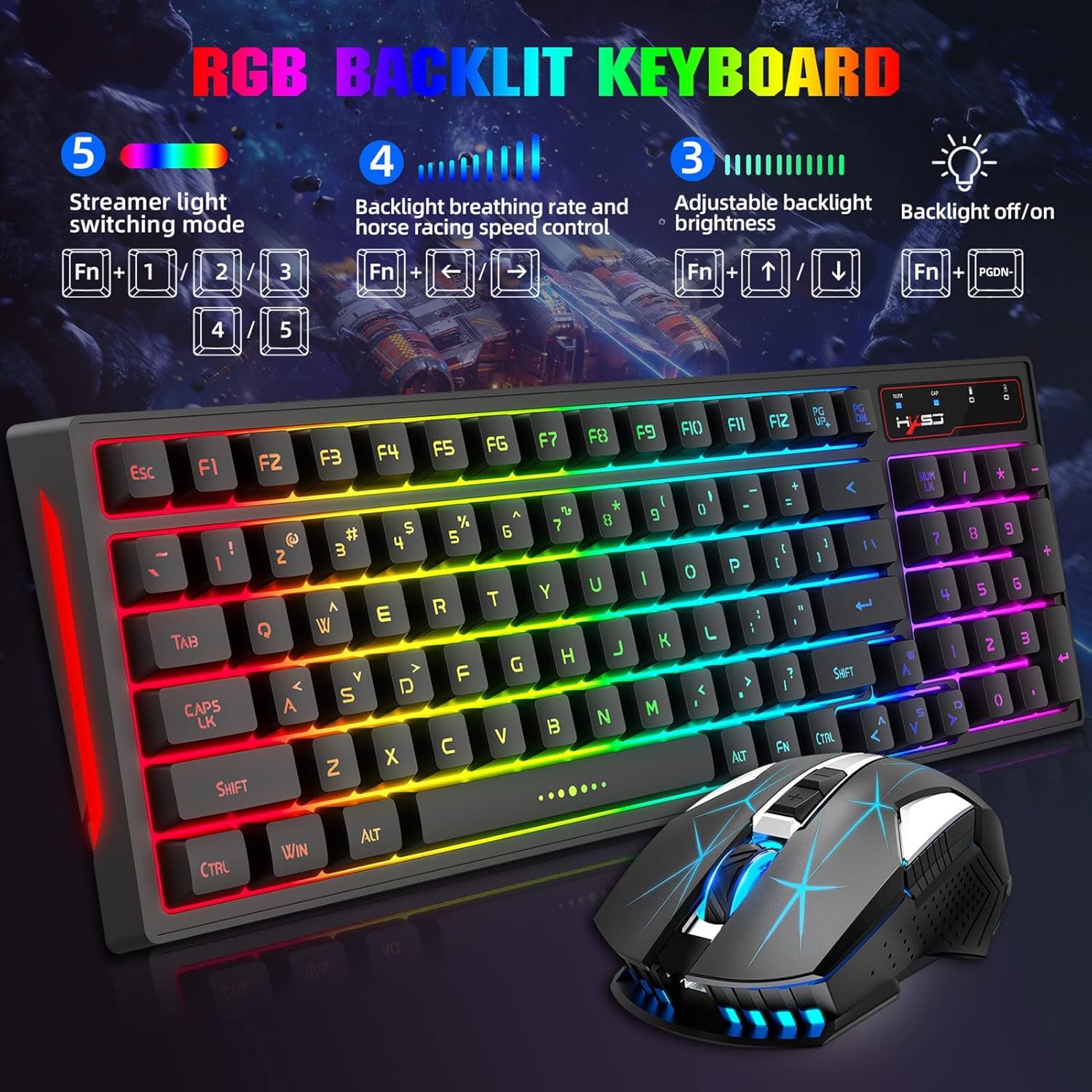
Image: Diagram illustrating the keyboard's FN key combinations for backlight control, brightness, and speed adjustments.
4.2 Musens funktioner
- DPI-justering: The mouse features three adjustable DPI levels: 1000, 1600, and 2400 DPI. Use the DPI button (usually located near the scroll wheel) to cycle through these settings for desired cursor sensitivity.
- Energisparetilstand: To conserve battery life, the mouse will automatically enter a power-saving mode if not used for over 8 minutes. Move the mouse or click a button to wake it up.

Image: Close-up of the HXSJ L99 mouse, highlighting its ergonomic shape and RGB lighting.
5. Vedligeholdelse
Proper maintenance ensures the longevity and optimal performance of your HXSJ L99 combo:
- Rensning: Brug en blød, tør klud til at tørre tastatur og mus af. Ved genstridigt snavs, tør letamp cloth with mild soap can be used, but ensure no liquid enters the device. Avoid harsh chemicals or abrasive cleaners.
- Rengøring af tastatur: For deeper cleaning, keycaps can be carefully removed (if designed to be removable) and cleaned separately. Ensure they are completely dry before reattaching.
- Opladning: Recharge the devices when the battery indicator shows low power. Avoid overcharging for extended periods.
- Opbevaring: Når tastatur og mus ikke er i brug i længere perioder, skal de opbevares køligt og tørt, væk fra direkte sollys og ekstreme temperaturer.
- USB-modtager: Always store the USB receiver in its designated slot within the mouse when transporting the combo to prevent loss.
6. Fejlfinding
| Problem | Mulig årsag | Løsning |
|---|---|---|
| Tastatur/mus reagerer ikke | Low battery; USB receiver disconnected; Interference; Device not paired. | Charge devices; Re-insert USB receiver; Move closer to receiver; Try a different USB port; Re-pair if necessary (refer to setup guide). |
| Forsinket eller forsinket respons | Distance from receiver; Interference from other wireless devices. | Reduce distance between devices and receiver; Move away from other 2.4GHz devices (e.g., Wi-Fi routers). |
| Baggrundslys virker ikke | Baggrundsbelysningen er slukket; Lavt batteri. | Trykke FN + PGDN to toggle backlight; Charge the keyboard. |
| Musemarkøren er uregelmæssig eller bevæger sig ikke jævnt | Snavset sensor; Uegnet overflade; Lavt batteri. | Rengør den optiske sensor; Brug på en ren, ikke-reflekterende musemåtte; Oplad musen. |
7. Specifikationer
| Feature | Detalje |
|---|---|
| Mærke | HXSJ |
| Modelnummer | L99 |
| Forbindelse | 2.4G trådløs |
| Tastaturtaster | 96 nøgler |
| Tastaturbaggrundslys | RGB (flere tilstande) |
| Mus DPI | 1000/1600/2400 DPI (Justerbar) |
| Museknapper | 6 Knapper |
| Musens baggrundslys | 7-color auto changing breathing backlight |
| Strømkilde | Batteridrevet (genopladeligt) |
| Kompatibilitet | PC (Windows, macOS compatible) |
| Varens vægt | 750 g |
8. Garanti og support
For warranty information and technical support, please refer to the official HXSJ webwebstedet eller kontakt deres kundeservice direkte. Gem din købskvittering som købsbevis i tilfælde af garantikrav.
For yderligere hjælp kan du besøge HXSJ-butik på Amazon.


