Produkt overview
The SWISSTEN Elegant Bluetooth Headphones are designed for versatile audio playback, offering high-quality sound and multiple connectivity options. These headphones feature Bluetooth wireless connectivity, an integrated FM radio tuner, a microSD card slot for direct music playback, a 3.5mm AUX audio input, and a built-in hands-free microphone. The earcups are pivotable for enhanced comfort during use.

Figur 1: Front view of the SWISSTEN Elegant Bluetooth Headphones, showcasing the sleek black design and earcups.
Pakkens indhold
Når du åbner pakken, skal du sørge for, at alle komponenter er til stede:
- SWISSTEN Elegant Bluetooth Headphones
- USB opladningskabel
- 3.5mm Audio Cable (AUX)
- Brugermanual
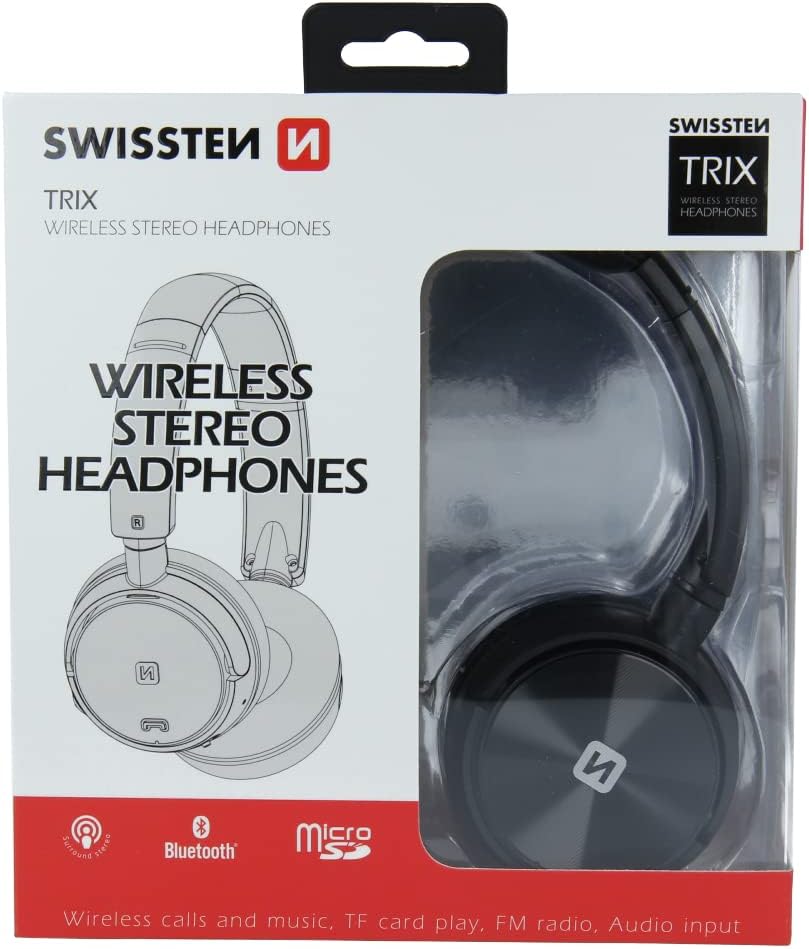
Figur 2: Retail packaging of the SWISSTEN Elegant Bluetooth Headphones, showing the product and key features.
Opsætning
Opladning af hovedtelefoner
Before first use, fully charge the headphones. Connect the supplied USB charging cable to the micro USB port on the headphones and the other end to a USB power source (e.g., computer USB port, USB wall adapter). The charging indicator light will illuminate during charging and turn off when fully charged. A full charge takes approximately 2 hours.
Tænd/sluk
- For at tænde: Tryk på tænd/sluk-knappen, og hold den nede, indtil indikatorlampen blinker.
- For at slukke: Tryk på tænd/sluk-knappen, og hold den nede, indtil indikatorlampen slukker.

Figur 3: Nærbillede view of the headphone earcup, highlighting the control buttons, charging port, and 3.5mm audio jack.
Betjeningsvejledning
Bluetooth-parring
- Sørg for, at hovedtelefonerne er slukket.
- Press and hold the Power button for approximately 5-7 seconds until the indicator light flashes blue and red alternately, indicating pairing mode.
- Aktiver Bluetooth på din enhed (smartphone, tablet, computer) og søg efter tilgængelige enheder.
- Select "SWISSTEN SW1010" (or similar name) from the list of found devices.
- Once paired, the indicator light will flash blue slowly.
Bluetooth-rækkevidden er cirka 10 meter (33 fod).
Music Playback (Bluetooth/MicroSD/AUX)
- Bluetooth-tilstand: After successful pairing, play music from your connected device. Use the headphone controls for Play/Pause, Next/Previous Track, and Volume adjustment.
- MicroSD-korttilstand: Insert a microSD card (up to 32GB) with MP3, WMA, or WAV audio files into the designated slot. The headphones will automatically switch to microSD mode and begin playback.
- AUX-tilstand: Connect one end of the 3.5mm audio cable to the headphone's AUX port and the other end to your audio source. The headphones will automatically switch to AUX mode. Note: In AUX mode, controls on the headphones may be limited; control playback from your audio source.
Betjening af FM-radio
- Tænd for hovedtelefonerne.
- Press the Mode button (often labeled 'M' or similar) to switch to FM Radio mode.
- Tryk én gang på Afspil/Pause-knappen for automatisk at scanne og gemme tilgængelige FM-stationer.
- Use the Next/Previous Track buttons to navigate between saved stations.
The FM frequency range is 87.5-108 MHz.
Håndfri opkald
- Besvar opkald: Tryk én gang på knappen Afspil/Pause.
- Afslut opkald: Press the Play/Pause button once during a call.
- Afvis opkald: Tryk og hold knappen Afspil/Pause nede i 2 sekunder.
- Genopkald sidste nummer: Dobbelttryk på Play/Pause-knappen.

Figur 4: A person wearing the SWISSTEN Elegant Bluetooth Headphones, demonstrating their comfortable fit.
Opretholdelse
- Rensning: Brug en blød, tør klud til at rengøre hovedtelefonerne. Brug ikke slibende rengøringsmidler eller opløsningsmidler.
- Opbevaring: Opbevar hovedtelefonerne et køligt, tørt sted væk fra direkte sollys og ekstreme temperaturer.
- Batteripleje: For at forlænge batteriets levetid bør du undgå at aflade batteriet helt ofte. Oplad hovedtelefonerne regelmæssigt, selvom de ikke er i brug i længere perioder.
- Vandeksponering: Disse hovedtelefoner er ikke vandtætte. Undgå udsættelse for vand eller overdreven fugt.
Fejlfinding
| Problem | Mulig årsag | Løsning |
|---|---|---|
| Hovedtelefonerne tændes ikke. | Lavt batteri. | Oplad hovedtelefonerne helt. |
| Kan ikke parres via Bluetooth. | Hovedtelefoner er ikke i parringstilstand; enhedens Bluetooth er slået fra; for langt fra enheden. | Ensure headphones are in pairing mode (flashing blue/red). Turn on Bluetooth on your device. Move headphones closer to the device (within 10m). |
| Ingen lyd. | Lydstyrken er for lav; forkert tilstand valgt; AUX-kabel er ikke sat helt i. | Increase volume on headphones and connected device. Ensure correct mode (Bluetooth, MicroSD, AUX, FM) is selected. Re-insert AUX cable firmly. |
| Dårlig FM-radiomodtagelse. | Svagt signal; interferens. | Move to an area with better signal. Re-scan stations. |
Specifikationer
| Feature | Detalje |
|---|---|
| Modelnummer | SW1010 |
| Bluetooth version | V4.2 |
| Understøttet Bluetooth Profiles | A2DP, AVRCP |
| Supported Audio Formats (MicroSD) | MP3 (8-320 Kbps), WMA (5-320 Kbps), WAV (16-1536 Kbps) |
| FM-radiofrekvensområde | 87.5-108 MHz |
| Højttaler diameter | 40 mm |
| Impedans | 32 ohm |
| Følsomhed | 108 +/- 3 dB |
| Frekvensrespons | 20 – 20,000 Hz |
| Driftsområde | 10 m |
| Opladningstid | 2 timer |
| Driftstid | 6 – 8 timer |
| Forbindelse | Wireless Bluetooth, 3.5mm Jack |
| Særlige funktioner | Microphone included, FM Radio, MicroSD slot |
| Formfaktor | Over-Ear (Supra-Auriculaire) |
| Materiale | Faux Leather (Simili cuir) |
Garanti og support
For warranty information and technical support, please refer to the official SWISSTEN webwebstedet eller kontakt din forhandler. Gem din købsbevis til garantikrav.
Fabrikant: SWISSTEN
ASIN: B0BC9F9LWM


