1. Introduktion
The ORDRO EP8 is a 4K head-mounted camcorder designed for hands-free video recording. It features a SONY STARVIS CMOS sensor, 2-axis gimbal stabilization, Wi-Fi connectivity for app control, and a wide-angle lens. This manual provides detailed instructions for setting up, operating, and maintaining your EP8 camcorder.

Image 1.1: The ORDRO EP8 4K Head-Mounted Camcorder and included accessories.
2. Hvad er der i æsken
Verify that all items listed below are included in your package.
- EP8 Head Camera x1
- Bracelet Remote Control x1
- Fast Charger x1
- USB-kabel x1
- Sæt skrue x1
- Head Band x1
- Rubber cap x1
- Krog x2
- Brugervejledning x1

Image 2.1: All components included in the ORDRO EP8 product package.
3. Produktet er slutview
Familiarize yourself with the main components of the ORDRO EP8 camcorder.

Image 3.1: Key features of the ORDRO EP8, including the 1/2.8 inch high-quality sensor, 4K high definition video record capabilities, and FHD optical lens.
- Kamerahus: Contains the lens, sensor, and control buttons.
- Pandebånd: Adjustable strap for comfortable head-mounting.
- 2-Axis Gimbal Stabilizer: Internal mechanism for reducing video shake.
- Micro SD -kortplads: For inserting memory cards (up to 128GB supported).
- USB-C-port: Til opladning og dataoverførsel.
- Fjernbetjening: Wearable bracelet for convenient operation.
4. Opsætning
4.1 Opladning af batteriet
The EP8 camcorder uses a built-in Lithium Ion battery.
- Connect the provided USB cable to the camcorder's USB-C port.
- Connect the other end of the USB cable to the fast charger.
- Plug the fast charger into a power outlet.
- A full charge takes approximately 70 minutes. The camera can be used while charging.
4.2 Indsættelse af et Micro SD-kort
A Micro SD card (not always included, check package contents) is required to store recordings. The EP8 supports cards up to 128GB.
- Locate the Micro SD card slot on the camcorder.
- Isæt Micro SD-kortet med de gyldne kontakter nedad, indtil det klikker på plads.
- To remove, gently push the card in until it clicks, then release. The card will eject slightly.
- It is recommended to format the SD card using the camera's settings via the mobile app for optimal performance.
4.3 Fastgørelse af pandebåndet
The camcorder attaches to the headband for hands-free operation.
- Align the camcorder with the mounting point on the headband.
- Secure the camcorder using the provided set screw.
- Adjust the headband for a comfortable and stable fit on your head.

Image 4.1: The ORDRO EP8 features a 1/4" standard screw hole, allowing it to be mounted on the headband, tripods, or other brackets.
5. Betjeningsvejledning
5.1 Tænd/sluk
- Tænd: Long press the power button on the camcorder.
- Sluk: Long press the power button again until the device shuts down.
5.2 Optagelse af video
You can start and stop recording using either the camcorder's button or the remote control.
- Start optagelse: Press the record button once. A voice prompt will indicate "start recording" (note: voice volume may be low outdoors).
- Stop optagelse: Press the record button once again. A voice prompt will indicate "stop recording".
- Vigtig bemærkning: Avoid pressing the record button on the camera for too long, as this may inadvertently switch the image orientation from 16:9 to 9:16. Use the remote control for consistent recording initiation.
5.3 Video Resolutions and Modes
The EP8 supports various recording resolutions and modes:
- 4K (3840x2160p) at 60FPS: For highest quality and smoothness.
- 2.7K ved 30FPS
- 1080P ved 60FPS
- Vertical Screen (1920P) at 30fps/60fps: Ideal for social media platforms. This mode can be activated by a long press on the record button or via the mobile app.

Image 5.1: The ORDRO EP8 features an upgraded 2-axis gimbal for stability, hands-free recording, a 130° wide-angle lens, and a vertical shooting mode for social media content.
5.4 Wi-Fi and Mobile App Control (OD Cam)
The EP8 features an upgraded Wi-Fi system for stable connection to the "OD Cam" mobile application. The app allows for real-time preview, settings adjustment, video editing, and direct sharing.
- Download appen: Søg efter "OD Cam" in your smartphone's app store and install it.
- Enable Wi-Fi on Camera: Two fast clicks on the power button will enable Bluetooth (which is part of the Wi-Fi connection process).
- Opret forbindelse til kameraets Wi-Fi:
- Gå til din telefons Wi-Fi-indstillinger.
- Locate a Wi-Fi network starting with "EP8_".
- Connect to this network. The default password is 12345678.
- Open OD Cam App: Once connected, open the "OD Cam" app to control the camcorder, view live footage, and manage settings.
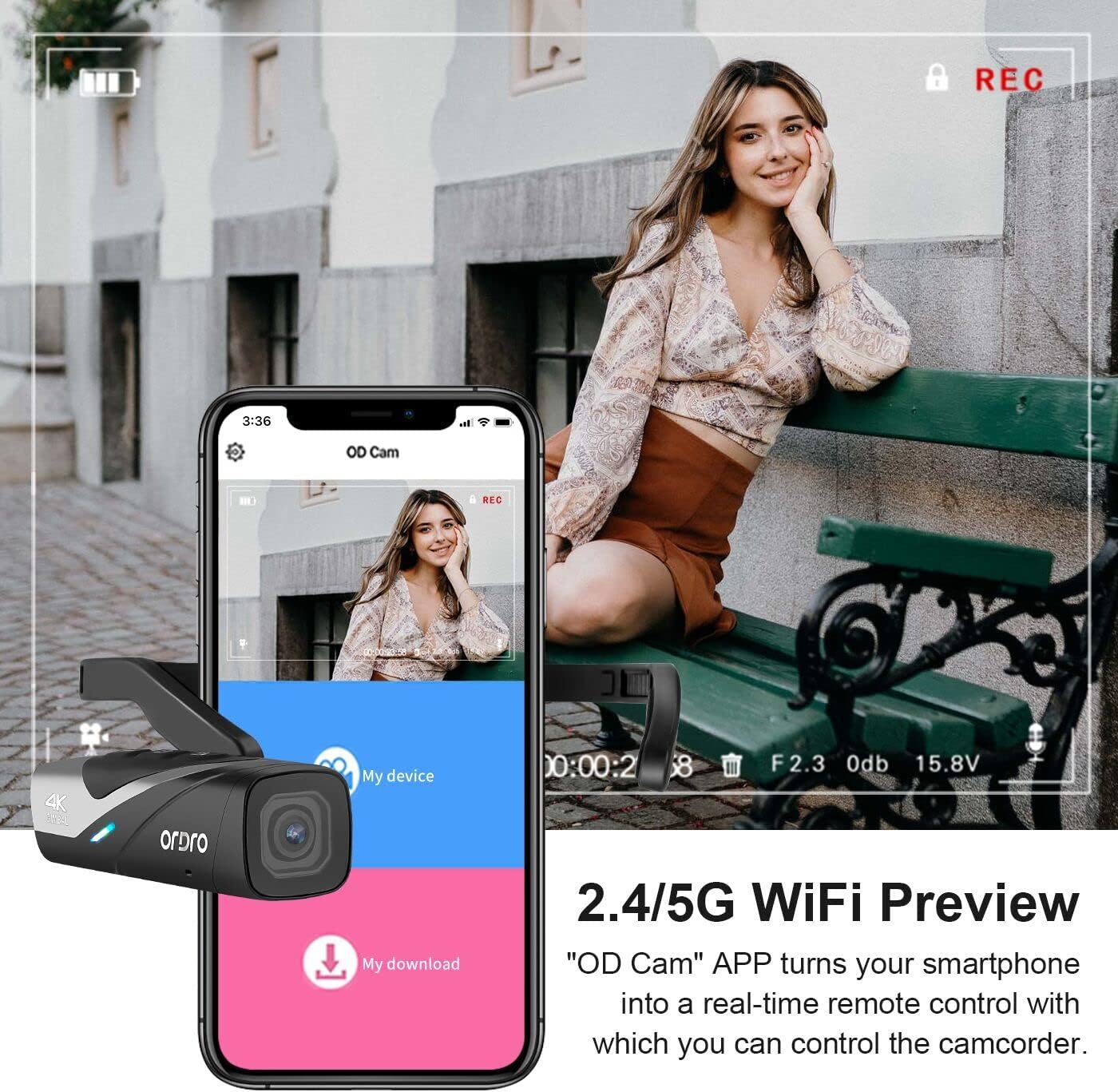
Image 5.2: The "OD Cam" app provides a real-time remote control interface for the ORDRO EP8 camcorder via 2.4/5G Wi-Fi.
5.5 Avancerede funktioner
- 2-Axis Gimbal Stabilization: The built-in gimbal automatically stabilizes footage, reducing shakiness during movement.
- 130° vidvinkel View & Distortion Calibration: The spherical wide-angle glass lens captures a broad field of view. Enable distortion calibration via the app to correct image distortion.
- Time Lapse, Loop Record, Slow Motion: These modes can be accessed and configured through the OD Cam app.
6. Vedligeholdelse
- Rengøring af linsen: Brug en blød, fnugfri klud, der er specielt designet til kameralinser. Undgå slibende materialer eller barske kemikalier.
- Rengøring af kroppen: Wipe the camcorder body with a dry or slightly damp blød klud.
- Opbevaring: Opbevar videokameraet et køligt og tørt sted, væk fra direkte sollys og ekstreme temperaturer.
- Batteripleje: For long-term storage, charge the battery to about 50% every few months to maintain its health.
7. Fejlfinding
| Problem | Mulig årsag | Løsning |
|---|---|---|
| Kameraet tænder ikke. | Lavt batteri. | Oplad batteriet helt. |
| Kan ikke oprette forbindelse til Wi-Fi-appen. | Incorrect Wi-Fi password; Wi-Fi not enabled on camera; App not installed. | Ensure Wi-Fi is enabled (two fast clicks on power button). Verify password 12345678. Reinstall "OD Cam" app. |
| Recording voice prompts are too low. | Environmental noise; fixed volume level. | Move to a quieter environment or rely on visual indicators. Volume is not adjustable. |
| Camera gets hot during use. | Normal operation, especially during extended 4K recording. | This is expected. If it becomes excessively hot, discontinue use and allow it to cool. |
| Video orientation changes unexpectedly. | Record button on camera pressed too long. | Use the bracelet remote control for starting/stopping recordings to avoid accidental mode changes. |
| Footage appears shaky despite gimbal. | Extreme movement; gimbal limits exceeded. | While the 2-axis gimbal provides stabilization, very rapid or jerky movements may still result in some shake. Try to maintain smoother movements. |
8. Specifikationer
| Feature | Detalje |
|---|---|
| Mærke | ORDRO |
| Modelnummer | EP8 |
| Sensor | SONY STARVIS CMOS (8.0 Megapixel) |
| Video opløsning | 4K (3840x2160p) 60FPS, 2.7K 30FPS, 1080P 60FPS, 1920P 30/60FPS (Vertical) |
| Foto opløsning | 20 MP |
| Billedstabilisering | 2-Axis Gimbal |
| Linse | 130° Wide-Angle (adjustable 130°-90°), FHD Optical Lens, 1.8 f Maximum Aperture |
| Forbindelse | Wi-Fi (2.4/5G), USB-C |
| Opbevaring | Micro SD (op til 128 GB) |
| Batteri | 1 lithium-ion batteri (medfølger) |
| Opladningstid | Ca. 70 minutter til fuld opladning |
| Varens vægt | 3.17 ounce |
| Særlige funktioner | 1/4 screw mount-shoe, Time Lapse, Wireless, Mobile App Control |
9. Garanti og support
For warranty information and technical support, please refer to the official ORDRO webwebstedet eller kontakt deres kundeservice direkte. Behold din købskvittering som købsbevis.


