1. Introduktion
This manual provides detailed instructions for the assembly, operation, and maintenance of your Dardoo Racing Simulator Cockpit, Model racing simulator 54. This cockpit is designed to enhance your racing simulation experience by providing a stable and adjustable platform for various racing peripherals. Please read this manual thoroughly before assembly and use to ensure proper setup and safe operation.

Billede 1.1: Hovedbillede view of the Dardoo Racing Simulator Cockpit.
2. Sikkerhedsoplysninger
- Sørg for, at alle bolte og fastgørelseselementer er forsvarligt fastspændt før brug. Kontroller regelmæssigt for løse forbindelser.
- Overskrid ikke den maksimale lastekapacitet på 500 pund.
- Hold hænder og fingre væk fra bevægelige dele under justering for at undgå klemning.
- Placer cockpittet på en stabil, plan overflade for at forhindre, at det vælter.
- This product is intended for adult use. Keep small parts away from children.
3. Pakkens indhold
Kontroller, at alle nedenstående komponenter er til stede, før monteringen påbegyndes. Hvis der mangler eller er beskadigede dele, bedes du kontakte kundesupport.

Image 3.1: All components and tools included with the cockpit.
- Main Frame Components (various tubes and brackets)
- Ratplatform
- Pedal platform
- Shifter Platform
- Seat Mounting Brackets
- Hardware Kit (bolts, nuts, washers, wrenches)
- Floor Protectors/Feet
4. Monteringsvejledning
Follow these steps carefully to assemble your racing simulator cockpit. It is recommended to have a second person assist with some steps.
4.1. Base Frame Assembly
Connect the main frame sections using the provided bolts and U-shaped clamps. Ensure all connections are secure but do not fully tighten until all sections are aligned.
Video 4.1: Detailed assembly guide for the Dardoo Racing Simulator Cockpit.
4.2. Steering Wheel Platform Attachment
Attach the steering wheel platform to the main frame. This platform supports two levels of height and angle adjustment. Use the appropriate bolts and secure tightly.

Image 4.2: Illustration of the adjustable steering wheel platform.
4.3. Pedal Platform Installation
Install the pedal platform. This platform is customizable for angle and distance to suit your preference.

Image 4.3: Illustration of the adjustable pedal platform.
4.4. Shifter Platform Setup
Attach the shifter platform. This platform offers flexibility for left/right driving configurations and height adjustments.

Image 4.4: Illustration of the adjustable shift lever platform.
4.5. Seat Mounting
Mount your racing seat (not included) to the seat mounting part. The design allows for adjustable usage width to match most seats on the market.

Image 4.5: Illustration of the adjustable seat mounting part.
Video 4.6: Additional assembly steps and overview of the cockpit.
5. Justeringer
The Dardoo Racing Simulator Cockpit offers multiple adjustment points for optimal comfort and performance:
- Ratplatform: Two levels of height and angle adjustment (0°-15°-30°) for comfortable hand positioning.
- Pedalplatform: Customizable angle and distance to accommodate various driving styles and pedal sets.
- Shifter Lever Platform: Adjustable for left/right driving and height to suit individual preferences.
- Seat Stand: Designed to match most racing seats on the market with adjustable usage width.

Billede 5.1: Overview of the cockpit's fully adjustable features.
6. Kompatibilitet
This racing simulator cockpit is designed for wide compatibility with various racing peripherals:
- Compatible with almost all Logitech, Fanatec, and Thrustmaster series racing steering wheels, pedals, and gears.
- Supports Logitech G29/G920/G923.
- Supports Thrustmaster T300/T248/T818/T248X/TX.
- Supports Fanatec CSL-DD GT-DD-PRO.
- Compatible with 90% of racing seats on the market.
- Suitable for direct drive steering wheels and TV bracket mounting.
- Supports DIY punching for custom setups.

Image 6.1: Visual representation of compatible racing brands and gaming platforms.
7. Betjeningsvejledning
Once assembled and your racing peripherals are securely mounted, ensure all connections are tight. Adjust the steering wheel, pedal, and shifter platforms to your preferred ergonomic position. The cockpit provides a stable base for an immersive racing experience. Remember that electronic equipment such as steering wheels, pedals, and shifters are not included with the cockpit.

Image 7.1: A complete racing simulator setup using the Dardoo cockpit.
8. Vedligeholdelse
- Regularly inspect all bolts and fasteners for tightness. Re-tighten as necessary.
- Rengør metaloverfladerne med en blød,amp klæde. Undgå slibende rengøringsmidler, der kan beskadige finishen.
- Check for any signs of wear or damage to the frame. If damage is found, discontinue use and contact customer support.
9. Fejlfinding
- Ustabilitet: Ensure the cockpit is on a flat surface and all adjustable feet are making firm contact. Check all frame connections for tightness.
- Vanskeligheder med at tilpasse sig: Loosen adjustment bolts sufficiently before attempting to move components. Do not force adjustments.
- Manglende dele: Refer to the package contents list. If any parts are missing, contact customer support immediately.
10. Specifikationer
- Modelnummer: racing simulator 54
- Produktdimensioner: 52.3 x 32 x 27.5 tommer
- Varens vægt: 43.2 pund
- Maksimal belastningskapacitet: 500 pund
- Rammemateriale: Alloy Steel (50x50mm large round tubes)
- Fabrikant: Dardoo
- Dato først tilgængelig: 15. august 2022
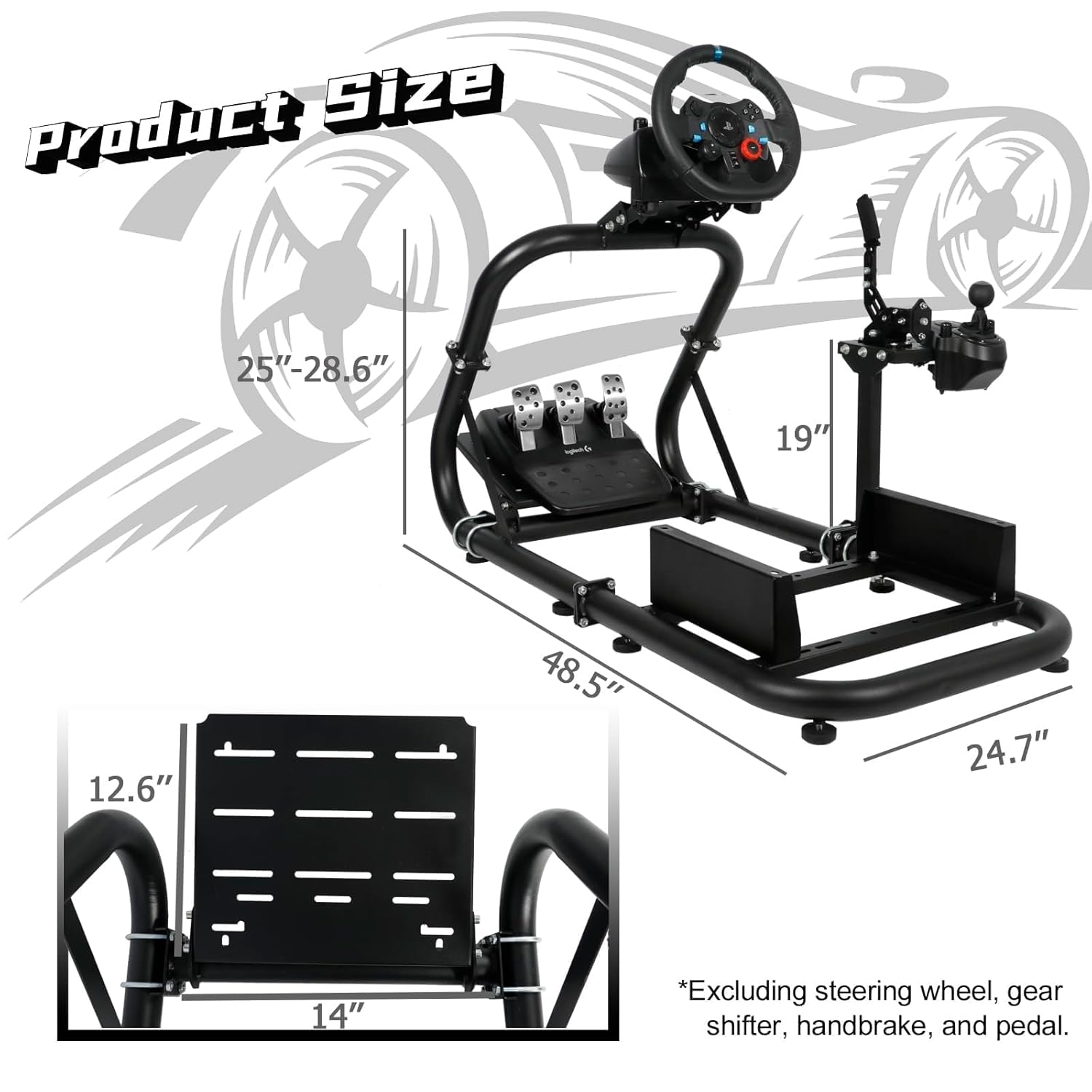
Image 10.1: Detailed dimensions of the Dardoo Racing Simulator Cockpit.
11. Garanti og support
For warranty information or technical support, please refer to the product packaging or contact Dardoo customer service directly. Keep your purchase receipt as proof of purchase.


