1. Introduktion
This manual provides essential instructions for the safe and efficient use of your Alcatel 3085 mobile phone. Please read this guide thoroughly before operating the device to ensure proper functionality and to prevent damage. Keep this manual for future reference.
2. Pakkens indhold
Bekræft, at din pakke indeholder følgende varer:
- Alcatel 3085 Mobiltelefon
- Batteri
- Oplader
- Hurtig startvejledning
- (Optional) Charging Cradle
Hvis der mangler eller er beskadigede varer, bedes du kontakte din forhandler.
3. Opsætning
3.1. Isætning af SIM-kort og batteri
- Fjern bagdækslet: Lirk forsigtigt telefonens bagdæksel op ved hjælp af det medfølgende hak.
- Indsæt SIM-kort: Locate the SIM card slot(s). Align your SIM card with the cut corner and slide it into the slot until it clicks into place. Ensure the gold contacts face downwards.
- Indsæt batteri: Place the battery into the battery compartment, ensuring the gold contacts on the battery align with the contacts in the phone.
- Replace back cover: Carefully align the back cover and press it firmly until it snaps into place.
3.2. Opladning af batteriet
Oplad telefonens batteri helt før første brug.
- Connect the charger to the charging port on the phone or place the phone in the charging cradle (if included).
- Sæt opladeren i en stikkontakt.
- The charging indicator will appear on the screen. Disconnect the charger once the battery is fully charged.
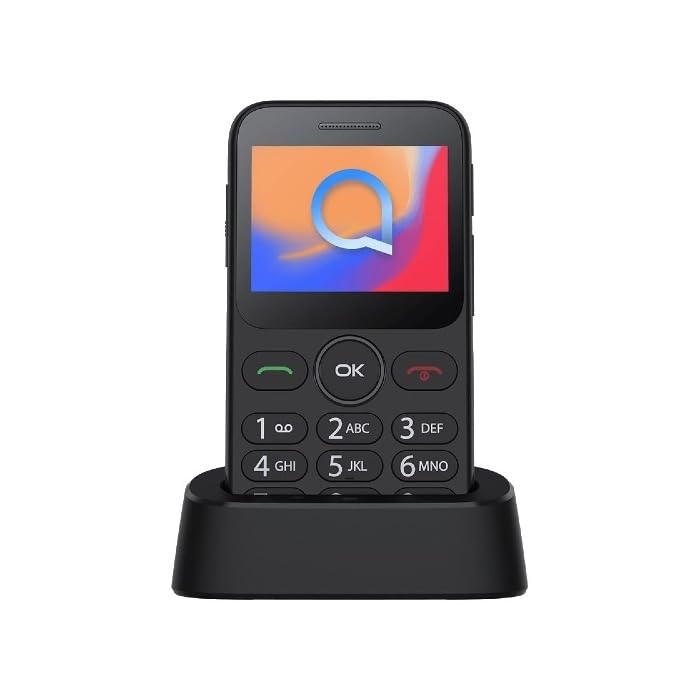
Image 1: Alcatel 3085 mobile phone placed in its charging cradle. The phone features a small color screen and a physical keypad with large, clearly labeled buttons.
4. Betjeningsvejledning
4.1. Tænd/sluk
- For at tænde: Tryk og hold på Tænd/afslut opkald knappen (rød knap), indtil skærmen lyser.
- For at slukke: Tryk og hold på Tænd/afslut opkald button until the power-off options appear, then select "Power off".
4.2. Foretage og modtage opkald
- Foretag et opkald: Indtast telefonnummeret ved hjælp af tastaturet, og tryk på Ring button (green button).
- Modtagelse af et opkald: Når telefonen ringer, tryk på Ring knappen for at svare.
- Afslutning af et opkald: Tryk på Afslut opkald knap.
4.3. Afsendelse og modtagelse af beskeder
- Naviger til Beskeder menu from the main screen.
- Select "Create new message" or "New SMS".
- Indtast modtagerens nummer, og skriv din besked ved hjælp af tastaturet.
- Tryk på "Send".
4.4. Grundlæggende navigation
- Brug Navigationstaster (up, down, left, right) to scroll through menus.
- Tryk på OK/Vælg button (center button) to confirm a selection.
- Tryk på Tilbage/Ryd button (often the right soft key) to go back to the previous screen or delete characters.
5. Vedligeholdelse og pleje
- Rensning: Use a soft, dry cloth to clean the phone's screen and body. Avoid liquid cleaners.
- Opbevaring: Opbevar telefonen et køligt og tørt sted, væk fra direkte sollys og ekstreme temperaturer.
- Batteripleje: Do not expose the battery to high temperatures or dispose of it in fire. Use only approved chargers.
- Vandtæthed: Denne telefon er ikke vandafvisende. Undgå kontakt med væsker.
6. Fejlfinding
| Problem | Mulig løsning |
|---|---|
| Telefonen tænder ikke | Sørg for, at batteriet er korrekt isat og opladet. Prøv at oplade telefonen i mindst 30 minutter. |
| Kan ikke foretage eller modtage opkald | Check if the SIM card is properly inserted. Verify that you have network coverage. Contact your service provider if the issue persists. |
| Batteriet aflades hurtigt | Reduce screen brightness. Close unused applications. Ensure the phone is not in an area with poor network signal, which can increase battery consumption. |
| Tastaturet reagerer ikke | Restart the phone. Ensure no physical obstruction is affecting the keys. |
7. Specifikationer
| Feature | Detalje |
|---|---|
| Mærke | Alcatel |
| Modelnummer | 3085 (HP02945) |
| Farve | Metallisk sort |
| ASIN | B0B8X482MH |
| Fabrikant | Alcatel |
| Softwareopdateringer garanteret indtil | Information ikke tilgængelig |
| Tilgængelighed af reservedele | Information ikke tilgængelig |
8. Garanti og support
For warranty information, please refer to the warranty card included in your product packaging or visit the official Alcatel website. For technical support, please contact Alcatel customer service through their official channels.
You can find more information and support resources on the official Alcatel webwebsted: www.alcatelmobile.com
9. Sikkerhedsoplysninger
- Forsøg ikke at skille telefonen ad eller ændre den.
- Brug kun originalt eller godkendt tilbehør.
- Avoid exposing the phone to extreme temperatures, direct sunlight, or moisture.
- Keep the phone away from medical devices, as it may interfere with their operation.
- Dispose of the phone and battery responsibly according to local regulations.


