1. Introduktion
Thank you for choosing the Bontempi Wireless Acoustic Trolley Box Model 49 1090. This device is designed to provide high-quality audio entertainment with versatile connectivity options and dynamic lighting effects. Please read this manual carefully before using the product to ensure proper operation and to maximize its lifespan. Keep this manual for future reference.
Pakkeindhold:
- Bontempi Wireless Acoustic Trolley Box (Model 49 1090)
- 2 trådløse mikrofoner
- Fjernbetjening
- USB Type-C opladerkabel
- Brugermanual
2. Sikkerhedsinstruktioner
To prevent damage to the product or injury to yourself and others, observe the following safety precautions:
- Udsæt ikke enheden for regn, fugt eller ekstreme temperaturer.
- Åbn ikke c'enasing. Overlad al service til kvalificeret personale.
- Keep the device away from heat sources such as radiators, stoves, or other heat-producing appliances.
- Use only the provided USB Type-C charging cable.
- Sørg for ordentlig ventilation; bloker ikke ventilationsåbninger.
- Bortskaf batterier og elektroniske komponenter ansvarligt i henhold til lokale regler.
- Undgå at lytte ved høje lydstyrker i længere perioder for at forhindre høreskader.
Batterisikkerhed:
- The device contains a Lithium Ion battery. Do not attempt to replace it yourself.
- Udsæt ikke batteriet for direkte sollys eller høje temperaturer.
- If the battery leaks, avoid contact with skin and eyes. Seek medical attention if contact occurs.
3. Produktet er slutview
The Bontempi Wireless Acoustic Trolley Box is a portable speaker system featuring a retractable handle and wheels for easy transport. It includes two wireless microphones and dynamic RGB lighting for an enhanced audio-visual experience. The control panel provides comprehensive adjustments for sound and playback.
Main Unit and Components:
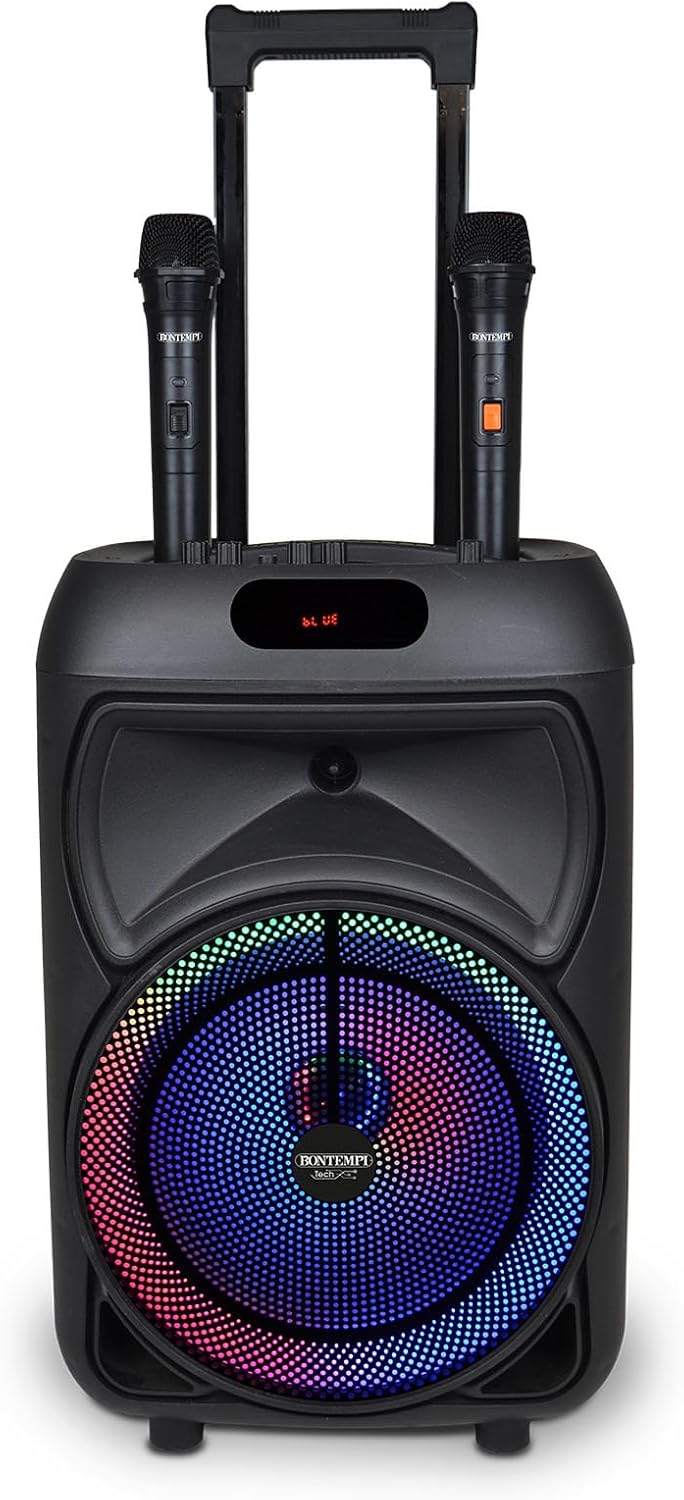
Figur 3.1: Forside view of the speaker with microphones and active RGB lighting.

Figur 3.2: Vinklet view highlighting the trolley design and portability.

Figur 3.3: Side view with the retractable handle extended.

Figur 3.4: Øverst view af kontrolpanelet.
Kontrolpanelets funktioner:
- MIC.VOL: Justerer mikrofonernes lydstyrke.
- EKKO: Controls the echo effect for the microphones.
- MIKROFON IND: Input jack for an additional wired microphone (if applicable).
- BAS: Justerer lavfrekvent lydudgang.
- DISKANT: Justerer højfrekvent lydudgang.
- EFFEKT VOLUMEN: Main volume control for the speaker and power on/off.
- USB-port: Til afspilning fra USB-flashdrev.
- TF-kortslot: Til afspilning af Micro SD-kort.
- AUX-indgang: Til tilslutning af eksterne lydenheder via et 3.5 mm kabel.
- MODE knap: Switches between input modes (Bluetooth, USB, TF, AUX, Radio).
- FORRIGE/NÆSTE-knapper: Springer numre over eller indstiller radiostationer.
- PLAY/PAUSE knap: Afspiller eller sætter lydafspilning på pause.
- REC-knap: Initiates voice recording (requires USB/TF storage).
- Mikrofonprioritet-knap: Lowers music volume when microphone is in use.
- RGB-lysknap: Activates or changes RGB lighting effects.
- Vise: Viser aktuel tilstand, spornummer eller radiofrekvens.
- USB Type-C-port: Til opladning af det interne litiumbatteri.
4. Opsætning
4.1 Indledende opladning
- Before first use, fully charge the speaker's internal lithium battery.
- Connect the provided USB Type-C charging cable to the USB Type-C port on the speaker.
- Tilslut den anden ende af kablet til en kompatibel USB-strømadapter (medfølger ikke) eller en USB-port på computeren.
- The charging indicator (if present) will illuminate during charging and turn off or change color when fully charged.
4.2 Mikrofonopsætning
The wireless microphones are typically pre-paired. Ensure they have power:
- Open the battery compartment of each wireless microphone.
- Insert the required batteries (e.g., AA or AAA, not specified but common for wireless mics) according to the polarity markings.
- Tænd mikrofonerne ved hjælp af deres respektive tænd/sluk-knapper.
4.3 Tænd/sluk
- For at tænde højttaleren skal du dreje STRØMVOLUMEN knob clockwise until you hear a click and the display illuminates.
- For at slukke skal du dreje STRØMVOLUMEN knob counter-clockwise until you hear a click and the display turns off.
5. Betjeningsvejledning
5.1 Trådløs (Bluetooth) forbindelse
- Power on the speaker. The display will show 'BLUE' or 'BT' indicating Bluetooth mode, or press the MODE button until Bluetooth mode is selected.
- Aktiver Bluetooth på din smartphone, tablet eller pc, og søg efter tilgængelige enheder.
- Select 'Bontempi 49 1090' (or similar name) from the list of devices.
- Once paired, the speaker will emit a confirmation sound, and the display will indicate a successful connection.
5.2 USB/Micro SD-afspilning
- Indsæt et USB-flashdrev i USB-port or a Micro SD card into the TF kort slot.
- Højttaleren skifter automatisk til USB- eller TF-tilstand og begynder at afspille lyd files. Hvis ikke, tryk på MODE knappen for at vælge den korrekte indgang.
- Brug FORR, AFSPIL/PAUSE, og NÆSTE knapper til at styre afspilning.
5.3 AUX-indgang
- Tilslut en ekstern lydenhed (f.eks. MP3-afspiller) til AUX-indgang ved hjælp af et 3.5 mm lydkabel (medfølger ikke).
- Tryk på MODE button to select AUX input.
- Styr afspilningen fra din tilsluttede enhed.
5.4 Radiofunktion
- Tryk på MODE button to select Radio mode (FM).
- Tryk og hold på AFSPIL/PAUSE button to automatically scan and save available radio stations.
- Brug FORR og NÆSTE knapper til at navigere gennem gemte stationer.
5.5 Brug af mikrofon
- Ensure wireless microphones are powered on.
- Juster mikrofonens lydstyrke ved hjælp af MIC.VOL knop.
- Apply echo effect using the EKKO knop.
- Tryk på MIC PRIORITET button to automatically lower background music when speaking into the microphone. Press again to deactivate.
- To record your voice (with music or independently), insert a USB drive or Micro SD card and press the REC button. Press again to stop recording.
5.6 TWS (ægte trådløs stereo) funktion
The TWS function allows you to connect two Bontempi Wireless Acoustic Trolley Boxes (Model 49 1090) for a stereo sound experience.
- Sørg for, at begge højttalere er tændt og i Bluetooth-tilstand, men ikke forbundet til nogen enhed.
- On one speaker (this will be the master), press and hold the MODE button (or a dedicated TWS button if present, refer to specific product markings) for a few seconds until you hear a pairing tone.
- De to højttalere vil automatisk oprette forbindelse til hinanden.
- Once connected, pair your Bluetooth device to the master speaker as described in section 5.1. Audio will now play in stereo through both speakers.
5.7 RGB-belysning
- Tryk på RGB lys knap to activate the dynamic lighting effects.
- Press the button again to cycle through different light modes or to turn off the lighting.
5.8 Fjernbetjening
The included remote control provides convenient access to most functions. Point the remote control towards the speaker's display area. Functions typically include power, mode selection, volume, track control, EQ presets, and microphone adjustments.
6. Vedligeholdelse
6.1 Rengøring
- Sluk altid for højttaleren og tag stikket ud af stikkontakten inden rengøring.
- Brug en blød, tør klud til at tørre de udvendige overflader af.
- Brug ikke slibende rengøringsmidler, voks eller opløsningsmidler.
- Undgå at fugt kommer ind i åbninger.
6.2 Opbevaring
- Opbevar højttaleren et køligt, tørt sted væk fra direkte sollys og ekstreme temperaturer.
- Hvis batteriet opbevares i længere tid, skal det oplades hver 3-6 måned for at bevare dets tilstand.
7. Fejlfinding
| Problem | Mulig årsag | Løsning |
|---|---|---|
| Ingen strøm | Battery discharged; Power knob off | Charge the speaker; Rotate POWER VOLUME knob clockwise to turn on. |
| Ingen lyd | Lydstyrken er for lav; Forkert inputtilstand; Enheden er ikke tilsluttet | Increase POWER VOLUME; Press MODE to select correct input; Ensure Bluetooth device is paired or AUX cable is connected. |
| Mikrofon virker ikke | Microphone off; Batteries low/incorrectly inserted; MIC.VOL too low | Turn on microphone; Replace/reinsert batteries; Increase MIC.VOL. |
| Problemer med Bluetooth-parring | Højttaler ikke i parringstilstand; Enhed for langt væk; Interferens | Ensure speaker is in Bluetooth mode; Move device closer; Turn off other Bluetooth devices. |
| TWS connection failure | Speakers not in TWS pairing mode; Already connected to another device | Sørg for, at begge højttalere er i Bluetooth-tilstand og ikke er forbundet til nogen enhed, før du starter TWS-parring. |
8. Specifikationer
| Feature | Detalje |
|---|---|
| Mærke | Bontempi |
| Modelnummer | 49 1090 |
| Produktmål (L x B x H) | 48 x 29 x 24 cm |
| Varens vægt | 4.5 kg |
| Batteritype | Genopladelig litiumion |
| Forbindelse | Wireless (Bluetooth), USB, Micro SD, AUX |
| Mikrofoner | 2 trådløse mikrofoner |
| Særlige funktioner | RGB Lighting, Remote Control, Display, TWS Function, Radio, Echo Effect, Microphone Volume, Equalizer, Voice Recording, Microphone Priority, USB Type-C Charging Port |
| UPC | 047663368559 |
9. Garanti og support
This Bontempi product is covered by a manufacturer's warranty. For specific warranty terms and conditions, please refer to the warranty card included with your purchase or visit the official Bontempi website. For technical support, troubleshooting assistance, or spare parts, please contact Bontempi customer service through their official channels.
Gem venligst dit købsbevis for garantikrav.


