1. Introduktion
Thank you for choosing the ENJOYWOOD E20 Laser Engraver and Cutter. This machine is designed for precision engraving and cutting a variety of materials, featuring a powerful 20W laser output and advanced compressed spot technology. This manual provides essential information for safe operation, setup, maintenance, and troubleshooting to ensure optimal performance and longevity of your device.
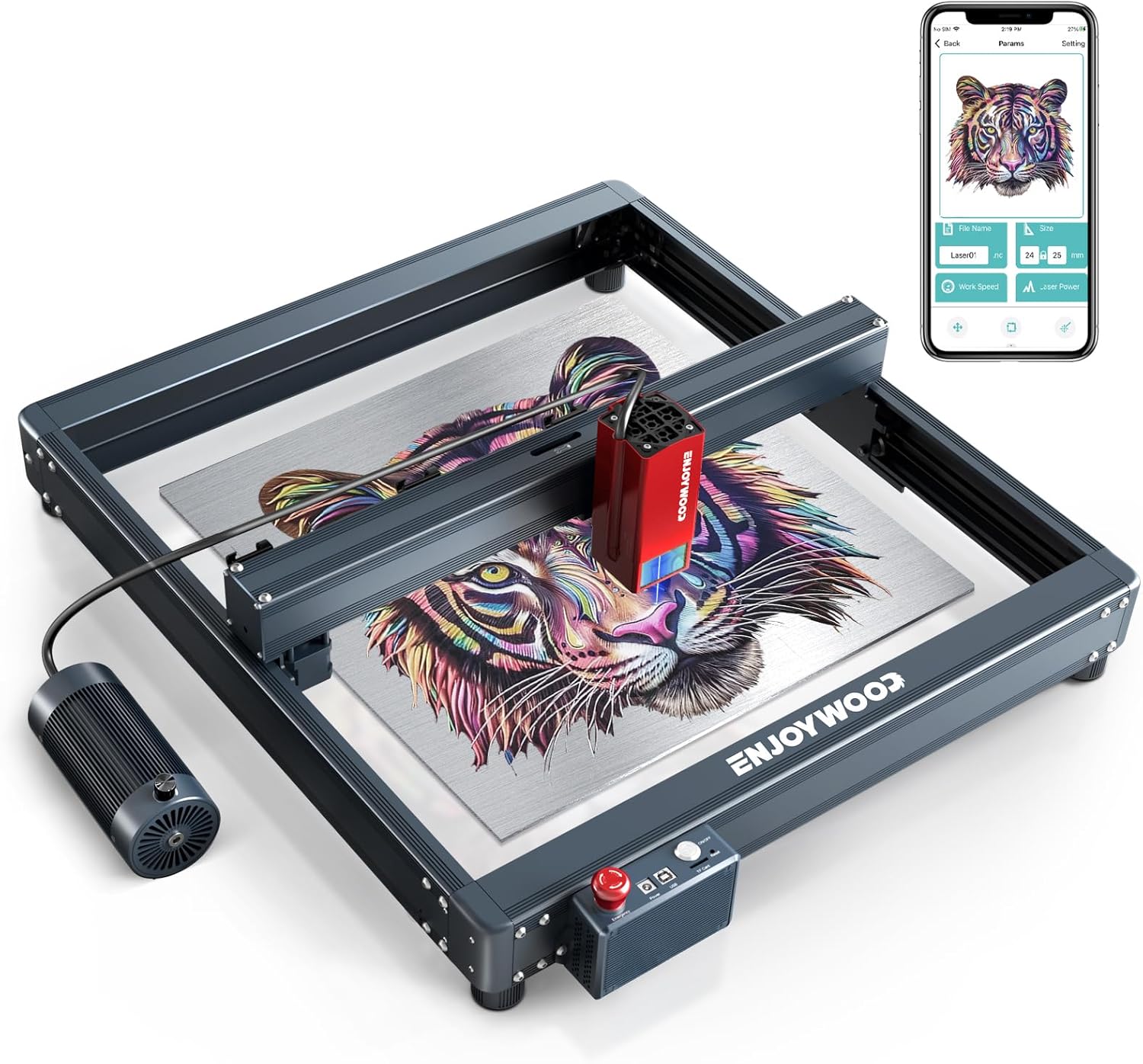
Figur 1.1: The ENJOYWOOD E20 Laser Engraver in operation, demonstrating its capability to engrave intricate designs. A mobile application interface is shown on a smartphone, indicating remote control functionality.
2. Sikkerhedsinstruktioner
Operating a laser engraver involves potential hazards. Adhere strictly to the following safety guidelines to prevent injury and damage to the equipment.
- Øjenbeskyttelse: Always wear the provided laser safety goggles when the machine is operating. The panoramic filter glass protective cover filters 97% of UV light, but direct exposure to the laser beam can cause permanent eye damage.
- Ventilation: Brug maskinen i et godt ventileret område for at fjerne dampe og røg, der produceres under gravering og skæring.
- Brandsikkerhed: Hav en brandslukker i nærheden. Visse materialer kan antændes under laserbehandling. Lad aldrig maskinen være uden opsyn, mens den er i brug.
- Nødstop: The E20 is equipped with an emergency stop button. In case of any malfunction or emergency, press this button immediately to halt all operations.
- Materiale kompatibilitet: Gravér eller skær kun materialer, der er angivet som sikre til laserbehandling. Undgå materialer, der producerer giftige dampe eller er meget brandfarlige.
- Fysisk kontakt: Do not touch the laser module or the engraving area during operation. The laser module can be hot, and moving parts can cause injury.
- Børn og kæledyr: Hold børn og kæledyr væk fra operationsområdet.
- Strømforsyning: Use only the specified power adapter. Ensure the power supply is stable and properly grounded.
- XY Axis Limit Switches: The machine includes XY axis limit switches to prevent the laser head from exceeding the working area, enhancing safety.
- Move/Tip Instant Stop: The machine is designed to stop instantly if moved or tipped during operation, adding an extra layer of safety.

Figur 2.1: Overview of the ENJOYWOOD E20's multiple security protection measures, including eye protection, limit switches, movement detection, and the emergency stop button.
3. Produktfunktioner
The ENJOYWOOD E20 Laser Engraver and Cutter incorporates several advanced features for enhanced performance and user experience:
- 20W Output Power Laser: Utilizes the latest four 6W laser coupling technology, providing a powerful 20W output for efficient engraving and cutting. Capable of cutting 12-15mm tung boards, 8mm black acrylic boards, and 0.05mm stainless steel sheets in a single pass.
- Upgraded Compressed Spot Technology: The ultra-fine laser focus area is reduced to 0.08 x 0.1mm, allowing for high-density laser application. This enables cutting of 25mm thick wood and 30mm thick black acrylic, with carving and cutting speeds up to 40% higher than standard models.
- Enhanced Engraving Accuracy: Features a newly upgraded 32-bit motherboard with a built-in 256-bit color scale diagram, resulting in more refined engravings with higher contrast. The all-aluminum alloy anodized structure ensures durability and improved carving precision.
- Integrated Air Assist System: Equipped with a standard air assist kit, significantly improving cutting ability, accuracy, and quality by reducing scorch marks and clearing debris. The built-in design ensures a clean setup without external wires.
- Offline Engraving Support: Includes a terminal control panel for offline engraving, allowing operation without a continuous computer connection.
- Øjenbeskyttelsesdesign: Features a panoramic filter glass protective cover that filters 97% of UV light, allowing observation of the engraving process without additional goggles for bystanders.
- Flere sikkerhedsforanstaltninger: Incorporates an emergency stop button, XY axis limit switches, and a move/tip instant stop function for enhanced operational safety.

Figur 3.1: Illustration of the dual compression spot coupling technology, detailing how four 6W lasers combine to create a powerful 20W output with a fine spot size of 0.08 x 0.14mm, enabling efficient cutting of various materials.

Figur 3.2: Speed comparison demonstrating the ENJOYWOOD E20's high-speed engraving capability at 400 mm/s, significantly faster than other models, while maintaining quality.

Figur 3.3: Depiction of the newly upgraded 32-bit motherboard with a built-in 256-bit color palette, highlighting the machine's ability to produce detailed and colorful engravings.

Figur 3.4: Visual comparison demonstrating the effectiveness of the integrated air assist system in producing smooth and clean engravings by reducing scorch marks.
4. Opsætning og montering
Follow these steps to assemble and set up your ENJOYWOOD E20 Laser Engraver:
- Udpakning: Fjern forsigtigt alle komponenter fra emballagen. Kontroller, at alle dele, der er anført på pakkelisten, er til stede og ubeskadigede.
- Rammeenhed: Assemble the aluminum alloy frame according to the included assembly guide. Ensure all screws are tightened securely to maintain structural rigidity and engraving accuracy.
- Installation af lasermodul: Mount the laser module onto the gantry. Connect the necessary cables to the laser module and the main control board.
- Lufthjælpsforbindelse: Connect the air assist hose from the integrated air pump to the laser module.
- Strømtilslutning: Tilslut strømadapteren til maskinen og derefter til en passende stikkontakt.
- Software installation: Install the recommended engraving software (e.g., LaserGRBL, LightBurn) on your computer. The ENJOYWOOD E20 is compatible with MacOS and Windows.
- Forbindelse: Connect the machine to your computer via USB, or utilize WiFi/TF card for offline engraving. The Enjoywood App is also available for control.
- Indledende test: Perform a small test engraving on a scrap piece of material to verify proper functionality and laser focus.

Figur 4.1: The ENJOYWOOD E20 demonstrating its wide compatibility and multiple connection options, including USB, WiFi, TF card, and dedicated app support for various operating systems like MacOS and Windows.
5. Betjeningsvejledning
5.1 Forberedelse til gravering/skæring
- Materiale placering: Place the material to be processed flat on the working surface. Ensure it is securely positioned and does not move during operation.
- Fokusjustering: Adjust the laser focus according to the material thickness. Refer to the specific instructions for your laser module for precise focusing.
- Software opsætning: Open your chosen engraving software (e.g., LaserGRBL, LightBurn). Import your design and adjust parameters such as power, speed, and passes based on the material type and desired outcome.
- Work Area Definition: Define the work area in the software to match the physical placement of your material.
5.2 Start af drift
- Initiate Job: Once all parameters are set and safety precautions are observed, start the engraving or cutting job from the software or the machine's terminal control panel for offline engraving.
- Overvågning: Continuously monitor the machine during operation. Observe for any unusual smells, smoke, or signs of fire.
- Lufthjælp: Ensure the integrated air assist system is active for cutting operations or when engraving materials prone to scorching.
5.3 Offline gravering
The E20 supports offline engraving via its terminal control panel or TF card. Prepare your G-code file using compatible software, transfer it to a TF card, insert the card into the machine, and select the file from the control panel to begin engraving without a computer connection.
6. Vedligeholdelse
Regular maintenance ensures the longevity and optimal performance of your ENJOYWOOD E20.
- Rengøring af laserlinsen: Periodically clean the laser lens using a specialized lens cleaning solution and a lint-free cloth or cotton swab. A dirty lens can reduce laser power and engraving quality.
- Rengøring af arbejdsområdet: Remove debris and dust from the engraving bed and surrounding areas after each use. This prevents accumulation that could interfere with machine movement or pose a fire hazard.
- Smøring: Apply a small amount of lubricant to the guide rails and lead screws every few months to ensure smooth movement of the laser module.
- Firmwareopdateringer: Check the official ENJOYWOOD webwebstedet for tilgængelige firmwareopdateringer for at sikre, at din maskine har de nyeste funktioner og fejlrettelser.
- Lufthjælpssystem: Ensure the air assist nozzle is clear of any blockages.
7. Fejlfinding
Se følgende almindelige problemer og deres mulige løsninger:
| Problem | Mulig årsag | Løsning |
|---|---|---|
| Laseren udløses ikke eller har svagt output |
|
|
| Maskinen opretter ikke forbindelse til computeren |
|
|
| Graveringskvaliteten er dårlig eller inkonsekvent |
|
|
| Maskinen stopper uventet |
|
|
8. Specifikationer
| Feature | Detalje |
|---|---|
| Model | ENJOYWOOD E20 |
| Laser udgangseffekt | 20W (four 6W laser coupling technology) |
| Laser Spot Størrelse | 0.08 x 0.1mm (Compressed Spot) |
| Bundkort | Opgraderet 32-bit med 256-bit farveskala |
| Engraving/Cutting Speed | Op til 400 mm/s |
| Cutting Capability (Single Pass) | 12-15mm Tung Boards, 8mm Black Acrylic, 0.05mm Stainless Steel |
| Lufthjælpssystem | Integreret |
| Øjenbeskyttelse | Panoramic Filter Glass Protective Cover (filters 97% UV) |
| Sikkerhedsfunktioner | Emergency Stop Button, XY Axis Limit Switches, Move/Tip Instant Stop |
| Forbindelse | USB, WiFi, TF Card, App (Enjoywood App) |
| Operativsystemer | MacOS, Windows |
| Dato først tilgængelig | 27. juli 2022 |
| ASIN | B0B7RPPJ17 |
9. Garanti og support
For warranty information and technical support, please refer to the official ENJOYWOOD webwebstedet eller kontakt deres kundeservice direkte. Gem din købskvittering som købsbevis i tilfælde af garantikrav.
For the latest drivers, software, and troubleshooting guides, visit the ENJOYWOOD support page.


