1. Introduktion
Thank you for choosing the Seenda Wireless Backlit Keyboard, Model JP300W. This keyboard is specifically designed for Mac OS systems, offering a full-size layout with 110 scissor-flex keys, including a numeric keypad and 20 Mac OS-specific shortcuts. It features a 2.4GHz wireless connection, adjustable backlighting, and a rechargeable battery. This manual provides detailed instructions for setup, operation, maintenance, and troubleshooting to ensure optimal performance.
2. Pakkens indhold
Kontroller venligst, at alle varer er til stede i din pakke:
- Seenda Wireless Backlit Keyboard (JP300W)
- USB-A modtager
- Type-C adapter
- USB-A til USB-C ladekabel
- Brugervejledning (dette dokument)
3. Produktet er slutview
The Seenda JP300W keyboard features a comprehensive layout designed for efficiency and comfort.

Figur 3.1: Full layout of the Seenda Wireless Backlit Keyboard, showing all keys including the numeric keypad and function row.
Nøglefunktioner omfatter:
- Layout i fuld størrelse: 110 keys with a dedicated numeric keypad.
- Mac OS Specific Keys: Includes 20 shortcuts for common Mac functions.
- Scissor Switches: Provides a responsive and comfortable typing experience.
- Justerbar baggrundsbelysning: Three levels of white backlighting for various environments.
- Dual Connectivity Adapters: USB-A receiver and a Type-C adapter for broad compatibility.
- Genopladeligt batteri: Built-in 1300mAh Lithium battery.

Figur 3.2: Keyboard dimensions: 17 inches (length), 4.8 inches (width), 0.8 inches (height at thickest point), 0.3 inches (height at thinnest point).
4. Opsætningsvejledning
4.1. Første opladning
Before first use, it is recommended to fully charge the keyboard. Connect the provided USB-A to USB-C charging cable to the keyboard's USB-C port and the other end to a USB-A power source (e.g., computer USB port, USB wall adapter). The charging indicator light will show the charging status.
Figur 4.1: The keyboard features a USB-C charging port and a 1300mAh built-in battery.
4.2. Tilslutning af tastaturet
The keyboard connects wirelessly via a 2.4GHz USB receiver. It includes both a standard USB-A receiver and a Type-C adapter for wider compatibility with Apple devices.
- Locate the USB-A receiver and the Type-C adapter in the package.
- For devices with a USB-A port: Plug the USB-A receiver directly into an available USB-A port on your Mac device.
- For devices with a USB-C port (e.g., newer MacBooks): Attach the Type-C adapter to the USB-A receiver, then plug the combined unit into an available USB-C port on your Mac device.
- Turn on the keyboard using the ON/OFF switch, usually located on the top edge of the keyboard.
- Your Mac device should automatically detect and connect to the keyboard. No additional drivers are typically required.

Figur 4.2: The 2.4GHz USB-A receiver and Type-C adapter facilitate stable wireless connection to various Apple devices.
5. Betjeningsvejledning
5.1. Tænd/sluk
Locate the ON/OFF switch on the keyboard. Slide it to the 'ON' position to power on the keyboard. Slide it to 'OFF' to conserve battery when not in use.
5.2. Baggrundslysstyring
The keyboard features an adjustable white backlight. To control the backlight:
- Press the dedicated light button (often marked with a light bulb icon) to cycle through backlight levels: Low, Medium, High, and Off.
- Adjust the brightness according to your preference and ambient lighting conditions.

Figur 5.1: The keyboard offers three adjustable backlight levels (Low, Medium, High) and an off setting.
5.3. Mac OS Specific Shortcuts and Multimedia Keys
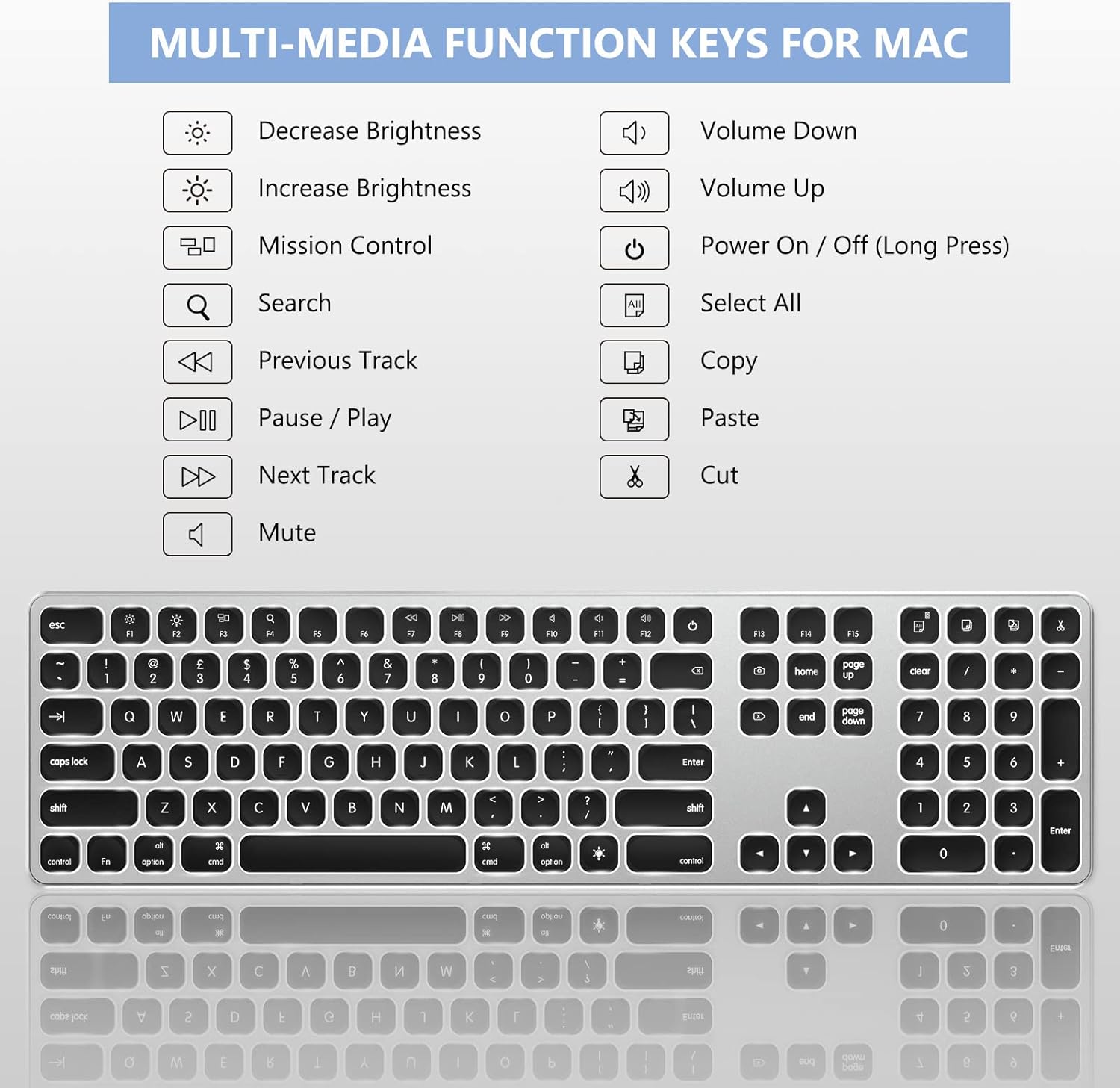
The keyboard includes a row of function keys (F1-F12) that double as Mac OS specific shortcuts and multimedia controls. These keys allow quick access to functions such as brightness adjustment, Mission Control, media playback, volume control, and more.

Figur 5.2: Overview of the multimedia and function keys, including Decrease Brightness, Increase Brightness, Mission Control, Search, Previous Track, Pause/Play, Next Track, Mute, Volume Down, Volume Up, Power On/Off (long press), Select All, Copy, and Cut.
Common shortcuts include:
- F1/F2: Decrease/Increase Brightness
- F3: Missionskontrol
- F4: Søg
- F7/F8/F9: Previous Track/Play-Pause/Next Track
- F10/F11/F12: Mute/Volume Down/Volume Up
- Power Button (F13): Langt tryk for at tænde/slukke.
- Select All (F14), Copy (F15), Cut (F16): Dedicated keys for these common actions.
5.4. Numeric Keypad Usage
The dedicated numeric keypad functions as expected for number entry. If you experience issues with the numeric keypad not responding or behaving unexpectedly (e.g., controlling the mouse cursor), refer to the Troubleshooting section (Section 7.2).
6. Opladning og batteriinformation
The Seenda JP300W keyboard is equipped with a built-in 1300mAh Lithium battery, providing extended usage times.
- Batterikapacitet: 1300 mAh.
- Opladning: Use the provided USB-A to USB-C cable to charge the keyboard. Connect the USB-C end to the keyboard and the USB-A end to a power source.
- Batterilevetid: Up to 800 hours on a single charge without backlight. Approximately 18 hours of continuous use with the backlight on.
- Automatisk dvaletilstand: To conserve power, the keyboard will automatically enter sleep mode after 30 minutes of inactivity. Press any key to wake it up.
- Strømindikator: A low battery indicator light will notify you when charging is required.
7. Fejlfinding
7.1. Keyboard Not Responding or Disconnecting
- Tjek strøm: Ensure the keyboard is turned ON and has sufficient battery charge. Recharge if necessary.
- Tjek forbindelsen: Verify that the USB receiver (with or without Type-C adapter) is securely plugged into your Mac's USB port. Try a different USB port if available.
- Power Cycle: Turn the keyboard OFF, wait a few seconds, then turn it back ON.
- Interferens: Move the keyboard closer to the USB receiver and away from other wireless devices that might cause interference.
7.2. Numeric Keypad Not Working or Controlling Mouse
If your numeric keypad is not functioning correctly or is controlling the mouse cursor, it is likely due to the "Mouse Keys" accessibility feature being enabled in macOS. To resolve this:
- Gå til Systemindstillinger (eller Systempræferencer on older macOS versions) on your Mac.
- Naviger til Tilgængelighed.
- In the sidebar, select Pointer kontrol (eller Mouse & Trackpad).
- Locate the option for Enable Mouse Keys and ensure it is umarkeret.
- Close System Settings. Your numeric keypad should now function normally.
8. Specifikationer
| Feature | Detalje |
|---|---|
| Modelnummer | JP300W |
| Mærke | Seenda |
| Forbindelsesteknologi | 2.4GHz Wireless (USB-A, USB-C) |
| Kompatible enheder | iMac, MacBook, iPad, iPhone (Mac OS + iOS) |
| Tastaturlayout | Full-Size, 110 Scissor Flex Keys, Mac OS Layout |
| Baggrundsbelysning | White, 3 Adjustable Levels |
| Batteritype | Indbygget lithium batteri |
| Batterikapacitet | 1300mAh |
| Opladningsport | USB-C |
| Battery Life (No Backlight) | Op til 800 timer |
| Battery Life (With Backlight) | Ca. 18 timer (kontinuerlig brug) |
| Automatisk dvaletilstand | Efter 30 minutters inaktivitet |
| Dimensioner | 44.6 x 13.59 x 3.3 cm (ca. 17 x 4.8 x 0.8 tommer) |
| Varens vægt | 630 g |
| Materiale | Plast, aluminium |
9. Vedligeholdelse
For at sikre dit tastaturs levetid og optimale ydeevne skal du følge disse retningslinjer for vedligeholdelse:
- Rensning: Use a soft, dry, lint-free cloth to wipe the keyboard surface. For stubborn dirt, slightly dampRengør kluden med vand eller et mildt, ikke-slibende rengøringsmiddel. Undgå for meget fugt.
- Undgå væsker: Do not expose the keyboard to liquids. Spills can cause damage to internal components.
- Opbevaring: Når tastaturet ikke er i brug i længere perioder, skal det opbevares et køligt og tørt sted.
- Håndteres med forsigtighed: Undgå at tabe tastaturet eller udsætte det for hårde stød.
10. Garanti og support
This Seenda product is covered by a 12 måneders garanti fra købsdatoen. Denne garanti dækker fabrikationsfejl og udførelse under normal brug.
For technical support, warranty claims, or any questions regarding your Seenda Wireless Backlit Keyboard, please contact Seenda customer service. Refer to the product packaging or the official Seenda webhjemmeside for de seneste kontaktoplysninger.


