1. Introduktion
This manual provides detailed instructions for the Akko 5087S TKL Mechanical Keyboard. The 5087S is an 87-key tenkeyless mechanical gaming keyboard designed for a comfortable and versatile typing experience, saving space by omitting the number pad. It features PBT shine-through keycaps, RGB backlighting, hot-swappable switches, and compatibility with both Windows and Mac operating systems.
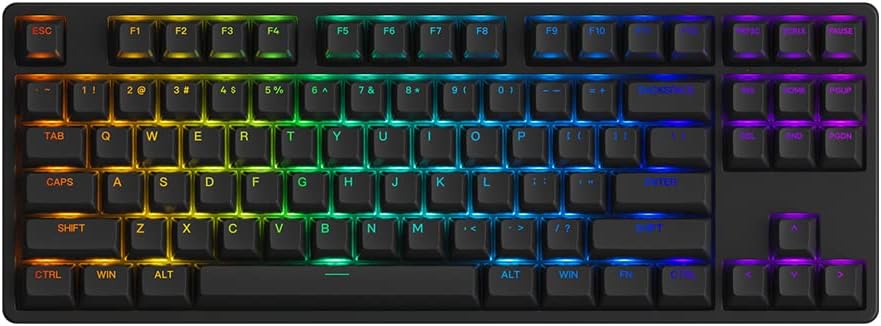
Image 1.1: The Akko 5087S TKL Mechanical Keyboard, showcasindens 87-tasters layout og levende RGB-baggrundsbelysning.
2. Pakkens indhold
Kontroller venligst, at alle varer er til stede i din pakke:
- Akko 5087S TKL Mechanical Keyboard
- Aftageligt USB-A til USB-C-kabel
- Keycap aftrækker
- Aftrækker
- Additional Switches (if included with your specific model)
3. Opsætning
3.1 Tilslutning af tastaturet
- Locate the USB-C port on the back of the Akko 5087S keyboard.
- Tilslut USB-C-enden af det medfølgende kabel til tastaturet.
- Tilslut USB-A-enden af kablet til en ledig USB-port på din computer.
- Tastaturet vil automatisk blive genkendt af dit operativsystem.
3.2 Systemkompatibilitet
The Akko 5087S supports both Windows and Mac operating systems. To switch between modes:
- For Windows tilstand: Tryk og hold nede Fn + Q.
- For Mac tilstand: Tryk og hold nede Fn + O.
4. Betjeningsvejledning
4.1 Key Functions and Remapping
All keys on the Akko 5087S can be re-mapped. For advanced customization and key function re-setting, utilize the Akko Cloud Driver software. This software also supports per-key RGB customization and music rhythm effects.
4.2 RGB-baggrundsbelysning
The keyboard features multiple built-in RGB backlit effects. You can cycle through different backlight modes using simple keyboard shortcuts. Refer to the keyboard's function layer markings or the Akko Cloud Driver software for specific key combinations to adjust RGB settings.

Image 4.1: Icons representing key features of the Akko 5087S: RGB lighting, hot-swappable switches, USB Type-C connectivity, and N-Key Rollover.
5. Hot-swap-kontakter
The 5087S is equipped with premium 5-pin hot-swappable sockets and a plate foam, allowing users to easily change 3-pin and 5-pin mechanical switches without soldering. The keyboard comes pre-installed with Akko CS Jelly Pink linear switches, known for their smooth feel and a lifespan of up to 60 million keystrokes.
To replace switches:
- Brug den medfølgende tastaftrækker til forsigtigt at fjerne den ønskede tast.
- Use the included switch puller to gently grip and pull the switch upwards until it detaches from the socket.
- Align the pins of the new switch with the holes in the hot-swappable socket.
- Tryk den nye kontakt godt fast på plads, indtil den klikker. Sørg for, at stifterne ikke er bøjede.
- Sæt tastaturdækslet på igen.
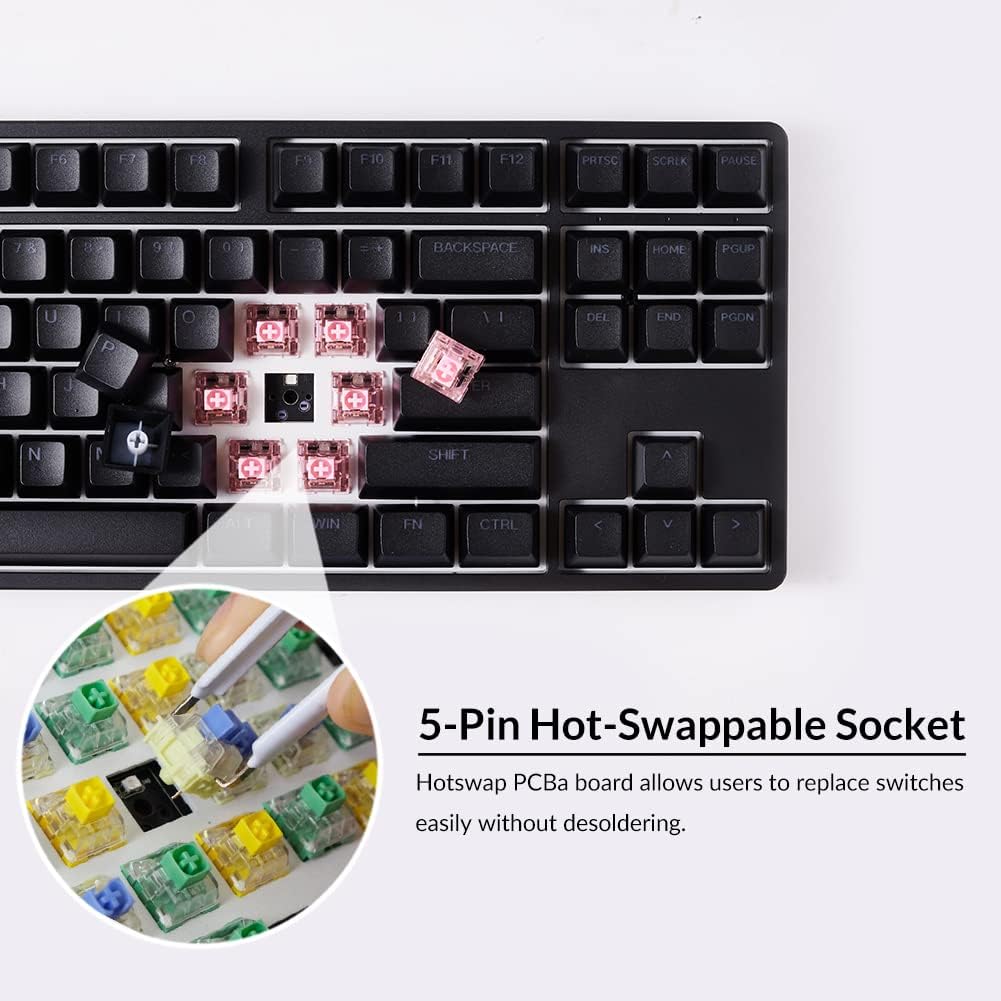
Billede 5.1: Et nærbillede view illustrating the 5-pin hot-swappable sockets, allowing for easy switch replacement without soldering.
6. PBT Double-Shot Keycaps
The Akko 5087S features ASA profile, double-shot PBT keycaps. These keycaps are highly durable and resistant to wear, ensuring legends remain vibrant and sharp even after extensive use. PBT material is also resistant to oil and fingerprints, maintaining a consistent typing feel over time.

Image 6.1: PBT Double-shot Keycaps, highlighting their robust construction and the included keycap puller.
7. Justerbare fødder
The keyboard is equipped with two adjustable feet, offering three levels of height to customize your typing angle for improved ergonomics and comfort.

Image 7.1: Illustration of the two adjustable feet providing multiple height options, alongside a diagram of the ASA keycap profile.
8. Vedligeholdelse
8.1 Rengøring af tastaturet
- Frakobl tastaturet fra computeren, før du rengør det.
- Brug let en blød, fnugfri klud damprengøres med vand eller en mild rengøringsopløsning til at tørre tastaturerne og kabinettet af.
- Brug trykluft eller en lille børste til at fjerne støv og snavs mellem tasterne.
- Undgå at bruge skrappe kemikalier eller slibende materialer, da disse kan beskadige tastaturerne eller finishen.
8.2 Vedligeholdelse af taster og kontakter
- When removing keycaps or switches, use the provided tools to prevent damage.
- Store spare keycaps and switches in a clean, dry place.
9. Fejlfinding
9.1 Tastaturet reagerer ikke
- Sørg for, at USB-kablet er korrekt tilsluttet til både tastaturet og computeren.
- Prøv at tilslutte tastaturet til en anden USB-port på din computer.
- Test tastaturet på en anden computer for at udelukke systemspecifikke problemer.
- Hvis du bruger en USB-hub, kan du prøve at tilslutte den direkte til computeren.
9.2 Problemer med RGB-baggrundsbelysning
- Verify that the keyboard is properly connected and powered.
- Use the keyboard shortcuts to cycle through RGB modes or adjust brightness.
- Install or update the Akko Cloud Driver software to customize RGB settings.
9.3 Nøgler registreres ikke
- Fjern forsigtigt tastaturdækslet, og skift til den berørte tast.
- Inspect the switch pins for any bends or damage. Straighten bent pins gently if possible.
- Re-insert the switch firmly into the hot-swappable socket.
- If the issue persists, consider replacing the switch with a spare or a new one.
10. Specifikationer
| Mærke | Akko |
| Modelnavn | 5087S |
| Tastaturbeskrivelse | 87-Key TKL Wired Mechanical Gaming Keyboard |
| Forbindelsesteknologi | USB Type-C med kabel |
| Kompatible enheder | PC, laptop, tablet, computer (Windows, Mac) |
| Særlige funktioner | RGB Backlit, Hot-swappable Switches |
| Materiale Type | Polybutylene Terephthalate (PBT) Keycaps |
| Produktdimensioner | 36.4 x 13.5 x 3 cm |
| Vægt | 1.5 kg |
11. Garanti og support
For warranty information, technical support, or further assistance, please refer to the official Akko website or contact Akko customer service directly. Keep your purchase receipt for warranty claims.
Officiel Akko Webwebsted: www.akkogear.com


