Indledning
Welcome to the user manual for your new vtech CS5209 DECT 6.0 Cordless Phone Expansion Handset. This manual provides detailed instructions for setting up, operating, and maintaining your new handset. For optimal performance, please read these instructions carefully before use.
Hvad er der i æsken
- CS5209 Cordless Handset
- Handset Battery Pack
- Handset Battery Cover
- Charger Cradle for Handset
- Strømadapter til opladerholder
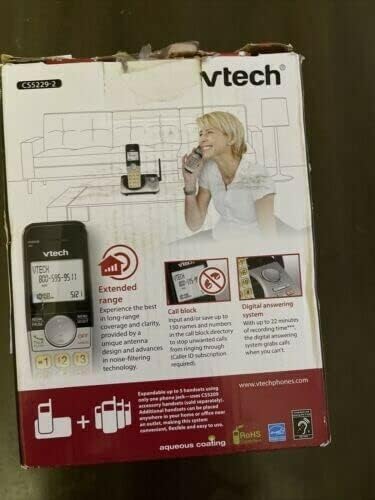
This image displays the product packaging for the vtech CS5209 DECT 6.0 Cordless Phone Expansion Handset. The box highlights key features including extended range for better coverage and clarity, a call block function capable of storing up to 150 numbers to prevent unwanted calls (requires Caller ID subscription), and a digital answering system with up to 17 minutes of recording time to capture messages when you are unavailable. The packaging also indicates that the system is expandable up to 5 handsets using only one phone jack.
Opsætning
1. Batteriinstallation
- Find batterirummet på bagsiden af håndsættet.
- Insert the battery pack into the compartment, ensuring the connector is properly aligned with the socket.
- Close the battery compartment with the battery cover until it clicks into place.
2. Opladning af håndsættet
- Connect the small end of the power adapter to the charger cradle.
- Sæt den store ende af strømadapteren i en almindelig stikkontakt.
- Place the handset face forward into the charger cradle. The charge indicator light on the handset should illuminate, indicating it is charging.
- Lad håndsættet oplade i mindst 16 timer før første brug for at sikre fuld batterikapacitet.
3. Registrering af håndsættet
The CS5209 is an expansion handset and must be registered to a compatible vtech DECT 6.0 base unit (e.g., CS5229, CS5249) before use. Refer to your base unit's manual for specific registration instructions. Generally, the process involves:
- Place the CS5209 handset in its charger cradle.
- On your base unit, press and hold the SIDE or HÅNDSÆT LOCATOR button for approximately 4 seconds until the registration light on the base unit begins to flash.
- Inden for 10 sekunder skal du trykke på # key on the CS5209 handset.
- The handset will display "Registering..." and then "Handset Registered" if successful. If registration fails, try again or consult the base unit's manual for troubleshooting.
Betjeningsvejledning
Foretage og modtage opkald
- Sådan foretager du et opkald: Trykke TALK / FLASH or any dial pad key, then dial the phone number.
- For at besvare et opkald: Når telefonen ringer, skal du trykke på TALK / FLASH or any dial pad key.
- Sådan afslutter du et opkald: Trykke FRA/RYD or place the handset back in the charger cradle.
- Lydstyrkejustering: Tryk på under et opkald VOL+ or VOL- on the side of the handset to adjust the earpiece volume.
Call Block Feature
The call block feature allows you to stop unwanted calls from ringing through. You can input and save up to 150 names and numbers in the call block directory. This feature requires a Caller ID subscription from your telephone service provider.
- Sådan blokerer du et nummer fra opkalds-ID-historikken: Mens vedrviewing Caller ID history, press BLOK to add the number to the block list.
- Sådan tilføjer du et nummer manuelt til blokeringslisten: Access the Call Block menu through the handset's menu options and follow the prompts to add a number.
Digital telefonsvarer
The digital answering system, integrated with your base unit, automatically answers calls and records messages when you are unavailable. It offers up to 17 minutes of recording time.
- Afspiller beskeder: Access the answering system menu on your handset or base unit to play new or old messages.
- Optagelse af en meddelelse: You can record a personalized outgoing announcement through the answering system menu.
- Sletning af beskeder: Messages can be deleted individually or all at once through the answering system menu.
Samtaleanlæg
If you have multiple registered handsets, you can use the intercom feature to communicate between them.
- To Initiate Intercom: Trykke INT on the handset, then dial the number of the desired handset (e.g., 2 for Handset 2).
- To Answer Intercom: Trykke TALK / FLASH when an intercom call comes in.
Opretholdelse
Rengøring af dit håndsæt
To keep your phone clean, wipe it with a soft, slightly damp cloth. Do not use cleaning sprays or harsh chemicals, as these may damage the finish or electrical components.
Batteripleje
- Always charge the handset for at least 16 hours before initial use.
- Hvis håndsættet ikke skal bruges i længere tid, skal du fjerne batteriet for at forhindre lækage.
- Replace the battery when the handset consistently shows a low battery warning or has significantly reduced talk/standby time. Use only the specified replacement battery pack.
Fejlfinding
| Problem | Løsning |
|---|---|
| Handset does not register to the base unit. | Ensure the handset battery is charged. Follow the registration steps carefully. If issues persist, try resetting the base unit by unplugging its power for a few minutes, then plugging it back in and attempting registration again. |
| Ingen klartone. | Check that the base unit is properly connected to the telephone line and power outlet. Ensure the handset is registered to the base unit. |
| Poor call quality (static, interference). | Move the handset closer to the base unit. Avoid placing the base unit near other electronic devices (Wi-Fi routers, microwaves, computers) that may cause interference. |
| Telefonsvareren optager ikke beskeder. | Check if the answering system is turned ON. Ensure there is sufficient recording time available (up to 17 minutes). Delete old messages to free up space if necessary. |
| Handset battery does not hold a charge. | Ensure the handset is properly seated in the charger cradle. Clean the charging contacts on both the handset and cradle. If the battery is old, it may need to be replaced. |
Specifikationer
- Model: CS5209
- Telefontype: Cordless DECT 6.0 Expansion Handset
- Farve: Sort
- Strømkilde: Corded Electric (for charger cradle)
- Opkaldstype: Enkelt tastatur
- Type svarsystem: Digital (integrated with compatible base unit)
- Optagelseskapacitet: Up to 17 minutes (on compatible base unit)
- Kompatible enheder: PSTN, ISDN (via compatible base unit)
- Multiline drift: Multi-Line Operation (via compatible base unit)
- Opkaldsidentifikation: Yes (requires subscription from service provider)
- Fabrikant: VTECH
Garanti og support
For warranty information, technical support, or to purchase replacement parts, please visit the official vtech webwebstedet eller kontakt deres kundeservice. Gem din købskvittering som købsbevis i tilfælde af garantikrav.
Official vtech webwebsted: www.vtechphones.com


