1. Introduktion
Tak for købetasing the DXQ K-1028E Universal Air Conditioner Remote Control. This remote is designed to provide convenient and comprehensive control over a wide range of air conditioning units. Its simple structure, large LCD display, and intelligent features make it an ideal replacement or secondary remote for your AC.
Nøglefunktioner:
- Universal kompatibilitet: Controls over 1000 different global air conditioner brands.
- Nem opsætning: Features a one-button setting for quick configuration.
- Stort LCD-display: Provides clear visibility of settings and status.
- Lang kontroldistance: Effective range of approximately 8 to 10 meters.
- Humaniseret design: Includes built-in clock, ON/OFF timer, and night light functions.
- Lavt strømforbrug: Efficient operation for extended battery life.

Image 1.1: Front and angled view of the DXQ K-1028E Universal AC Remote Control.

Image 1.2: The universal remote control demonstrating compatibility with various air conditioning units.
2. Opsætning
2.1 Batteriinstallation
The remote control requires two (2) AAA batteries (not included). Follow these steps to install them:
- Åbn dækslet til batterirummet på bagsiden af fjernbetjeningen.
- Isæt to AAA-batterier, og sørg for at polerne (+ og -) vender korrekt som angivet i batterirummet.
- Luk batterirummets dæksel forsvarligt.

Image 2.1: Illustration of battery installation in the remote control.
2.2 Code Setting (Pairing with AC Unit)
There are two methods to set up the remote control with your air conditioner:
Method 1: Manual Code Input
- Turn on your air conditioner manually.
- Refer to the "Applicable Brand and Code List" (Image 2.2) to find the 3-digit code(s) for your AC brand.
- Tryk og hold på SÆT button on the remote control until the 3-digit code on the LCD display starts flashing.
- Brug Temperatur + or Temperature - buttons to adjust the code until your brand's code appears.
- Once the correct code is displayed, press the OK button to confirm. The code will stop flashing.
- Test the remote control by pressing the ON/OFF button. If the AC unit responds, the setup is complete. If not, try the next code for your brand or proceed to Method 2.
Method 2: Automatic Code Search
- Ensure your air conditioner is turned on manually.
- Point the remote control towards the AC unit.
- Tryk og hold på SÆT button for approximately 6 seconds until the 3-digit code on the LCD display starts flashing and automatically cycles through codes.
- Observe your AC unit. When the AC unit responds (e.g., turns off, changes mode, or makes a sound), immediately release the SÆT knap.
- Tryk på OK button to confirm the code.
- Test the remote control by pressing various function buttons. If the AC unit responds correctly, the setup is complete. If not, repeat the automatic search process.
Note: For some popular brands, the remote may work directly after battery installation without needing to set a code.

Image 2.2: Applicable Brand and Code List for the K-1028E remote.
3. Betjeningsvejledning
3.1 Fjernbetjeningens layout og funktioner
Familiarize yourself with the buttons and display on your K-1028E remote control:
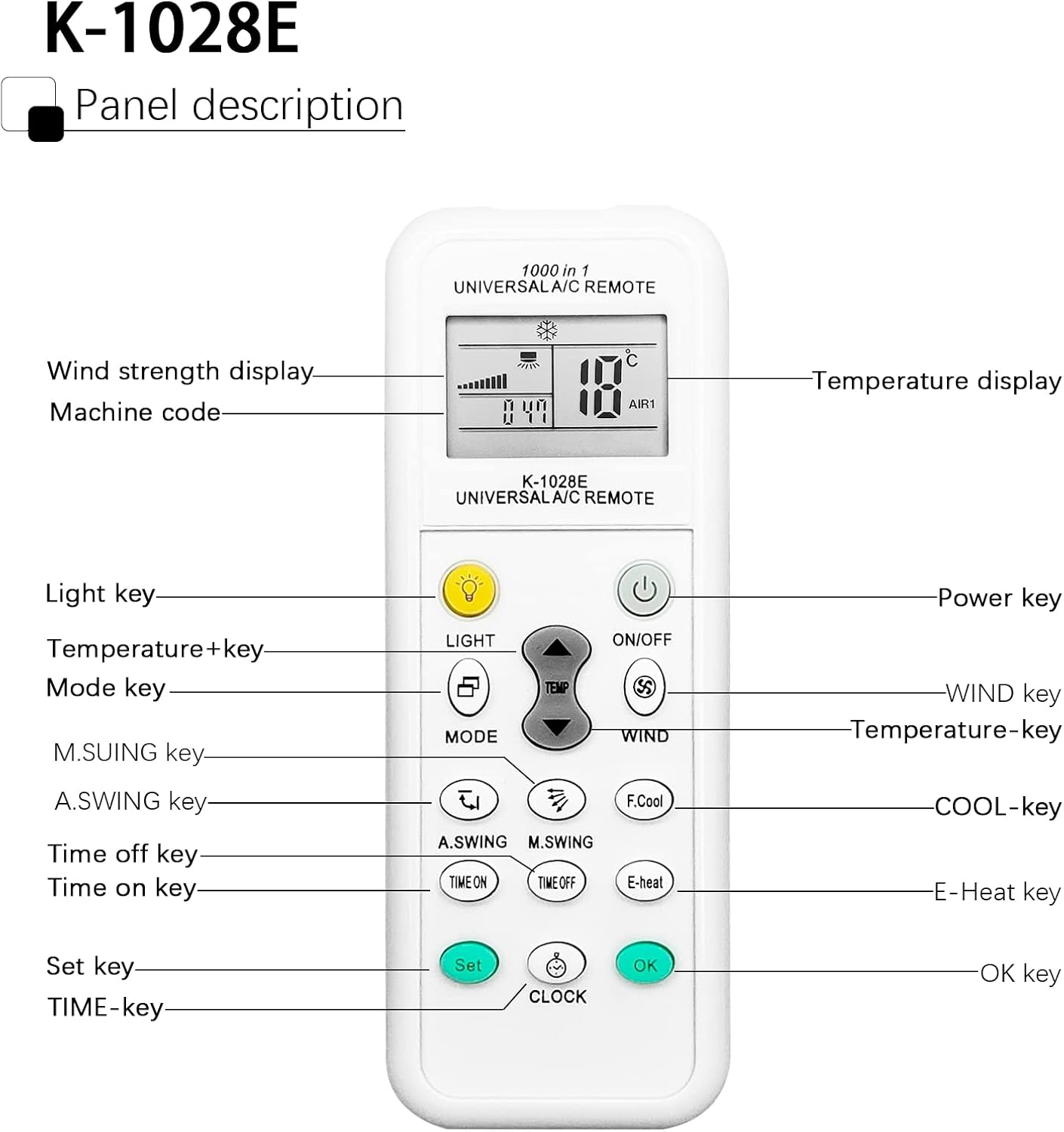
Image 3.1: Panel Description of the K-1028E Universal AC Remote.
- LCD-skærm: Shows temperature, mode, fan speed, timer status, and machine code.
- LYS-tast: Activates the built-in night light function.
- ON/OFF-tast: Powers the AC unit on or off.
- MODE-tast: Skifter mellem driftstilstande (f.eks. Køling, Varme, Ventilator, Tørring, Auto).
- TEMP + / TEMP - Keys: Justerer temperaturindstillingen.
- WIND Key: Justerer ventilatorhastigheden (Auto, Lav, Mellem, Høj).
- A.SWING / M.SWING Keys: Controls the vertical (A.SWING) and horizontal (M.SWING) swing of the air deflector.
- F.Cool Key: Activates the fast cool mode (if supported by AC).
- E-Heat Key: Activates the electric heat mode (if supported by AC).
- TIME ON / TIME OFF Keys: Sets the automatic power-on or power-off timer.
- CLOCK Key: Indstiller det aktuelle klokkeslæt.
- SET-tast: Used for code setting (as described in Section 2.2).
- OK-tast: Bekræfter indstillinger.
3.2 Grundlæggende betjening
- Tænd/sluk: Tryk på ON/OFF knap.
- Vælg tilstand: Tryk på MODE button repeatedly to cycle through available modes (e.g., Cool, Heat, Fan, Dry, Auto). The selected mode will be displayed on the LCD.
- Juster temperatur: Brug TEMP + or TEMP - for at indstille den ønskede temperatur.
- Juster blæserhastighed: Tryk på VIND button to cycle through fan speed options.
- Control Airflow Direction: Bruge A.SWING og M.SWING buttons to adjust the louver direction.

Image 3.2: Remote control effective distance and available operating modes.
3.3 Timerfunktioner
The remote control allows you to set a timer for the AC unit to automatically turn on or off.
- Indstilling af aktuel tid: Tryk på UR button. The time display will flash. Use TEMP + or TEMP - for at justere timetallet, og tryk derefter på UR again to adjust minutes. Press OK for at bekræfte.
- Setting ON Timer: Tryk på TID TIL button. The time display will flash. Use TEMP + or TEMP - to set the desired power-on time. Press OK for at bekræfte.
- Setting OFF Timer: Tryk på FRITID button. The time display will flash. Use TEMP + or TEMP - to set the desired power-off time. Press OK for at bekræfte.
- Canceling Timer: Tryk på det tilsvarende TID TIL or FRITID button again, then press OK.

Image 3.3: The remote's time switch function for automated operation.
4. Vedligeholdelse
4.1 Udskiftning af batteri
When the remote control's display becomes dim or the remote becomes unresponsive, it's time to replace the batteries. Follow the battery installation steps in Section 2.1.
- Udskift altid begge batterier på samme tid.
- Bland ikke gamle og nye batterier eller forskellige typer batterier.
- Fjern batterierne, hvis fjernbetjeningen ikke skal bruges i længere tid, for at forhindre lækage.
- Bortskaf brugte batterier ansvarligt i henhold til lokale regler.
4.2 Rengøring
Brug en blød, tør klud til at rengøre fjernbetjeningen. Brug ikke flydende rengøringsmidler, spray eller slibende materialer, da disse kan beskadige fjernbetjeningens overflade eller interne komponenter.
5. Fejlfinding
| Problem | Mulig årsag | Løsning |
|---|---|---|
| Remote does not work or AC does not respond. | Incorrect code setting; Dead or weak batteries; Obstruction between remote and AC unit; Remote not pointed correctly. | Re-perform code setting (Section 2.2); Replace batteries; Remove any obstructions; Ensure remote is pointed directly at the AC unit's receiver. |
| Limited control distance. | Weak batteries; Obstruction; Interference. | Replace batteries; Ensure clear line of sight to AC unit; Avoid strong light sources or other infrared devices. |
| Nogle funktioner virker ikke. | AC unit does not support the function; Incorrect code. | Not all AC units support every function (e.g., F.Cool, E-Heat). Verify if your AC unit has this feature. Try another code for your brand (if available). |
| LCD-skærmen er svag eller blank. | Lave batterier. | Udskift batterierne. |
6. Specifikationer
| Feature | Specifikation |
|---|---|
| Mærke | DXQ |
| Modelnummer | K-1028E |
| Farve | Hvid |
| Forbindelsesteknologi | Infrarød |
| Kompatible enheder | Aircondition |
| Maksimal rækkevidde | 10 meter (ca. 33 fod) |
| Antal knapper | 20 |
| Strømkilde | 2 x AAA batterier (medfølger ikke) |
| Varens vægt | 30 gram |
7. Garanti og support
7.1 Garantioplysninger
Specific warranty information for this product is not available in the provided documentation. Please refer to the seller or manufacturer's webwebstedet for detaljer vedrørende garantidækning og vilkår.
7.2 Kundesupport
If you encounter any issues or have questions not covered in this manual, please contact the seller or manufacturer's customer support. Keep your purchase receipt or order details handy for faster service.


