Produkt overview
The Ratakee Digital AM/FM Radio Alarm Clock (Model RA01SA) is designed for ease of use and clear readability, featuring large 1.4-inch LED digits. This versatile alarm clock offers multiple alarm sound options, an AM/FM radio with preset capabilities, a dimmable display, sleep timer, and snooze function. It operates via AC power with a battery backup for continued functionality during power outages.
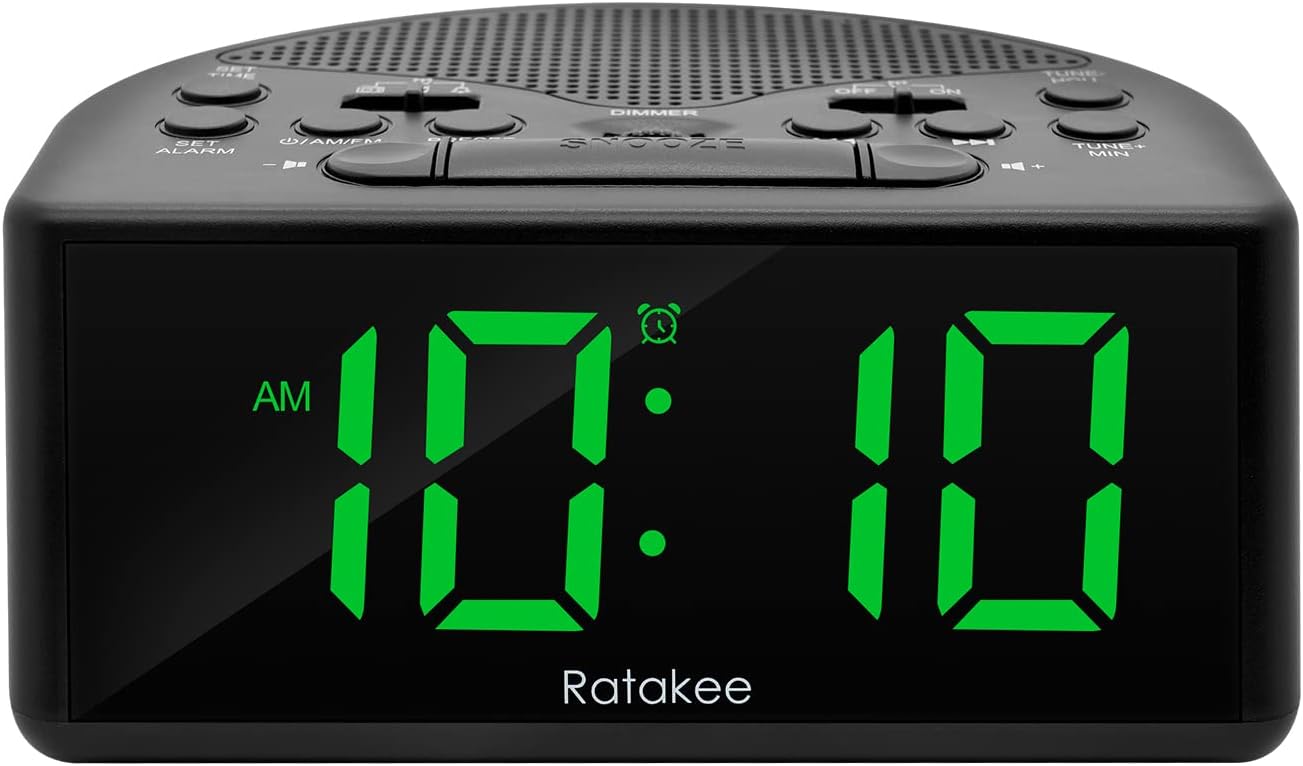
Figur 1: Forside view of the Ratakee Digital AM/FM Radio Alarm Clock displaying 10:10 AM.
Opsætning
Tænd for vækkeuret
The alarm clock can be powered by an AC outlet or by batteries for backup.
- AC strøm: Connect the included power cord to the AC120V outlet and plug it into a wall socket. The display will light up, and the radio will be operational.
- Batteri-sikkerhedskopi: For power outage protection, insert 3 AA batteries (not included) into the battery compartment located on the bottom of the unit. When powered by batteries, the display will auto-dim after 20 seconds of no operation to conserve power, but the clock, alarm, and radio functions will remain active.

Figure 2: Illustration of the dual power methods: AC cord connection and battery compartment for 3 AA batteries.
Betjeningsvejledning
This section details the operation of your Ratakee alarm clock. Refer to Figure 3 for button and switch locations.

Figure 3: Top panel controls of the Ratakee Digital AM/FM Radio Alarm Clock.
Indstilling af tid
- Tryk og hold på FASTSAT TIDSPUNKT button for 2 seconds. The hour digits will begin to flash.
- Brug TUNE+ HOU knappen for at justere timen.
- Brug TUNE- MIN knappen for at justere minutter.
- Tryk på FASTSAT TIDSPUNKT knappen igen for at bekræfte og afslutte tidsindstillingstilstanden.
Indstilling af alarm
The alarm clock offers three selectable alarm sounds: AM/FM radio, music, or a classic beep.

Figure 4: The alarm clock offers three distinct alarm sound options.
- Tryk og hold på SÆT ALARM -knappen i 2 sekunder. Alarmtimecifrene blinker.
- Brug TUNE+ HOU knappen for at indstille alarmens time.
- Brug TUNE- MIN knappen for at indstille alarmminutten.
- Slide the alarm tone switch (located near the SÆT ALARM button) to select your desired alarm sound: radio, music, or beep.
- Tryk på SÆT ALARM button again to confirm the alarm time and sound.
- To turn the alarm ON or OFF, use the dedicated ON/OFF slide switch for the alarm (located on the top panel, near the right side).
Justering af alarmlydstyrke: The alarm volume is adjustable from 5 to 15 levels. When using the radio as an alarm, the clock will play the last station you listened to at the set volume level.
AM/FM-radiodrift
The radio allows you to store up to 20 AM and 20 FM stations.

Figure 5: The alarm clock features AM/FM radio with strong reception capabilities.
- Turn Radio On/Off: Tryk på ON/AM/FM knappen til at tænde eller slukke radioen.
- Skift bånd: Mens radioen er tændt, skal du trykke på ON/AM/FM knappen for at skifte mellem AM- og FM-båndene.
- Manuel indstilling: Brug TUNE+ HOU og TUNE- MIN knapperne til manuelt at indstille til den ønskede frekvens.
- Auto Scan/Preset: Tryk på FORUDINDSTILLING button to scan and store available stations automatically.
- Genkald forudindstillinger: Brug FORUDINDSTILLING button to cycle through stored stations.
- Juster lydstyrken: Brug LYDSTYRKE + og VOLUME - knapper til at justere radioens lydstyrke (1-16 niveauer).
Note: When listening to FM stations with earphones (via the earphone jack), stereo mode will automatically activate for enhanced sound.
Display lysdæmper
The alarm clock features a full-range dimmable LED display (0-100% brightness).

Figure 6: Adjusting the display brightness from 0% to 100% for optimal viewing.
Drej på DIMMER knob (located on the top panel) to adjust the display brightness to your preferred level.
Sleep Timer
Sleep-timeren gør det muligt for radioen at spille i et indstillet tidsrum, før den automatisk slukker.
For at aktivere sleeptimeren skal du trykke på SOVE button. Each press will cycle through available sleep timer durations (e.g., 10, 20, 30, 60, 90 minutes). The radio will turn off automatically after the selected time.
Snooze funktion
Når alarmen lyder, skal du trykke på den store SLUM button (located on the top center) to temporarily silence the alarm for an additional 9 minutes of sleep.

Figure 7: Easily activate the snooze function for a short delay in your alarm.
Høretelefonstik
A 3.5mm earphone jack is provided on the side of the unit for private listening. Plug in your earphones to enjoy radio content without disturbing others.
Opretholdelse
- Rensning: To clean the unit, wipe it with a soft, dry cloth. Do not use abrasive cleaners or solvents.
- Udskiftning af batteri: If using battery backup, replace the 3 AA batteries when the display dims significantly or the clock functions become unreliable during a power outage. Sørg for korrekt polaritet, når du isætter nye batterier.
- Opbevaring: Hvis enheden opbevares i længere tid, skal batterierne fjernes for at forhindre lækage.
Fejlfinding
| Problem | Mulig årsag/løsning |
|---|---|
| Skærmen er svag eller slukket. |
|
| Alarmen lyder ikke. |
|
| Dårlig radiomodtagelse eller statisk. |
|
| Cannot set radio presets. |
|
Specifikationer
| Feature | Detalje |
|---|---|
| Mærke | Ratakee |
| Modelnummer | RA01SA |
| Display Type | Digital LED (Green Digits) |
| Skærmstørrelse | 1.4 inches (LED Digits) |
| Strømkilde | Corded Electric (AC120V) / Battery Powered (3 AA batteries, not included) |
| Produktdimensioner | 5.4 cm B x 2.4 cm H |
| Varens vægt | 0.4 kilo (14 ounce) |
| Radio bands | AM/FM (20 AM, 20 FM presets) |
| Alarm ringetoner | 3 (AM/FM Radio, Music, Beep) |
| Alarmvolumen | Adjustable (5-15 levels) |
| Display lysdæmper | 0-100% (Rotary Knob) |
| Sleep Timer | 10-90 minutter |
| Snooze-varighed | 9 minutter |
| Høretelefonstik | Ja |
| Materiale | Plast |
| Indendørs/Udendørs brug | Indendørs |
Garanti og support
Garantitype: Livstidsgaranti
For technical support, troubleshooting assistance, or warranty claims, please contact Ratakee customer service. Refer to the product packaging or the official Ratakee webhjemmeside for de seneste kontaktoplysninger.
You may also find helpful resources and frequently asked questions on the manufacturer's support page.
