1. Introduktion
1.1 Produkt overview
The ARROWMAX SGS PRO Smart Mini Electric Engraving and Polishing Pen is a versatile tool designed for precision work on various materials. It functions as an engraving pen, carving pen, and a wireless rotary tool, utilizing a diamond-tipped engraving head for intricate designs.
This tool is suitable for a wide range of crafting and design projects, including miniatures, jewelry, prototypes, sculptures, and complex art pieces. It can be used on materials such as plastic, wood, stone, steel, aluminum, gold, glass, ceramic, and even crystals or minerals like jade.
Key features include intelligent motion control that adjusts speed based on the angle of twist, an OLED display for status, Bluetooth connectivity for app customization, and convenient magnetic wireless charging.

Figure 1.1: ARROWMAX SGS PRO Electric Engraving and Polishing Pen with its storage case and included bits.
1.2 Pakkens indhold
The SGS PRO package includes the following items:
- ARROWMAX SGS PRO Smart Mini Electric Engraving and Polishing Pen
- Magnetisk opladningsbase
- USB opladningskabel
- 30 Engraving Bits
- 12 Polishing Bits
- Storage Case for the pen and bits

Figure 1.2: All items included in the SGS PRO product package.
2. Sikkerhedsoplysninger
Please read and understand all safety warnings and instructions before operating the device. Failure to follow the warnings and instructions may result in electric shock, fire, and/or serious injury.
- Keep Work Area Clean and Well Lit: Rodede eller mørke områder inviterer til ulykker.
- Undgå farlige miljøer: Brug ikke elværktøj i damp or wet locations, or where flammable liquids or gases are present.
- Vær opmærksom: Watch what you are doing and use common sense when operating a power tool. Do not use the tool while tired or under the influence of drugs, alcohol, or medication.
- Use Personal Protective Equipment: Always wear eye protection. Dust mask, non-skid safety shoes, hard hat, or hearing protection used for appropriate conditions will reduce personal injuries.
- Sikkert arbejdsemne: Altid clamp eller på anden måde fastgør emnet til en stabil platform. At holde emnet i hånden eller mod kroppen er ustabilt og kan føre til tab af kontrol.
- Overdriv ikke: Hold hele tiden ordentligt fodfæste og balance.
- Afbryd strømmen: Frakobl altid værktøjet fra strømkilden, før du foretager justeringer, skifter tilbehør eller opbevarer værktøjet.
- Store Idle Tools: Når værktøj ikke er i brug, skal det opbevares tørt, højt eller aflåst, utilgængeligt for børn.
- Vedligehold værktøj med omhu: Hold skæreværktøj skarpt og rent. Korrekt vedligeholdte værktøjer med skarpe skærekanter er mindre tilbøjelige til at binde sig og er nemmere at kontrollere.
- Tjek for beskadigede dele: Før yderligere brug af værktøjet, skal en beskyttelsesskærm eller en anden del, der er beskadiget, kontrolleres omhyggeligt for at fastslå, om den vil fungere korrekt og udføre sin tilsigtede funktion.
3. Opsætning
3.1 Opladning af enheden
The SGS PRO features a 4V rechargeable battery and supports magnetic wireless charging. A full charge provides approximately 90 minutes of operation time.
- Place the SGS PRO pen onto the magnetic charging base. Ensure the pen is correctly aligned for the magnetic connection.
- Connect the USB charging cable to the charging base and then to a compatible USB power source (e.g., computer USB port, USB wall adapter).
- The OLED display on the pen will indicate the charging status.
- Once fully charged, disconnect the charging cable and remove the pen from the base.

Figure 3.1: Key components of the SGS PRO pen, including the magnetic charging port.
3.2 Attaching and Changing Bits
The SGS PRO comes with 30 engraving bits and 12 polishing bits, designed for various applications. The chuck allows for easy bit changes without requiring additional tools.
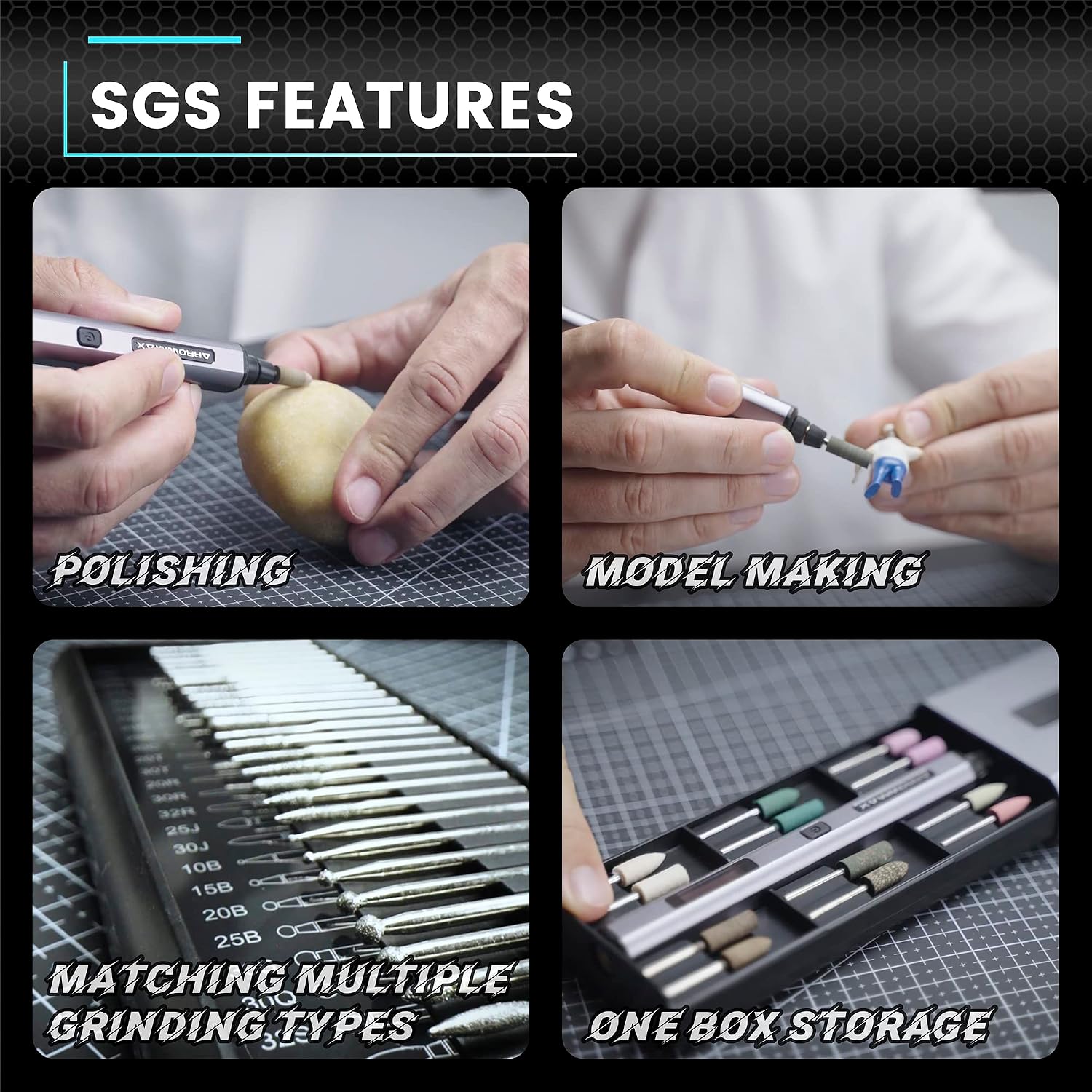
Figure 3.2: The complete set of 30 engraving and 12 polishing bits.
- Ensure the device is turned off before changing any bits.
- Gently pull out the currently installed bit from the chuck.
- Select the desired engraving or polishing bit.
- Insert the new bit firmly into the chuck until it is securely seated.
- Verify the bit is properly installed and stable before turning on the device.
4. Betjeningsvejledning
4.1 Tænd/sluk
To power on the SGS PRO, press and hold the Power Button located on the pen. The OLED display will illuminate, showing battery status, selected mode, and rotation direction. To power off, press and hold the Power Button again.
4.2 Speed Control and Intelligent Motion System
The SGS PRO features an intelligent motion system that automatically adjusts the tool's speed based on the angle of the twist, ensuring precise and consistent engraving and polishing results. The OLED display provides real-time feedback on the current speed and mode.
The device offers multiple preset speed modes. You can cycle through these modes by short-pressing the Power Button (or a dedicated mode button if present, refer to the OLED display for indicators).
4.3 App Customization (Optional)
For advanced customization, the ARROWMAX SGS PRO can be connected to the Arrowmax smartphone application, available for both Android and iOS devices. This app allows users to precisely customize the speed in increments of 500 RPM and control the forward/reverse direction for each mode.
- Download the "Arrowmax" app from the Google Play Store (for Android) or the Apple App Store (for iOS).
- Sørg for, at Bluetooth er aktiveret på din smartphone.
- Open the Arrowmax app and follow the on-screen instructions to pair with your SGS PRO device.
- Once connected, use the app interface to adjust speed settings and rotation direction as desired.

Figure 4.1: The ARROWMAX smartphone application for advanced control.
4.4 Ansøgning Eksamples
The SGS PRO is designed for a variety of light craft and design tasks. Here are some common applications:
- Gravering: Create precise and intricate designs on materials like wood, glass, metal (gold, aluminum, steel), stone, and ceramics.
- Polering: Smooth and shine surfaces, particularly useful for jewelry and small models.
- Udskæring: Detail work on softer materials such as wood or plastic.
- Modelbygning: Refine and customize miniature models and prototypes.

Figure 4.2: Customizing various items with the SGS PRO.

Figure 4.3: Various features and uses of the SGS PRO.
5. Vedligeholdelse
Proper maintenance ensures the longevity and optimal performance of your ARROWMAX SGS PRO.
- Rensning: After each use, wipe down the pen body with a soft, dry cloth to remove any dust or debris. Do not use harsh chemicals or abrasive cleaners.
- Bitpleje: Clean engraving and polishing bits after use. Store them in the provided case to prevent damage and loss. Replace worn or dull bits to maintain precision and prevent damage to your workpiece.
- Opbevaring: When not in use, store the SGS PRO and its accessories in the original case in a dry, cool place, away from direct sunlight and moisture.
- Batteripleje: For long-term storage, ensure the battery is partially charged (around 50%). Avoid fully discharging the battery for extended periods.
6. Fejlfinding
| Problem | Mulig årsag | Løsning |
|---|---|---|
| Enheden tændes ikke. | Batteriet er afladet. | Charge the device using the magnetic charging base and USB cable. |
| Bitten er løs eller falder ud. | Bit not inserted correctly or chuck is worn. | Ensure the bit is fully inserted into the chuck. If the problem persists, contact customer support. |
| Inconsistent engraving/polishing results. | Worn bit, incorrect speed setting, or improper technique. | Replace the bit if dull. Adjust speed via the device or app. Practice technique on scrap material. |
| Cannot connect to Arrowmax app. | Bluetooth is off, device is not discoverable, or app issue. | Ensure Bluetooth is on. Restart the pen and the app. Try re-pairing the device. |
| Enheden overophedes. | Prolonged continuous use or excessive pressure. | Allow the device to cool down. Avoid applying excessive pressure during operation. Take breaks during long usage sessions. |
7. Specifikationer
| Feature | Detalje |
|---|---|
| Modelnummer | SGS PRO (AM-199213) |
| Mærke | ARROWMAX |
| Strømkilde | Batteridrevet |
| Batteritype | 1 litiumpolymer (inkluderet) |
| Voltage | 5 volt |
| Driftstid (fuld opladning) | Ca. 90 minutter |
| Kropsmateriale | Aluminiumslegering |
| Inkluderet tilbehør | 30 Engraving Bits, 12 Polishing Bits |
| Forbindelse | Bluetooth (for app customization) |
| Opladningsmetode | Magnetic USB Charging |
| Dimensioner (pakke) | 21.79 x 10.01 x 4.39 cm |
| Vægt (pakke) | 440 gram |
| Fabrikant | Freemax Technology Company Limited (IMPORT) |
8. Garanti og support
For warranty information and customer support, please refer to the documentation provided with your purchase or contact ARROWMAX customer service directly. Information regarding spare parts availability is not explicitly provided.
For further assistance, visit the official ARROWMAX website or contact their support team through the contact details provided in your product packaging.


