1. Produktet er slutview
The NOTIFIER NFC-RPU is a remote paging unit designed for integration with compatible fire alarm and emergency communication systems. It features a built-in microphone and message control switches, enabling authorized personnel to broadcast live voice messages or pre-recorded announcements across designated zones. This unit is crucial for effective emergency response and communication in various facilities.
The NFC-RPU provides a reliable interface for manual and automated paging functions, ensuring clear and timely dissemination of critical information during emergencies or routine operations.
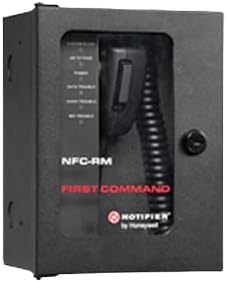
Figure 1: Notifier Remote Paging Unit (NFC-RM shown, similar to NFC-RPU). This image displays a Notifier remote paging unit, specifically the NFC-RM model, which shares a similar design and operational principles with the NFC-RPU. The unit is housed in a black metal enclosure with a clear front panel revealing a built-in microphone with a coiled cord and various message control switches. A key lock is visible on the right side for secure access.
2. Installation og opsætning
Proper installation of the NFC-RPU is essential for its reliable operation. Installation should only be performed by qualified personnel in accordance with all local codes and standards, and the instructions provided in the main Fire Alarm Control Panel (FACP) manual.
2.1 Udpakning og inspektion
- Carefully unpack the NFC-RPU unit and all accessories from its packaging.
- Inspect the unit for any signs of shipping damage. Report any damage immediately to the carrier and supplier.
- Kontroller, at alle komponenter, der er anført på følgesedlen, er til stede.
2.2 Montering
- Select a suitable mounting location that is easily accessible, visible, and protected from environmental extremes.
- Mount the unit securely to a wall or other stable surface using appropriate hardware (not supplied). Ensure the mounting surface can support the unit's weight.
- Allow sufficient space around the unit for ventilation and access to wiring terminals.
2.3 Ledningsforbindelser
Refer to the specific wiring diagrams provided in the main FACP installation manual for detailed connection instructions. General steps include:
- Ensure all power to the FACP and associated equipment is disconnected before making any wiring connections.
- Connect the data communication lines from the NFC-RPU to the FACP or network interface module as specified.
- Connect the power supply lines to the NFC-RPU, ensuring correct polarity and voltage.
- Terminate all wiring neatly and securely, ensuring no bare wires are exposed.
2.4 Første opstart og test
- After all wiring is complete and verified, restore power to the FACP and NFC-RPU.
- Observe the unit's status indicators (if present) to confirm proper initialization.
- Perform functional tests as outlined in the FACP manual to ensure the NFC-RPU can successfully initiate and broadcast messages to all designated zones.
3. Betjeningsvejledning
The NFC-RPU allows for live voice paging and activation of pre-recorded messages. Access to the unit is typically secured by a key lock.
3.1 Accessing the Unit
- Use the provided key to unlock and open the front panel of the NFC-RPU.
- The microphone and message control switches will be accessible.
3.2 Live Voice Paging
- Select Zones: Use the message control switches to select the desired zones for the broadcast. Refer to your system's specific configuration for zone assignments.
- Aktivér mikrofon: Press and hold the "Push-to-Talk" (PTT) button on the microphone. A status indicator may illuminate to confirm the microphone is active.
- Tal tydeligt: Speak clearly and directly into the microphone. Maintain a consistent distance from the microphone for optimal audio quality.
- Slip PTT: Release the PTT button when your message is complete.
3.3 Activating Pre-recorded Messages
If configured, the NFC-RPU can trigger pre-recorded messages stored within the FACP or associated audio system.
- Select Message: Use the message control switches to select the desired pre-recorded message. The switches may be labeled with message numbers or descriptions.
- Initiate Broadcast: Press the designated "Activate Message" or "Broadcast" button. The system will then play the selected message to the configured zones.
- Monitorstatus: Observe system indicators to confirm the message is broadcasting successfully.
Always ensure the unit is closed and locked after use to prevent unauthorized access.
4. Vedligeholdelse
Regular maintenance helps ensure the longevity and proper functioning of your NFC-RPU unit. All maintenance should be performed by qualified personnel.
4.1 Rutinemæssig rengøring
- Periodically clean the exterior of the unit with a soft, dry, or slightly damp klæde.
- Brug ikke slibende rengøringsmidler, opløsningsmidler eller stærke kemikalier, da disse kan beskadige overfladen og de indvendige komponenter.
- Sørg for, at der ikke kommer fugt ind i enheden.
4.2 Funktionstest
- Conduct periodic functional tests of the NFC-RPU as part of your overall fire alarm system testing schedule (e.g., monthly, quarterly).
- Verify that live voice paging and pre-recorded message activation work correctly for all designated zones.
- Check all status indicators for proper operation.
4.3 Komponentinspektion
- Inspect the microphone cord for any signs of wear, fraying, or damage.
- Check the integrity of the enclosure and ensure all screws are tight.
- Verify that the key lock mechanism operates smoothly.
5. Fejlfinding
This section provides solutions to common issues encountered with the NFC-RPU. For problems not listed here, contact technical support.
| Problem | Mulig årsag | Løsning |
|---|---|---|
| Enheden tænder ikke. | No power supply; loose wiring; internal fault. | Verify power connections and FACP status. Check wiring for secure connections. If problem persists, contact support. |
| Microphone not broadcasting. | PTT button not pressed; microphone fault; communication issue with FACP. | Ensure PTT button is held down. Check FACP status for communication errors. Test with another microphone if available (if applicable). |
| Poor audio quality during broadcast. | Incorrect microphone distance; microphone fault; system audio settings. | Speak clearly and consistently into the microphone. Consult FACP manual for audio level adjustments. Inspect microphone for damage. |
| Pre-recorded messages not playing. | Incorrect message selection; FACP configuration error; communication issue. | Verify correct message selection. Check FACP programming for message assignments and zone activation. |
6. Specifikationer
The following specifications apply to the NOTIFIER NFC-RPU Remote Paging Unit:
- Modelnummer: NNFCRPU
- Mærke: Underretning
- Fabrikant: MEDDELELSE
- Fungere: Remote Paging Unit with Built-in Microphone
- Alarmtype: Audible (via connected FACP)
- Varepakkemængde: 1
- ASIN: B0B5KC7HDP
- UPC: 737214684831
- Første tilgængelige: 30. juni 2022
- Farve: Sort
- Funktioner: Message Control Switches
7. Garanti og support
7.1 Garantioplysninger
Warranty terms and conditions for the NOTIFIER NFC-RPU are provided by the manufacturer, NOTIFIER. Please refer to the warranty documentation included with your purchase or contact your authorized Notifier dealer for specific details regarding warranty coverage, duration, and claims procedures.
7.2 Teknisk support
For technical assistance, installation guidance, or troubleshooting beyond the scope of this manual, please contact your authorized Notifier distributor or the NOTIFIER technical support department. Ensure you have your product model number (NNFCRPU) and serial number (if applicable) ready when contacting support.
You can typically find contact information for Notifier support on their official webwebstedet eller gennem din produktleverandør.