1. Introduktion
This manual provides detailed instructions for the setup, operation, and maintenance of your Bisofice ZJ-5810 58mm Thermal Receipt Printer. Please read this manual thoroughly before using the printer to ensure proper functionality and to extend the product's lifespan.
2. Produktet er slutview
2.1 Nøglefunktioner
- Udskrivningsmetode: Direkte termisk print
- Papirbredde: 58 mm
- Effektiv udskriftsbredde: 48 mm
- Udskrivningshastighed: Op til 90 mm/s
- Opløsning: 203 dpi (8 punkter/mm)
- Forbindelse: USB, Bluetooth 2.0/4.0
- Batteri: 2000mAh 7.4V Rechargeable Lithium Battery
- Kompatibilitet: iOS, Android, Windows, Linux
- Barcode Support: 1D (UPC-A/E, EAN13/8, CODE39/93/128, ITF, CODABAR), 2D (QR Code)
2.2 Pakkens indhold
Bekræft at alle varer er til stede i pakken:
- 1 x Bisofice ZJ-5810 Thermal Receipt Printer
- 1 x termisk papirrulle
- 1 x USB-kabel
- 1 x brugermanual

Image: Package contents including the printer, manual, USB cable, and a thermal paper roll.
3. Specifikationer
| Feature | Specifikation |
|---|---|
| Model | ZJ-5810 |
| Dimensioner (L x B x H) | 11.2 x 8.4 x 5 cm (4.4 x 3.3 x 2 tommer) |
| Vægt | 254 g (9 oz) |
| Udskrivningsmetode | Termisk linjeudskrivning |
| Printhovedets levetid | 100 million pulses/dot, or 100 km |
| Opløsning | 203 dpi (8 punkter/mm) |
| Effektiv printbredde | 48 mm (384 punkter) |
| Available Paper Width | 58 ± 1 mm |
| Papirrullens diameter | Max. ≤ 50 mm |
| Udskrivningshastighed | ≤ 90 mm/s |
| Batteri | 2000mAh 7.4V Rechargeable Lithium Battery |
| Opladningsmetode | External Charger (5V-2A) |
| Kommunikationsgrænseflade | USB, Bluetooth 2.0/4.0 |
| Operativsystemer | iOS, Android, Windows (9X/2000/2003/XP/Vista/7/8/10), Linux |

Image: Physical dimensions of the ZJ-5810 printer.
4. Opsætning
4.1 Tænd og opladning
- Ensure the printer is fully charged before first use. Connect the printer to the external charger using the provided USB cable. The charge indicator light will illuminate.
- Press and hold the power button to turn the printer on or off.

Image: The printer's battery compartment, showing the 2000mAh lithium battery. The product label indicates Model: ZJ-5810, Paper Width: 58mm, Power Supply: 9V/1.5A, and a serial number: 345276248958.
4.2 Installing the Thermal Paper Roll
- Open the printer's top cover by gently lifting it.
- Insert the thermal paper roll into the compartment, ensuring the printing side of the paper faces the print head.
- Træk en lille mængde papir ud forbi printhovedet.
- Luk topdækslet godt, indtil det klikker på plads.
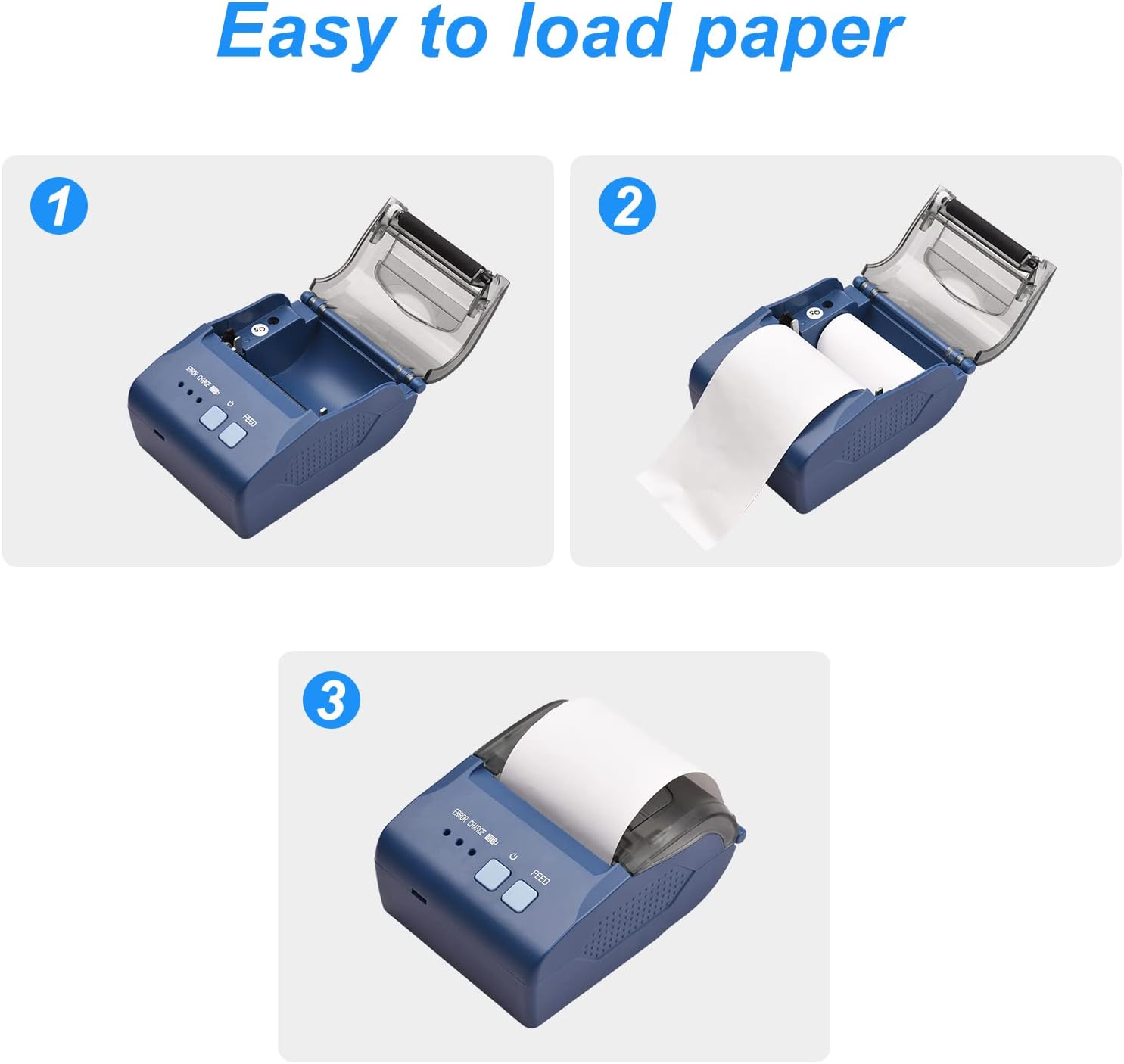
Image: Visual steps demonstrating how to open the cover, insert the paper roll, and close the cover.
4.3 Driver Installation (Windows/Linux)
For Windows and Linux operating systems, download the printer driver from the official webwebsted:
- Besøg: http://www.cnfujun.com/d/41
- Følg instruktionerne på skærmen for at installere driveren.
4.4 Bluetooth-forbindelse (iOS/Android)
To connect the printer via Bluetooth to a mobile device:
- Ensure the printer is powered on and Bluetooth is enabled on your mobile device.
- Til iOS: Download the "POS-PrinterV1.0" application from the Apple App Store. Open the app and follow its instructions to connect to the printer.
- Til Android: Scan the QR code provided in the physical user manual to download the DEMO APP. Alternatively, you may find the app at https://www.pgyer.com/Z59z?sign=&auSign=&code=. Follow the in-app instructions to complete the installation and connection.

Image: The printer connected to a smartphone via Bluetooth for mobile printing.
4.5 USB-forbindelse
Connect the printer to your computer using the provided USB cable. After driver installation (Section 4.3), the printer should be recognized by your system.
5. Betjeningsvejledning
5.1 Grundlæggende udskrivning
Once the printer is connected and drivers/apps are installed, you can initiate printing from your application. The printer will automatically feed and cut the receipt after printing.

Image: The Bisofice ZJ-5810 printer with a sample receipt being printed.
5.2 Barcode and QR Code Printing
The ZJ-5810 supports various 1D and 2D barcode formats. Ensure your printing software or application is configured to send barcode data in a compatible format for optimal results.

Image: The printer's internal mechanism, illustrating its high-speed printing capability of up to 90mm/s.
6. Vedligeholdelse
6.1 Rengøring af printhovedet
Regular cleaning of the print head ensures clear print quality and extends the printer's life.
- Sluk printeren, og frakobl strømkablet.
- Åbn topdækslet.
- Brug en vatpind letampmed isopropylalkohol for forsigtigt at tørre printhovedets overflade af.
- Lad printhovedet tørre helt, før du lukker dækslet og tænder printeren.
6.2 Pleje af batterier
- Undgå at aflade batteriet helt ofte.
- If storing the printer for an extended period, charge the battery to approximately 50% and store in a cool, dry place.
- Use only the provided charger or a compatible 5V-2A charger.
7. Fejlfinding
- Ingen strøm: Ensure the printer is charged and the power button is pressed firmly. Check the USB cable and charger connection.
- Dårlig udskriftskvalitet: Clean the print head (Section 6.1). Ensure you are using high-quality thermal paper.
- Papir i klemme: Turn off the printer, open the cover, carefully remove any jammed paper, and re-install the paper roll correctly (Section 4.2).
- Kan ikke oprette forbindelse via Bluetooth: Ensure Bluetooth is enabled on both devices. Restart the printer and your mobile device. Re-pair the devices. Verify the correct app is installed for your operating system.
- Printer Not Recognized (USB): Ensure the USB cable is securely connected. Reinstall the printer drivers (Section 4.3). Try a different USB port or cable.
8. Garanti og support
Information regarding specific warranty terms and conditions for the Bisofice ZJ-5810 printer is not available in this manual. For warranty claims, technical support, or service inquiries, please refer to the documentation provided at the time of purchase or contact your retailer.


