1. Introduktion
The Inrico B01 Wireless Bluetooth Speaker Microphone is designed to enhance communication for users of Android and iOS smart devices. This device pairs easily via Bluetooth 4.2 and offers features such as Push-to-Talk (PTT) and volume control, making it ideal for use with applications like Zello and RealPTT. Full functionality may vary depending on the specific application and its support for external devices.
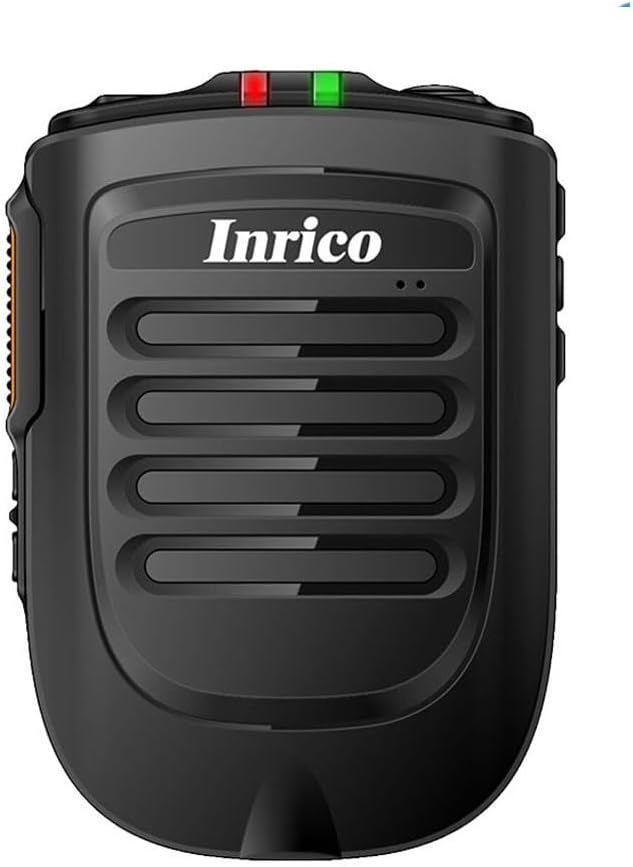
Figur 1: Forside view of the Inrico B01 Wireless Bluetooth Speaker Microphone. This image shows the sleek black design with the Inrico logo and speaker grille.
2. Produktfunktioner
- Embedded PTT and Volume Control Buttons: Designed for easy access and operation, compatible with applications like Zello and other popular communication platforms.
- 3.5 mm hovedtelefonstik: Allows for connection of external listen-only earpieces for private audio.
- LED-indikator: A discreet LED on the top of the speaker provides visual status in various environments.
- Ansøgningskompatibilitet: Works effectively with Zello and RealPTT. Note that some features may not be fully supported by other applications.
- Desktop Charger Compatibility: Designed to be compatible with the B01 Desktop Charger (sold separately).
- Inkluderede komponenter: Comes with a Micro USB Cable for charging.
3. Pakkens indhold
Når du åbner pakken, skal du kontrollere, at alle følgende varer er inkluderet:
- Inrico B01 Wireless Bluetooth Speaker Microphone
- USB oplader
- USB datakabel
- Instruktionsmanual (dette dokument)
- Bælteclips
- Lithium-ion-batteri (forinstalleret eller separat)
4. Enhedslayout og kontroller
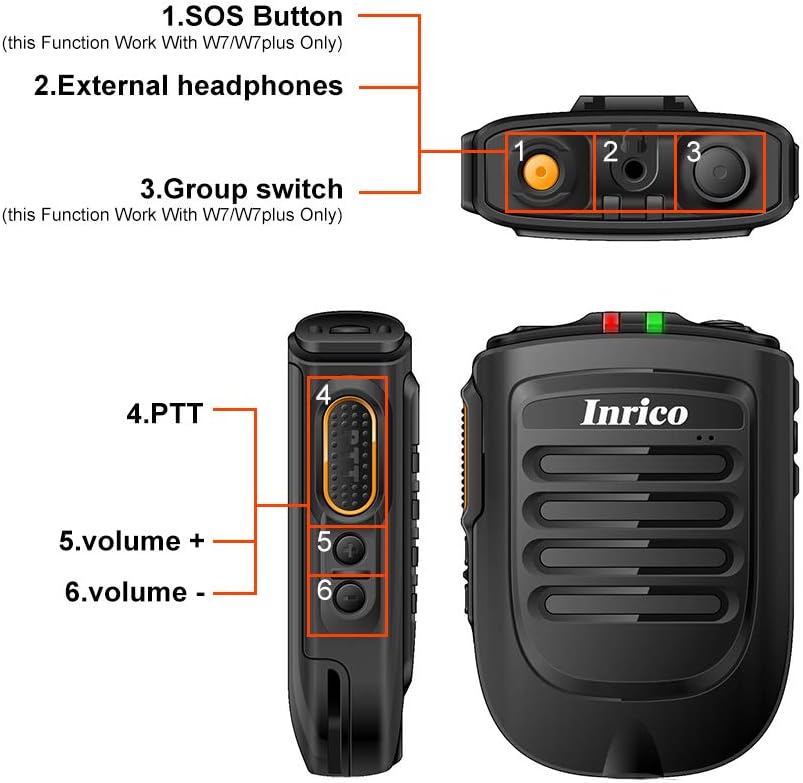
Figure 2: Detailed diagram illustrating the various buttons and ports on the Inrico B01.
- 1. SOS Button: (Functionality may depend on application and device compatibility, e.g., W7/W7plus).
- 2. External Headphones Jack: 3.5mm port for connecting an external earpiece.
- 3. Group Switch: (Functionality may depend on application and device compatibility, e.g., W7/W7plus).
- 4. PTT (Push-to-Talk) Button: Main communication button.
- 5. Volume + Button: Øger lydstyrken.
- 6. Volume - Button: Sænker lydstyrken.
5. Opsætning
5.1 Opladning af enheden
Before initial use, fully charge the Inrico B01. Connect the provided USB data cable to the device's charging port and the other end to a USB charger or a computer's USB port. The LED indicator will show charging status (refer to LED indicator section for details).

Figure 3: Illustration of the Inrico B01's 2000mAh battery capacity and estimated usage times. The image shows battery level indicators and approximate talking, PTT, and standby times.
| Metrisk | Omtrentlig tid |
|---|---|
| Taletid | ≈14 time |
| PTT time | ≈14 time |
| Standby tid | >90 timer |
5.2 Bluetooth -parring
- Ensure the Inrico B01 is powered on and in pairing mode (refer to device's LED indicator for pairing status, usually a blinking blue light).
- On your smartphone (Android or iOS), navigate to the Bluetooth settings.
- Søg efter available devices. The Inrico B01 should appear in the list (e.g., "Inrico B01" or similar).
- Select the Inrico B01 to initiate pairing. If prompted for a passcode, enter "0000" (four zeros).
- Once paired, the LED indicator on the B01 will change to a solid blue light, indicating a successful connection.
6. Betjeningsvejledning
6.1 Using Push-to-Talk (PTT)
After successfully pairing the device with your smartphone and configuring it within your chosen communication application (e.g., Zello, RealPTT):
- Open your communication application on your smartphone.
- To transmit, press and hold the PTT button (labeled '4' in Figure 2) on the Inrico B01. Speak clearly into the microphone.
- Release the PTT button to stop transmitting and listen for replies.
6.2 Justering af lydstyrke
Use the Volume + (labeled '5' in Figure 2) and Volume - (labeled '6' in Figure 2) buttons on the side of the device to adjust the speaker's output volume.
6.3 Using the Earphone Jack
For private listening, connect a 3.5mm listen-only earpiece to the external headphones jack (labeled '2' in Figure 2) on the top of the device. Audio will be routed to the earpiece instead of the internal speaker.
6.4 LED-indikatorstatus
- Blå LED blinker: Device is in pairing mode or waiting for connection.
- Blue LED Solid: Device is successfully connected via Bluetooth.
- Red LED Solid: Enheden oplades.
- Grøn LED fast: Enheden er fuldt opladet.
- Rød LED blinker: Advarsel om lavt batteri.
7. Vedligeholdelse
- Rensning: Tør enheden af med en blød, tør klud. Brug ikke skrappe kemikalier eller slibende rengøringsmidler.
- Opbevaring: Opbevar enheden et køligt, tørt sted væk fra direkte sollys og ekstreme temperaturer.
- Batteripleje: For at forlænge batteriets levetid bør du undgå at aflade batteriet helt ofte. Oplad enheden regelmæssigt, selvom den ikke er i brug i længere perioder.
- Vandtæthed: Denne enhed er ikke vandtæt. Undgå udsættelse for vand eller overdreven fugt.

Figure 4: Image showing the metal sheet on the battery cover, designed for compatibility with magnetic car holders. This feature allows for convenient mounting in vehicles.
8. Fejlfinding
| Problem | Mulig årsag | Løsning |
|---|---|---|
| Enheden tænder ikke. | Lav eller ingen batteriopladning. | Charge the device fully using the provided USB cable and charger. |
| Kan ikke parres med smartphone. | Bluetooth is off on smartphone; device not in pairing mode; too far from smartphone. | Ensure Bluetooth is enabled on your phone. Put the B01 into pairing mode. Keep devices within 10 meters. Try restarting both devices. |
| No audio from speaker/earpiece. | Volume too low; device not connected; application not configured correctly. | Increase volume. Verify Bluetooth connection. Check audio settings within your communication application. |
| PTT button not working. | Application not running or not configured to recognize the PTT button. | Ensure your communication application is active and properly configured to use the external PTT button. Some applications may require specific settings. |
9. Specifikationer

Figure 5: Physical dimensions and weight of the Inrico B01. The image provides measurements in both millimeters and feet, and weight in grams and ounces.
| Parameter | Værdi |
|---|---|
| Mærke | Inrico |
| Modelnavn | B01 |
| Bluetooth version | 4.2 |
| Bluetooth-protokol | HFP / HSP / A2DP / AVRCP / SPP |
| Transmission Range | 10m |
| Transmissionseffekt | KLASSE 2, 4dbm |
| Følsomhed | 80dBm < 0.1%BER |
| Lydydelse | SBC Decode |
| Audio to Noise Ratio | ≥75dB |
| Højttalerkraft | 1W/8R (116dB) |
| LED-indikator | Blue/Green LED Indicator |
| Høretelefonstik | 3.5 mm |
| Batterikapacitet | 2000mA @ 3.7V (Lithium Ion) |
| Dimensioner (L*B*H) | 90 x 63 x 25.6 mm (ca. 3.54 x 2.48 x 1.01 tommer) |
| Varens vægt | 8.8 ounce (ca. 249 gram) |
| Kompatible enheder | Smartphone (Android and iOS) |
| UPC | 785582409181 |

Figure 6: The Inrico B01 is compatible with various mobile radios, such as the TM-7 7plus, expanding its utility beyond just smartphones.
10. Garanti og support
For garantioplysninger og teknisk support henvises til den officielle Inrico-side. website or contact your point of purchase. Keep your purchase receipt as proof of purchase for warranty claims.
For yderligere hjælp kan du også henvise til produktside på Amazon.


