1. Introduktion
This manual provides comprehensive instructions for the proper use, setup, and maintenance of your boAt Immortal IM 300 Over-Ear Wired Gaming Headphones. Please read this manual thoroughly before using the product to ensure optimal performance and longevity.

Image 1.1: The boAt Immortal IM 300 Over-Ear Wired Gaming Headphones, showcasing dens design og RGB-belysning.
2. Pakkens indhold
Bekræft, at alle nedenstående varer er til stede i din produktemballage:
- boAt Immortal IM-300 Gaming Headphones
- Type-C til Type-A kabel
- Type-C til Type-C kabel
- Brugervejledning (dette dokument)
- Garantikort
3. Produktet er slutview
The boAt Immortal IM 300 headphones are designed for an immersive audio experience, featuring advanced drivers, dual microphone options, and customizable settings.
3.1. Nøglefunktioner
- 50 mm drivere: Engineered for a powerful and immersive auditory experience.
- Dobbelte EQ-tilstande: Switch between 3D Spatial Sound for gaming and boAt Signature Sound for music and movies.
- RGB-lysdioder: Integrated RGB lighting for visual customization.
- Dobbelte mikrofoner: Includes a detachable boom mic for clear communication and a passive mic for general use.
- Tilpasning: Audio and mic driver settings can be adjusted via boAt Plugin Labz software.
- Komfortabelt design: Lightweight, over-ear design with soft earmuffs for extended wear.
- Kabelforbindelse: USB Type-C connection for reliable audio transmission.
- Multi-platform kompatibilitet: Designed for use with PCs, laptops, smartphones, and gaming consoles.

Billede 3.1: En eksploderet view illustrating the 50mm audio drivers within the headphone earcups.
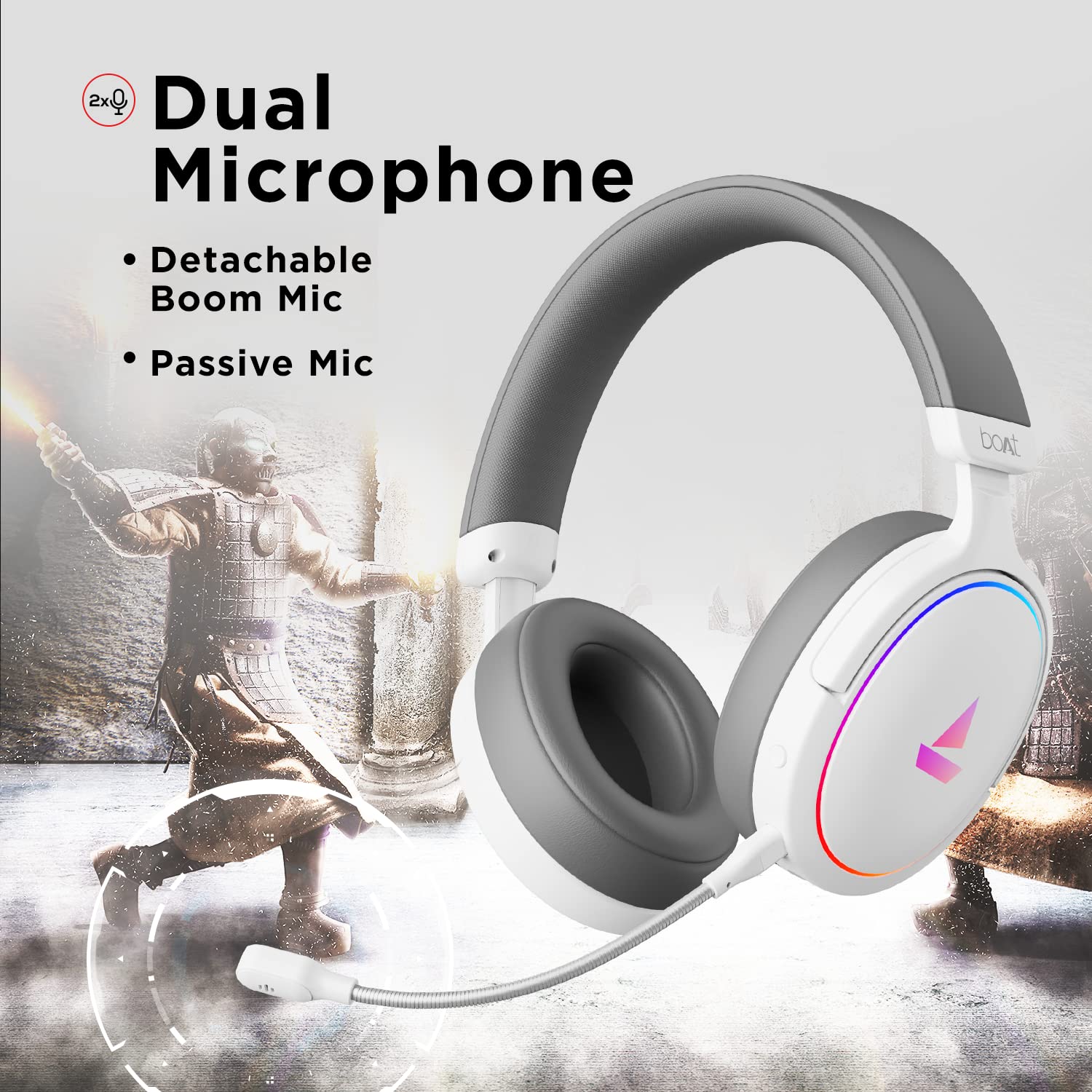
Image 3.2: The headphones featuring the detachable boom microphone, highlighting the dual microphone system.
4. Opsætning
4.1. Tilslutning til din enhed
The Immortal IM 300 headphones connect via USB. Use the appropriate cable for your device:
- Til pc/laptop: Use the provided Type-C to Type-A cable. Connect the Type-C end to the headphone and the Type-A end to an available USB port on your computer.
- For Smartphones/Other Type-C Devices: Use the provided Type-C to Type-C cable. Connect one end to the headphone and the other to your device's Type-C port.
Once connected, your device should automatically detect the headphones. You may need to select the "Immortal IM-300" as the audio output and input device in your system's sound settings.
4.2. Attaching the Boom Microphone
The boom microphone is detachable. To attach it, align the microphone's connector with the port on the left earcup and gently push until it clicks into place. Ensure it is securely connected for optimal voice pickup.
To detach, gently pull the microphone straight out from the port.
5. Betjeningsvejledning
5.1. Audio Modes (Dual EQ)
The headphones feature two distinct audio equalization (EQ) modes:
- 3D Spatial Sound Mode: Optimized for gaming, providing enhanced directional audio cues.
- Music Mode (boAt Signature Sound): Balanceret lydprofffile suitable for listening to music and watching movies.
Refer to the inline remote control or the boAt Plugin Labz software for instructions on switching between these modes.

Image 5.1: Illustration of the Dual EQ Modes, highlighting the 3D Spatial Audio and Music Mode functionalities.
5.2. RGB LED Control
The headphones are equipped with RGB LEDs. These lights can be customized or turned off. Specific controls for RGB lighting are typically located on the inline remote or accessible through the boAt Plugin Labz software.

Image 5.2: The headphones showcasing their RGB lighting, indicating customization options via boAt Plugin Labz.
5.3. Mikrofonbrug
The Immortal IM 300 offers two microphone options:
- Boom-mikrofon: For clear and focused voice communication, especially during gaming. Ensure it is positioned correctly near your mouth.
- Passive Microphone: An integrated microphone for casual use when the boom mic is detached.
Use the inline remote to mute/unmute the microphone as needed.
6. Customization via boAt Plugin Labz
For advanced audio and microphone settings, download and install the boAt Plugin Labz software. This application allows you to fine-tune your listening experience and microphone performance.
Please visit the official boAt website for download instructions and compatibility information for the Plugin Labz software.
7. Vedligeholdelse
7.1. Rensning
- Tør hovedtelefonerne af med en blød, tør klud.
- Brug ikke skrappe kemikalier, rengøringsopløsningsmidler eller stærke rengøringsmidler.
- Keep the earcups clean to prevent debris buildup.
7.2. Opbevaring
- Opbevar hovedtelefonerne et køligt, tørt sted væk fra direkte sollys og ekstreme temperaturer.
- Undgå at placere tunge genstande på hovedtelefonerne.
- When not in use, consider storing them in a protective case to prevent damage.
8. Fejlfinding
| Problem | Mulig årsag | Løsning |
|---|---|---|
| Ingen lyd fra hovedtelefoner. |
|
|
| Mikrofon virker ikke. |
|
|
| RGB LEDs are not lighting up. |
|
|
9. Specifikationer
| Feature | Detalje |
|---|---|
| Modelnavn | Immortal IM-300 |
| Forbindelsesteknologi | Kablet (USB Type-C) |
| Audio driver størrelse | 50 mm |
| Ørestykke form | Over-ear-kopper |
| Mikrofonformat | Boom (detachable) & Passive |
| Støjkontrol | Passiv støjreduktion |
| Frekvensområde | 50-10KHz |
| Varens vægt | 260 gram |
| Produktmål (LxBxH) | 20 x 18 x 8 cm |
| Kompatible enheder | Smartphones, Laptops, Desktops, Gaming Consoles |
| Materiale | Plast |
| Kontrolmetode | Fjern |

Billede 9.1: Overview of key features including multi-platform compatibility, lightweight construction, wired connection, and passive noise isolation.
10. Garanti og support
Your boAt Immortal IM 300 headphones come with a 1 års garanti fra købsdatoen. Gem venligst din købskvittering i tilfælde af garantikrav.
For technical support, warranty claims, or further assistance, please contact boAt customer service through their official webwebstedet eller kontaktoplysningerne på dit garantikort.
For mere information, besøg den officielle boAt Store.


