1. Introduktion
This manual provides essential information for the safe and efficient operation of your ONN 43-Inch Class 4K UHD (2160P) LED Smart TV. This television offers a 4K Ultra High Definition display, High Dynamic Range (HDR) compatibility, and integrated smart TV functionalities powered by Roku. It supports popular streaming services and voice assistants like Alexa and Google Assistant. Please read this manual thoroughly before using your television and retain it for future reference.

Image 1: ONN 43-Inch 4K UHD Smart TV in a typical living room environment.
2. Sikkerhedsoplysninger
Always follow basic safety precautions when using this product to reduce the risk of fire, electric shock, and injury. Keep this manual handy for reference.
- Strømkilde: Tilslut kun tv'et til den angivne strømforsyning.
- Ventilation: Sørg for tilstrækkelig ventilation omkring tv'et. Bloker ikke ventilationsåbningerne.
- Vand og fugt: Udsæt ikke tv'et for regn eller fugt. Placer ikke genstande fyldt med væsker oven på tv'et.
- Rensning: Tag stikket ud af tv'et før rengøring. Brug en blød, tør klud.
- Vægmontering: If wall mounting, ensure the mount is compatible with VESA 400x400 standards and installed by qualified personnel.
- Børn: Hold opsyn med børn for at forhindre dem i at klatre op på eller lege med tv'et.
3. Pakkens indhold
Kontroller, at alle varer er til stede i pakken. Hvis der mangler eller er beskadigede varer, skal du kontakte din forhandler.
- ONN 43-Inch Class 4K UHD LED Smart TV
- Fjernbetjening
- Wall Mount (Note: For renewed products, TV stands may not be included as a wall mount is provided for installation.)
- Strømledning
- Lynstartguide (ikke inkluderet i denne manual)

Image 2: The ONN 43-Inch 4K UHD Smart TV alongside its included wall mount.
4. Opsætning
4.1 Vægmontering
Your ONN 43-Inch Smart TV is designed for wall mounting using a VESA 400x400 compatible bracket. Follow these general steps for installation:
- Forbered væggen: Locate wall studs and ensure the mounting area can support the TV's weight (approximately 16.9 pounds) plus the mount.
- Attach Mount Brackets to TV: Secure the wall mount brackets to the VESA holes on the back of the TV using appropriate screws.
- Installer vægplade: Mount the wall plate securely to the wall studs according to the wall mount manufacturer's instructions.
- Hæng fjernsynet op: Carefully lift the TV and attach it to the wall plate. Ensure it is securely locked in place.
Note: Always refer to the specific instructions provided with your wall mount for detailed installation steps. Professional installation is recommended.
4.2 Tilslutning af eksterne enheder
TV'et tilbyder forskellige porte til tilslutning af eksterne enheder:
- HDMI: 3 HDMI ports (including 1 eARC) for high-definition audio/video devices like Blu-ray players, gaming consoles, or cable boxes.
- USB: 1 USB port for media playback from USB drives.
- LAN: 1 Ethernet-port til kablet internetforbindelse.
- Optisk: 1 Optical digital audio output for connecting to soundbars or home theater systems.
- Sammensat: 1 Composite video input for older devices.
- Koaksial/Kabel: 1 Coaxial input for antenna or cable TV connection.
- Hovedtelefoner: 1 Headphone jack for private listening.
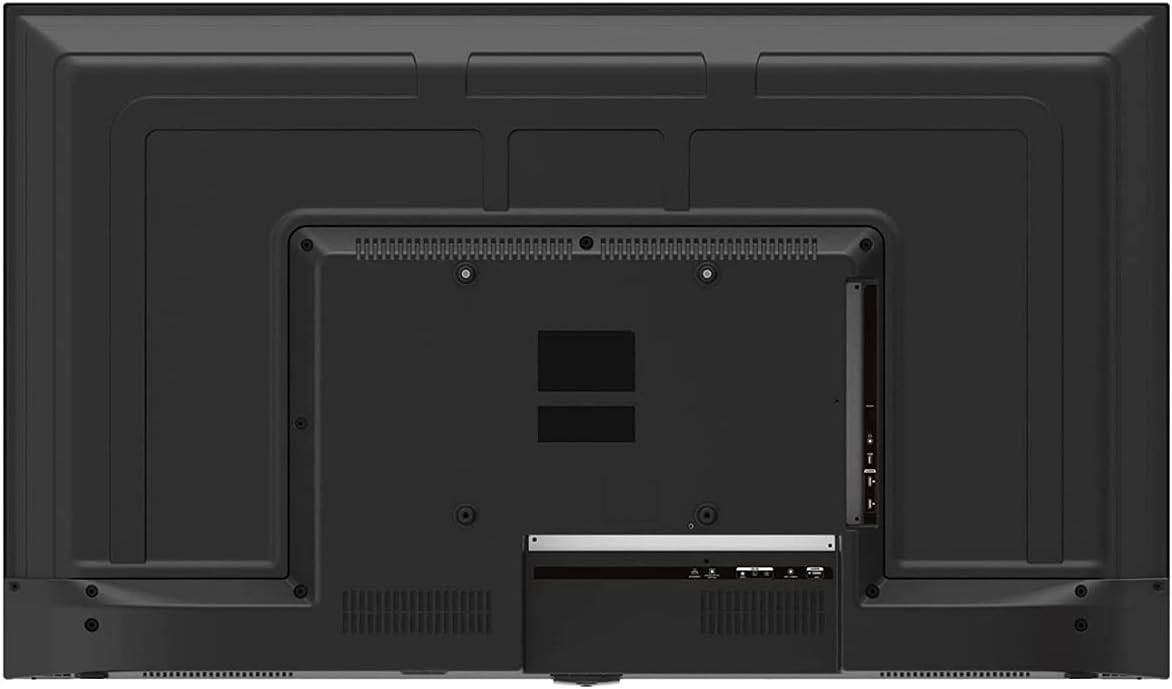
Image 3: Rear panel of the ONN 43-Inch Smart TV, highlighting the available connectivity ports.
4.3 Første opstart og netværksopsætning
- Tænd: Connect the power cord to the TV and a power outlet. Press the power button on the remote control.
- Sprogvalg: Følg vejledningen på skærmen for at vælge dit foretrukne sprog.
- Netværks forbindelse: Vælg dit Wi-Fi-netværk på listen, og indtast adgangskoden. Alternativt kan du tilslutte et Ethernet-kabel for en kabelbaseret forbindelse.
- Roku Account Setup: Follow the instructions to create or sign in to your Roku account. This is necessary to access streaming channels and features.
5. Betjening af dit TV
5.1 Fjernbetjening
The included remote control provides easy access to all TV functions and streaming services. It features dedicated buttons for popular streaming apps like Netflix, Apple TV+, Paramount+, and HBO Max.
5.2 Smart TV Interface (Roku TV)
The Roku TV home screen provides a centralized hub for all your entertainment. You can easily navigate through streaming channels, live TV inputs, and device connections.

Image 4: The Roku TV home screen on the ONN 43-Inch Smart TV, showing available streaming applications.

Billede 5: En vinklet view af ONN 43-tommer Smart TV, vistasing the user interface from a different perspective.
- Hjem: Access the main Roku TV interface.
- Live tv: Browse available live television channels.
- Streamingbutik: Discover and add new streaming channels.
- Apps og input: Select connected devices (e.g., HDMI 1, HDMI 2) or launch installed applications.
5.3 Integration af stemmeassistent
The TV is compatible with Alexa and Google Assistant. You can use a compatible voice assistant device (sold separately) or the Roku mobile app to control your TV with voice commands, such as turning it on/off, changing channels, or launching apps.
5.4 Billedindstillinger
To adjust picture quality, navigate to Settings > Picture Settings on the Roku TV menu. Options typically include Brightness, Contrast, Color, Tint, Sharpness, and various picture modes (e.g., Movie, Sports, Vivid, Standard).
5.5 Lydindstillinger
To adjust audio settings, navigate to Settings > Audio Settings. Options may include Volume Mode, Audio Delay, and various sound modes (e.g., Standard, Theater, Music).
6. Vedligeholdelse
6.1 Rengøring af tv'et
- Tag altid stikket ud af tv'et inden rengøring.
- Brug en blød, fnugfri klud til forsigtigt at tørre skærmen og kabinettet af.
- For genstridige mærker, gnid letampRengør kluden med vand eller et mildt, ikke-slibende skærmrensemiddel. Spray aldrig rengøringsmiddel direkte på skærmen.
6.2 Softwareopdateringer
Your ONN Roku TV automatically receives software updates to improve performance and add new features. Ensure your TV is connected to the internet for these updates. You can manually check for updates via Indstillinger > System > Systemopdatering.
7. Fejlfinding
Hvis du støder på problemer med dit tv, kan du bruge følgende almindelige løsninger:
| Problem | Løsning |
|---|---|
| Ingen strøm | Sørg for, at netledningen er korrekt tilsluttet både tv'et og en fungerende stikkontakt. Prøv en anden stikkontakt. |
| Intet billede/lyd | Check all cable connections (HDMI, coaxial). Ensure the correct input source is selected on the TV. |
| Fjernbetjening virker ikke | Udskift batterierne i fjernbetjeningen. Sørg for, at der ikke er nogen forhindringer mellem fjernbetjeningen og tv'ets IR-sensor. |
| Kan ikke oprette forbindelse til Wi-Fi | Verify your Wi-Fi password. Restart your router and modem. Move the TV closer to the router if possible. |
| Dårlig billedkvalitet | Check the resolution settings of your connected device. Adjust picture settings on the TV. Ensure you are viewaf 4K-indhold for optimal opløsning. |
8. Specifikationer
| Feature | Detalje |
|---|---|
| Skærmstørrelse | 43 tommer |
| Displayteknologi | LED |
| Opløsning | 4K Ultra HD (2160p) |
| HDR-kompatibilitet | Ja |
| Smart TV platform | Roku TV |
| Stemmeassistent support | Alexa, Google Assistant |
| Forbindelse | 3 HDMI (1 eARC), 1 Composite, 1 USB, 1 LAN, 1 Optical, 1 Coaxial/Cable, 1 Headphone |
| Aspektforhold | 16:9 |
| Produktmål (D x B x H) | 7 cm x 38 cm x 23 cm |
| Varens vægt | 16.9 pund |
| Farve | Sort |

Billede 6: Side profile of the ONN 43-Inch Smart TV, illustrating its slim design.

Billede 7: Energimærke med anslåede årlige energiomkostninger og -forbrug for fjernsynet.
9. Garanti og support
For warranty information and technical support, please refer to the documentation included with your product or visit the official ONN support website. As this is a renewed product, specific warranty terms may vary. Please consult the seller or product listing for details regarding the renewed product warranty.


