1. Introduktion
This user manual provides comprehensive instructions for the EXVIST 4G LTE Dongle, Model 4GDEC25AFX. This device is designed to provide high-speed 4G LTE connectivity for personal computers, routers, and laptops by integrating a Mini PCIe modem (not included) and a SIM card.
The dongle is equipped with a Quectel EC25-AFX IoT/M2M-optimized LTE Cat 4 module, enabling data rates up to 150Mbps downlink and 50Mbps uplink. It features an industrial electric circuit design for reliable operation in various environments.
2. Produktet er slutview og komponenter
The EXVIST 4G LTE Dongle includes the following main components:
- EXVIST 4G LTE Dongle Unit
- To eksterne antenner
- Brugervejledning (dette dokument)
Key interfaces and features of the dongle include:
- Mini PCIe connector for 4G LTE module (module excluded)
- USB 2.0 (Type-C 3.1) connector for host connection
- SIM card slot (Push-Push Type)
- Two SMA antenna connectors
- LED indikator
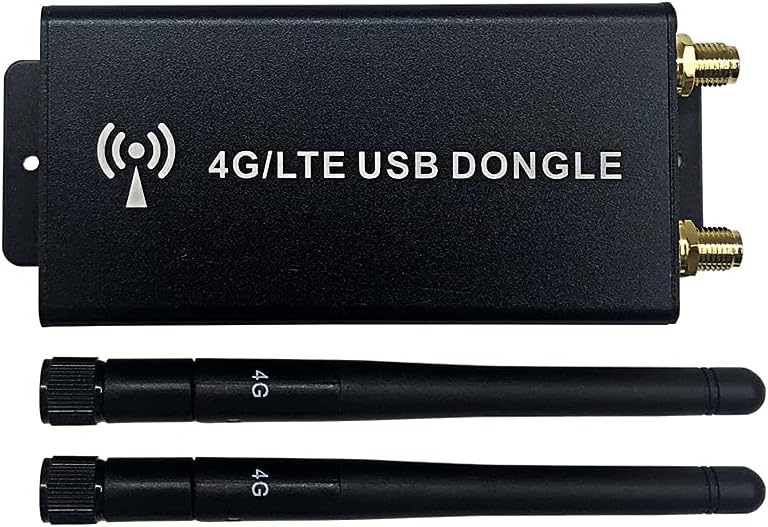
Figure 2.1: EXVIST 4G LTE Dongle with included antennas. The dongle is a black rectangular unit with two antenna ports and a USB-C port, designed for mobile broadband connectivity.

Figur 2.2: Forside view of the dongle highlighting its specifications: USB 2.0, Type-C, CAT4, and EC25-AFX module compatibility. It supports various LTE FDD and WCDMA bands for North American carriers like Verizon, AT&T, U.S. Cellular, and Telus.

Figur 2.3: Side view of the dongle, showing the LED indicator and the USB Type-C port for connecting to a host device.

Figur 2.4: Modsat side view of the dongle, displaying the two SMA antenna connectors (ANT1, ANT2) and the Push-Push type SIM card slot.
3. Opsætningsvejledning
Follow these steps to set up your EXVIST 4G LTE Dongle:
3.1. Installing the Mini PCIe Module
The EXVIST 4G LTE Dongle requires a compatible Mini PCIe 4G LTE module (e.g., Quectel EC25-AFX) which is ikke inkluderet with this product. Ensure you have acquired a suitable module before proceeding.
- Carefully open the dongle casing to access the internal Mini PCIe slot.
- Align your Mini PCIe module with the slot and gently push it in until it is securely seated.
- Secure the module with any provided screws or clips within the dongle.

Figur 3.1: Intern view of the adapter board inside the dongle, showing the Mini PCIe slot where the 4G LTE module is to be installed, and the SIM card slot on the reverse side.
3.2. Isætning af SIM-kortet
The dongle supports standard SIM cards. Ensure your SIM card is activated with a data plan from a compatible carrier (e.g., Verizon, AT&T).
- Locate the SIM card slot on the side of the dongle (refer to Figure 2.4).
- Gently insert the SIM card into the slot until it clicks into place. This is a Push-Push type slot.
- Vigtig: Do not attempt to hot-plug (insert or remove while powered on) the SIM card. Ensure the dongle is disconnected from power before inserting or removing the SIM card.
3.3. Montering af antenner
The dongle comes with two external antennas for optimal signal reception.
- Screw the two provided antennas onto the SMA connectors labeled ANT1 and ANT2 on the dongle (refer to Figure 2.4).
- Ensure the antennas are securely tightened but do not overtighten.
- Position the antennas for best signal reception, typically upright.
3.4. Forbindelse til værtsenhed
Connect the dongle to your personal computer, router, or laptop using a compatible USB Type-C cable (not included).
- Plug one end of the USB Type-C cable into the dongle's Type-C port (refer to Figure 2.3).
- Plug the other end of the cable into an available USB port on your host device.
- The dongle will draw power from the USB port. The input voltage of 5V from USB is converted to 3.6V via a DC-DC power chip to power the module and SIM card.
3.5. Driver installation
Depending on your operating system and the specific Mini PCIe module installed, you may need to install drivers. Typically, modern operating systems may automatically detect and install necessary drivers. If not, refer to the documentation provided with your Mini PCIe module for driver installation instructions.
4. Betjeningsvejledning
Once the dongle is set up and connected, it should be recognized by your host device. The LED indicator on the dongle will provide status feedback (refer to your Mini PCIe module's documentation for specific LED patterns).
4.1. Netværksforbindelse
After successful driver installation and module recognition, your host device should detect the 4G LTE modem. You can then configure your network settings to connect to the cellular network provided by your SIM card carrier.
- Få adgang til dit operativsystems netværksindstillinger.
- Look for cellular or mobile broadband connections.
- Select your modem and configure the Access Point Name (APN) settings as required by your mobile carrier.
- Initiate a connection to establish internet access.
4.2. Data Transfer Rates
The dongle, when equipped with a compatible LTE Cat 4 module, supports maximum data rates of up to 150Mbps for downlink (download) and 50Mbps for uplink (upload). Actual speeds may vary based on network conditions, carrier service, and environmental factors.
4.3. Supported Carriers and Bands
The EC25-AFX module is designed for North American regions and supports the following LTE FDD and WCDMA bands, making it compatible with major carriers like Verizon, AT&T, U.S. Cellular, and Telus:
- LTE FDD: B2, B4, B5, B12, B13, B14, B66, B71
- WCDMA: B2, B4, B5
5. Vedligeholdelse
Proper care and maintenance will ensure the longevity and optimal performance of your EXVIST 4G LTE Dongle.
5.1. Almen pleje
- Hold donglen ren og fri for støv. Brug en blød, tør klud til rengøring.
- Undgå at udsætte enheden for ekstreme temperaturer, fugt eller direkte sollys.
- Do not drop or subject the dongle to strong impacts.
5.2. Reliability Features
The dongle incorporates an industrial electric circuit design, a DC-DC power chip, and two external tantalum capacitors. These components are designed to ensure stable operation and prevent offline issues even under challenging environmental conditions. While these features enhance reliability, it is still recommended to operate the device within typical indoor environments.
6. Fejlfinding
If you encounter issues with your EXVIST 4G LTE Dongle, refer to the following common problems and solutions:
| Problem | Mulig årsag | Løsning |
|---|---|---|
| Device not powering on or detected by PC. |
|
|
| No network connection or poor signal. |
|
|
| SMS functionality not working. |
|
|
7. Specifikationer
| Feature | Detalje |
|---|---|
| Produkt model | 4GDEC25AFX |
| Kompatibelt modul | Mini PCIe (e.g., Quectel EC25-AFX LTE Cat 4) |
| Dataoverførselshastighed | Up to 150 Mbps (Downlink), 50 Mbps (Uplink) |
| USB interface | USB 2.0 (Type-C 3.1) |
| SIM-kortslot | Push-Push Type (No hot-plugging) |
| Antennestik | 2 x SMA |
| Supported LTE FDD Bands | B2, B4, B5, B12, B13, B14, B66, B71 (EC25-AFX) |
| Understøttede WCDMA-bånd | B2, B4, B5 (EC25-AFX) |
| Kompatible enheder | Personal Computer, Router, Laptop |
| Produktdimensioner | 3.5 x 1.77 x 0.71 tommer (8.89 x 4.5 x 1.8 cm) |
| Varens vægt | 3.04 ounce (86.18 gram) |
| Fabrikant | EXVIST |
8. Support og garanti
For technical support, warranty information, or further assistance with your EXVIST 4G LTE Dongle, please contact EXVIST customer service through their official channels. Refer to the product packaging or the EXVIST webwebsted for kontaktoplysninger.
Please have your product model number (4GDEC25AFX) and any relevant purchase information ready when contacting support.
