Indledning
Thank you for choosing the WARSUN Y36 and Y39 LED Work Lights. These portable, rechargeable work lights are designed for various applications, including car repair, camping, and emergency situations. This manual provides essential information for the safe and effective use of your device. Please read it thoroughly before operation and retain it for future reference.

Image: WARSUN Y36 (yellow) and Y39 (orange) LED Work Lights.
Sikkerhedsoplysninger
For at sikre sikker drift skal du overholde følgende forholdsregler:
- Do not look directly into the LED light when it is on, as it can cause eye strain or damage.
- Keep the device away from water and moisture. This product is not water-resistant.
- Do not disassemble, repair, or modify the device. Contact authorized service personnel for any repairs.
- Opbevares utilgængeligt for børn.
- Brug kun de medfølgende eller anbefalede opladningskabler og adaptere.
- Undgå at udsætte enheden for ekstreme temperaturer eller direkte sollys i længere perioder.
- Bortskaf batterier og elektroniske komponenter i henhold til lokale bestemmelser.
Produkt overview
Familiarize yourself with the components of your WARSUN LED Work Light.

Image: WARSUN Y36 Component Diagram. This diagram illustrates the key features of the Y36 model, including the COB light panel, magnetic base, integrated hook, and USB port.

Image: WARSUN Y39 Component Diagram. This diagram highlights the COB panel, power switch, wall hanging hole, metal hook, strong magnet, and Micro USB port for the Y39 model.
- COB LED Panel: Giver lys, vidvinkelbelysning.
- Power knap: Controls power and switches between lighting modes.
- USB-indgangs-/udgangsport: Til opladning af arbejdslampen og til brug som powerbank.
- Magnetisk base: Muliggør fastgørelse på metaloverflader for håndfri betjening.
- Integreret krog: For hanging the light in various locations.
- Bracket Design (Y36): Provides a stand for directional lighting.
- Wall Hanging Hole (Y39): For mounting on a wall.
Opsætning
Opladning af arbejdslyset
Before first use, fully charge your WARSUN LED Work Light.
- Locate the USB input/output port on the side of the work light.
- Connect the provided USB charging cable to the port and plug the other end into a suitable USB power source (e.g., wall adapter, computer USB port).
- Opladningsindikatorlampen lyser rødt under opladning.
- Når den er fuldt opladet, lyser indikatorlyset grønt.

Image: Charging Indicator. The red light signifies that the device is currently charging, while the green light indicates that the battery is fully charged.
Bruges som powerbank
The work light can also be used to charge other devices.
- Connect your mobile phone or other electronic device to the USB output port of the work light using your device's charging cable.
- The work light's internal battery will begin charging your connected device.

Image: Power Bank Function. The Y36 work light can be used to charge mobile phones and other USB-powered devices.
Betjeningsvejledning
Turning On and Changing Modes
The work light features multiple lighting modes:
- Tryk én gang på tænd/sluk-knappen for at tænde lyset i høj lysstyrketilstand.
- Press the power button again to switch to Medium brightness mode.
- Press the power button a third time to switch to Low brightness mode (or Strobe mode, depending on model).
- Tryk på tænd/sluk-knappen en fjerde gang for at slukke lyset.
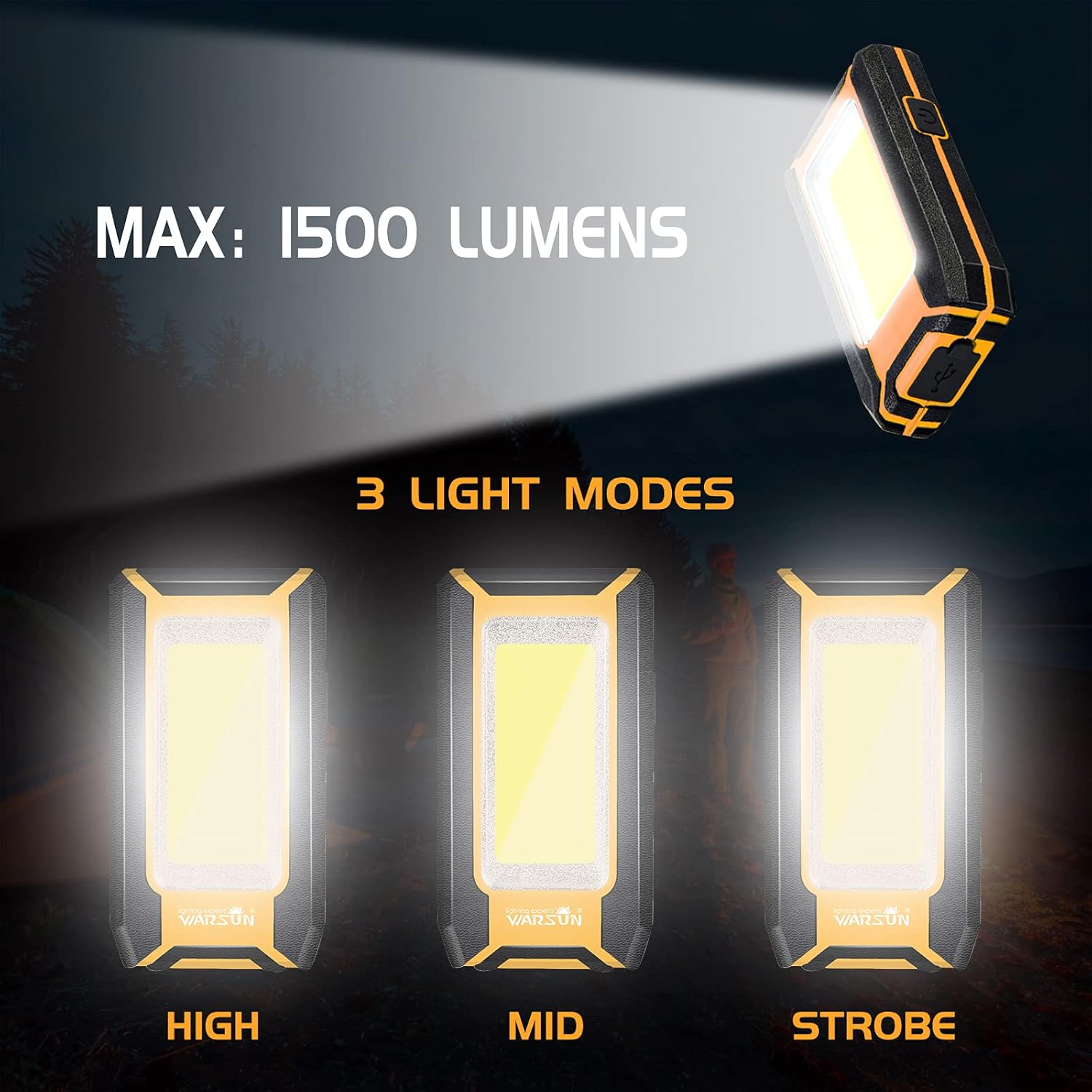
Image: Three Light Modes. The work light offers High, Mid, and Strobe (or Low) brightness settings for various needs.
Using the Magnetic Base
The strong magnetic base allows for hands-free operation.
- Attach the magnetic base to any ferrous metal surface, such as a car hood, metal beam, or workbench.
- Ensure the light is securely attached before releasing det.

Image: Magnetic Design in Use. The integrated magnet allows the light to be securely attached to metal surfaces, providing convenient hands-free illumination for tasks like car repair.
Using the Integrated Hook
The integrated hook provides additional mounting options.
- Extend the hook from the back of the work light.
- Hang the light on tents, pipes, or other suitable structures for overhead or directional lighting.

Image: Hook Design. The retractable hook allows for versatile hanging options, making it suitable for various environments.
Opretholdelse
Rensning
- Sørg for, at enheden er slukket og frakoblet enhver strømkilde før rengøring.
- Wipe the exterior of the work light with a soft, damp klæde.
- Brug ikke slibende rengøringsmidler, opløsningsmidler eller stærke kemikalier, da disse kan beskadige overfladen.
Opbevaring
- Opbevar arbejdslampen et køligt og tørt sted, væk fra direkte sollys og ekstreme temperaturer.
- Hvis batteriet opbevares i længere tid, skal det oplades til cirka 50% hver 3.-6. måned for at opretholde batteriets tilstand.
Fejlfinding
If you encounter issues with your WARSUN LED Work Light, refer to the table below:
| Problem | Mulig årsag | Løsning |
|---|---|---|
| Lyset tændes ikke. | Batteriet er afladet. | Oplad arbejdslampen helt. |
| Lyset er svagt. | Batteriet er lavt. | Genoplad arbejdslampen. |
| Kan ikke oplade ekstern enhed. | Work light battery is too low or cable is faulty. | Ensure work light is sufficiently charged. Try a different USB cable. |
| Ladeindikatoren virker ikke. | Problem med opladningskabel eller strømkilde. | Prøv et andet opladningskabel eller en USB-strømadapter. |
Specifikationer
| Feature | Detalje |
|---|---|
| Mærke | WARSUN |
| Modeller | Y36, Y39 |
| Lyskildetype | COB LED |
| Lysstyrke | Up to 1200 Lumens (Y36), Up to 1500 Lumens (Y39) |
| Strømkilde | Batteridrevet (genopladeligt litium-ion) |
| Batterikapacitet | 2 x 1800 mAh (i alt 3600 mAh) |
| Voltage | 3.7 volt (DC) |
| Materiale | Aluminiumslegering |
| Særlige funktioner | Durable, Portable, Rechargeable, Magnetic Base, Integrated Hook, Power Bank Function |
| Vandmodstandsniveau | Ikke vandafvisende |
| Inkluderede komponenter | Batteri |
Garanti og support
WARSUN offers a 30-day money-back guarantee and a 1-year limited warranty for this product. For warranty claims or technical support, please refer to your purchase documentation or contact WARSUN customer service through the retailer where the product was purchased.


