1. Introduktion
This manual provides detailed instructions for setting up, operating, and maintaining your MINIX X35-i Plus 4K Ultra HD Industrial Android Player. This device is designed for reliable performance in digital signage and various industrial applications, offering robust connectivity and a pre-rooted Android 11 firmware.

Image 1.1: MINIX X35-i Plus Industrial Android Player. This image displays the compact black device alongside icons indicating its key features: 4K Ultra HD resolution, WiFi 6 connectivity, and Android 11 operating system.
2. Pakkens indhold
Kontroller venligst, at alle nedenstående varer er inkluderet i din pakke:
- MINIX X35-i Plus Unit
- Dual-Band antenne
- HDMI kabel
- USB-C til USB-A-kabel
- 12V 2A Power Adapter (with multiple plug types)
- Fjernbetjening
- Opsætningsvejledning

Image 2.1: Contents of the MINIX X35-i Plus package. This image shows the main unit, a power adapter with interchangeable international plugs, a remote control, an HDMI cable, a USB-C to USB-A cable, a dual-band antenna, and a setup guide.
3. Produktet er slutview
The MINIX X35-i Plus features a compact design with various ports for comprehensive connectivity. Understanding the layout of these ports is essential for proper setup and operation.
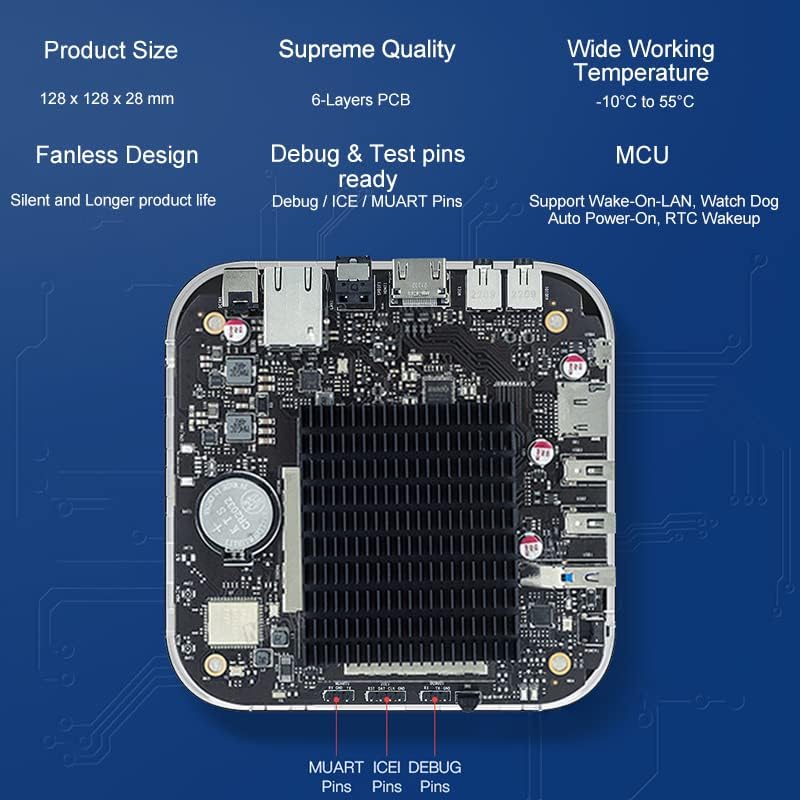
Image 3.1: MINIX X35-i Plus device with port labels and dimensions. The image highlights the device's dimensions (128mm x 128mm x 28mm) and labels its ports: Power Button, USB 3.0, 2x USB 2.0, TF Card Slot, OTG, Kensington Lock, Headphone Jack, Microphone Jack, HDMI 2.0, Gigabit Ethernet, S/PDIF, and DC 12V Power Jack.
Indvendigt design
The device incorporates industrial-grade components and a 6-layer PCB for stable, long-term operation. Its fanless design ensures silent operation and extended product life, suitable for continuous 24/7 use.

Billede 3.2: Intern view of the MINIX X35-i Plus PCB. This image shows the internal circuit board, highlighting the fanless heatsink design and debug/test pins (MUART, ICEI, DEBUG) for advanced users or developers.
4. Opsætningsvejledning
Follow these steps to set up your MINIX X35-i Plus:
- Tilslut antennen: Screw the dual-band antenna onto the designated connector at the rear of the device.
- Tilslut til skærm: Connect one end of the HDMI cable to the HDMI port on the MINIX X35-i Plus and the other end to an HDMI input on your display (TV, monitor, projector).
- Opret forbindelse til netværk (valgfrit):
- Kablet forbindelse: Connect an Ethernet cable from your router or network switch to the Gigabit Ethernet port on the device.
- Trådløs forbindelse: The device supports 802.11ax Dual-Band Wi-Fi 6. You will configure the Wi-Fi connection after initial power-on.
- Tilslutning af periferiudstyr (valgfrit):
- USB-enheder: Connect USB keyboards, mice, or other peripherals to the available USB 3.0 (x1) or USB 2.0 (x2) ports.
- Lydenheder: Connect headphones or external speakers to the 3.5mm Headphone Jack. For digital audio, use the S/PDIF port.
- Mikrofon: Connect a microphone to the 3.5mm Microphone Jack.
- Tænd: Connect the 12V 2A power adapter to the DC 12V Power Jack on the device, then plug the adapter into a power outlet. The device should automatically power on or can be turned on using the power button.
5. Betjeningsvejledning
5.1 Initial Boot and Android 11 System
Upon first power-on, the device will boot into the Android 11 operating system. Follow the on-screen prompts for initial setup, including language selection and network configuration. The device features a pre-rooted firmware, allowing for advanced customization.

Image 5.1: Android 11 operating system interface. This image illustrates the Android 11 system running on the MINIX X35-i Plus, emphasizing its 'rooted firmware' and 'customization accept' features.
5.2 Network Connectivity (Wi-Fi 6)
The MINIX X35-i Plus supports Wi-Fi 6 (802.11ax) for faster and more reliable wireless connections. To connect to Wi-Fi:
- Naviger til Indstillinger > Netværk og internet > Wi-Fi.
- Turn Wi-Fi On.
- Vælg det ønskede netværk fra listen, og indtast adgangskoden, hvis du bliver bedt om det.

Image 5.2: Illustration of Wi-Fi 6 capabilities. This image highlights the device's Wi-Fi 6 support, indicating speeds up to 2400Mbps, which is three times faster than Wi-Fi 5.
5.3 Avancerede funktioner
- Wake On LAN (WOL): Allows the device to be powered on remotely via a network message. Ensure this feature is enabled in the system settings if required.
- Automatisk strøm: Configures the device to automatically power on when electricity is supplied, ideal for unattended installations.
- RTC (Real-Time Clock) Wakeup: Enables scheduled power-on times.
- Vagthund: A hardware feature that monitors system operation and can automatically restart the device if it becomes unresponsive, ensuring continuous uptime.
- Touch Screen Support: The device supports touch screen displays, making it suitable for interactive digital signage applications.
Image 5.3: MINIX X35-i Plus connected to a touch screen display. This image demonstrates the device's compatibility with touch screen interfaces, suitable for interactive kiosks or digital signage.
5.4 Applikationsscenarier
The MINIX X35-i Plus is versatile and can be deployed in various industrial and commercial settings:
- Digital skiltning
- Automater
- Medicinsk udstyr
- Spilkonsoller
- Robot Assistance
- Digital POS Registers

Image 5.4: Various use cases for the MINIX X35-i Plus. This image depicts the device being used in diverse environments such as vending machines, medical equipment, game consoles, robot assistance, digital POS registers, and advertising machines.
6. Vedligeholdelse
The MINIX X35-i Plus is designed for low maintenance due to its fanless construction and robust components.
- Rensning: Use a soft, dry cloth to clean the exterior of the device. Avoid using liquid cleaners or aerosols directly on the unit.
- Ventilation: Although fanless, ensure the device is placed in a location with adequate airflow to prevent heat buildup, especially during continuous operation.
- Firmwareopdateringer: Periodically check the official MINIX webwebsted for firmwareopdateringer for at sikre optimal ydeevne og sikkerhed.
7. Fejlfinding
If you encounter issues with your MINIX X35-i Plus, refer to the following common solutions:
- Ingen strøm:
- Sørg for, at strømadapteren er korrekt tilsluttet både enheden og en fungerende stikkontakt.
- Kontroller, at stikkontakten fungerer.
- Ingen skærmoutput:
- Check that the HDMI cable is firmly connected to both the device and the display.
- Sørg for, at din skærm er indstillet til den korrekte HDMI-indgangskilde.
- Prøv et andet HDMI-kabel eller en anden skærm, hvis det er muligt.
- Fjernbetjening reagerer ikke:
- Sørg for, at der ikke er nogen forhindringer mellem fjernbetjeningen og enhedens IR-modtager.
- Udskift fjernbetjeningens batterier.
- Consider using a USB keyboard and mouse for easier navigation if the remote remains problematic.
- Cannot Connect to Wi-Fi/Network:
- Verify that the Wi-Fi antenna is properly attached.
- Tjek din router og internetforbindelse.
- Sørg for, at du indtaster den korrekte Wi-Fi-adgangskode.
- Hvis du bruger en kabelforbindelse, skal du sørge for, at Ethernet-kablet er korrekt tilsluttet.
- Issues with Google Account or Bluetooth Pairing:
- Ensure the device has a stable internet connection for Google account services.
- For Bluetooth skal du sørge for, at den eksterne enhed er i parringstilstand og inden for rækkevidde.
- Restart the device and attempt pairing again.
- System reagerer ikke:
- Tryk på tænd/sluk-knappen og hold den nede i 5-10 sekunder for at gennemtvinge en nedlukning, og genstart derefter enheden.
- If the issue persists, a factory reset may be necessary (refer to advanced settings, this will erase all data).
8. Specifikationer
| Feature | Specifikation |
|---|---|
| Modelnavn | X35-i Plus |
| CPU | RK3566 Cortex-A55 Quad-Core |
| GPU | Mali-G52-2EE |
| Hukommelse | 2GB DDR4 |
| Intern opbevaring | 32 GB eMMC 5.1 |
| Operativsystem | Android 11 (Pre-Rooted Firmware) |
| Video output | HDMI 2.0, up to 4K@60Hz |
| Lydudgang | HDMI 2.0, 3.5mm stereo jack, optical S/PDIF |
| Trådløs forbindelse | 802.11ax Dual-Band Wi-Fi 6, Bluetooth 5.0 |
| Kablet netværk | RJ-45 Gigabit Ethernet |
| Perifer grænseflade | Micro SD card reader, USB 3.0 x1, USB 2.0 x2, OTG port x1, Kensington Lock, 3.5mm Headphone jack, 3.5mm Microphone jack, IR Receiver |
| Strømforsyning | 12V/2A adapter (CE, FCC certified) |
| Særlige funktioner | Wake On LAN, Auto Power, RTC, Watchdog, HDMI CEC, Portrait mode, Miracast, Electrostatic Prevention for interfaces, Gigabit Ethernet Port with lightning protection design, Over-voltage beskyttelse |
| Produktdimensioner | 5.04 x 5.04 x 1.1 tommer (128 x 128 x 28 mm) |
| Varens vægt | 1.61 pund (730 gram) |
| Farve | Sort |
9. Garantioplysninger
For detailed warranty information, please refer to the official MINIX webwebstedet eller kontakt dit købssted. Garantivilkår og -betingelser kan variere afhængigt af region og forhandler.
10. Support
If you require further assistance or have questions not covered in this manual, please utilize the following support channels:
- Official MINIX Webwebsted: Besøg www.minix.com.hk for product information, FAQs, and firmware downloads.
- MINIX Forum: Engage with the community and find solutions at www.theminixforum.com.
- Amazon Customer Support: For purchase-related inquiries, log in to your Amazon account, go to 'Your Orders', and select 'Ask Product Question' for the MINIX X35-i Plus.
- Sociale medier: Connect with MINIX on Facebook at http://www.facebook.com/minixtech.


