1. Introduktion
The Kramer AFM-20DSP-AEC is an advanced, professional audio matrix switcher designed for versatile audio routing and processing. This device features 20 analog ports configurable as inputs or outputs, multi-channel DSP, Acoustic Echo Cancellation (AEC), a built-in power amplifier, and a Dante interface. This manual provides essential information for the proper setup, operation, and maintenance of your AFM-20DSP-AEC unit.
2. Pakkens indhold
Bekræft at alle varer er til stede i din pakke:
- Kramer AFM-20DSP-AEC 20-Port Audio Matrix with DSP
- Strømledning
- Rack Ears (if applicable)
- Terminalblokforbindelser
- Lynstartguide (se denne manual for yderligere oplysninger)
3. Physical Description and Connections
The AFM-20DSP-AEC features a robust design with various ports and indicators on its front and rear panels. Understanding these components is crucial for proper installation and operation.
3.1 Frontpanel
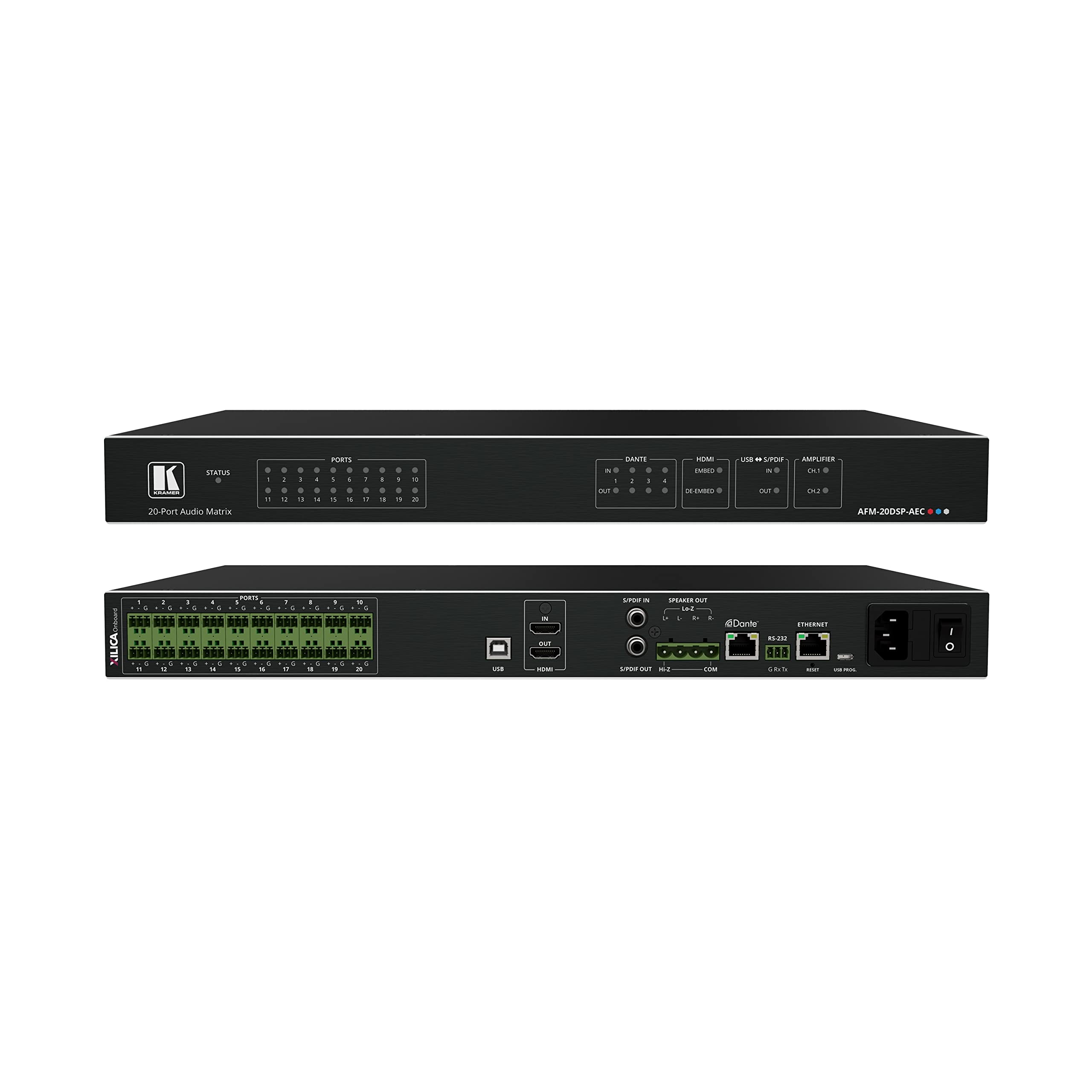
Figur 1: Front and Rear Panels of the AFM-20DSP-AEC. The front panel displays the Kramer logo, status indicator, 20 port status LEDs, Dante indicators, HDMI embed/de-embed indicators, USB/S/PDIF indicators, and amplifier channel indicators. The model number AFM-20DSP-AEC is also visible.
- Kramer Logo: Brand identification.
- STATUS LED: Indicates the operational status of the unit.
- PORTS LEDs (1-20): Indicate the status of each of the 20 configurable audio ports.
- DANTE IN/OUT LEDs: Indicate Dante network activity.
- HDMI EMBED/DE-EMBED LEDs: Indicate HDMI audio embedding or de-embedding status.
- USB S/PDIF IN/OUT LEDs: Indicate USB or S/PDIF audio input/output activity.
- AMPLIFIER CH.1/CH.2 LEDs: Indicate the status of the built-in amplifier kanaler.
3.2 Bagpanel
Figur 2: Rear Panel Connections of the AFM-20DSP-AEC. This view shows the 20 analog audio ports (XILICA Onboard), USB port, HDMI input/output, S/PDIF input/output, Speaker Out (Lo-Z), COM port, Dante Ethernet ports, RS-232 port, Reset button, USB Prog. port, and the AC power inlet with power switch.
- XILICA Onboard PORTS (1-20): Terminal block connectors for analog audio inputs/outputs. Each port includes connections for signal (+) and ground (G).
- USB-port: For connecting to a computer for configuration and control.
- HDMI IN/OUT: HDMI ports for audio embedding and de-embedding.
- S/PDIF IN/OUT: Coaxial S/PDIF digital audio connections.
- SPEAKER OUT (Lo-Z): Terminal block for low-impedance speaker connections (L+, L-, R+, R-).
- Hi-Z / COM: Terminal block for high-impedance speaker output and common ground.
- Dante ETHERNET Ports: RJ-45 connectors for Dante audio networking.
- RS-232: Serial port for control system integration (G, Rx, Tx).
- Genstarts knap: For factory reset or reboot.
- USB PROG. Port: Dedicated USB port for firmware updates and programming.
- AC strømindtag: Til tilslutning af strømkablet.
- Afbryderen: For at tænde eller slukke for enheden.
4. Opsætning og installation
Follow these steps for proper installation of your AFM-20DSP-AEC unit.
- Montering: Install the unit in a standard 19-inch equipment rack using the provided rack ears, or place it on a stable surface. Ensure adequate ventilation around the unit.
- Strømtilslutning: Connect the supplied power cord to the AC Power Inlet on the rear panel and then to a grounded AC power outlet. Do not power on the unit yet.
- Lydforbindelser:
- Analog lyd: Connect your analog audio sources and destinations to the XILICA Onboard PORTS (1-20) using appropriate terminal block connectors. Ensure correct polarity (+ and G).
- Digital Audio (S/PDIF): Connect S/PDIF sources and destinations to the S/PDIF IN/OUT ports.
- HDMI lyd: Connect HDMI sources to HDMI IN and displays/receivers to HDMI OUT for audio embedding/de-embedding.
- Dante Network: Connect the Dante ETHERNET ports to your Dante-enabled network switch for Dante audio routing.
- Højttalerforbindelser: If using the built-in amplifier, connect your low-impedance speakers to the SPEAKER OUT (Lo-Z) terminal block. Observe correct polarity (L+, L-, R+, R-).
- Kontrolforbindelser:
- USB: Connect the USB port to a computer for initial configuration and control via Kramer software.
- RS-232: Connect to a control system using an RS-232 cable for external control.
- Tænd: Once all connections are secure, switch the Power Switch on the rear panel to the 'ON' position. Observe the STATUS LED and other indicators on the front panel.
5. Betjeningsvejledning
The AFM-20DSP-AEC is primarily configured and controlled via Kramer's dedicated software interface, which provides access to its advanced DSP capabilities, matrix routing, and AEC functions.
- Software kontrol: Connect the unit to a computer via the USB port and launch the Kramer control software. This interface allows for:
- Configuring input/output assignments for the 20 analog ports.
- Managing multi-channel DSP settings (EQ, dynamics, routing).
- Adjusting Acoustic Echo Cancellation (AEC) parameters for optimal performance.
- Controlling HDMI audio embedding and de-embedding.
- Monitoring Dante network status and routing.
- Adjusting built-in amplifier output levels.
- Dante Integration: Utilize Dante Controller software for network-wide audio routing and management of Dante flows to and from the AFM-20DSP-AEC.
- RS-232 kontrol: Integrate the unit into a larger control system using RS-232 commands for automated operation. Refer to the Kramer programming guide for detailed command protocols.
- Audio Signal Flow: The unit allows for flexible routing of any input to any output, with DSP processing applied as configured. Ensure proper gain staging throughout your audio system to prevent clipping or noise.
6. Vedligeholdelse
To ensure the longevity and optimal performance of your AFM-20DSP-AEC, follow these maintenance guidelines:
- Rensning: Afbryd strømmen før rengøring. Brug en blød, tør klud til at tørre ydersiden af. Brug ikke flydende rengøringsmidler eller rengøringsmidler på sprayform.
- Ventilation: Ensure that the ventilation openings are not blocked. Overheating can damage the unit.
- Firmwareopdateringer: Periodically check the Kramer website for firmware updates. Use the USB PROG. port and Kramer's update utility to install new firmware, following the provided instructions carefully.
- Miljøforhold: Operate the unit within specified temperature and humidity ranges. Avoid exposure to direct sunlight, excessive dust, or moisture.
7. Fejlfinding
If you encounter issues with your AFM-20DSP-AEC, refer to the following common problems and solutions:
| Problem | Mulig årsag | Løsning |
|---|---|---|
| Ingen strøm | Power cord disconnected; Power switch off; Faulty power outlet. | Check power cord connection; Ensure power switch is ON; Test power outlet with another device. |
| Ingen lydudgang | Incorrect routing in software; Muted channels; Incorrect input/output configuration; Faulty cables. | Verify routing and mute settings in Kramer software; Check analog, S/PDIF, HDMI, and Dante connections; Ensure speakers are connected correctly and powered. |
| Forvrænget lyd | Input signal too high (clipping); Incorrect gain staging; Faulty cables. | Reduce input levels; Adjust gain settings in DSP software; Replace suspect cables. |
| AEC not working effectively | Improper AEC configuration; Microphone placement issues; Room acoustics. | Review and adjust AEC parameters in the software; Optimize microphone placement; Consider room acoustic treatment. |
| Cannot connect via USB/Ethernet | Driver issues; Incorrect IP settings; Firewall blocking connection; Faulty cable. | Install/update Kramer drivers; Verify network settings (IP address, subnet mask); Temporarily disable firewall; Try a different USB/Ethernet cable. |
If the problem persists after attempting these solutions, contact Kramer technical support.
8. Specifikationer
Key technical specifications for the Kramer AFM-20DSP-AEC:
- Model: AFM-20DSP-AEC
- Porte: 20 configurable analog audio ports
- DSP: Multi-channel Digital Signal Processing
- AEC: Akustisk ekko-annullering
- Amplivligere: Built-in 2x60W @ 8Ω and 1x120W @ 70V / 100V power amplivligere
- Dante Interface: 4x4 Dante channels
- HDMI: Audio indlejring og de-indlejring
- S/PDIF: Digital lydindgang/udgang
- USB: Mini USB for control, USB PROG. for firmware
- Kontrollere: RS-232, Ethernet (Dante)
- Sampling sats: Op til 96 kHz
- Varens vægt: 7 pund
- Pakkedimensioner: 17 x 9 x 2 tommer
- Fabrikant: Kramer Electronics
9. Garanti og support
Kramer Electronics provides a standard warranty for its products. For specific warranty terms and conditions, please refer to the warranty card included with your product or visit the official Kramer website. For technical support, product registration, or service inquiries, please contact Kramer customer support through their official channels.
Kramer Webwebsted: www.kramerav.com


