1. Introduktion
The Ewent EW1053 is an RFID and NFC reader designed for secure and easy access to data on contactless smart cards. This device supports various card types, including electronic ID cards (CIE 3.0), CNS-TS, Mifare, RFID, and NFC Tag 1-4, T=CL, MIFARE, and Desfire cards. It is suitable for applications in public administration, banking, and healthcare sectors.

Figure 1: Ewent EW1053 RFID and NFC Reader, top-down view. A black rectangular Ewent EW1053 RFID and NFC reader with a USB cable extending from the top. The device features a contactless card icon and the 'ewent W' logo on its surface.
2. Nøglefunktioner
- Electronic ID Card (CIE 3.0) Compatibility: Reads the new electronic ID cards (CIE 3.0) issued from 2016, enabling access to various public administration services.
- Public Administration Access: Facilitates access to online services of public administration bodies such as the National Population Register (ANPR), Revenue Agency, INPS, Electronic Health Record (FSE), and other digital public services.
- Plug & Play USB: Automatically installs with Windows, macOS, and Linux operating systems upon connection.
- Secure and Certified: Manufactured by Identiv Inc., the reader holds CE and RoHS certifications, ensuring quality and safety.
- Contactless Card Support: Reads and writes 13.56 MHz ISO 14443 A and B contactless cards, including Mifare and Desfire.
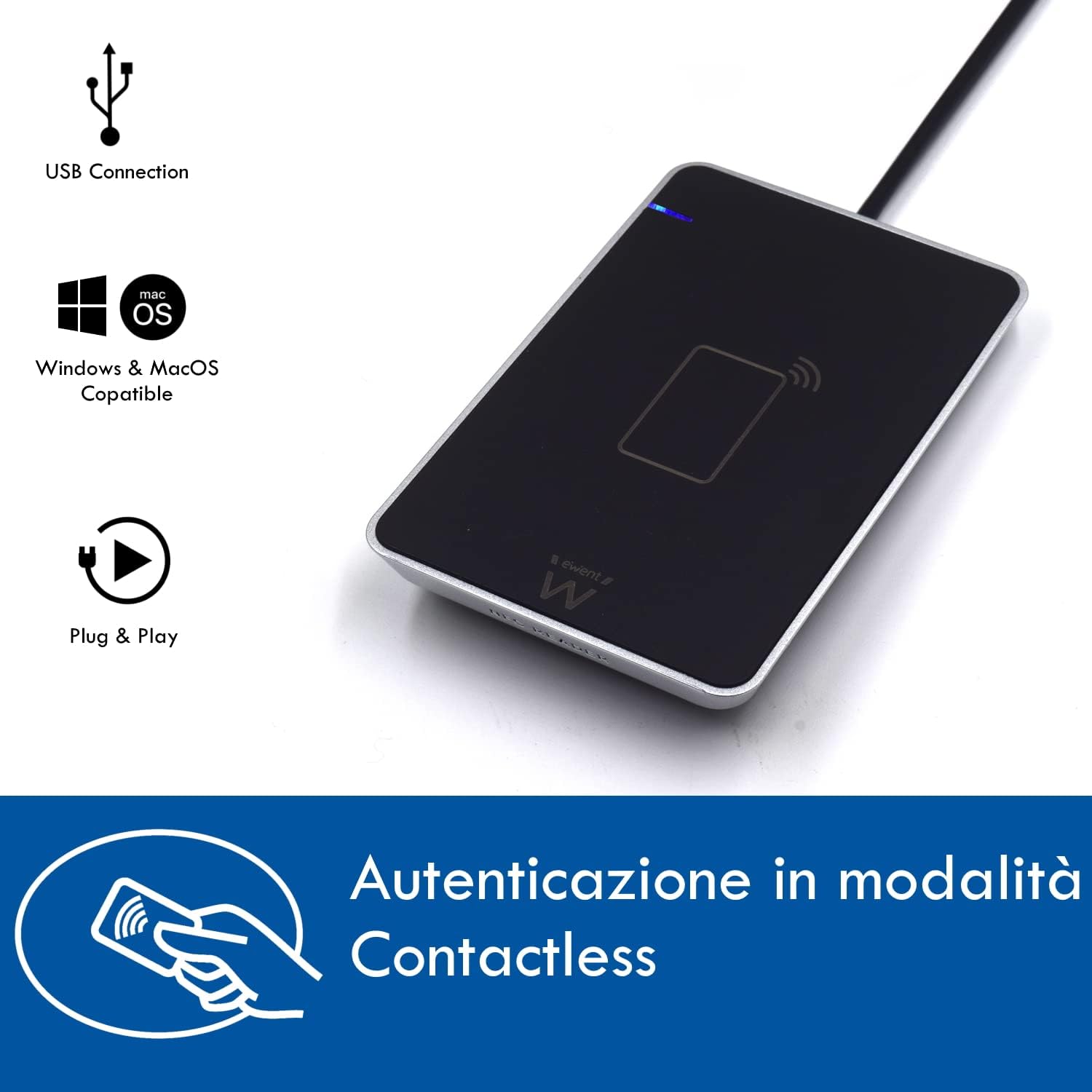
Figure 2: Ewent EW1053 RFID and NFC Reader with feature icons. An image displaying the Ewent EW1053 reader from an angled perspective, accompanied by icons representing its key features: USB connection, Windows & macOS compatibility, Plug & Play functionality, and contactless authentication.
3. Opsætningsvejledning
- Tilslut læseren: Plug the USB connector of the Ewent EW1053 reader into an available USB port on your computer. The device is Plug & Play and should be automatically recognized by your operating system (Windows, macOS, or Linux).
- Installer nødvendig software: To utilize the full functionality of the reader, especially for accessing services with the Electronic ID Card (CIE 3.0), it is necessary to download and install the appropriate software. For CIE 3.0, download the free "Middleware CIE" software from the official government website (e.g., the official CIE website of the Ministry of Interior).
- Bekræft installationen: After connecting the device and installing any necessary software, ensure that the reader is recognized and functioning correctly by checking your computer's device manager or the software application.

Figure 3: CIE ID software interface. This image shows a screenshot of the CIE ID software interface, guiding the user through the process of authenticating an electronic ID card with the reader. It highlights the necessary software for using CIE 3.0.
4. Betjeningsvejledning
- Prepare Your Card: Ensure your contactless smart card (e.g., CIE 3.0, CNS-TS, Mifare) is clean and free from obstructions.
- Place the Card: Gently place the contactless smart card directly onto the surface of the Ewent EW1053 reader. The reader is designed to detect the card's presence automatically.
- Initiate Reading/Writing: Open the relevant application on your computer (e.g., CIE ID software, banking application, public administration portal). Follow the on-screen prompts to initiate the reading or writing process.
- Godkendelse: For secure applications, you may be prompted to enter a PIN or other authentication details. Ensure you enter these details accurately.
- Færdiggørelse: Wait for the application to confirm that the card operation is complete before removing the card from the reader.

Figure 4: Reader in use with a laptop. The Ewent EW1053 reader is connected via USB to a laptop, with an electronic Italian ID card placed on its surface, demonstrating the device in active use for card reading.

Figure 5: Accessing public administration services. A computer monitor displays the homepage of the INPS (Italian National Social Security Institute) website, signifying the reader's capability to access various online public administration services.
5. Vedligeholdelse
- Rensning: Use a soft, dry, lint-free cloth to clean the surface of the reader. Do not use liquid cleaners, aerosols, or abrasive materials, as these can damage the device.
- Opbevaring: Opbevar læseren et køligt, tørt sted væk fra direkte sollys og ekstreme temperaturer.
- Håndtering: Avoid dropping the device or subjecting it to strong impacts. Do not attempt to disassemble the reader, as this will void the warranty.
6. Fejlfinding
| Problem | Mulig årsag | Løsning |
|---|---|---|
| Reader not recognized by computer | Loose USB connection, driver issue, incompatible OS. | Ensure the USB cable is securely connected. Try a different USB port. Restart your computer. Verify your operating system is supported (Windows, macOS, Linux). |
| Card not reading | Incorrect card placement, card type not supported, software not running, damaged card. | Ensure the card is placed flat on the reader's surface. Confirm the card type is supported by the EW1053. Make sure the necessary application (e.g., CIE ID software) is open and active. Try another card if available. |
| CIE 3.0 card not working | CIE Middleware software not installed or outdated. | Download and install the latest "Middleware CIE" software from the official government website. Ensure the software is correctly configured. |
| Slow or intermittent connection | USB port issues, cable damage. | Try a different USB port. Inspect the USB cable for any visible damage. |
7. Specifikationer
| Feature | Detalje |
|---|---|
| Mærke | Ewent |
| Modelnummer | EW1053 |
| Farve | Sort |
| Operativsystemkompatibilitet | Linux, macOS, Windows |
| Forbindelse | USB |
| Kompatible enheder | Computer |
| Card Types Supported | CIE 3.0, CNS-TS, Mifare, RFID, NFC Tag 1-4, T=CL, MIFARE, Desfire (13.56 MHz ISO 14443 A and B) |
| Dimensioner (L x B x H) | 127 mm x 77 mm x 15 mm (approx. 5.0 in x 3.0 in x 0.6 in) (Note: Original specification listed as '15L x 127l x 77H centimètres', which is likely a unit error. Dimensions provided are a realistic interpretation.) |
| Fabrikant | Ewent |
| Oprindelsesland | Kina |
8. Garantioplysninger
The Ewent EW1053 RFID and NFC Reader comes with a 5 års producentgaranti. Please retain your proof of purchase for warranty claims. For detailed terms and conditions, refer to the official Ewent webwebsted eller kontakt kundesupport.
9. Support og kontakt
For further assistance, technical support, or to download the latest drivers and software, please visit the official Ewent website or the relevant government portal for CIE 3.0 software.
If you encounter issues not covered in this manual, please contact Ewent customer service through their official channels.


