1. Produktet er slutview
The Kuephom Portable CD Player (Model PM11-Black) is a versatile audio device designed for personal and multi-user listening. It features a built-in speaker, rechargeable battery, and anti-skip protection, making it suitable for various environments including home, car, and travel. The player supports multiple audio formats and offers adjustable playback speed for learning purposes.

Image 1.1: Kuephom Portable CD Player and accessories.
Nøglefunktioner:
- Genopladeligt batteri: Integrated 1500mAh battery provides up to 8 hours of playback with earphones or 5 hours with the built-in speaker on a 4-hour charge.
- Indbygget højttaler: Allows direct listening without external headphones or speakers.
- Anti-Spring beskyttelse: Ensures uninterrupted audio playback during movement or light shocks.
- Memory Playing: Resumes playback from the last played track when the device is turned on again.
- Bred kompatibilitet: Supports CD, CD-R, CD-RW, MP3, and WMA formats.
- Flere tilslutningsmuligheder: Includes 3.5mm AUX input/output, USB port, and headphone jack.
- Adjustable Playback Speed: Useful for language learning or musical practice.
2. Opsætningsvejledning
2.1 Opladning af enheden
Before initial use, fully charge the CD player. The device features a built-in rechargeable battery, eliminating the need for disposable AA batteries.
- Locate the charging port on the side of the CD player.
- Connect the provided USB charging cable to the player and a compatible USB power source (e.g., wall charger, power bank, car charger, computer USB port).
- Opladningsindikatorlampen lyser. En fuld opladning tager typisk cirka 4 timer.

Image 2.1: Charging options for the CD player.
2.2 Loading a CD
The CD player supports standard CD, CD-R, CD-RW, MP3, and WMA disc formats.
- Locate the 'OPEN' switch on the side of the player.
- Slide the switch to the 'OPEN' position to release the lid.
- Gently place the CD onto the central spindle with the label side facing up. Ensure the CD is securely seated.
- Luk låget godt, indtil det klikker på plads.
Video 2.2: Demonstrates the basic functions and usage scenarios of the Kuephom Portable CD Player, including loading a CD and identifying ports.
2.3 Tilslutning af eksterne enheder
- Hovedtelefoner: Plug the included earbuds or your preferred 3.5mm headphones into the headphone jack (blue port).
- AUX -forbindelse: Use the provided 3.5mm audio cable to connect the player's AUX port (green port) to external speakers or a car's AUX input.
- USB-afspilning: Insert a USB flash drive into the USB port to play compatible audio files (MP3, WMA).

Image 2.3: Connecting the CD player to a car's audio system.
3. Betjeningsvejledning
3.1 Tænd/sluk
Locate the power switch on the side of the player. Slide it to the 'ON' position to power on the device. Slide it to 'OFF' to power off.
3.2 Grundlæggende afspilningskontroller
The control panel on the top of the player features intuitive buttons:
- Play/Pause (►▮): Tryk for at starte eller sætte afspilning på pause.
- Previous Track (◀◀): Press once to go to the beginning of the current track. Press twice to go to the previous track.
- Next Track (►►): Tryk for at springe til næste spor.
- Lydstyrke op (+): Øger lydstyrken.
- Skrue ned for lyden (-): Sænker lydstyrken.
3.3 Advanced Playback Functions
- Repeat (REP): Cycles through repeat modes (e.g., repeat one, repeat all, random).
- Tilstand (MODE): Switches between different playback modes (e.g., CD, USB, AUX).
- A-B Repeat (A-B): Allows repeating a specific segment of audio.
- Program (PROG): Enables programming a custom playback order for tracks.
- Speed Adjustment (SPEED +/-): Adjusts the playback speed, useful for language learning or transcribing audio.

Image 3.1: The adjustable playback speed feature is beneficial for learning.
3.4 Anti-Skip and Memory Functions
- Anti-Spring beskyttelse: This function is automatically activated when the player is turned on, providing a buffer against minor shocks and vibrations to ensure continuous playback.
- Memory Playing: The device remembers the last played track and position, resuming from that point when powered on again.
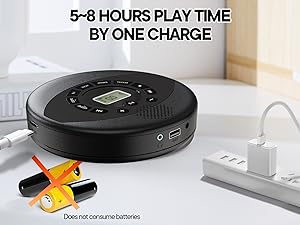
Image 3.2: Anti-shock protection for active use.
4. Vedligeholdelse
4.1 Cleaning the CD Player
- Use a soft, dry cloth to clean the exterior of the player.
- For the lens, use a specialized CD lens cleaning kit. Do not touch the lens directly.
- Undgå at bruge slibende rengøringsmidler eller opløsningsmidler.
4.2 Pleje af batterier
- For at forlænge batteriets levetid bør du undgå at aflade batteriet helt ofte.
- Opbevar enheden et køligt og tørt sted, når den ikke er i brug i længere perioder.
- Charge the device at least once every three months if unused to prevent deep discharge.
4.3 CD-pleje
- Hold cd'er i kanterne for at undgå fingeraftryk og ridser.
- Rengør cd'er med en blød, fnugfri klud, og tør af fra midten og udad.
- Store CDs in their cases to protect them from dust and damage.
5. Fejlfinding
| Problem | Mulig årsag | Løsning |
|---|---|---|
| Afspilleren tænder ikke. | Batteriet er fladt. Strømafbryderen er slukket. | Charge the battery. Ensure the power switch is in the 'ON' position. |
| Ingen lyd. | Volume is too low. Headphones/AUX cable not connected properly. CD/USB not playing. | Increase volume. Check connections. Ensure CD/USB is playing and not paused. |
| CD'en springer over eller afspiller ikke. | CD is dirty or scratched. CD is not properly seated. Incorrect CD format. | Clean the CD. Re-seat the CD. Ensure the CD format (CD, CD-R, CD-RW, MP3, WMA) is supported. |
| USB-afspilning virker ikke. | USB drive not properly inserted. Incompatible file format. | Ensure USB drive is fully inserted. Check if files are MP3 or WMA format. |
6. Produktspecifikationer
| Feature | Detalje |
|---|---|
| Modelnummer | PM11-Black |
| Produktdimensioner | 5.7 x 5.7 x 1.2 tommer |
| Varens vægt | 1.01 pund |
| Batteritype | 1 Lithium Polymer batteri (medfølger) |
| Forbindelse | Hjælpeudstyr, USB |
| Særlige funktioner | Anti-Skip Protection, Portable, Programmable Memory, Rechargeable |
| Inkluderede komponenter | CD player X 1, Earbuds X 1, Audio cable X 1, Charging cable X 1, Pouch X 1 |
| Understøttede formater | CD, CD-R, CD-RW, MP3, WMA |
7. Garanti og support
For warranty information and customer support, please contact Kuephom directly. Details regarding product warranty periods and service procedures are typically provided with your purchase documentation or can be found on the official Kuephom webwebsted.
If you encounter any issues not covered in this manual, please reach out to Kuephom customer service for assistance.


