Indledning
The HAPPYMODEL Mobula7 1S HD is a lightweight and efficient 75mm brushless FPV whoop drone designed for high-definition video recording. It features a highly integrated X12 5-IN-1 AIO flight controller with a built-in Frsky receiver, capable of 1080P HD video capture, and includes an external blackbox for Gyroflow stabilization. This manual provides essential information for the safe and effective operation of your Mobula7 1S HD drone.

Figur 1: Øverst view of the HAPPYMODEL Mobula7 1S HD Micro FPV Whoop Drone.
Sikkerhedsoplysninger
Always prioritize safety when operating FPV drones. Failure to follow these guidelines may result in injury or damage to property.
- Operate in open areas, away from people, animals, and obstacles.
- Hold en sikker afstand fra dronen under drift.
- Ensure propellers are clear before connecting the battery.
- Må ikke anvendes i nærheden af vand eller under våde forhold.
- Always disconnect the battery after use and before handling the drone for maintenance.
- Use only recommended 1S LiPo/LiHV batteries (not included).
- Voksenopsyn anbefales til brugere under 18 år.
Pakkens indhold
Bekræft at alle komponenter er til stede i din pakke:
- HAPPYMODEL Mobula7 1S HD Micro FPV Whoop Drone (Frsky Version)
- RunCam Split3-Lite Camera (pre-installed)
- 1 inch PC Material Propellers (pre-installed, with spares)
- External Blackbox module
Note: Batteries are not included with this product. Recommended batteries are 1S 450mAh/550mAh/650mAh LiPo/LiHV.
Opsætning
1. Indledende inspektion
Carefully unbox the drone and inspect it for any visible damage. Ensure all propellers are securely attached and free from bends or cracks. Check all wiring connections for proper seating.
2. Batteritilslutning
Connect a fully charged 1S LiPo/LiHV battery to the drone's power connector. Ensure the polarity is correct. The drone will power on and initiate its boot sequence.
3. Binding with Frsky Transmitter
The Mobula7 1S HD (Frsky version) features a built-in SPI Frsky 2.4G receiver. Refer to your Frsky transmitter's manual for specific binding procedures. Typically, you will put your transmitter into binding mode, then power on the drone while holding the bind button (if applicable, consult the flight controller diagram for location) or initiate binding via Betaflight configurator.
4. Flight Controller Configuration (Betaflight)
The drone uses an X12 Frsky V1.0 flight controller (Target: CRAZYBEEF4FR). For advanced configuration, connect the drone to a computer via USB and use the Betaflight Configurator software. This allows for PID tuning, OSD customization, mode setup, and more.
5. External Blackbox Setup
The external blackbox module allows for flight data recording, essential for Gyroflow stabilization.
- Insert a Micro SD card (up to 32GB, formatted to FAT32) into the blackbox module. Be careful when inserting the card to avoid damage.
- Do not pull out the SD card while the battery is connected or the drone is powered on.
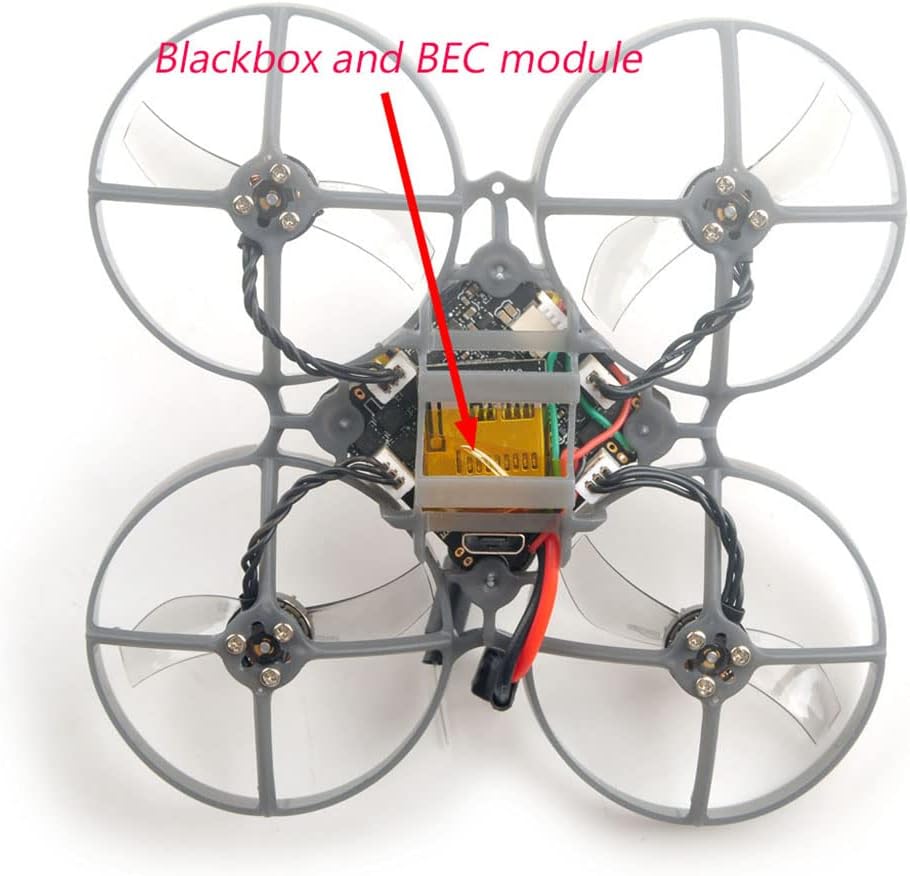
Figure 2: Location of the external blackbox and BEC module on the Mobula7 1S HD.
6. RunCam Split3-Lite Power
The RunCam Split3-Lite camera requires an external voltage booster module for stable power, as the onboard 5V DC module may not handle it optimally. Ensure this connection is secure as per the wiring diagram.
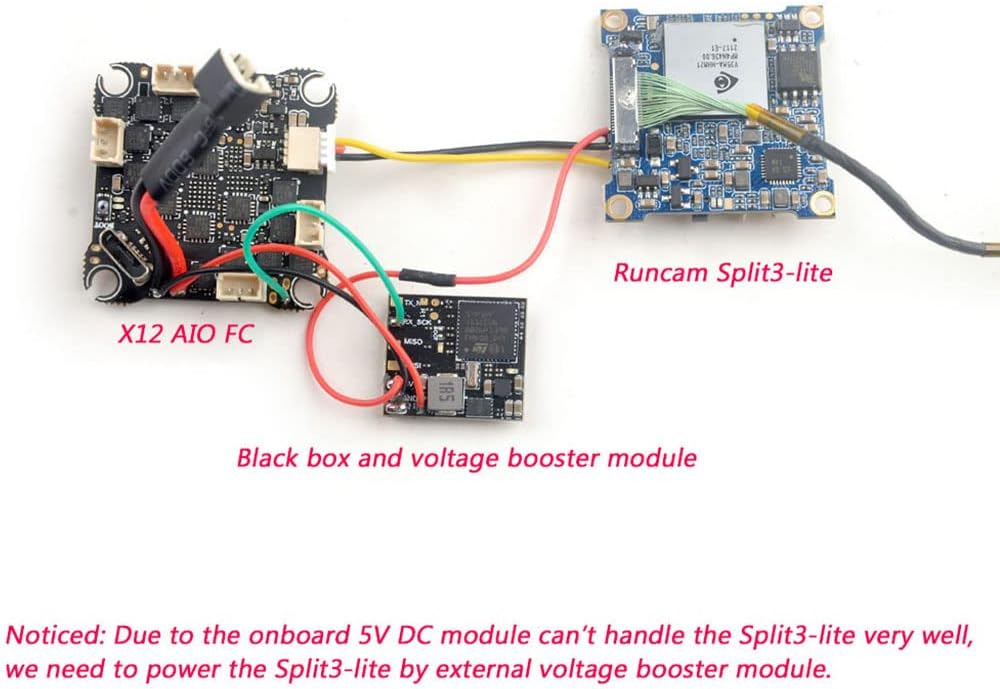
Figure 3: Wiring diagram illustrating connections between the X12 AIO FC, RunCam Split3-Lite, and the external blackbox with voltage booster module.
Betjeningsvejledning
1. Tjek før flyvning
- Sørg for, at din sender er tændt og forbundet til dronen.
- Tjek batterivolumentage on both the drone and transmitter.
- Verify propellers are free from obstructions and damage.
- Confirm FPV video feed is clear and stable.
2. Tilkobling og frakobling
Arming and disarming procedures are typically configured in Betaflight. Common methods include a stick command (e.g., throttle down and yaw right) or a dedicated switch on your transmitter. Ensure you are in a safe area before arming.
3. Grundlæggende flyvekontrol
The Mobula7 1S HD is an intermediate-level drone. Familiarize yourself with standard FPV flight controls:
- Gashåndtag: Styrer højden.
- Rulle: Tilts the drone left or right.
- Pitch: Tilts the drone forward or backward.
- Yaw: Roterer dronen til venstre eller højre om dens lodrette akse.
4. HD-videooptagelse
The RunCam Split3-Lite records 1080P HD video. Recording is typically initiated via a switch on your transmitter, configured in Betaflight. Ensure an SD card is inserted into the external blackbox for flight data logging, which is crucial for post-processing with Gyroflow for smooth footage.

Figur 4: Nærbillede view of the RunCam Split3-Lite camera module.
Opretholdelse
Regelmæssig vedligeholdelse sikrer din drones levetid og ydeevne.
- Rensning: After each flight, especially outdoors, gently clean the drone to remove dust, dirt, or debris from the frame, motors, and camera lens. Use a soft brush or compressed air.
- Udskiftning af propel: Inspect propellers before and after each flight for cracks, bends, or chips. Damaged propellers can cause vibrations and affect flight performance. Replace them immediately if damaged.
- Motorinspektion: Check motors for any signs of damage, loose wires, or excessive play in the bearings. Ensure they spin freely.
- Firmwareopdateringer: Periodically check the HAPPYMODEL website or Betaflight resources for firmware updates for the flight controller. Updating firmware can improve performance and add new features.

Figur 5: Nærbillede view of the RS0802 KV20000 motor and 1-inch PC material propeller.
Fejlfinding
| Problem | Mulig årsag | Løsning |
|---|---|---|
| Dronen tænder ikke | Batteri ikke tilsluttet, batteri afladet, defekt forbindelse. | Ensure battery is fully charged and securely connected. Check power lead for damage. |
| No FPV video feed | VTX not powered, camera disconnected, incorrect VTX channel. | Check camera and VTX connections. Verify VTX channel matches goggles. Ensure external voltage booster for RunCam Split3-Lite is working. |
| Drone not binding to transmitter | Incorrect binding procedure, receiver issue, transmitter not in bind mode. | Review binding steps in this manual and your transmitter's manual. Ensure correct receiver protocol (Frsky D8/D16). |
| Unstable flight/excessive vibrations | Damaged propellers, loose motors, incorrect PID tuning. | Inspect and replace damaged propellers. Check motor screws. Adjust PID settings in Betaflight if necessary. |
| HD recording issues | SD card full/corrupt, incorrect format, card not inserted correctly. | Format SD card to FAT32. Ensure card is fully inserted. Try a different SD card. |
Specifikationer
| Feature | Detalje |
|---|---|
| Mærke | HAPPYMODEL |
| Modelnavn | Mobula7 1S HD |
| Akselafstand | 75 mm |
| Dimensioner (L x B x H) | 99 mm x 99 mm x 45.5 mm (3.9" L x 3.9" B x 1.79" H) |
| Flight Controller | X12 Frsky V1.0 AIO (CRAZYBEEF4FR) |
| MCU | STM32F411CEU6 (100MHZ, 512K FLASH) |
| Sensor | ICM20689 (SPI-forbindelse) |
| Modtager mulighed | SPI Frsky D8/D16 |
| ESC | Built-in 12A (each) Blheli_S 4in1 ESC (Peak 15A for 3s) |
| Motorer | RS0802 KV20000 (9N12P) |
| Propeller | 1 inch PC Material Propellers |
| Kamera | RunCam Split3-Lite (1080P HD video record) |
| Videooptagelsesopløsning | 1080p (1920x1080 pixels) |
| Videooptagelsesformat | MP4 |
| VTX | Built-in 5.8G OpenVTX 0mw~400mw |
| Blackbox | External, supports Micro SD card (max 32GB, FAT32) |
| Strømforsyning | 1S battery input (DC 2.9V-4.35V) |
| Anbefalet batteri | 1S 450mAh/550mAh/650mAh (not included) |
| Færdighedsniveau | Mellemliggende |
| Materiale | PC |
| UPC | 086972526571 |
Garantioplysninger
Specific warranty details for the HAPPYMODEL Mobula7 1S HD Micro FPV Whoop Drone are not provided within this manual. Please refer to the product packaging, the seller's website, or contact HAPPYMODEL directly for warranty terms and conditions.
Støtte
For technical support, troubleshooting beyond this manual, or inquiries regarding your HAPPYMODEL Mobula7 1S HD drone, please contact the seller or visit the official HAPPYMODEL website. Online communities and forums dedicated to FPV drones can also be valuable resources for assistance.


